(continue)
to test, runserver and npm start, access localhost:30
send something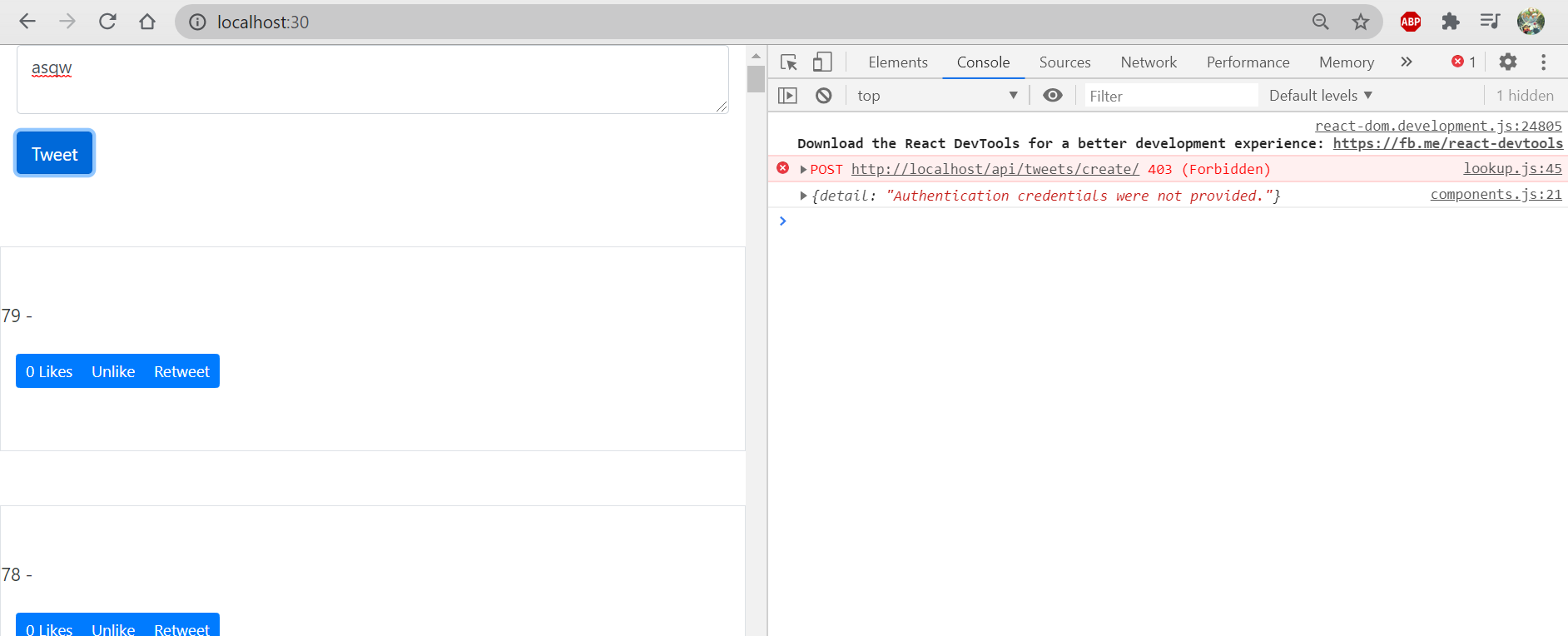
meet status 403, and the cause is “authentication credentials were not provided”
to fix this problem,
- comment a SessionAuthentication line /tweets/views.py
to test again, runserver and npm start, access localhost:30@api_view(['POST']) # http method the client === POST# @authentication_classes([SessionAuthentication])@permission_classes([IsAuthenticated])def tweet_create_view(request, *args, **kwargs):serializer = TweetCreateSerializer(data=request.POST)if serializer.is_valid(raise_exception=True): # send back what the error isserializer.save(user=request.user)return Response(serializer.data, status=201)return Response({}, status=400)
send something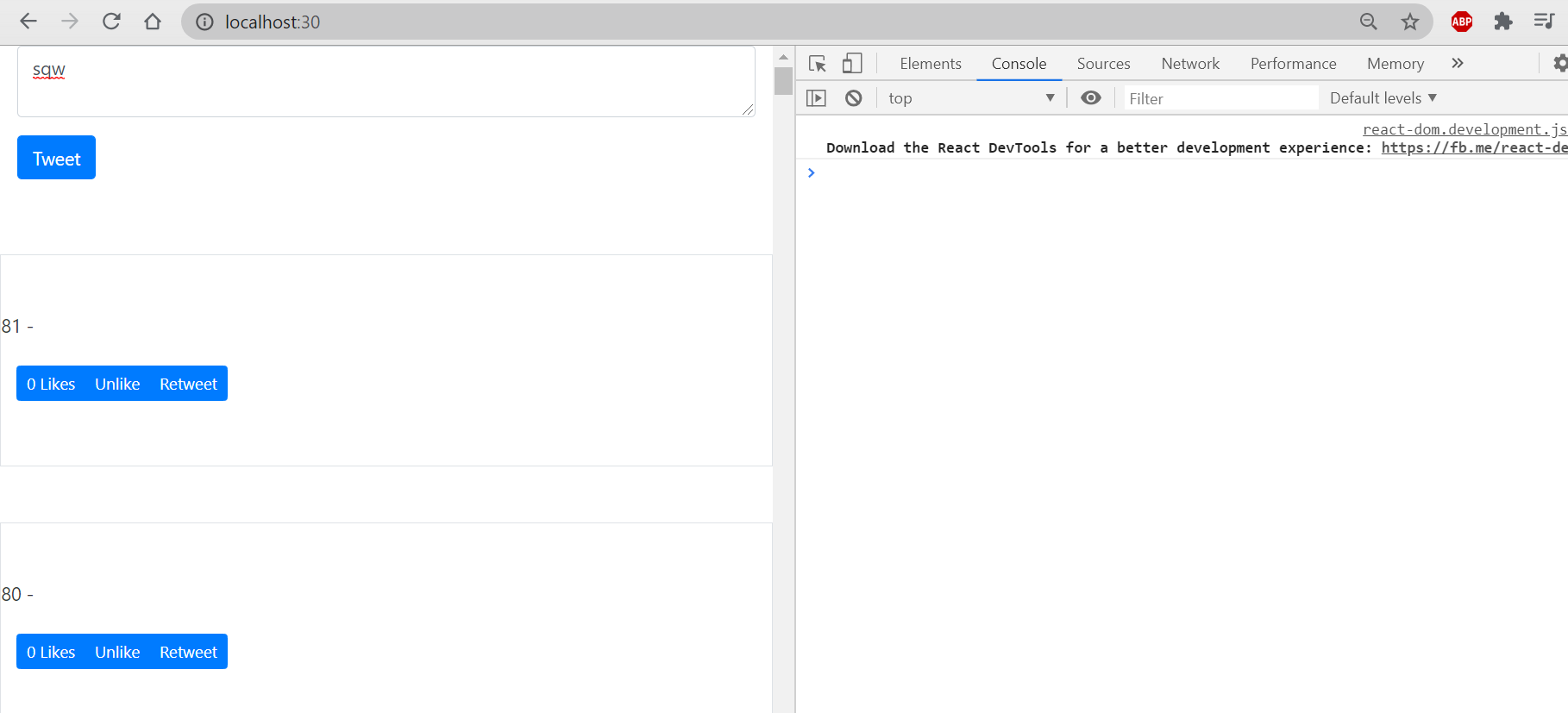
seems like new tweets are created, but content is null.
Handling New Tweet:
send content:
to trace the problem that the content is not sent.
add console log to
- /twittme-web/src/lookup/lookup.js ```javascript function lookup(method, endpoint, callback, data) { //…
xhr.onload = function () { callback(xhr.response, xhr.status); }; xhr.onerror = function (e) { console.log(e); callback({ message: “The request was an error” }, 400); }; console.log(jsonData) //new xhr.send(jsonData); }
- twittme-web/src/tweets/components.js```javascriptexport function TweetsComponent(props) {//...const handleSubmit = (event) => {event.preventDefault();const newVal = textAreaRef.current.value;let tempNewTweets = [...newTweets];console.log("new value", newVal); //newcreateTweet(newVal, (response, status) => {console.log(response, status); //newif (status === 201) {tempNewTweets.unshift(response);} else {console.log(response);alert("An error occured please try again");}});//...};//...}
after this, runserver and npm start, localhost:30 to send something:
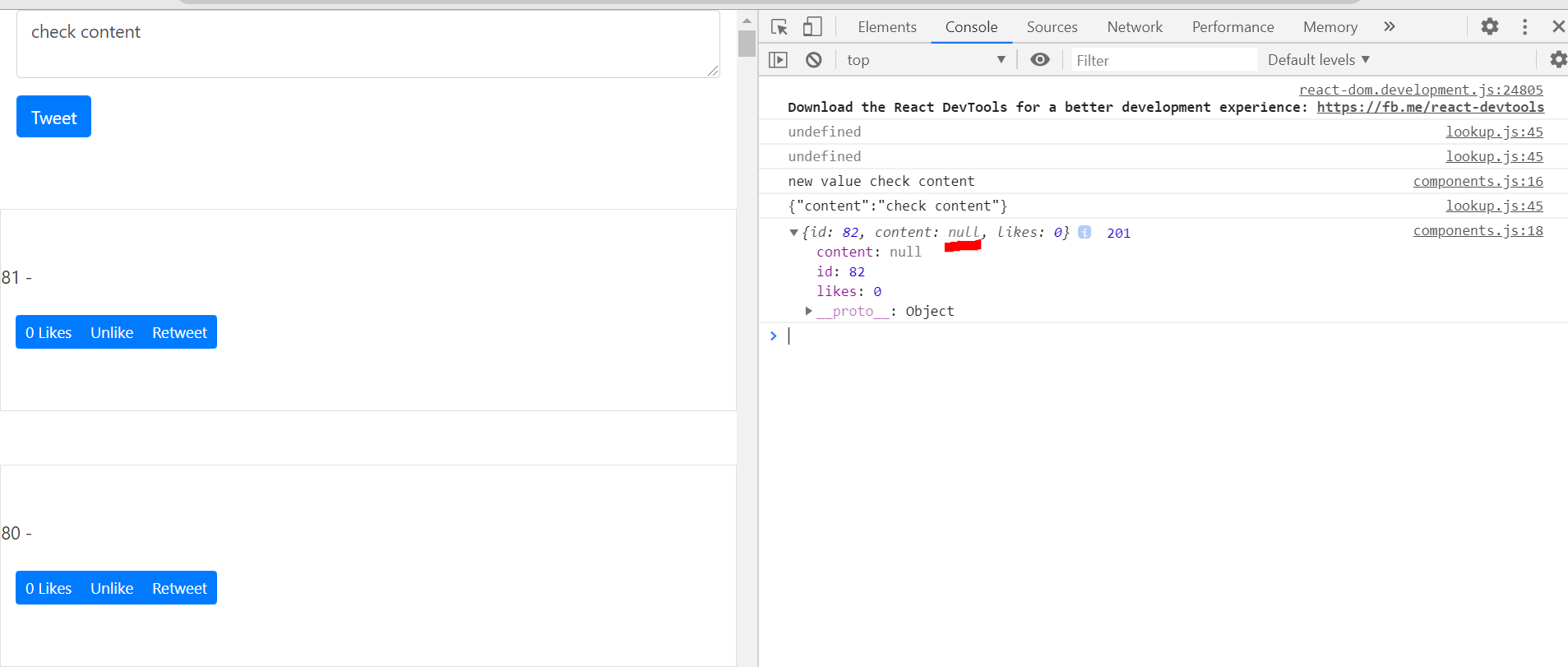
so that content was not coming through.print the received POST request in /tweets/views.py
@api_view(['POST']) # http method the client === POST# @authentication_classes([SessionAuthentication])@permission_classes([IsAuthenticated])def tweet_create_view(request, *args, **kwargs):print(request.POST) # new# ...return Response({}, status=400)
send something and see the terminal

not getting any request either.
so change POST into data here:
@api_view(['POST']) # http method the client === POST# @authentication_classes([SessionAuthentication])@permission_classes([IsAuthenticated])def tweet_create_view(request, *args, **kwargs):# print(request.POST)print(request.data)# serializer = TweetCreateSerializer(data=request.POST)serializer = TweetCreateSerializer(data=request.data)# ...return Response({}, status=400)
send something again
successful, even though it’s not a correct update for reactjs
update right after sent:
in the previous step, we need to refresh and make new tweets shown
to fix this, change the position of setNewTweets() in /twittme-web/src/tweets/components.js
export function TweetsComponent(props) {//...const handleSubmit = (event) => {//...createTweet(newVal, (response, status) => {console.log(response, status);if (status === 201) {tempNewTweets.unshift(response);setNewTweets(tempNewTweets); //new} else {console.log(response);alert("An error occured please try again");}});//setNewTweets(tempNewTweets);textAreaRef.current = ""; //after the submission, clear the textarea};//...}
to trigger the update quicker
and new tweets will be shown immediately after sent.
then create a handleBackendUpdate constant to replace some lines before and increase code reuse.
export function TweetsComponent(props) {//...const handleBackendUpdate = (response, status) => {//backend api response handlerlet tempNewTweets = [...newTweets];if (status === 201) {tempNewTweets.unshift(response);setNewTweets(tempNewTweets);} else {console.log(response);alert("An error occured please try again");}}const handleSubmit = (event) => {event.preventDefault();const newVal = textAreaRef.current.value;//let tempNewTweets = [...newTweets];console.log("new value", newVal);/*createTweet(newVal, (response, status) => {console.log(response, status);if (status === 201) {tempNewTweets.unshift(response);setNewTweets(tempNewTweets);} else {console.log(response);alert("An error occured please try again");}});*/createTweet(newVal, handleBackendUpdate)};//...}
API Methods in React:
to reduce ambiguity:
- rename /twittme-web/src/lookup/lookup.js into components.js
- change import in /twittme-web/src/lookup/index.js ```javascript //import {createTweet, loadTweets} from ‘./lookup’ import {createTweet, loadTweets} from ‘./components’
//…
<a name="XYw3z"></a>#### export and new lookup:- rename and export lookup() in /twittme-web/src/lookup/components.js```javascript//function lookup(method, endpoint, callback, data) {export function backendLookup(method, endpoint, callback, data) {//...}
- create a new file lookup.js in /twittme-web/src/tweets/
- cut 2 functions in /twittme-web/src/lookup/components.js and paste into /twittme-web/src/tweets/lookup.js ```javascript import { backendLookup } from “../lookup”;
export function createTweet(newTweet, callback) { backendLookup(“POST”, “/tweets/create/“, callback, { content: newTweet }); }
export function loadTweets(callback) { backendLookup(“GET”, “/tweets/“, callback); }
- apply backendLookup in /twittme-web/src/lookup/index.js```javascript//import {createTweet, loadTweets} from './components'import { backendLookup } from "./components";export {/*createTweet,loadTweets*/backendLookup,};
- becasue refered lookup was changed, change import in /twittme-web/src/tweets/components.js
//import { createTweet, loadTweets } from "../lookup";import { createTweet, loadTweets } from "./lookup";
mapping to the right function:
- rename appropriately in /twittme-web/src/tweets/lookup.js ```javascript import { backendLookup } from “../lookup”;
//export function createTweet(newTweet, callback) { export function apiTweetCreate(newTweet, callback) { backendLookup(“POST”, “/tweets/create/“, callback, { content: newTweet }); }
//export function loadTweets(callback) { export function apiTweetList(callback) { backendLookup(“GET”, “/tweets/“, callback); }
- and```javascript//import { createTweet, loadTweets } from "./lookup";import { apiTweetCreate, apiTweetList } from "./lookup";export function TweetsComponent(props) {//...const handleSubmit = (event) => {//...//createTweet(newVal, handleBackendUpdate);apiTweetCreate(newVal, handleBackendUpdate);//...};//...}export function TweetsList(props) {//...useEffect(() => {if (tweetsDidSet === false) {//const myCallback = (response, status) => {const handleTweetListLookup = (response, status) => {if (status === 200) {setTweetsInit(response);setTweetsDidSet(true);} else {alert("There was an error");}};//loadTweets(myCallback);apiTweetList(handleTweetListLookup);}}, [tweetsInit, tweetsDidSet, setTweetsDidSet]);//...}
Tweet Action Btn:
- create a apiTweetAction() method in /twittme-web/src/tweets/lookup.js ```javascript import { backendLookup } from “../lookup”;
export function apiTweetCreate(newTweet, callback) { backendLookup(“POST”, “/tweets/create/“, callback, { content: newTweet }); }
export function apiTweetList(callback) { backendLookup(“GET”, “/tweets/“, callback); }
export function apiTweetAction(tweetId, action, callback) { //new const data = { id: tweetId, action: action }; backendLookup(“POST”, “/tweets/action/“, callback, data); }
- import and use it in /twittme-web/src/tweets/components.js```javascript//import { apiTweetCreate, apiTweetList } from "./lookup";import { apiTweetCreate, apiTweetList, apiTweetAction } from "./lookup";//...export function ActionBtn(props) {//...const handleActionBackendEvent = (response, status) => { //newconsole.log(response, status)if (action.type === "like") {if (userLike === true) {setLikes(likes - 1);setUserLike(false);} else {setLikes(likes + 1);setUserLike(true);}}};const handleClick = (event) => {event.preventDefault();apiTweetAction(tweet.id, action.type, handleActionBackendEvent); //new/*if (action.type === "like") {if (userLike === true) {setLikes(likes - 1);setUserLike(false);} else {setLikes(likes + 1);setUserLike(true);}}*/};//...}
to test, runserver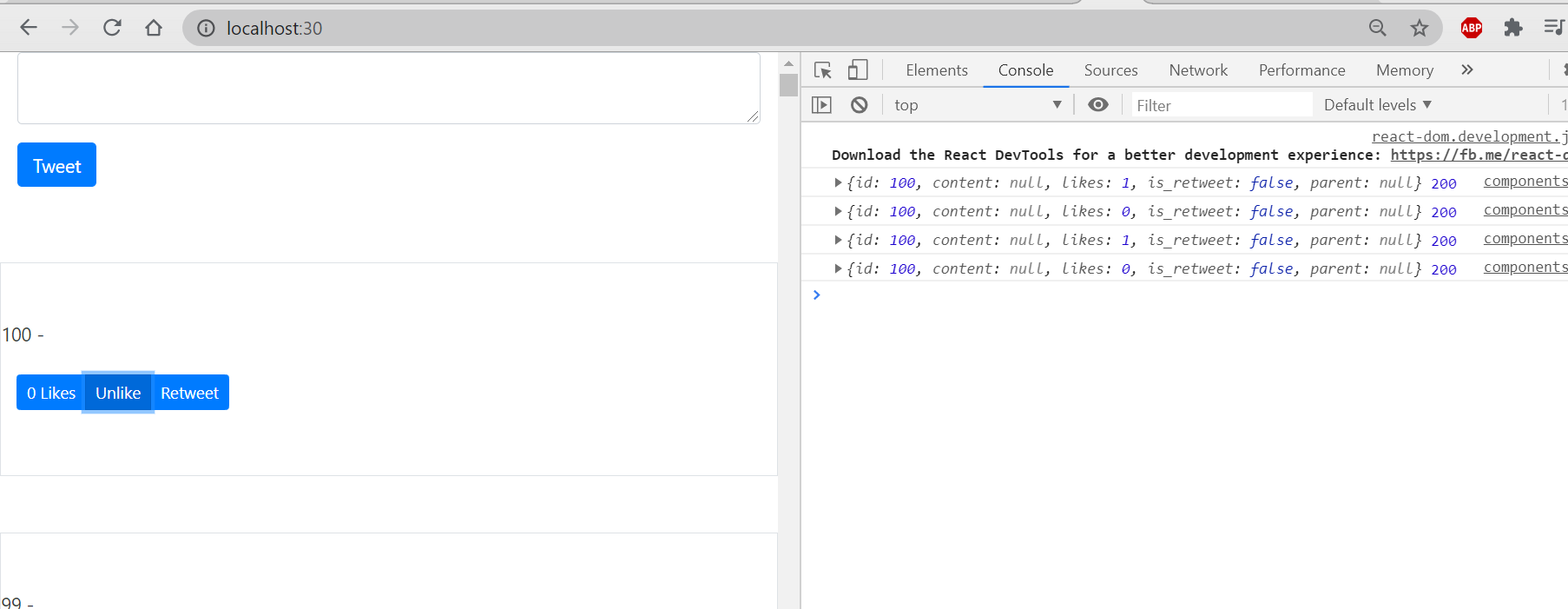
I kept clicking id 100 on “likes” and “unlike” repeatedly, and the right console log has shown the number of “likes” get.
fix 2 “likes”:
Here’s a problem, if I “like” a tweet and then refresh, “like” again:
It will show 2 “likes”, but a user only could like a tweet once, and we see the count on the log is still 1.
To fix this:
- disable setUserLike
only apply setLikes in /twittme-web/src/tweets/components.js
- for a user, setLikes make a like either 1 or 0
- “like” +1, “unlike” -1, and number of likes is 1 or 0 ```javascript export function ActionBtn(props) { const { tweet, action } = props; const [likes, setLikes] = useState(tweet.likes ? tweet.likes : 0);
/ const [userLike, setUserLike] = useState( tweet.userLike === true ? true : false ); /
//…
const handleActionBackendEvent = (response, status) => { console.log(response, status);
if (status === 200) {
//newsetLikes(response.likes);//setUserLike(true);
}
/* if (action.type === “like”) {
if (userLike === true) {setLikes(likes - 1);setUserLike(false);} else {setLikes(likes + 1);setUserLike(true);}
} */ };
//… } ``` to test, refresh and send:
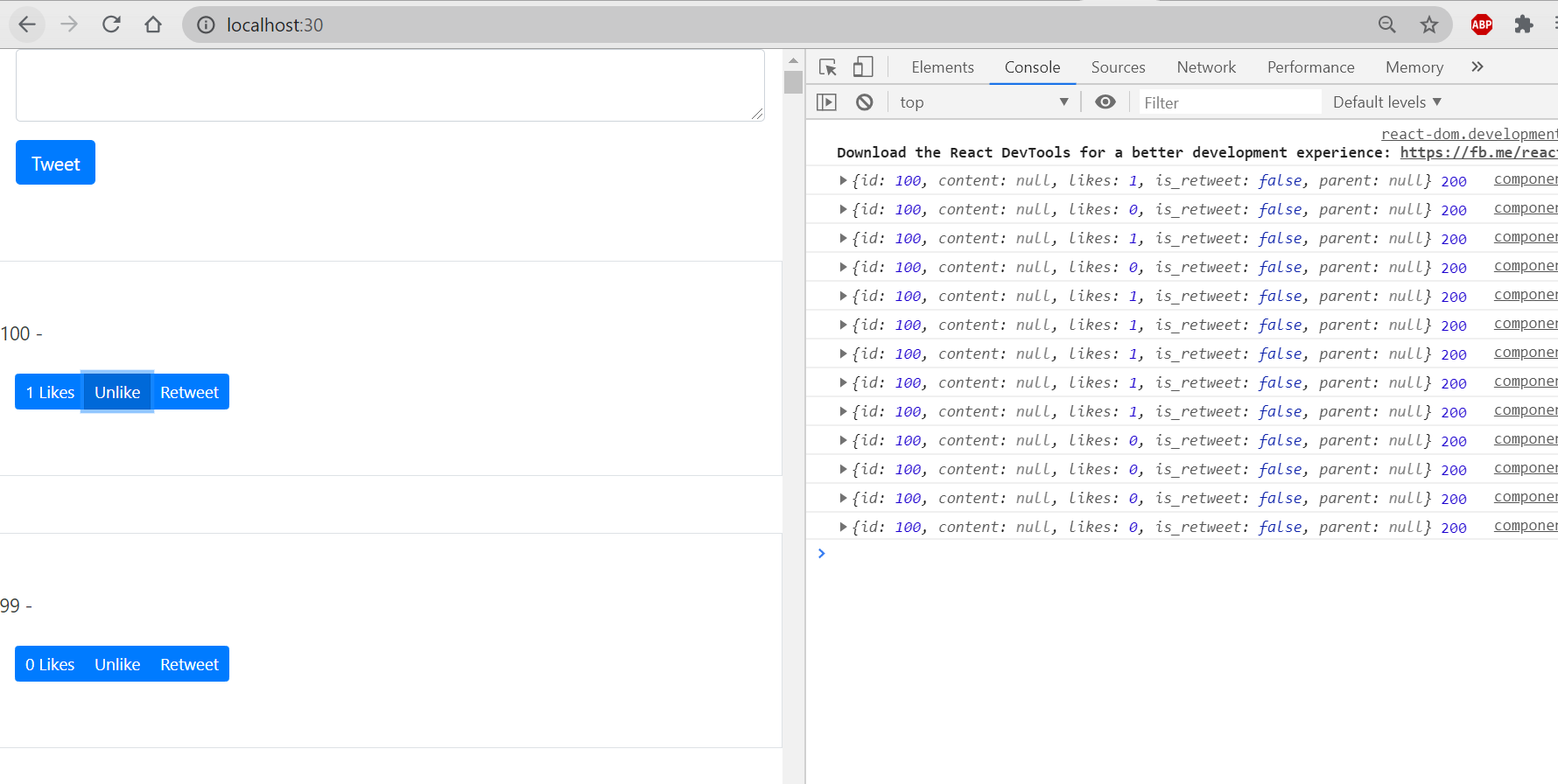
count of likes is always either 0 or 1.
Rendering the ReTweet:
include parent:
- add a new div to display the parent tweet in /twittme-web/src/tweets/components.js
to test, refresh and click “retweet” button on something.export function Tweet(props) {const { tweet } = props;const className = props.className? props.className: "col-10 mx-auto col-md-6";/*return (<div className={className}><p>{tweet.id} - {tweet.content}</p><div className="btn btn-group"><ActionBtn tweet={tweet} action={{ type: "like", display: "Likes" }} /><ActionBtntweet={tweet}action={{ type: "unlike", display: "Unlike" }}/><ActionBtntweet={tweet}action={{ type: "retweet", display: "Retweet" }}/></div></div>);*/return (<div className={className}><div><p>{tweet.id} - {tweet.content}</p>{tweet.parent && (<div><Tweet tweet={tweet.parent} /></div>)}</div><div className="btn btn-group"><ActionBtn tweet={tweet} action={{ type: "like", display: "Likes" }} /><ActionBtntweet={tweet}action={{ type: "unlike", display: "Unlike" }}/><ActionBtntweet={tweet}action={{ type: "retweet", display: "Retweet" }}/></div></div>);}
we can see parent tweets like this: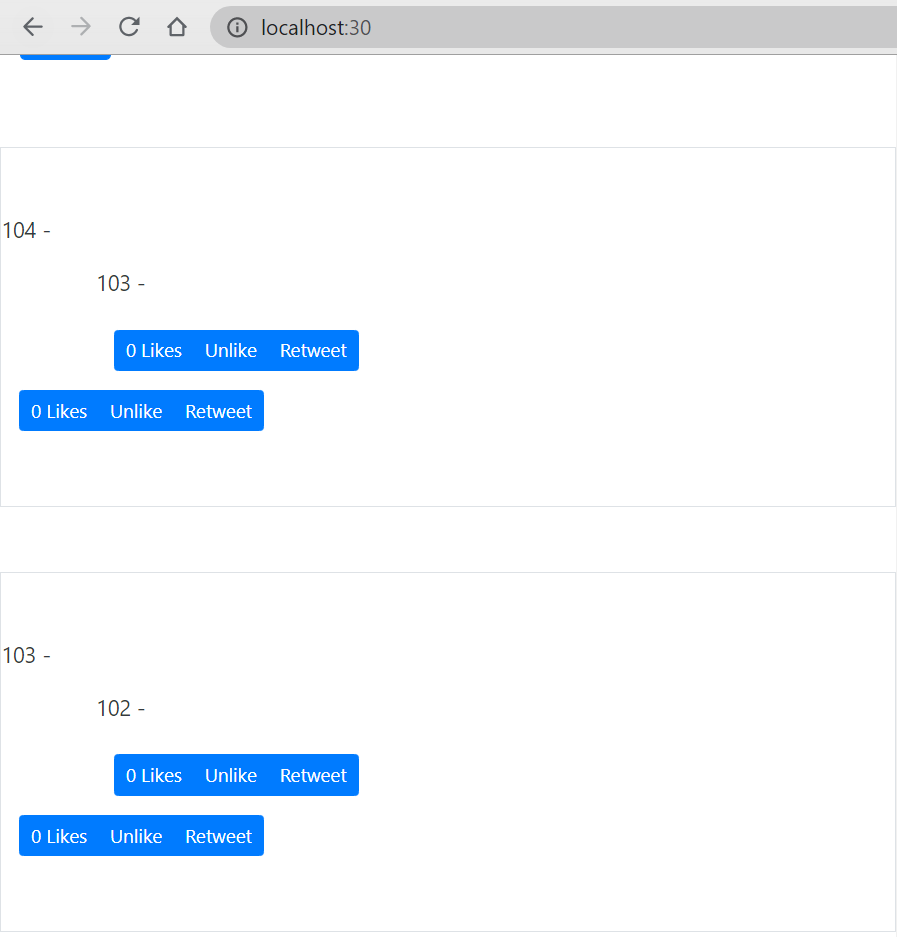
However, there are several problems exist, such as cannot retweet with contents.
more organized format:
- change className
- add a new
and
pair in /twittme-web/src/tweets/components.js ```javascript export function Tweet(props) { const { tweet } = props; const className = props.className ? props.className : “col-10 mx-auto col-md-6”; /* return (); */ return (<div><p>{tweet.id} - {tweet.content}</p>{tweet.parent && (<div><Tweet tweet={tweet.parent} /></div>)}</div><div className="btn btn-group"><ActionBtn tweet={tweet} action={{ type: "like", display: "Likes" }} /><ActionBtntweet={tweet}action={{ type: "unlike", display: "Unlike" }}/><ActionBtntweet={tweet}action={{ type: "retweet", display: "Retweet" }}/></div>
); }<div><p>{tweet.id} - {tweet.content}</p>{tweet.parent && (<div className="row"><div className="col-11 mx-auto p-3 border rounded"><p className="mb-0 text-muted small">Retweet</p><Tweet className={" "} tweet={tweet.parent} /></div></div>)}</div><div className="btn btn-group"><ActionBtn tweet={tweet} action={{ type: "like", display: "Likes" }} /><ActionBtntweet={tweet}action={{ type: "unlike", display: "Unlike" }}/><ActionBtntweet={tweet}action={{ type: "retweet", display: "Retweet" }}/></div>
and refresh, the page looks like: <br />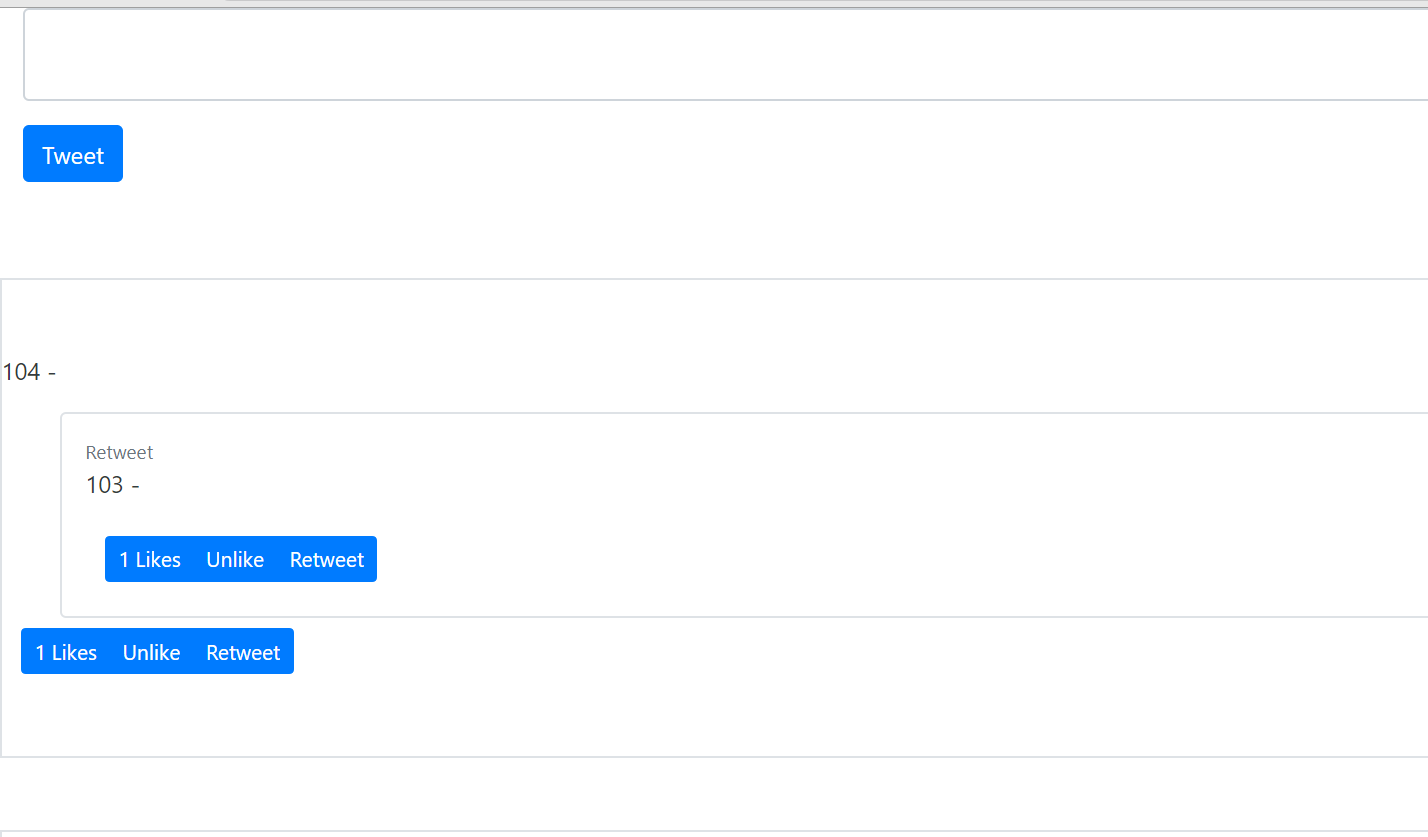<br />It has clear that which one is tweet, which one is retweet now.<a name="jBbTI"></a>#### split parent tweet and tweet:- in /twittme-web/src/tweets/components.js- pick that double div, one p format into parent tweet into a function- then apply parentTweet in Tweet```javascriptexport function ParentTweet(props) {const { tweet } = props;return tweet.parent ? (<div className="row"><div className="col-11 mx-auto p-3 border rounded"><p className="mb-0 text-muted small">Retweet</p><Tweet className={" "} tweet={tweet.parent} /></div></div>) : null;}export function Tweet(props) {const { tweet } = props;const className = props.className? props.className: "col-10 mx-auto col-md-6";return (<div className={className}><div><p>{tweet.id} - {tweet.content}</p><ParentTweet tweet={tweet} /></div><div className="btn btn-group"><ActionBtn tweet={tweet} action={{ type: "like", display: "Likes" }} /><ActionBtntweet={tweet}action={{ type: "unlike", display: "Unlike" }}/><ActionBtntweet={tweet}action={{ type: "retweet", display: "Retweet" }}/></div></div>);/*return (<div className={className}><div><p>{tweet.id} - {tweet.content}</p>{tweet.parent && (<div className="row"><div className="col-11 mx-auto p-3 border rounded"><p className="mb-0 text-muted small">Retweet</p><Tweet className={" "} tweet={tweet.parent} /></div></div>)}</div><div className="btn btn-group"><ActionBtn tweet={tweet} action={{ type: "like", display: "Likes" }} /><ActionBtntweet={tweet}action={{ type: "unlike", display: "Unlike" }}/><ActionBtntweet={tweet}action={{ type: "retweet", display: "Retweet" }}/></div></div>);*/}

若有收获,就点个赞吧
0 人点赞


