安装
pip install -U spaCypython -m spacy download en
特性
spaCy的一大特点是在进行tokenize的时候会保留下标,它在进行标记时还会保留原字符串中的空格(分割单词的单个空格不算)。这与NLTK是有很大不同的,每个单词可以通过idx下标轻松获取到对应原字符串中的位置。
nlp = spacy.load("en_core_web_sm")doc = nlp('Hello World!')for token in doc:print('"' + token.text + '"', token.idx)结果:"Hello" 0" " 6"World" 7"!" 12
句子检测
nlp = spacy.load("en_core_web_sm")doc = nlp("These are apples. These are oranges.")for sent in doc.sents:print(sent)结果:These are apples.These are oranges.
词性标注(POS Tagging)
nlp = spacy.load("en_core_web_sm")doc = nlp("Next week I'll be in Madrid.")print([(token.text, token.tag_) for token in doc])结果:[('Next', 'JJ'), ('week', 'NN'), ('I', 'PRP'), ("'ll", 'MD'), ('be', 'VB'), ('in', 'IN'), ('Madrid', 'NNP'), ('.', '.')]
命名实体识别
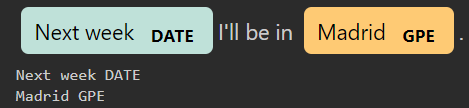
nlp = spacy.load("en_core_web_sm")doc = nlp("Next week I'll be in Madrid.")for ent in doc.ents:print(ent.text, ent.label_)结果:Next week DATEMadrid GPE
使用notebook可以对结果进行可视化:
import spacyfrom spacy import displacynlp = spacy.load("en_core_web_sm")doc = nlp("Next week I'll be in Madrid.")displacy.render(doc, style='ent', jupyter=True)for ent in doc.ents:print(ent.text, ent.label_)
分词(词组)
nlp = spacy.load("en_core_web_sm")doc = nlp("Wall Street Journal just published an interesting piece on crypto currencies")for chunk in doc.noun_chunks:print(chunk.text, chunk.label_, chunk.root.text)# Wall Street Journal NP Journal# an interesting piece NP piece# crypto currencies NP currencies
依存分析
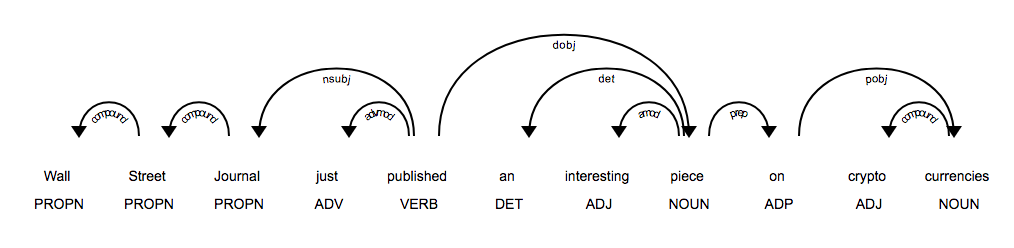
nlp = spacy.load("en_core_web_sm")doc = nlp('Wall Street Journal just published an interesting piece on crypto currencies')for token in doc:print("{0}/{1} <--{2}-- {3}/{4}".format(token.text, token.tag_, token.dep_, token.head.text, token.head.tag_))# Wall/NNP <--compound-- Street/NNP# Street/NNP <--compound-- Journal/NNP# Journal/NNP <--nsubj-- published/VBD# just/RB <--advmod-- published/VBD# published/VBD <--ROOT-- published/VBD# an/DT <--det-- piece/NN# interesting/JJ <--amod-- piece/NN# piece/NN <--dobj-- published/VBD# on/IN <--prep-- piece/NN# crypto/JJ <--compound-- currencies/NNS# currencies/NNS <--pobj-- on/IN
同样,使用notebook可以进行可视化
from spacy import displacynlp = spacy.load("en_core_web_sm")doc = nlp('Wall Street Journal just published an interesting piece on crypto currencies')displacy.render(doc, style='dep', jupyter=True, options={'distance': 90})

若有收获,就点个赞吧
0 人点赞


