梳理
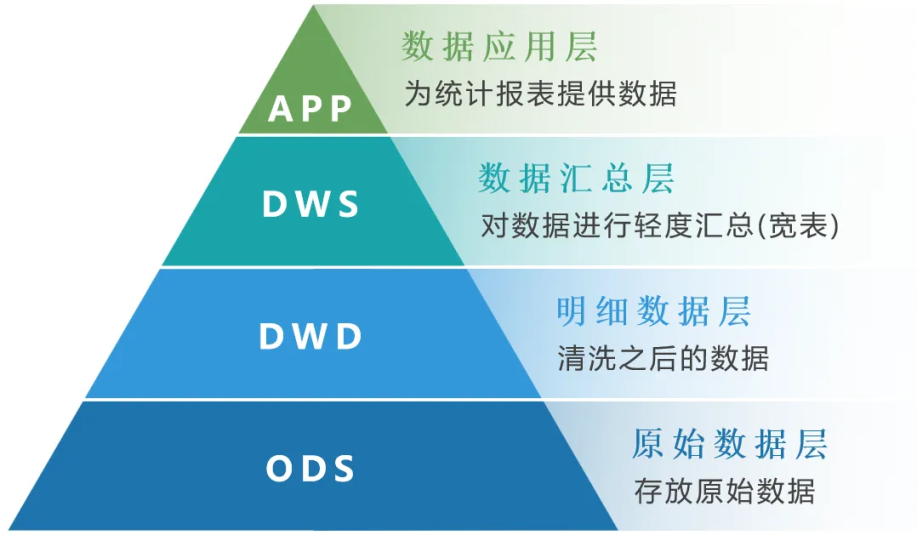
数据仓库分层
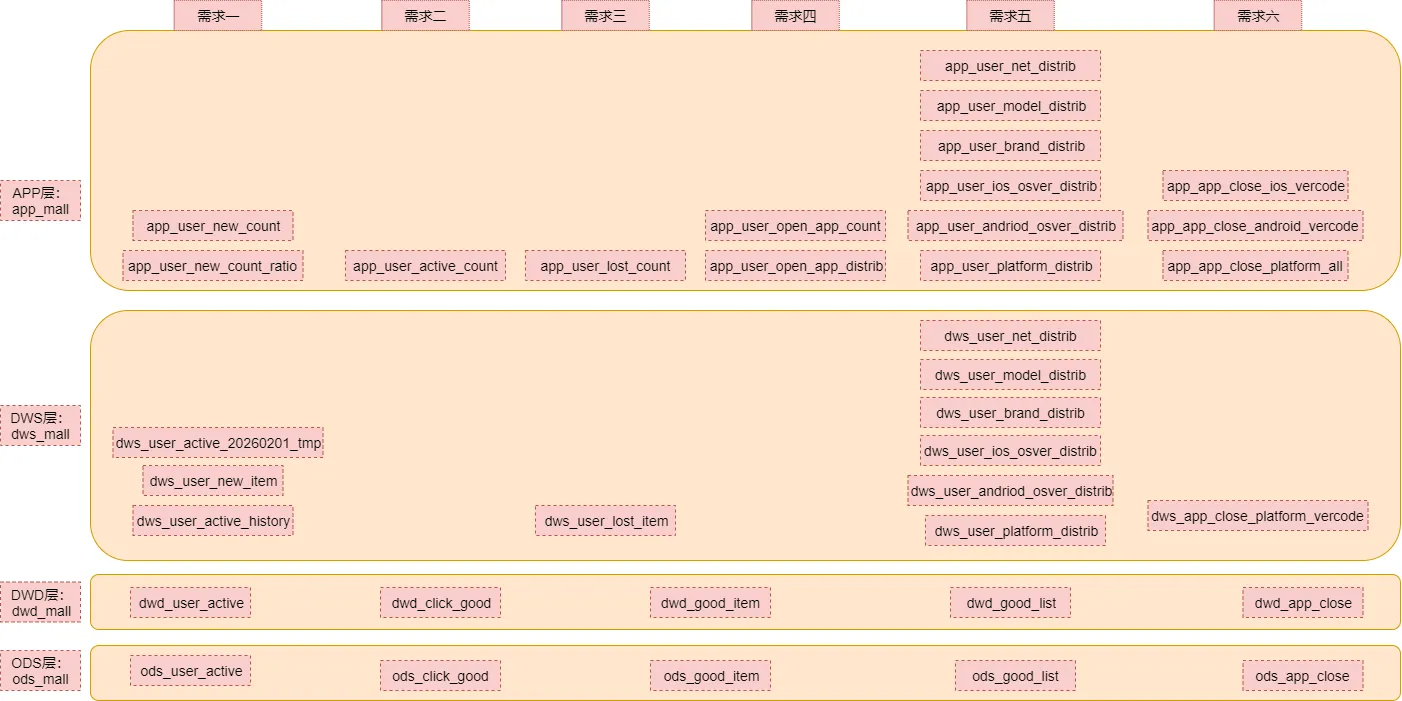
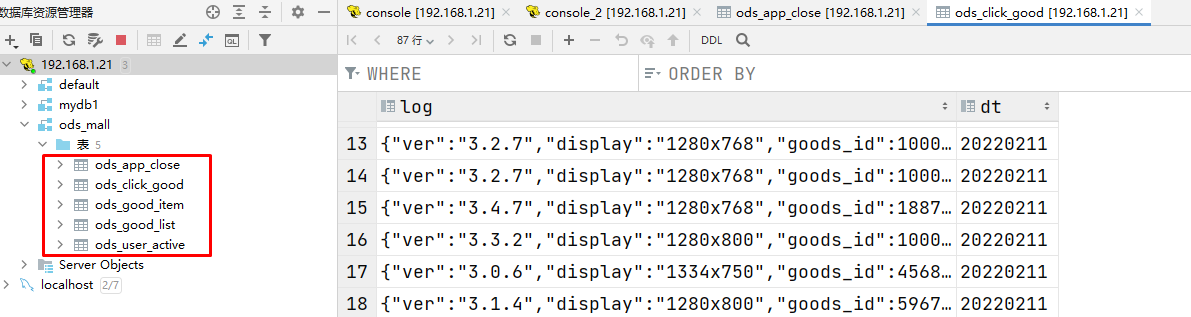
数据库和表梳理
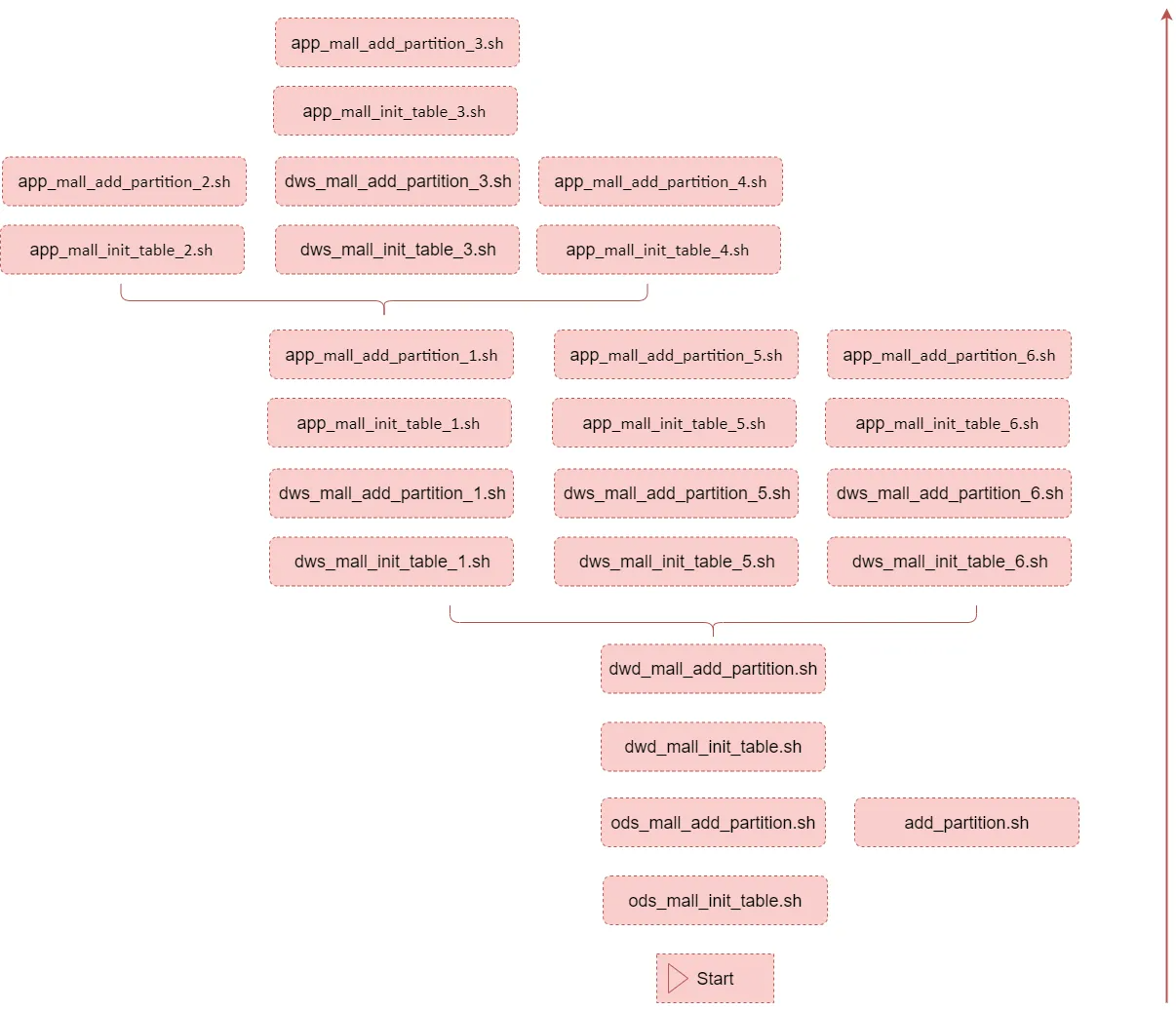
任务脚本梳理
ODS层(原始数据)
ODS层开发
用户行为数据相关表
| 表名 | 解释 |
|---|---|
| ods_user_active | 用户主动活跃表,打开APP(act=1) |
| ods_click_good | 点击商品表(act=2) |
| ods_good_item | 商品详情页表(act=3) |
| ods_good_list | 商品列表页表(act=4) |
| ods_app_close | APP崩溃数据表(act=5) |
注意: 1:建议在创建和使用表的时候,在表名前面加上数据库的名称:
数据库名称.表名称2:考虑到SQL重跑的情, 需要在SQL语句中添加if not exists 3:string、date、timestamp,建议使用string对日期格式进行统一
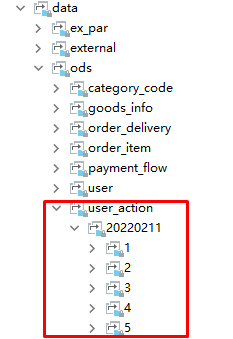
create database ods_mall;
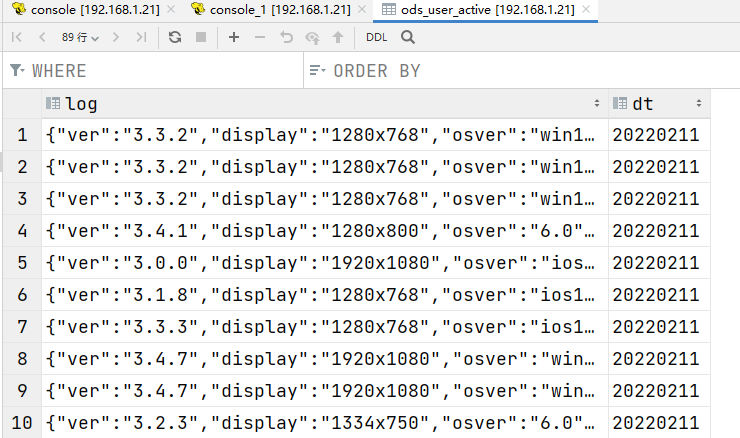
ods_user_active(打开APP)
create external table if not exists ods_mall.ods_user_active(log string)partitioned by (dt string)row format delimitedfields terminated by '\t'location 'hdfs://bigdata1:9000/data/ods/user_action/';--分区的location使用相对路径,省略了前面的hdfs://bigdata1:9000/data/ods/user_action/alter table ods_mall.ods_user_active add if not exists partition(dt='20220211') location '20220211/1';

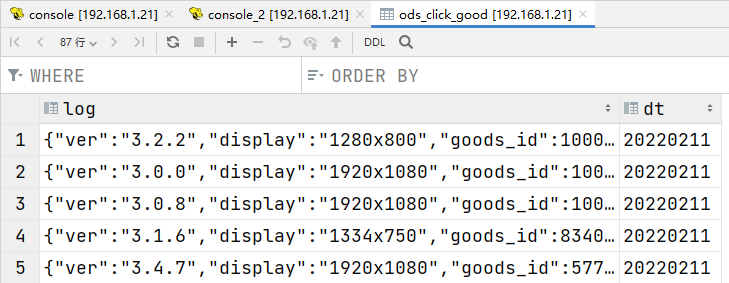
ods_click_good(点击商品)
create external table if not exists ods_mall.ods_click_good(log string)partitioned by (dt string)row format delimitedfields terminated by '\t'location 'hdfs://bigdata1:9000/data/ods/user_action/';alter table ods_mall.ods_click_good add if not exists partition(dt='20220211') location '20220211/2';
ods_good_item(商品详情页)
create external table if not exists ods_mall.ods_good_item(log string)partitioned by (dt string)row format delimitedfields terminated by '\t'location 'hdfs://bigdata1:9000/data/ods/user_action/';alter table ods_mall.ods_good_item add if not exists partition(dt='20220211') location '20220211/3';
ods_good_list(商品列表页)
create external table if not exists ods_mall.ods_good_list(log string)partitioned by (dt string)row format delimitedfields terminated by '\t'location 'hdfs://bigdata1:9000/data/ods/user_action/';alter table ods_mall.ods_good_list add if not exists partition(dt='20220211') location '20220211/4';
ods_app_close(关闭APP)
create external table if not exists ods_mall.ods_app_close(log string)partitioned by (dt string)row format delimitedfields terminated by '\t'location 'hdfs://bigdata1:9000/data/ods/user_action/';alter table ods_mall.ods_app_close add if not exists partition(dt='20220211') location '20220211/5';
ODS层脚本抽取
ods_mall_init_table.sh
表初始化脚本(初始化执行一次)
#!/bin/bash# ods层数据库和表初始化脚本,只需要执行一次hive -e "create database if not exists ods_mall;create external table if not exists ods_mall.ods_user_active(log string)partitioned by (dt string)row format delimitedfields terminated by '\t'location 'hdfs://bigdata1:9000/data/ods/user_action/';create external table if not exists ods_mall.ods_click_good(log string)partitioned by (dt string)row format delimitedfields terminated by '\t'location 'hdfs://bigdata1:9000/data/ods/user_action/';create external table if not exists ods_mall.ods_good_item(log string)partitioned by (dt string)row format delimitedfields terminated by '\t'location 'hdfs://bigdata1:9000/data/ods/user_action/';create external table if not exists ods_mall.ods_good_list(log string)partitioned by (dt string)row format delimitedfields terminated by '\t'location 'hdfs://bigdata1:9000/data/ods/user_action/';create external table if not exists ods_mall.ods_app_close(log string)partitioned by (dt string)row format delimitedfields terminated by '\t'location 'hdfs://bigdata1:9000/data/ods/user_action/';"
add_partition.sh
添加区分数据脚本(每天执行一次)
这个脚本是通用的,所有添加分区的地方都可以使用
#!/bin/bash# 给外部分区表添加分区# 接收三个参数#1:表名#2:分区字段dt的值:格式20260101#3:分区路径(相对路径或者绝对路径都可以)if [ $# != 3 ]thenecho "参数异常:add_partition.sh <tabkle_name> <dt> <path>"exit 100fitable_name=$1dt=$2path=$3hive -e "alter table ${table_name} add if not exists partition(dt='${dt}') location '${path}';"
ods_mall_add_partition.sh
给ods层的表添加分区,这个脚本后期每天执行一次
#!/bin/bash# 给ods层的表添加分区,这个脚本后期每天执行一次# 每天凌晨,添加昨天的分区,添加完分区之后,再执行后面的计算脚本# 默认获取昨天的日期,也支持传参指定一个日期if [ "z$1" = "z" ]thendt=`date +%Y%m%d --date="1 days ago"`elsedt=$1fi#alter table ods_mall.ods_user_active add if not exists partition(dt='20260101') location '20260101/1';#alter table ods_mall.ods_click_good add if not exists partition(dt='20260101') location '20260101/2';#alter table ods_mall.ods_good_item add if not exists partition(dt='20260101') location '20260101/3';#alter table ods_mall.ods_good_list add if not exists partition(dt='20260101') location '20260101/4';#alter table ods_mall.ods_app_close add if not exists partition(dt='20260101') location '20260101/5';sh add_partition.sh ods_mall.ods_user_active ${dt} ${dt}/1sh add_partition.sh ods_mall.ods_click_good ${dt} ${dt}/2sh add_partition.sh ods_mall.ods_good_item ${dt} ${dt}/3sh add_partition.sh ods_mall.ods_good_list ${dt} ${dt}/4sh add_partition.sh ods_mall.ods_app_close ${dt} ${dt}/5
创建文件夹mkdir warehouse_shell_user_action,上传脚本
cd /data/softmkdir warehouse_shell_user_action
测试:
1、删除数据仓库ods_mall
drop table ods_app_close;drop table ods_click_good;drop table ods_good_item;drop table ods_good_list;drop table ods_user_active;drop database ods_mall;
2、执行脚本
sh ods_mall_init_table.shsh ods_mall_add_partition.sh 20220211
DWD层(明细数据)
DWD层开发
create database dwd_mall;
dwd_user_active
create external table if not exists dwd_mall.dwd_user_active(user_id bigint,xaid string,platform tinyint,ver string,vercode string,net bigint,brand string,model string,display string,osver string,acttime bigint,ad_status tinyint,loading_time bigint)partitioned by(dt string)row format delimitedfields terminated by '\t'location 'hdfs://bigdata1:9000/data/dwd/user_active/';
insert overwrite table dwd_mall.dwd_user_active partition(dt='20220211') selectget_json_object(log,'$.uid') as user_id,get_json_object(log,'$.xaid') as xaid,get_json_object(log,'$.platform') as platform,get_json_object(log,'$.ver') as ver,get_json_object(log,'$.vercode') as vercode,get_json_object(log,'$.net') as net,get_json_object(log,'$.brand') as brand,get_json_object(log,'$.model') as model,get_json_object(log,'$.display') as display,get_json_object(log,'$.osver') as osver,get_json_object(log,'$.acttime') as acttime,get_json_object(log,'$.ad_status') as ad_status,get_json_object(log,'$.loading_time') as loading_timefrom(select log from ods_mall.ods_user_active where dt = '20220211' group by log) as tmpwhere get_json_object(log,'$.xaid') !='';
使用insert overwrite而不是insert into,重复执行时覆盖旧数据 使用group by log对重复的采集的log去重,效率比distinct高 where get_json_object(log,’$.xaid’) !=’’; 过滤掉PC端,只统计APP端

dwd_click_good
create external table if not exists dwd_mall.dwd_click_good(user_id bigint,xaid string,platform tinyint,ver string,vercode string,net bigint,brand string,model string,display string,osver string,acttime bigint,goods_id bigint,location tinyint)partitioned by(dt string)row format delimitedfields terminated by '\t'location 'hdfs://bigdata1:9000/data/dwd/click_good/';
insert overwrite table dwd_mall.dwd_click_good partition(dt='20220211') selectget_json_object(log,'$.uid') as user_id,get_json_object(log,'$.xaid') as xaid,get_json_object(log,'$.platform') as platform,get_json_object(log,'$.ver') as ver,get_json_object(log,'$.vercode') as vercode,get_json_object(log,'$.net') as net,get_json_object(log,'$.brand') as brand,get_json_object(log,'$.model') as model,get_json_object(log,'$.display') as display,get_json_object(log,'$.osver') as osver,get_json_object(log,'$.acttime') as acttime,get_json_object(log,'$.goods_id') as goods_id,get_json_object(log,'$.location') as locationfrom(select log from ods_mall.ods_click_good where dt = '20220211' group by log) as tmpwhere get_json_object(log,'$.xaid') !='';
dwd_good_item
create external table if not exists dwd_mall.dwd_good_item(user_id bigint,xaid string,platform tinyint,ver string,vercode string,net bigint,brand string,model string,display string,osver string,acttime bigint,goods_id bigint,stay_time bigint,loading_time bigint)partitioned by(dt string)row format delimitedfields terminated by '\t'location 'hdfs://bigdata1:9000/data/dwd/good_item/';
insert overwrite table dwd_mall.dwd_good_item partition(dt='20220211') selectget_json_object(log,'$.uid') as user_id,get_json_object(log,'$.xaid') as xaid,get_json_object(log,'$.platform') as platform,get_json_object(log,'$.ver') as ver,get_json_object(log,'$.vercode') as vercode,get_json_object(log,'$.net') as net,get_json_object(log,'$.brand') as brand,get_json_object(log,'$.model') as model,get_json_object(log,'$.display') as display,get_json_object(log,'$.osver') as osver,get_json_object(log,'$.acttime') as acttime,get_json_object(log,'$.goods_id') as goods_id,get_json_object(log,'$.stay_time') as stay_time,get_json_object(log,'$.loading_time') as loading_timefrom(select log from ods_mall.ods_good_item where dt = '20220211' group by log) as tmpwhere get_json_object(log,'$.xaid') !='';
dwd_good_list
create external table if not exists dwd_mall.dwd_good_list(user_id bigint,xaid string,platform tinyint,ver string,vercode string,net bigint,brand string,model string,display string,osver string,acttime bigint,loading_time bigint,loading_type tinyint,goods_num tinyint)partitioned by(dt string)row format delimitedfields terminated by '\t'location 'hdfs://bigdata1:9000/data/dwd/good_list/';
insert overwrite table dwd_mall.dwd_good_list partition(dt='20220211') selectget_json_object(log,'$.uid') as user_id,get_json_object(log,'$.xaid') as xaid,get_json_object(log,'$.platform') as platform,get_json_object(log,'$.ver') as ver,get_json_object(log,'$.vercode') as vercode,get_json_object(log,'$.net') as net,get_json_object(log,'$.brand') as brand,get_json_object(log,'$.model') as model,get_json_object(log,'$.display') as display,get_json_object(log,'$.osver') as osver,get_json_object(log,'$.acttime') as acttime,get_json_object(log,'$.loading_time') as loading_time,get_json_object(log,'$.loading_type') as loading_type,get_json_object(log,'$.goods_num') as goods_numfrom(select log from ods_mall.ods_good_list where dt = '20220211' group by log) as tmpwhere get_json_object(log,'$.xaid') !='';
dwd_app_close
create external table if not exists dwd_mall.dwd_app_close(
    user_id    bigint,
    xaid    string,
    platform    tinyint,
    ver    string,
    vercode    string,
    net    bigint,
    brand    string,
    model    string,
    display    string,
    osver    string,
    acttime    bigint
)partitioned by(dt string)
 row format delimited
 fields terminated by '\t'
 location 'hdfs://bigdata1:9000/data/dwd/app_close/';
insert overwrite table dwd_mall.dwd_app_close partition(dt='20220211') select
get_json_object(log,'$.uid') as user_id,
get_json_object(log,'$.xaid') as xaid,
get_json_object(log,'$.platform') as platform,
get_json_object(log,'$.ver') as ver,
get_json_object(log,'$.vercode') as vercode,
get_json_object(log,'$.net') as net,
get_json_object(log,'$.brand') as brand,
get_json_object(log,'$.model') as model,
get_json_object(log,'$.display') as display,
get_json_object(log,'$.osver') as osver,
get_json_object(log,'$.acttime') as acttime
from
(
select log from ods_mall.ods_app_close where dt = '20220211' group by log
) as tmp
where get_json_object(log,'$.xaid') !='';
DWD层脚本抽取
dwd_mall_init_table.sh
表初始化脚本(初始化执行一次)
#!/bin/bash
# dwd层数据库和表初始化脚本,只需要执行一次即可

hive -e "
create database if not exists dwd_mall;

create external table if not exists dwd_mall.dwd_user_active(
    user_id    bigint,
    xaid    string,
    platform    tinyint,
    ver    string,
    vercode    string,
    net    bigint,
    brand    string,
    model    string,
    display    string,
    osver    string,
    acttime    bigint,
    ad_status    tinyint,
    loading_time    bigint
)partitioned by(dt string)
 row format delimited
 fields terminated by '\t'
 location 'hdfs://bigdata1:9000/data/dwd/user_active/';


create external table if not exists dwd_mall.dwd_click_good(
    user_id    bigint,
    xaid    string,
    platform    tinyint,
    ver    string,
    vercode    string,
    net    bigint,
    brand    string,
    model    string,
    display    string,
    osver    string,
    acttime    bigint,
    goods_id    bigint,
    location    tinyint
)partitioned by(dt string)
 row format delimited
 fields terminated by '\t'
 location 'hdfs://bigdata1:9000/data/dwd/click_good/';


create external table if not exists dwd_mall.dwd_good_item(
    user_id    bigint,
    xaid    string,
    platform    tinyint,
    ver    string,
    vercode    string,
    net    bigint,
    brand    string,
    model    string,
    display    string,
    osver    string,
    acttime    bigint,
    goods_id    bigint,
    stay_time    bigint,
    loading_time    bigint
)partitioned by(dt string)
 row format delimited
 fields terminated by '\t'
 location 'hdfs://bigdata1:9000/data/dwd/good_item/';


create external table if not exists dwd_mall.dwd_good_list(
    user_id    bigint,
    xaid    string,
    platform    tinyint,
    ver    string,
    vercode    string,
    net    bigint,
    brand    string,
    model    string,
    display    string,
    osver    string,
    acttime    bigint,
    loading_time    bigint,
    loading_type    tinyint,
    goods_num    tinyint
)partitioned by(dt string)
 row format delimited
 fields terminated by '\t'
 location 'hdfs://bigdata1:9000/data/dwd/good_list/';


create external table if not exists dwd_mall.dwd_app_close(
    user_id    bigint,
    xaid    string,
    platform    tinyint,
    ver    string,
    vercode    string,
    net    bigint,
    brand    string,
    model    string,
    display    string,
    osver    string,
    acttime    bigint
)partitioned by(dt string)
 row format delimited
 fields terminated by '\t'
 location 'hdfs://bigdata1:9000/data/dwd/app_close/';
"
dwd_mall_add_partition.sh
添加区分数据脚本(每天执行一次)
#!/bin/bash
# 基于ods层的表进行清洗,将清洗之后的数据添加到dwd层对应表的对应分区中
# 每天凌晨执行一次

# 默认获取昨天的日期,也支持传参指定一个日期
if [ "z$1" = "z" ]
then
dt=`date +%Y%m%d --date="1 days ago"`
else
dt=$1
fi

hive -e "
insert overwrite table dwd_mall.dwd_user_active partition(dt='${dt}')  select
get_json_object(log,'$.uid') as user_id,
get_json_object(log,'$.xaid') as xaid,
get_json_object(log,'$.platform') as platform,
get_json_object(log,'$.ver') as ver,
get_json_object(log,'$.vercode') as vercode,
get_json_object(log,'$.net') as net,
get_json_object(log,'$.brand') as brand,
get_json_object(log,'$.model') as model,
get_json_object(log,'$.display') as display,
get_json_object(log,'$.osver') as osver,
get_json_object(log,'$.acttime') as acttime,
get_json_object(log,'$.ad_status') as ad_status,
get_json_object(log,'$.loading_time') as loading_time
from
(
select log from ods_mall.ods_user_active where dt = '${dt}' group by log
) as tmp
where get_json_object(log,'$.xaid') !='';


insert overwrite table dwd_mall.dwd_click_good partition(dt='${dt}')  select
get_json_object(log,'$.uid') as user_id,
get_json_object(log,'$.xaid') as xaid,
get_json_object(log,'$.platform') as platform,
get_json_object(log,'$.ver') as ver,
get_json_object(log,'$.vercode') as vercode,
get_json_object(log,'$.net') as net,
get_json_object(log,'$.brand') as brand,
get_json_object(log,'$.model') as model,
get_json_object(log,'$.display') as display,
get_json_object(log,'$.osver') as osver,
get_json_object(log,'$.acttime') as acttime,
get_json_object(log,'$.goods_id') as goods_id,
get_json_object(log,'$.location') as location
from
(
select log from ods_mall.ods_click_good where dt = '${dt}' group by log
) as tmp
where get_json_object(log,'$.xaid') !='';


insert overwrite table dwd_mall.dwd_good_item partition(dt='${dt}') select
get_json_object(log,'$.uid') as user_id,
get_json_object(log,'$.xaid') as xaid,
get_json_object(log,'$.platform') as platform,
get_json_object(log,'$.ver') as ver,
get_json_object(log,'$.vercode') as vercode,
get_json_object(log,'$.net') as net,
get_json_object(log,'$.brand') as brand,
get_json_object(log,'$.model') as model,
get_json_object(log,'$.display') as display,
get_json_object(log,'$.osver') as osver,
get_json_object(log,'$.acttime') as acttime,
get_json_object(log,'$.goods_id') as goods_id,
get_json_object(log,'$.stay_time') as stay_time,
get_json_object(log,'$.loading_time') as loading_time
from
(
select log from ods_mall.ods_good_item where dt = '${dt}' group by log
) as tmp
where get_json_object(log,'$.xaid') !='';


insert overwrite table dwd_mall.dwd_good_list partition(dt='${dt}') select
get_json_object(log,'$.uid') as user_id,
get_json_object(log,'$.xaid') as xaid,
get_json_object(log,'$.platform') as platform,
get_json_object(log,'$.ver') as ver,
get_json_object(log,'$.vercode') as vercode,
get_json_object(log,'$.net') as net,
get_json_object(log,'$.brand') as brand,
get_json_object(log,'$.model') as model,
get_json_object(log,'$.display') as display,
get_json_object(log,'$.osver') as osver,
get_json_object(log,'$.acttime') as acttime,
get_json_object(log,'$.loading_time') as loading_time,
get_json_object(log,'$.loading_type') as loading_type,
get_json_object(log,'$.goods_num') as goods_num
from
(
select log from ods_mall.ods_good_list where dt = '${dt}' group by log
) as tmp
where get_json_object(log,'$.xaid') !='';


insert overwrite table dwd_mall.dwd_app_close partition(dt='${dt}') select
get_json_object(log,'$.uid') as user_id,
get_json_object(log,'$.xaid') as xaid,
get_json_object(log,'$.platform') as platform,
get_json_object(log,'$.ver') as ver,
get_json_object(log,'$.vercode') as vercode,
get_json_object(log,'$.net') as net,
get_json_object(log,'$.brand') as brand,
get_json_object(log,'$.model') as model,
get_json_object(log,'$.display') as display,
get_json_object(log,'$.osver') as osver,
get_json_object(log,'$.acttime') as acttime
from
(
select log from ods_mall.ods_app_close where dt = '${dt}' group by log
) as tmp
where get_json_object(log,'$.xaid') !='';
"
测试
1、删除表和数据库
drop table dwd_user_active;

drop schema dwd_mall;
2、执行脚本
sh dwd_mall_init_table.sh

sh dwd_mall_add_partition.sh 20220211


若有收获,就点个赞吧
0 人点赞


