SourceInterceptors
Source 可以指定一个或者多个拦截器按先后顺序依次对采集到的数据进行处理。
系统中已经内置提供了很多 Source Interceptors,常见的 Source Interceptors 类型:Timestamp Interceptor、Host Interceptor、Search and Replace Interceptor 、Static Interceptor、Regex Extractor Interceptor等。
| Timestamp Interceptor | 向 event 中的 header 里面添加 timestamp 时间戳信息。 |
|---|---|
| Host Interceptor | 向 event 中的 header 里面添加 host 属性,host 的值为当前机器的主机名或者ip。 |
| Search and Replace Interceptor | 根据指定的规则查询 Event 中 body 里面的数据,然后进行替换,这个拦截器会修改 event 中 body 的值,也就是会修改原始采集到的数据内容。 |
| Static Interceptor | 向 event 中的 header 里面添加固定的 key 和 value。 |
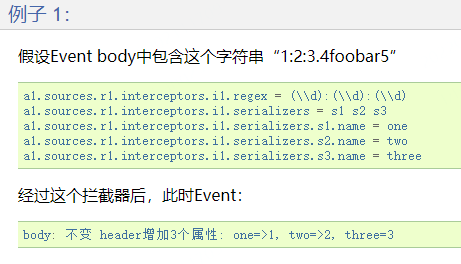
| Regex Extractor Interceptor | 根据指定的规则从 Event 中的 body 里面抽取数据,生成 key 和 value,再把 key 和 value 添加到 header 中。 |
总结一下: Timestamp Interceptor、Host Interceptor、Static Interceptor、Regex Extractor Interceptor 是向 event 中的 header 里面添加 key-value 类型的数据,方便后面的 channel 和 sink 组件使用,对采集到的原始数据内容没有任何影响。 Search and Replace Interceptor 是会根据规则修改 event 中 body 里面的原始数据内容,对 header 没有任何影响,使用这个拦截器需要特别小心,因为它会修改原始数据内容。 这里面这几个拦截器,其中 Search and Replace Interceptor 和 Regex Extractor Interceptor 在工作中使用的比较多一些。
案例
对采集到的数据按天按类型分目录存储
原始数据:
video_info{"id":"14943445328940974601","uid":"840717325115457536","lat":"53.530598","lnt":"-2.5620373","hots":0,"title":"0","status":"1","topicId":"0","end_time":"1494344570","watch_num":0,"share_num":"1","replay_url":null,"replay_num":0,"start_time":"1494344544","timestamp":1494344571,"type":"video_info"}user_info{"uid":"861848974414839801","nickname":"mick","usign":"","sex":1,"birthday":"","face":"","big_face":"","email":"abc@qq.com","mobile":"","reg_type":"102","last_login_time":"1494344580","reg_time":"1494344580","last_update_time":"1494344580","status":"5","is_verified":"0","verified_info":"","is_seller":"0","level":1,"exp":0,"anchor_level":0,"anchor_exp":0,"os":"android","timestamp":1494344580,"type":"user_info"}gift_record{"send_id":"834688818270961664","good_id":"223","video_id":"14943443045138661356","gold":"10","timestamp":1494344574,"type":"gift_record"}
这份数据中有三种类型的数据,视频信息、用户信息、送礼信息,数据都是 json 格式的,这些数据还有一个共性就是里面都有一个 type 字段,type 字段的值代表数据类型,当直播平台正常运行的时候,会实时产生这些日志数据,我们希望把这些数据采集到 hdfs 上进行存储,并且要按照数据类型进行分目录存储,视频数据放一块、用户数据放一块、送礼数据放一块。
针对这个需求配置 agent 的话,source 使用基于文件的 execsource、channle 使用基于文件的 channle,我们希望保证数据的完整性和准确性,sink 使用 hdfssink,但是注意了,hdfssink 中的 path 不能写死,首先是按天就是需要动态获取日期,然后是因为不同类型的数据要存储到不同的目录中,那也就意味着 path 路径中肯定要是有变量,除了日期变量还要有数据类型变量,这里的数据类型的格式都是单词中间有一个下划线,但是要求是目录中的单词不要出现下划线,使用驼峰的命名格式。
最终在 hdfs 中需要生成的目录大致是这样的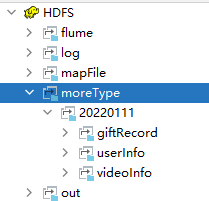
conf下创建 file-to-hdfs-moreType.conf:
# agent的名称是a1# 指定source组件、channel组件和Sink组件的名称a1.sources = r1a1.channels = c1a1.sinks = k1# 配置source组件a1.sources.r1.type = execa1.sources.r1.command = tail -F /data/log/moreType.log# 配置拦截器 [多个拦截器按照顺序依次执行]a1.sources.r1.interceptors = i1 i2 i3 i4a1.sources.r1.interceptors.i1.type = search_replacea1.sources.r1.interceptors.i1.searchPattern = "type":"video_info"a1.sources.r1.interceptors.i1.replaceString = "type":"videoInfo"a1.sources.r1.interceptors.i2.type = search_replacea1.sources.r1.interceptors.i2.searchPattern = "type":"user_info"a1.sources.r1.interceptors.i2.replaceString = "type":"userInfo"a1.sources.r1.interceptors.i3.type = search_replacea1.sources.r1.interceptors.i3.searchPattern = "type":"gift_record"a1.sources.r1.interceptors.i3.replaceString = "type":"giftRecord"a1.sources.r1.interceptors.i4.type = regex_extractor#提取type字段,\w 匹配非特殊字符,即a-z、A-Z、0-9、_、汉字a1.sources.r1.interceptors.i4.regex = "type":"(\\w+)"a1.sources.r1.interceptors.i4.serializers = s1#匹配到"type":"videoInfo",会往event的header中添加<"logType","videoInfo">的值a1.sources.r1.interceptors.i4.serializers.s1.name = logType# 配置channel组件a1.channels.c1.type = filea1.channels.c1.checkpointDir = /data/soft/apache-flume-1.9.0-bin/data/moreType/checkpointa1.channels.c1.dataDirs = /data/soft/apache-flume-1.9.0-bin/data/moreType/data# 配置sink组件a1.sinks.k1.type = hdfsa1.sinks.k1.hdfs.path = hdfs://192.168.1.21:9000/moreType/%Y%m%d/%{logType}a1.sinks.k1.hdfs.fileType = DataStreama1.sinks.k1.hdfs.writeFormat = Texta1.sinks.k1.hdfs.rollInterval = 3600a1.sinks.k1.hdfs.rollSize = 134217728a1.sinks.k1.hdfs.rollCount = 0a1.sinks.k1.hdfs.useLocalTimeStamp = true#增加文件前缀和后缀a1.sinks.k1.hdfs.filePrefix = dataa1.sinks.k1.hdfs.fileSuffix = .log# 把组件连接起来a1.sources.r1.channels = c1a1.sinks.k1.channel = c1
注意:这里面的拦截器,拦截器可以设置一个或者多个,source 采集的每一条数据都会经过所有的拦截器进行处理,多个拦截器按照顺序执行
创建测试文件moreType.log
cd /data/log/vim moreType.log{"id":"14943445328940974601","uid":"840717325115457536","lat":"53.530598","lnt":"-2.5620373","hots":0,"title":"0","status":"1","topicId":"0","end_time":"1494344570","watch_num":0,"share_num":"1","replay_url":null,"replay_num":0,"start_time":"1494344544","timestamp":1494344571,"type":"video_info"}{"uid":"861848974414839801","nickname":"mick","usign":"","sex":1,"birthday":"","face":"","big_face":"","email":"abc@qq.com","mobile":"","reg_type":"102","last_login_time":"1494344580","reg_time":"1494344580","last_update_time":"1494344580","status":"5","is_verified":"0","verified_info":"","is_seller":"0","level":1,"exp":0,"anchor_level":0,"anchor_exp":0,"os":"android","timestamp":1494344580,"type":"user_info"}{"send_id":"834688818270961664","good_id":"223","video_id":"14943443045138661356","gold":"10","timestamp":1494344574,"type":"gift_record"}
启动flume
bin/flume-ng agent --name a1 --conf conf --conf-file conf/file-to-hdfs-moreType.conf -Dflume.root.logger=INFO,console
查看HDFS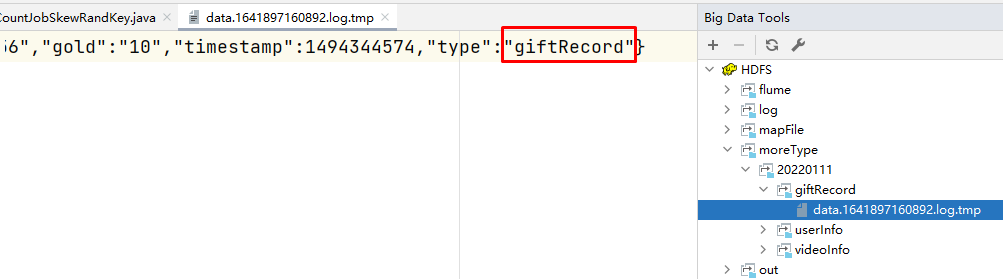
Channel Selectors
Source 发往多个 Channel 的策略设置,如果 source 后面接了多个 channel,到底是给所有的 channel 都发,还是根据规则发送到不同 channel,这些是由 Channel Selectors 来控制的。
Sink Processors
Sink 发送数据的策略设置,一个 channel 后面可以接多个 sink,channel 中的数据是被哪个 sink 获取,这个是由 Sink Processors 控制的。

若有收获,就点个赞吧
0 人点赞


