1.个人对于主从的理解
当数据较多的时候,搞一台额外的数据库当做从(副)节点。当主服务器损坏,从服务器可以顶替,并且从服务器也被用来读取数据。
2.准备
准备两台主机,均停止防火墙,selinux并且完成二进制免编译mysql的安装。
| 主机名 | IP | Mysql版本 |
|---|---|---|
| server(主节点) | 192.168.148.156 | mysql-5.6.47-linux-glibc2.12-x86_64.tar.gz |
| other mysql(从节点) | 192.168.148.171 | (版本要一致) |
3.主节点操作
server(192.168.148.156) 进行操作
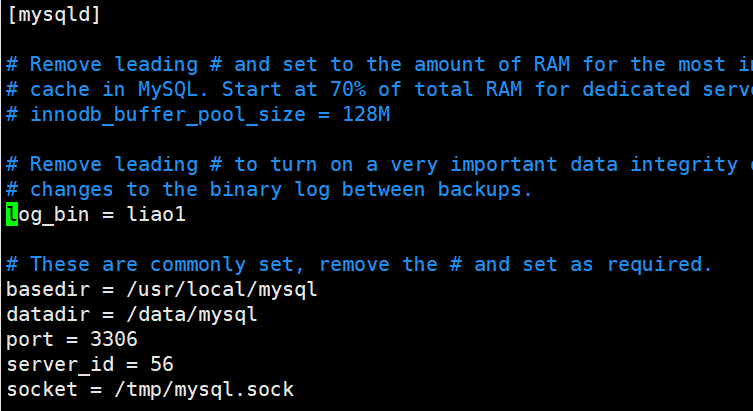
#vim /etc/my.cnf //修改配置文件log_bin=liao //可自定义server_id = 56 //(这里也可以自定义,但是不能与从节点相同)
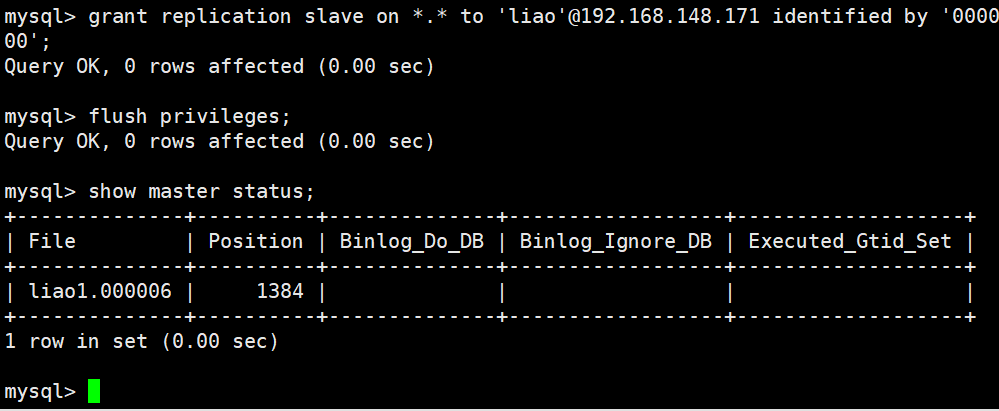
#Mysql //进入数据库>grant replication slave on *.* to 'liao'@192.168.148.171 identified by '000000'; //创建主从用户,给予权限>flush privileges; //刷新权限>show master status; //查看server节点状态
- ‘liao’:用户名
- ‘000000’:密码
- @后跟的是从节点IP,因为到时候要在从节点的mysql中登录。
4.从节点操作
othermysql(192.168.148.171) 进行操作
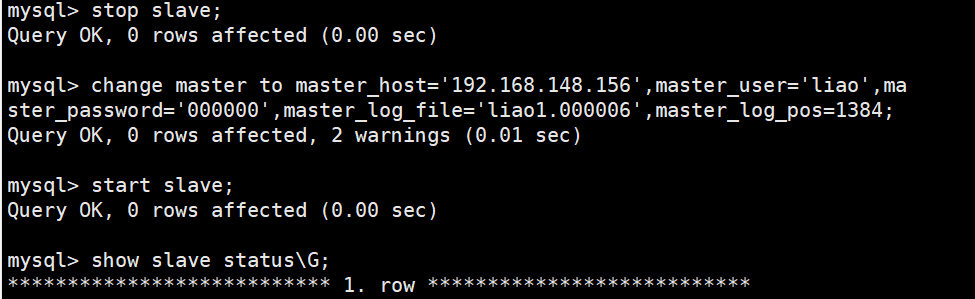
#vim /etc/my.cnf //修改配置文件server_id = 10 (别和主节点相同即可)这里的 log_bin 可以不用配置#mysql //进入数据库>stop slave; //关闭主从同步服务>change master to master_host='192.168.148.156',master_user='liao',master_password='000000',master_log_file='liao1.000006',master_log_pos=1384; //创建连接,主节点信息,bin_log文件以及大小>start slave; //开启主从同步服务>show slave status\G; //查看主从同步服务配置
- master_host:主节点IP
- master_user:主节点用户名
- master_password:主节点用户密码
- master_log_file:log文件,show master status中的第一个文件
- master_log_pos:log的位置号码
*************************** 1. row ***************************Slave_IO_State: Waiting for master to send eventMaster_Host: 192.168.148.156Master_User: liaoMaster_Port: 3306Connect_Retry: 60Master_Log_File: liao1.000006Read_Master_Log_Pos: 1384Relay_Log_File: localhost-relay-bin.000002Relay_Log_Pos: 279Relay_Master_Log_File: liao1.000006Slave_IO_Running: Yes #这里要为yesSlave_SQL_Running: Yes #这里要为yesReplicate_Do_DB:Replicate_Ignore_DB:Replicate_Do_Table:Replicate_Ignore_Table:Replicate_Wild_Do_Table:Replicate_Wild_Ignore_Table:Last_Errno: 0Last_Error:Skip_Counter: 0Exec_Master_Log_Pos: 1384Relay_Log_Space: 456Until_Condition: NoneUntil_Log_File:Until_Log_Pos: 0Master_SSL_Allowed: NoMaster_SSL_CA_File:Master_SSL_CA_Path:Master_SSL_Cert:Master_SSL_Cipher:Master_SSL_Key:Seconds_Behind_Master: 0Master_SSL_Verify_Server_Cert: NoLast_IO_Errno: 0 #如果有问题,在这里看报错Last_IO_Error:Last_SQL_Errno: 0 #如果有问题,在这里看报错Last_SQL_Error:Replicate_Ignore_Server_Ids:Master_Server_Id: 56Master_UUID: a79ad7b9-1cf5-11ec-afb2-000c294a072cMaster_Info_File: /data/mysql/master.infoSQL_Delay: 0SQL_Remaining_Delay: NULLSlave_SQL_Running_State: Slave has read all relay log; waiting for the slave I/O thread to update itMaster_Retry_Count: 86400Master_Bind:Last_IO_Error_Timestamp:Last_SQL_Error_Timestamp:Master_SSL_Crl:Master_SSL_Crlpath:Retrieved_Gtid_Set:Executed_Gtid_Set:Auto_Position: 01 row in set (0.00 sec)ERROR:No query specified
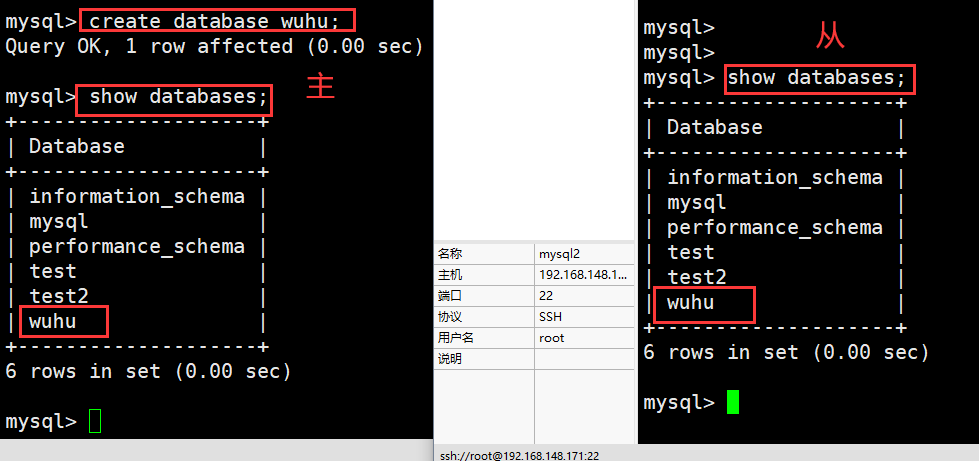
5.测试
server(192.168.148.156) 进行操作

若有收获,就点个赞吧
0 人点赞


