以github为例,简要介绍OAuth第三方登录流程。
参考:
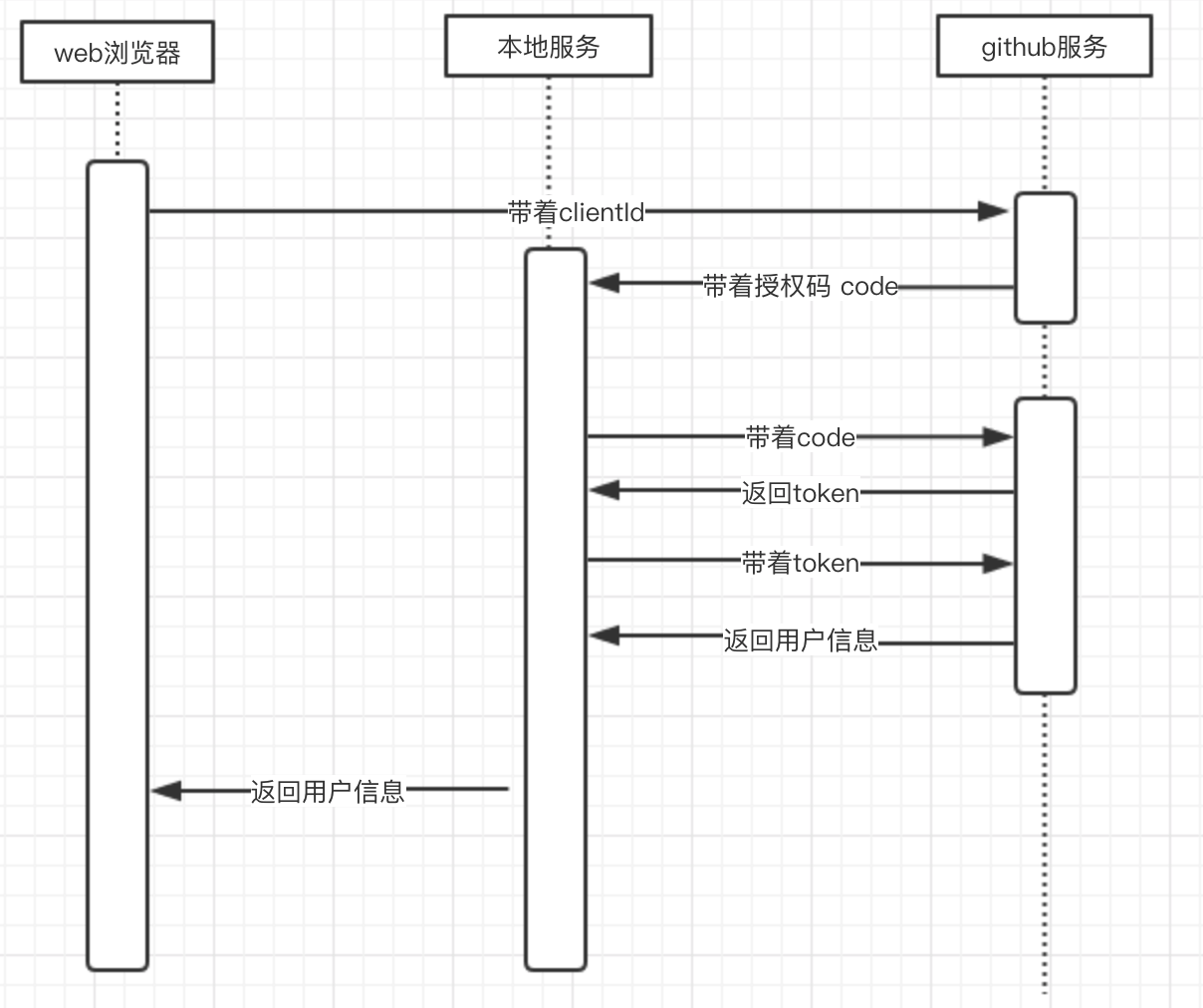
流程
代码
web
<!DOCTYPE html><html><head><meta charset="utf-8"/><meta http-equiv="X-UA-Compatible" content="IE=edge"><title>Node OAuth2 Demo</title><meta name="viewport" content="width=device-width, initial-scale=1"></head><body><a id="login">Login with GitHub</a><script>// fill in your cliend_idconst client_id = '2d6ab4268ae36f01a7a4';const authorize_uri = 'https://github.com/login/oauth/authorize';const redirect_uri = 'http://localhost:8080/oauth/redirect';const link = document.getElementById('login');link.href = `${authorize_uri}?client_id=${client_id}&redirect_uri=${redirect_uri}`;</script></body></html>
本地接口
/*** @Description* @Author 田云* @Date 2019/6/4 16:17* @Version 1.0*/@RestController@RequestMapping("oauth")public class Login {private String client_id = "XXX";private String client_secret = "XXX";@GetMapping("redirect")public String login(String code) {String me = CommonUtil.sendPost("https://github.com/login/oauth/access_token?" +"client_id=" + client_id +"&client_secret=" + client_secret +"&code=" + code,null);String atoke = me.split("&")[0];String res = CommonUtil.sendGet("https://api.github.com/user?" + atoke + "");return res;}}
工具类参考
/*** @Description* @Author 田云* @Date 2019/6/4 16:56* @Version 1.0*/public class CommonUtil {/*** 向指定 URL 发送POST方法的请求** @param url* 发送请求的 URL* @param param* 请求参数,请求参数应该是 name1=value1&name2=value2 的形式。* @return 所代表远程资源的响应结果*/public static String sendPost(String url, String param) {PrintWriter out = null;BufferedReader in = null;String result = "";try {URL realUrl = new URL(url);// 打开和URL之间的连接URLConnection conn = realUrl.openConnection();// 设置通用的请求属性conn.setRequestProperty("accept", "*/*");conn.setRequestProperty("connection", "Keep-Alive");conn.setRequestProperty("user-agent","Mozilla/4.0 (compatible; MSIE 6.0; Windows NT 5.1;SV1)");// 发送POST请求必须设置如下两行conn.setDoOutput(true);conn.setDoInput(true);conn.connect();// 获取URLConnection对象对应的输出流out = new PrintWriter(conn.getOutputStream());// 发送请求参数out.print(param);// flush输出流的缓冲out.flush();// 定义BufferedReader输入流来读取URL的响应InputStream instream = conn.getInputStream();if(instream!=null){in = new BufferedReader( new InputStreamReader(instream));String line;while ((line = in.readLine()) != null) {result += line;}}} catch (Exception e) {e.printStackTrace();}//使用finally块来关闭输出流、输入流finally{try{if(out!=null){out.close();}if(in!=null){in.close();}}catch(IOException ex){ex.printStackTrace();}}return result;}/*** 发起http请求获取返回结果* @param req_url 请求地址* @return*/public static String sendGet(String req_url) {StringBuffer buffer = new StringBuffer();try {URL url = new URL(req_url);HttpURLConnection httpUrlConn = (HttpURLConnection) url.openConnection();httpUrlConn.setDoOutput(false);httpUrlConn.setDoInput(true);httpUrlConn.setUseCaches(false);httpUrlConn.setRequestMethod("GET");httpUrlConn.connect();// 将返回的输入流转换成字符串InputStream inputStream = httpUrlConn.getInputStream();InputStreamReader inputStreamReader = new InputStreamReader(inputStream, "utf-8");BufferedReader bufferedReader = new BufferedReader(inputStreamReader);String str = null;while ((str = bufferedReader.readLine()) != null) {buffer.append(str);}//res = new String(buffer.toString().getBytes("iso-8859-1"),"utf-8");bufferedReader.close();inputStreamReader.close();// 释放资源inputStream.close();inputStream = null;httpUrlConn.disconnect();} catch (Exception e) {e.printStackTrace();}return buffer.toString();}}

若有收获,就点个赞吧
0 人点赞


