1.Seata-Server的配置
1.1Nacos配置信息配置
- 启动nacos
- 准备config.txt,内容如下:
注:config.txt位置放在seata的Home目录下。service.vgroupMapping.my_test_tx_group=defaultstore.mode=dbstore.db.datasource=druidstore.db.dbType=mysqlstore.db.driverClassName=com.mysql.jdbc.Driverstore.db.url=jdbc:mysql://127.0.0.1:3306/seata?useUnicode=truestore.db.user=root #改成自己的store.db.password=888888 #改成自己的store.db.minConn=5store.db.maxConn=30store.db.globalTable=global_tablestore.db.branchTable=branch_tablestore.db.queryLimit=100store.db.lockTable=lock_tablestore.db.maxWait=5000
3.将config.txt中的配置配置到nacos上(通过脚本)
https://github.com/seata/seata/blob/develop/script/config-center/nacos/nacos-config.sh 将此脚本放在seata的conf目录下后,执行以下命令:
注:windows用户可以用git bash来执行哦!!sh nacos-config.sh -h nacos的ip -p nacos端口 -g nacos配置文件的组 -t 你的namespace号(若是public可省略此选项) -u nacos用户名 -w nacos密码
4.观察结果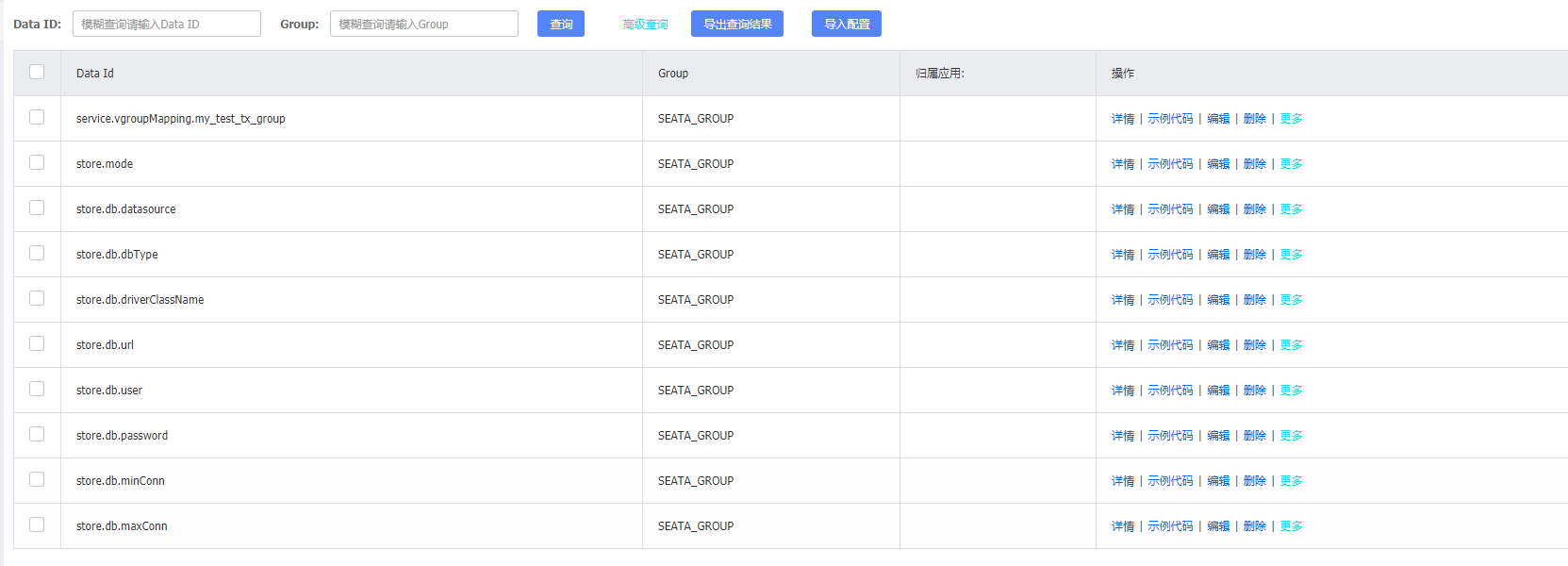
1.2数据库的变化
1.新建seata数据库
2.在库中新建3张数据表
-- -------------------------------- The script used when storeMode is 'db' ---------------------------------- the table to store GlobalSession dataCREATE TABLE IF NOT EXISTS `global_table`(`xid` VARCHAR(128) NOT NULL,`transaction_id` BIGINT,`status` TINYINT NOT NULL,`application_id` VARCHAR(32),`transaction_service_group` VARCHAR(32),`transaction_name` VARCHAR(128),`timeout` INT,`begin_time` BIGINT,`application_data` VARCHAR(2000),`gmt_create` DATETIME,`gmt_modified` DATETIME,PRIMARY KEY (`xid`),KEY `idx_gmt_modified_status` (`gmt_modified`, `status`),KEY `idx_transaction_id` (`transaction_id`)) ENGINE = InnoDBDEFAULT CHARSET = utf8;-- the table to store BranchSession dataCREATE TABLE IF NOT EXISTS `branch_table`(`branch_id` BIGINT NOT NULL,`xid` VARCHAR(128) NOT NULL,`transaction_id` BIGINT,`resource_group_id` VARCHAR(32),`resource_id` VARCHAR(256),`branch_type` VARCHAR(8),`status` TINYINT,`client_id` VARCHAR(64),`application_data` VARCHAR(2000),`gmt_create` DATETIME(6),`gmt_modified` DATETIME(6),PRIMARY KEY (`branch_id`),KEY `idx_xid` (`xid`)) ENGINE = InnoDBDEFAULT CHARSET = utf8;-- the table to store lock dataCREATE TABLE IF NOT EXISTS `lock_table`(`row_key` VARCHAR(128) NOT NULL,`xid` VARCHAR(96),`transaction_id` BIGINT,`branch_id` BIGINT NOT NULL,`resource_id` VARCHAR(256),`table_name` VARCHAR(32),`pk` VARCHAR(36),`gmt_create` DATETIME,`gmt_modified` DATETIME,PRIMARY KEY (`row_key`),KEY `idx_branch_id` (`branch_id`)) ENGINE = InnoDBDEFAULT CHARSET = utf8;
1.3Seata-Server配置和启动
1.修改seata的conf目录下的registry.conf文件
registry {# file 、nacos 、eureka、redis、zk、consul、etcd3、sofatype = "nacos"nacos {application = "seata-server"serverAddr = "127.0.0.1:8848"group = "SEATA_GROUP"namespace = ""cluster = "default"username = "nacos"password = "nacos"}}config {# file、nacos 、apollo、zk、consul、etcd3type = "nacos"nacos {serverAddr = "127.0.0.1:8848"namespace = ""group = "SEATA_GROUP"username = "nacos"password = "nacos"}}
2.启动seata-server
①linus/mac
sh seata-server.sh
②windows
.\seata-server.bat
2.各个微服务的配置
seata:tx-service-group: my_test_tx_groupregistry:type: nacosnacos:server-addr: localhost:8848username: nacospassword: nacosconfig:type: nacosnacos:server-addr: localhost:8848username: nacospassword: nacos

若有收获,就点个赞吧
0 人点赞


