https://api.flutter.dev/flutter/material/TabBar-class.html
https://api.flutter.dev/flutter/material/TabBarView-class.html
DefaultTabController、TabBar、TabBarView
TabBar定义:
const TabBar({Key key,@required this.tabs, //显示的标签内容,一般使用Tab 对象,也可以是其他的Widgetthis.controller, //TabController 对象this.isScrollable = false, //是否可滚动this.indicatorColor, //指示器颜色this.indicatorWeight = 2.0, //指示器高度this.indicatorPadding = EdgeInsets.zero, //指示器边距this.indicator, //指示器decoration,例如边框等this.indicatorSize, //指示器大小计算方式,TabBarIndicatorSize.label 跟文字等宽,//TabBarIndicatorSize.tab 跟每个tab 等宽this.labelColor, //选中label 颜色this.labelStyle, //选中label 的Stylethis.labelPadding, //每个label 的padding 值this.unselectedLabelColor, //未选中label 颜色this.unselectedLabelStyle, //未选中label 颜色this.dragStartBehavior = DragStartBehavior.start,this.mouseCursor,this.onTap,this.physics,})
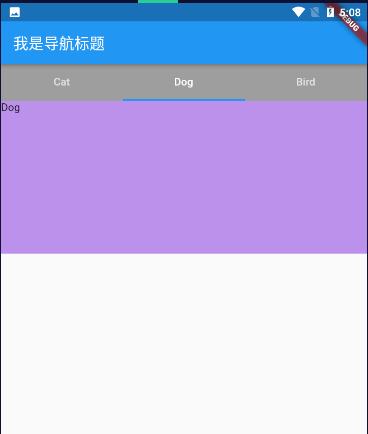
bandicam 2020-11-23 17-03-58-063.mp4
DefaultTabController 控制
import "package:flutter/material.dart";import "package:app1/utils/Base.dart";class MyHomePage extends StatelessWidget {@overrideWidget build(BuildContext context) {return DefaultTabController(length: 3,child: Column(children: [Container(color: Colors.grey,child: TabBar(tabs: [Tab(text: 'Cat'),Tab(text: 'Dog'),Tab(text: 'Bird'),],),),Container(height: 200.0,child: TabBarView(children: [Container(color: Colors.blue, child: Text('Cat')),Container(color: Colors.red, child: Text('Dog')),Container(color: Colors.green, child: Text('Bird')),],),),],),);}}
TabController 控制
import "package:flutter/material.dart";class TestPage extends StatefulWidget {@override_TestPageState createState() => _TestPageState();}class _TestPageState extends State<TestPage> with SingleTickerProviderStateMixin {TabController _tabController;@overridevoid initState() {// TODO: implement initStatesuper.initState();_tabController = new TabController(length: 3, vsync: this);// 监听tab切换_tabController.addListener(() {print(_tabController.index);});}@overrideWidget build(BuildContext context) {return Scaffold(appBar: AppBar(title: Text('flutter demo'),bottom: TabBar(controller: _tabController,tabs: [Tab(text: 'Cat'),Tab(text: 'Dog'),Tab(text: 'Bird'),],),),body: Container(height: 200.0,child: TabBarView(controller: _tabController,children: [Container(color: Colors.blue, child: Text('Cat')),Container(color: Colors.red, child: Text('Dog')),Container(color: Colors.green, child: Text('Bird')),],),),);}}

若有收获,就点个赞吧
0 人点赞


