弹性布局允许子组件按照一定比例来分配父容器空间。弹性布局的概念在其它UI系统中也都存在,如H5中的弹性盒子布局,Android中的FlexboxLayout等。Flutter中的弹性布局主要通过Flex和Expanded来配合实现。
Flex
Flex组件可以沿着水平或垂直方向排列子组件,如果你知道主轴方向,使用Row或Column会方便一些,因为Row和Column都继承自Flex,参数基本相同,所以能使用Flex的地方基本上都可以使用Row或Column。Flex本身功能是很强大的,它也可以和Expanded组件配合实现弹性布局。定义如下:
Flex({Key key,@required this.direction, //弹性布局的方向, Row默认为水平方向,Column默认为垂直方向this.mainAxisAlignment = MainAxisAlignment.start,this.mainAxisSize = MainAxisSize.max,this.crossAxisAlignment = CrossAxisAlignment.center,this.textDirection,this.verticalDirection = VerticalDirection.down,this.textBaseline = TextBaseline.alphabetic,this.clipBehavior = Clip.hardEdge,List<Widget> children = const <Widget>[],})
Flex继承自MultiChildRenderObjectWidget,对应的RenderObject为RenderFlex,RenderFlex中实现了其布局算法。
Flex(direction: Axis.horizontal, //horizontal verticalmainAxisAlignment: MainAxisAlignment.center,children: [Text('你'),Text('hello flutter'),],),//等同于Row(mainAxisAlignment: MainAxisAlignment.center,children: [Text('你'),Text('hello flutter'),],),
权重组件
- Spacer 是通过 Expanded 实现的,Expanded继承自Flexible。
- 填满剩余空间直接使用Expanded更方便。
- Spacer 用于撑开 Row、Column、Flex 的子组件的空隙。
Flexible
Flexible 组件可以控制 Row、Column、Flex 的子控件占满父组件。定义:
const Flexible({Key key,this.flex = 1,this.fit = FlexFit.loose,@required Widget child,}) : super(key: key, child: child);
示例1:Row 中有3个子组件,两边的宽是100,中间的占满剩余的空间

Row(children: [Container(width: 100, height: 50, color: Colors.blue),Flexible(child: Container(height: 50, color: Colors.red)),Container(width: 100, height: 50, color: Colors.blue),],)
示例2:Row中有3个子组件,第一个占1/6,第二个占2/6,第三个占3/6
子组件占比 = 当前子控件 flex / 所有子组件 flex 之和。

Row(children: [Flexible(flex: 1, child: Container(height: 50, color: Colors.blue)),Flexible(flex: 2, child: Container(height: 50, color: Colors.red)),Flexible(flex: 3, child: Container(height: 50, color: Colors.yellow)),],),
Flexible中fit属性 表示填满剩余空间的方式
- tight:必须(强制)填满剩余空间。
- loose:尽可能大的填满剩余空间,但是可以不填满。
loose 详解
下面代码是在“示例1代码”的基础上:
给中间的红色Container添加了Text子控件,此时红色Container就不在充满空间;
再给Container添加对齐方式,此时又填满剩余空间。
是否还记得 Container 组件的大小是如何调整的吗? Container 没设置child时,默认填满父组件; Container 设置了child,默认是适配子控件大小的,即其宽高由子元素决定。 Container 设置了child,又设置了对齐方式,默认填满父组件。
因此是否填满剩余空间取决于子组件是否需要填满父组件。
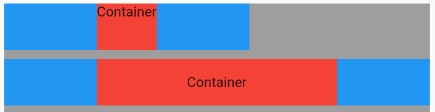
Column(children: [Row(children: [Container(width: 100, height: 50, color: Colors.blue),Flexible(child: Container(height: 50, color: Colors.red, child: Text('Container'))),Container(width: 100, height: 50, color: Colors.blue),],),SizedBox(height: 10),Row(children: [Container(width: 100, height: 50, color: Colors.blue),Flexible(child: Container(height: 50,color: Colors.red,alignment: Alignment.center,child: Text('Container'),),),Container(width: 100, height: 50, color: Colors.blue),],),],),
Expanded
Expanded 继承字 Flexible,fit 参数固定为 FlexFit.tight,也就是说 Expanded 必须(强制)填满剩余空间。
可以按比例“扩伸” Row、Column和Flex子组件所占用的空间。
class Expanded extends Flexible {/// Creates a widget that expands a child of a [Row], [Column], or [Flex]/// so that the child fills the available space along the flex widget's/// main axis.const Expanded({Key key,int flex = 1,@required Widget child,}) : super(key: key, flex: flex, fit: FlexFit.tight, child: child);}
flex参数为弹性系数,如果为0或null,则child是没有弹性的,即不会被扩伸占用的空间。如果大于0,所有的Expanded按照其flex的比例来分割主轴的全部空闲空间。
示例: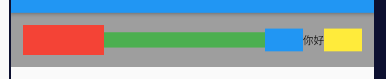
Container(padding: EdgeInsets.all(16),color: Colors.grey,child: Row(children: [// 占空闲空间的 1/3Expanded(flex: 1, //主轴为水平反向,设置了flex大于0,则width无效child: Container(height: 40, color: Colors.red),),// 占空闲空间的 2/3Expanded(flex: 2,child: Container(height: 20, color: Colors.green),),// 固定空间Container(width: 50, height: 30, color: Colors.blue),Text('你好'),Expanded(flex: 0,child: Container(width: 50, height: 30, color: Colors.yellow),),],),);
Spacer
Spacer 的功能是占用指定比例的空间,其本质也是 Expanded 的实现的,和Expanded的区别是:Expanded 可以设置子控件,而 Spacer 的子控件尺寸是0,因此Spacer适用于撑开 Row、Column、Flex 的子控件的空隙。源码:
class Spacer extends StatelessWidget {final int flex;const Spacer({Key key, this.flex = 1}): assert(flex != null),assert(flex > 0),super(key: key);@overrideWidget build(BuildContext context) {return Expanded(flex: flex,child: const SizedBox.shrink(),);}}
示例: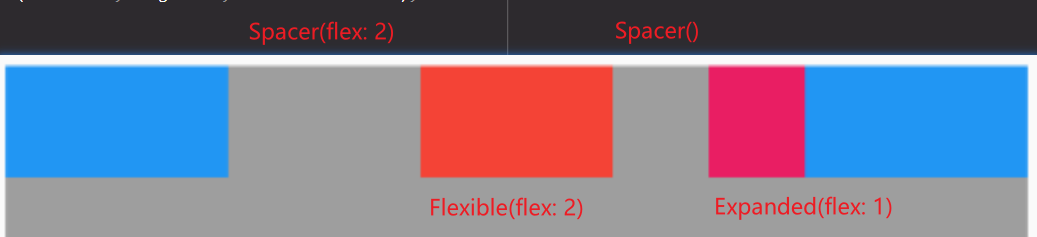
Row(children: [Container(width: 100, height: 50, color: Colors.blue),Spacer(flex: 2),Flexible(flex: 2, child: Container(height: 50, color: Colors.red)),Spacer(),Expanded(flex: 1, child: Container(height: 50, color: Colors.pink)),Container(width: 100, height: 50, color: Colors.blue),],),

若有收获,就点个赞吧
0 人点赞


