https://api.flutter.dev/flutter/material/MaterialApp-class.html
https://api.flutter.dev/flutter/material/ThemeData-class.html
MaterialApp 是一个方便的 Widget,它封装了应用程序实现 Material Design 所需要的一些 Widget。一般作为顶层 Widget 使用。
定义
MaterialApp({Key key,this.navigatorKey,this.home, //App默认显示的页面this.routes = const <String, WidgetBuilder>{},this.initialRoute,this.onGenerateRoute,this.onGenerateInitialRoutes,this.onUnknownRoute,this.navigatorObservers = const <NavigatorObserver>[],this.builder,this.title = '',this.onGenerateTitle,this.color,this.theme,this.darkTheme,this.highContrastTheme,this.highContrastDarkTheme,this.themeMode = ThemeMode.system,this.locale,this.localizationsDelegates,this.localeListResolutionCallback,this.localeResolutionCallback,this.supportedLocales = const <Locale>[Locale('en', 'US')],this.debugShowMaterialGrid = false, //打开网格调试this.showPerformanceOverlay = false, //打开性能检测this.checkerboardRasterCacheImages = false,this.checkerboardOffscreenLayers = false,this.showSemanticsDebugger = false, //打开语义化调试this.debugShowCheckedModeBanner = true, //打开右上角debug图标this.shortcuts,this.actions,})
常用参数
home
title
应用程序的描述,在Android上,在任务管理器的应用程序快照上面显示,在IOS上忽略此属性,IOS上任务管理器应用程序快照上面显示的是Info.plist文件中的CFBundleDisplayName。如果想根据区域显示不同的描述使用onGenerateTitle,用法如下:
MaterialApp(title: 'APP 标题',onGenerateTitle: (context) {var local = Localizations.localeOf(context);if (local.languageCode == 'zh') {return 'APP 标题';}return 'App title';},...)
routes、initialRoute、onGenerateRoute、onUnknownRoute
routes、initialRoute、onGenerateRoute、onUnknownRoute是和路由相关的4个属性,路由简单的理解就是页面,路由的管理通常是指页面的管理,比如跳转、返回等。
MaterialApp按照如下的规则匹配路由:
- 路由为
/,home不为null则使用home。 - 使用
routes指定的路由。 - 使用
onGenerateRoute生成的路由,处理除home和routes以外的路由。 - 如果上面都不匹配则调用
onUnknownRoute。
路由加载规则:
如果initialRoute 设置为 /,那么加载 HomePage 页面;
如果initialRoute设置为 /search,在routes中存在,所以加载routes中指定的路由,即SearchPage页面;
如果initialRoute设置为 /bag,此时routes中并不存在名称为 /bag 路由,调用onGenerateRoute;
如果onGenerateRoute返回路由页面,则加载此页面;
如果返回的是null,且 home参数 不为null,则加载home参数指定的页面;
如果home为null,则回调onUnknownRoute。
MaterialApp(routes: {'/': (context) => HomePage(),'/search': (context) => SearchPage(),'/login': (context) => LoginPage(),},initialRoute: '/',home: Scaffold(appBar: AppBar(title: Text('标题')),),onGenerateRoute: (RouteSettings routeSettings){if(routeSettings.name == 'search'){return MaterialPageRoute(builder: (context){return SearchPage();});}},onUnknownRoute: (RouteSettings routeSettings){return MaterialPageRoute(builder: (context){return ErrorPage();});},...)
theme、darkTheme、themeMode
theme、darkTheme、themeMode是关于主题的参数,设置整个App的主题,包括颜色、字体、形状等。
示例:修改主题颜色为红色用法如下:

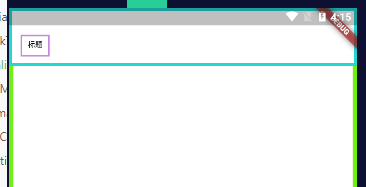
MaterialApp(theme: ThemeData(primaryColor: Colors.red),darkTheme: ThemeData(primaryColor: Colors.red),themeMode: ThemeMode.dark,home: Scaffold(appBar: AppBar(title: Text('标题')),),)
locale、localizationsDelegates等
locale、localizationsDelegates、localeListResolutionCallback、localeResolutionCallback、supportedLocales是区域设置和国际化相关的参数,如果App支持多国语言,那么就需要设置这些参数。
默认情况下,Flutter仅支持美国英语,如果想要添加其他语言支持则需要指定其他MaterialApp属性,并引入flutter_localizations 包,到2019年4月,flutter_localizations包已经支持52种语言,如果你想让你的应用在iOS上顺利运行,那么你还必须添加“flutter_cupertino_localizations”包。
在pubspec.yaml文件中添加包依赖:
dependencies:flutter:sdk: flutterflutter_localizations:sdk: flutterflutter_cupertino_localizations: ^1.0.1
设置如下:
MaterialApp(localizationsDelegates: [// ... app-specific localization delegate[s] hereGlobalMaterialLocalizations.delegate, //为Material Components库提供了本地化的字符串和其他值。GlobalWidgetsLocalizations.delegate, //定义widget默认的文本方向,从左到右或从右到左。GlobalCupertinoLocalizations.delegate, //为Cupertino(ios风格)库提供了本地化的字符串和其他值。],// 指定了当前App支持的语言。supportedLocales: [// ... other locales the app supportsconst Locale('zh', 'CH'), // Chinaconst Locale('en', 'US'), // English],...)
localeResolutionCallback和localeListResolutionCallback都是对语言变化的监听,比如切换系统语言等,localeResolutionCallback和localeListResolutionCallback的区别是localeResolutionCallback返回的第一个参数是当前语言的Locale,而localeListResolutionCallback返回当前手机支持的语言集合,在早期的版本手机没有支持语言的集合,只显示当前语言,在设置->语言和地区的设置选项效果如下: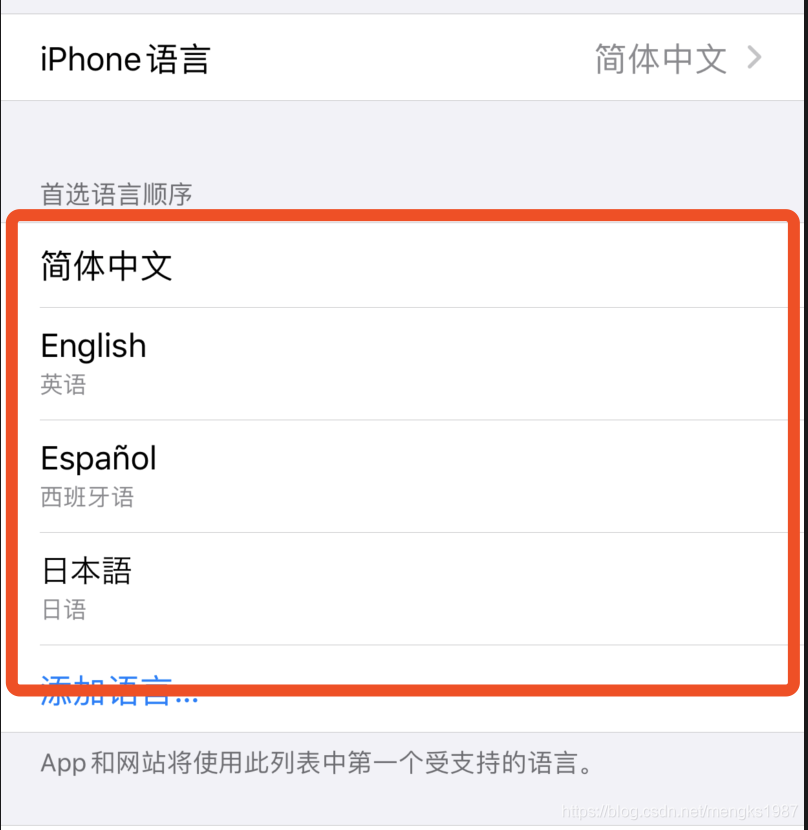
在早期是没有红色区域的。
因此我们只需使用localeListResolutionCallback即可,通过用户手机支持的语言和当前App支持的语言返回一个语言选项。
通常情况下,如果用户的语言正好是App支持的语言,那么直接返回此语言,如果不支持,则返回一个默认的语言,用法如下:
MaterialApp(localeListResolutionCallback:(List<Locale> locales, Iterable<Locale> supportedLocales) {if (locales.contains('zh')) {return Locale('zh');}return Locale('en');},...)
在App中也可以通过如下方法获取区域设置:
Locale myLocale = Localizations.localeOf(context);
debugShowMaterialGrid 打开网格调试
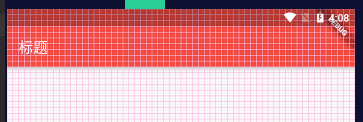
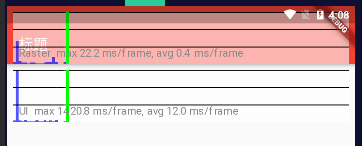
showPerformanceOverlay 打开性能检测
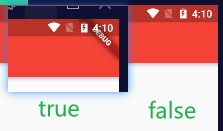
debugShowCheckedModeBanner 打开debug图标
showSemanticsDebugger 打开语义化调试

若有收获,就点个赞吧
0 人点赞


