一、什么是查询
查询产生一个虚拟表
看到的是表形式显示的结果,但结果并不真正存储
每次执行查询只是从数据表中提取数据,并按照表的形式显示出来
二、查询机制简介

三、查询语法
select 列名,...from 表名[where 查询条件表达式][order by 排序的列名[asc或desc]] -- asc是升序,是默认值,desc是降序[limit 行数] -- 限制行数
查询所有列
select * from 表名 -- 查询某个表的所有数据
查询部分行或者列(有条件的查询)
-- 查询北京地区的学生姓名和年级select student_name ,grade_idfrom studentswhere address = '北京'-- 查询性别是f的学生姓名和地址select student_name,addressfrom studentswhere sex='f'-- 查询一年级,电话是123的学生姓名和地址select student_name,addressfrom studentswhere grade_id=1 and phone='123'-- 查询成绩在60到90 之间的学生编号和成绩select student_id,scorefrom scorewhere score >=60 and score <= 90-- 查询成绩大于等于90或者成绩小于等于50的学生编号和成绩select student_id,scorefrom scorewhere score >=90 or score <= 50-- 查询邮箱是空的学生姓名select student_namefrom studentswhere email is null
单列排序
-- 查询学号和学生成绩,按照成绩升序排列select student_id,scorefrom scoreorder by score-- 查询综合成绩大于60分的学号和综合成绩,按照成绩升序select student_id as 学生id,(score*0.9+5) as 综合成绩from scorewhere (score*0.9+5)>60order by score;-- 查询学号和学生成绩,按照成绩降序select student_id,scorefrom scoreorder by score desc;
多列排序
-- 查询学生编号,科目编号和考试成绩,先按照科目编号升序,再按照成绩升序select student_id as 学生id, subject_id as 课程id, score as 成绩from scorewhere score > 60order by subject_id, score;-- 查询学生编号,科目编号和考试成绩,先按照科目编号降序,再按照成绩升序select student_id as 学生id, subject_id as 课程id, score as 成绩from scorewhere score > 60order by subject_id desc, score;
限制行数
-- 查询性别是m的前五个学生的姓名和地址select student_name, addressfrom studentswhere sex ='m'limit 5;
列别名
语法:select 列名 [as] 别名 from 表名
-- 查询地址不是河南新乡的学生编号,学生姓名,学生地址select student_no as 学生编号,student_name 学生姓名,address as 学生地址, '清美教育' as 标记from studentswhere address <> '河南新乡';-- 查询员工姓名,firstname是名,lastname是姓select concat(firstname , lastname) as 姓名from employees
注意:
- 可以是字段
- 可以是常量
- 可以是表达式
四、函数
常用的几类函数
- 字符串函数
- 用于控制返回给用户的字符串
- 日期函数
- 用于操作日期值
- 数学函数
- 用于对数值进行代数运算
- 系统函数
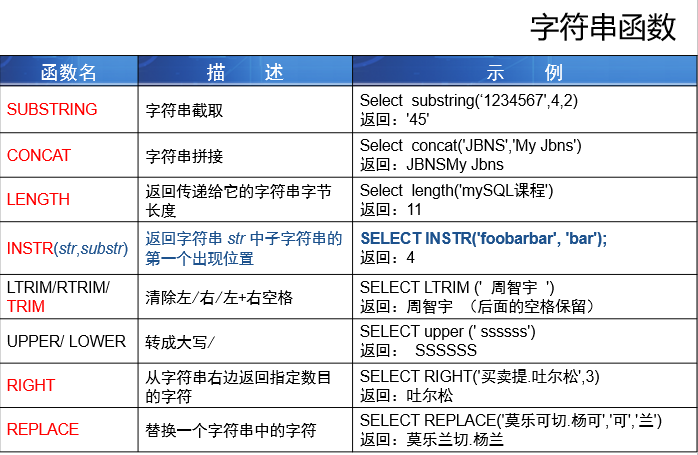
日期函数

datediff(日期1,日期2): 日期1减去日期2 得到的天数
得到日期一部分的函数
日期部分(年月日):DATE(expr)
时间部分(时分秒):TIME(expr)
年:YEAR(expr)
月:MONTH(expr)
日:DAY(expr)
小时:HOUR(expr)
分钟: MINUTE(expr)
秒:SECOND(expr)
说明:expr是日期或者时间表达式
数学函数
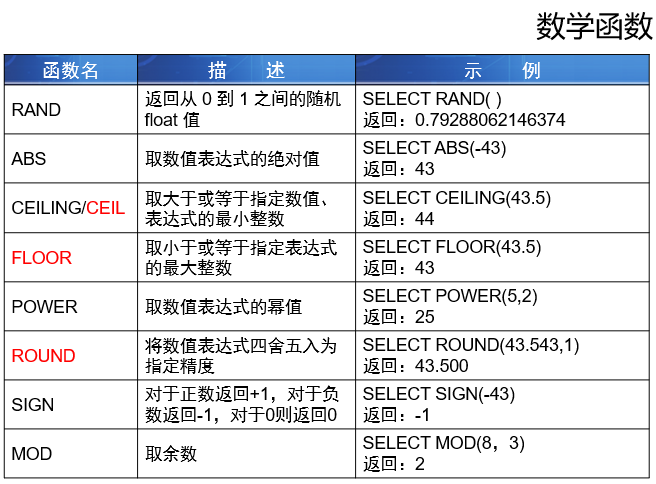
round 函数 小数位 不写,默认是0
系统函数

convert函数或者cast 函数中的type可以写 BINARY[(N)] 二进制字符串 CHAR[(N)] 字符 DATE 日期 DATETIME 日期时间 DECIMAL 数 SIGNED [INTEGER] #数 ,有interger代表整数 TIME 时间 UNSIGNED [INTEGER] 非负数
五、扩展
-- 使用union 把两个查询结果拼成一个结果select concat(au_lname, '.' , au_fname) as empfrom authors unionselect concat(fname , '.' , lname) as empfrom employeeorder by emp desc

若有收获,就点个赞吧
0 人点赞


