一、模糊查询
模糊查询提取的数据不一定是确切的,查询者对查询条件也是模糊的、大概的、不特别明确的
模糊查询包括:like,between..and ,in 三种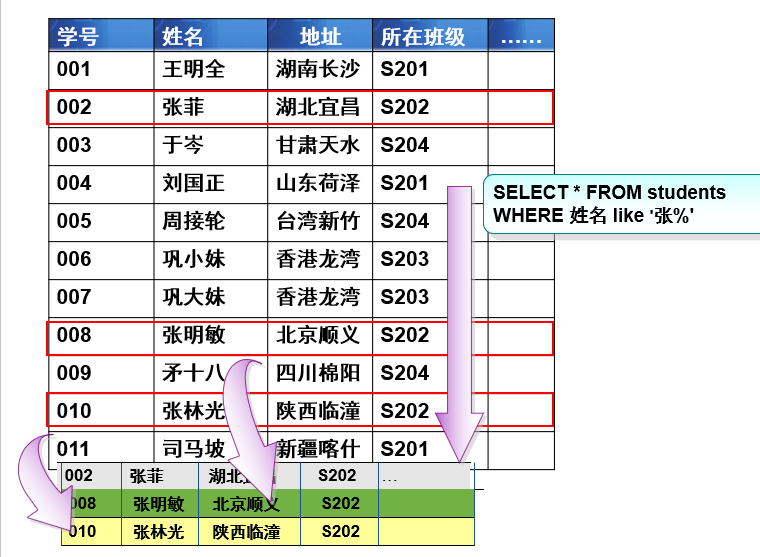
like
like 是像的意思,和通配符一起使用,只和字符数据一起使用
通配符:是一类字符,代替一个或多个真正的字符 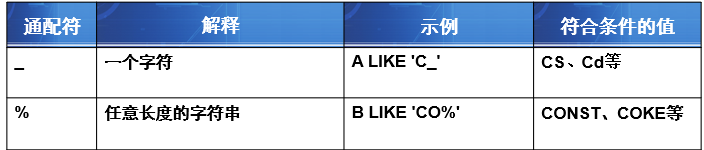
语法select * from 表名 where 列名 like '值通配符'
示例:
-- 查询一年级姓张的人(名字以张开头)select *from studentwhere name like '张%' and grade_id=1-- 查询姓张,名只有一个字的男学生(名字以张开头)select *from studentwhere name like '张_' and sex='男'-- 查询名字包含java的课程名称和课时select subject_name,class_hourfrom subjectwhere subject_name like '%java%'-- 查询邮箱是QQ邮箱的学生信息select *from studentwhere email like '%@qq.com'
between
between用于 查询某一列中内容在特定范围内的记录,包括两边的值
语法select * from 表名 where 列名 between 小的值 and 大的值
等同于:select * from 表名 where 列名 >= 小的值 and 列名 <= 大的值
示例:
-- 查询考试成绩在60到90之间的成绩信息select *from SCOREwhere SCORE between 60 and 90-- 查询考试时间在'2009-1-1'到'2009-1-15'的成绩信息select *from SCOREwhere exam_date between '2009-1-1' and '2009-1-15'-- 查询科目编号2-5之间的科目名称和学时,并按照学时升序select subject_name,class_hourfrom subjectwhere subject_id between 2 and 5order by class_hour
in
in 查询某一列中内容与所列出的内容列表匹配的记录
语法select * from 表名 where 列名 in (值1,值2...)
select * from 表名 where 列名=值1 or 列名=值2 …
示例:
-- 查询地址是北京,广州,上海的学生姓名和地址select student_name as 学生姓名,address as 地址from studentswhere address in ('北京','广州','上海')-- 查询科目编号是1,3,5 的科目信息select *from subjectwhere subject_id in (1,3,5)
二、聚合函数
对一组值进行计算,并返回计算后的值 ,具有统计数据的作用
聚合函数共五个:
- sum(列名) 求和
- avg(列名) 平均值
- max(列名) 最大值
- min(列名) 最小值
- count(*或者常量值或者列名) 计数
语法select 聚合函数(列名) from 表名
示例:
-- 查询学号是23的学生的总分select sum(score) as 学号为23的学生总分from scorewhere student_id =23-- 查询科目1的及格平均分select avg(score) as 及格平均成绩from scorewhere score >=60 and subject_id=1-- 查询2009年10月1日考试的最高分,最低分,平均分select max(score) 最高分,min(score) 最低分 ,avg(score) 平均分from scorewhere exam_date='2009-10-1'-- 查询三年级的人数select count(*) from student where grade_id=3
注意: 查询结果有聚合函数后,不能出现其他的列,除非有分组
三、分组查询
单列分组
应用场合:当出现”每” “各” 字时使用分组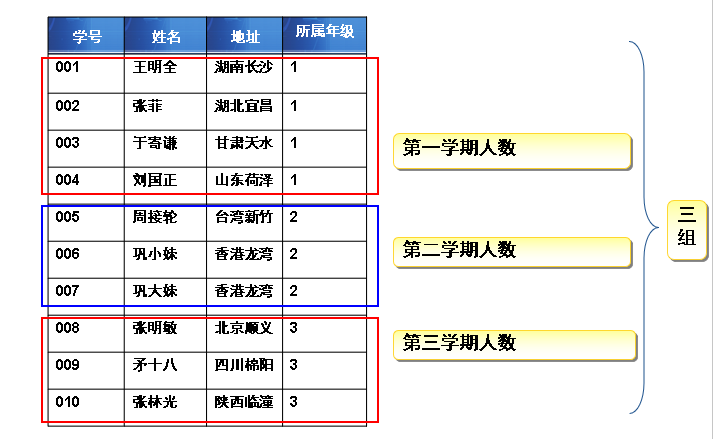
语法
select 聚合函数(列名),用来分组的列名 from 表名[where 条件表达式 ]group by 列名
注意: select后边只能写聚合函数和用来分组的列名
示例:
-- 每年级的学生人数各是多少?select count(*) as 人数, grade_id as 年级from studentsgroup by grade_id-- 查询每门课程的平均分select courseid, avg(score) as 课程平均成绩from scoregroup by courseid-- 查询每门课程的平均分,并且按照分数由低到高的顺序排列显示select subject_id, avg(score) as 课程平均成绩from scoregroup by subject_idorder by avg(score)
多列分组
group by 后边可以写多个列名,列名之间逗号间隔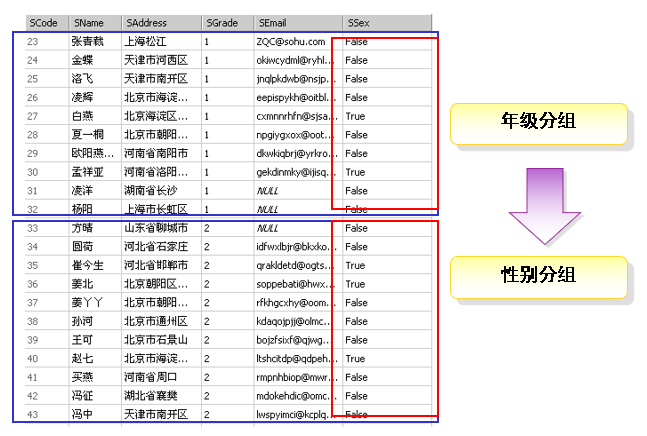
示例:
-- 统计每学期男女同学的人数select count(*) as 人数,grade_id as 年级,sex as 性别from studentsgroup by grade_id,sexorder by grade_id
分组筛选
语法
select 聚合函数(列名),用来分组的列名from 表名[where 条件表达式 ]group by 列名having 聚合函数(列名) 运算符 值
示例:
-- 获得总人数超过15人的年级select count(*) as 人数,grade_id as 年级from studentsgroup by grade_idhaving count(*)>15
WHERE与HAVING对比
- WHERE子句:用来筛选 FROM 子句中指定的操作所产生的行
- GROUP BY子句:用来分组 WHERE 子句的输出
- HAVING子句:用来从分组的结果中筛选行

示例:
-- 查询有多个员工的工资不低于2000 的部门编号select 部门编号, count(*)from 员工信息表where 工资 >= 2000group by 部门编号having count(*) > 1
四、联接查询
什么时候使用联接查询?
当查询结果或者查询条件来自多个表时使用联接查询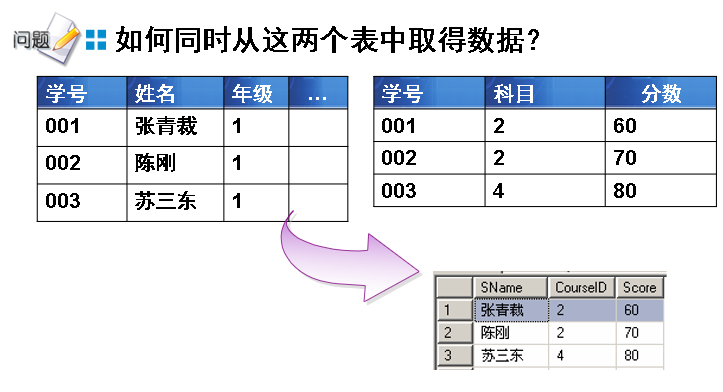
常用的联接查询
- 内联接(INNER JOIN)
- 外联接
- 左外联接 (LEFT JOIN)
- 右外联接 (RIGHT JOIN)
内联接
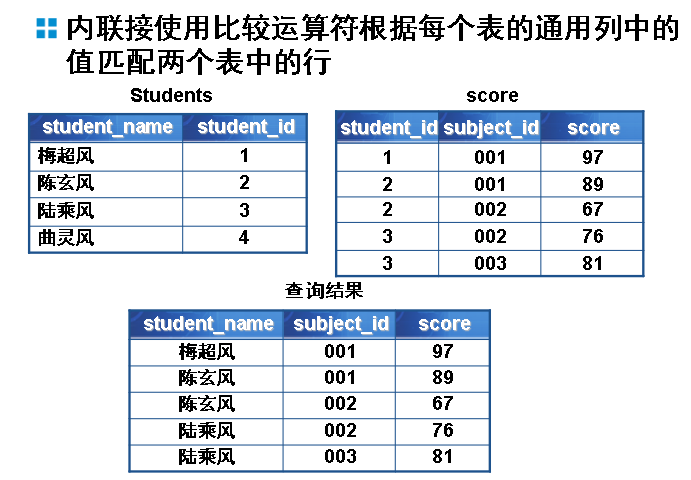
使用通用列去匹配多个表的数据,匹配上的显示,没有匹配方向
通用列:同时出现在多个表中的列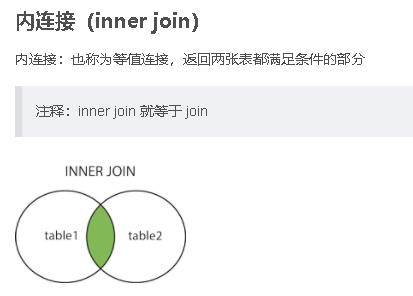
语法1
示例:select ……from 表1inner join 表2 on 表1.列=表2.列[inner join 表3 on 表1.列=表3.列 ...]
语法2-- 查询学生名字,科目编号,考试成绩select s.student_name,c.subject_id,c.scorefrom score as cinner join students as son c.student_id = s.student_id
示例:select ……from 表1,表2 [,表3 ..]where 表1.列=表2.列 [and 表1.列=表3.列 ... ]
三表联接查询示例:-- 查询学生名字,科目编号,考试成绩select students.student_name, score.subject_id, score.scorefrom students,scorewhere students.student_id = score.student_id
-- 查询姓名,课程名称,成绩 方式一selects.student_name as 姓名, cs.subject_name as 课程, c.score as 成绩from students as sinner join score as c on s.student_id = c.student_idinner join subject as cs on cs.subject_id = c.subject_id-- 查询姓名,课程名称,成绩 方式二select s.student_name as 姓名, cs.subject_name as 课程, c.score as 成绩from students as s ,score as c , subject as cswhere (s.student_no = c.student_no) and (cs.subject_id = c.subject_id)
外联接
左外连接
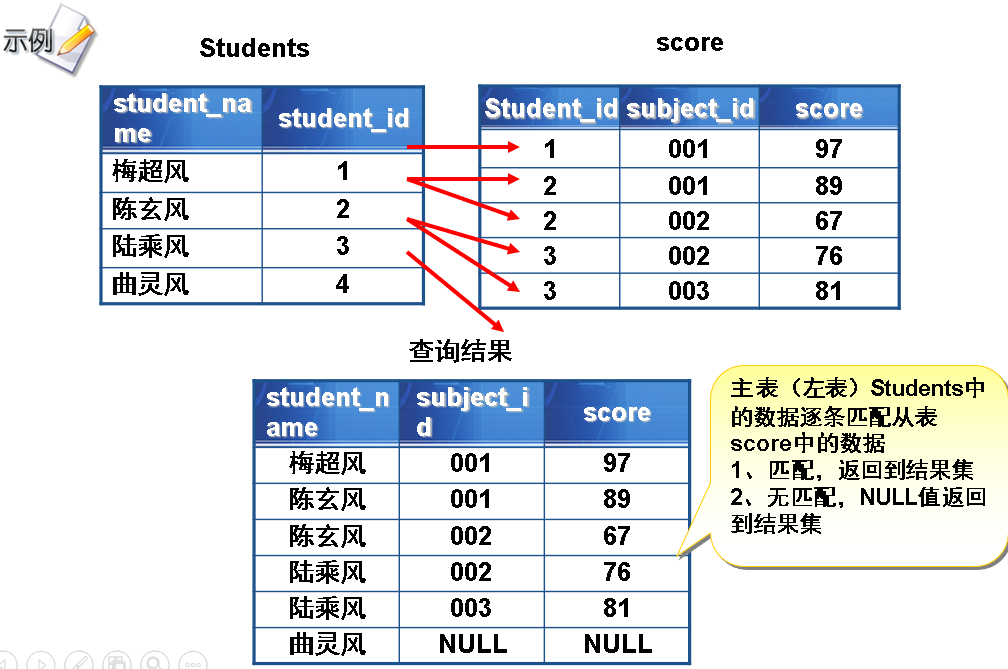
语法
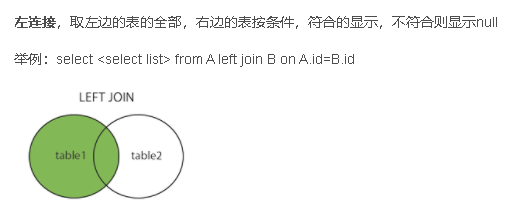
示例:select ……from 左表left join 右表 on 左表.列=右表.列
-- 查询所有学生的考试信息,包括没有参加考试的学生select s.student_name,c.subject_id,c.scorefrom students as sleft join score as con c.student_id = s.student_id
注意:不能改表左右表的顺序
右外连接
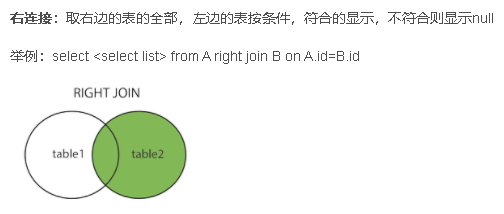
语法
select ……from 左表right join 右表 on 左表.列=右表.列
示例:
-- 查询所有出版社出版的图书select 图书编号,图书名称,出版社名称from 图书表right outer join 出版社表on 图书表.出版社编号 = 出版社表.出版社编号
查询语法总结
select [distinct] 列名,... --distinct去重from 表1[inner|left|right join 表2 on 表1.列名=表2.列名] --联接查询[where 条件表达式] --查询条件,多个条件间逻辑运算符间隔[group by 列名] --分组,多列分组逗号隔开[having 条件表达式] --对分组后的结果进行筛选[order by 列名 [asc|desc]] --排序,asc 升序(默认值),desc 降序,多列排序逗号隔开[limit 条数] --限制行数
总结
1.模糊查询有哪些?【重要】
- like :where 列名 like ‘值通配符’通配符:%代表任意长度字符,_代表一个字符
- between..and: where 列名 between 小的值 and 大的值
-
2.SQL中连接接查询的都有那些?并写出具体的语法格式 【重要】
内联接语法一: select 列名 from 表1 inner join 表2 on 表1.列名=表2.列名
- 内联接语法二: select 列名 from 表1,表2 where 表1.列名=表2.列名
- 左外联接语法: select 列名 from 左表 left join 右表 on 表1.列名=表2.列名
右外联接:用右表匹配左表的数据,主要显示右表的数据,不管是否匹配上,右表的数据都显示
3.聚合函数有哪些?【重要】
SUM()求和
- AVG()平均分
- MAX()最大值
- MIN()最小值
-
4.查询语句的语法
SELECT DISTINCT 列名1 别名,列名2 as 别名…
FROM 表1
[inner|left|right] join 表2 on 表1.列名=表2.列名
[WHERE 条件表达式] #查询条件
[GROUP BY 列名] #分组,多列分组逗号隔开
[HAVING 条件表达式] #对分组后的结果进行筛选
[ORDER BY 列名 [ASC|DESC]] #排序,asc 升序(默认值),desc 降序,多列排序逗号隔开
[LIMIT [开始行号,]条数]; #限制行数5.SQL查询语句中涉及哪些查询,并简述查询语法中各关指令的执行顺序?【重要】
按照执行顺序:基础查询,条件查询,分组查询,排序查询,限制行数查询

若有收获,就点个赞吧
0 人点赞


