Core concepts
- world:environment
- agent:model and dataset
-
Agents
An agent can be a human, a simple bot which repeats back anything that it hears, your perfectly tuned neural network, a dataset being read out, or anything else that might send messages or interact with its environment.
Agents have two primary methods they need to define:def observe(self, observation): # update internal state with observationdef act(self): # produce action based on internal state
observe()takes as input an observation dict, which is usually the result of an action taken by another agent, and updates this agent’s internal state accordingly.act()produces an action from the agent. For a dataset agent, this might increment a counter for examples seen and return the next batch of examples. For a neural net agent, this could be a train step or eval step. Agent
a subclass of a python
dictcontaining the actions of an agent (observable by other agents or the environment)The primary function of the
Messageobject is to ensure that agents do not unintentionally edit the fields within observations and actions. In order to edit the field of aMessageobject, one must callmessage.force_set(key, new_value).Teachers
A Teacher is special type of agent. They implement the
actandobservefunctions as all agents do, but they also keep track of metrics which they return via areportfunction- Datasets and tasks typically implement a subclass of Teacher, providing functions which download the dataset from its source if necessary, read the file into the right format, and return an example with each call to the teacher’s
actfunction. - Teacher(Agent)
- FixedDialogTeacher
- DialogTeacher
- ParlAIDialogTeacher
- ConversationTeacher: The data should be set up so that each dialogue instance (or, episode) occupies one line of valid JSON
- AbstractImageTeacher: Abstract class to allow easier creation of image + dialogue tasks
- ChunkTeacher: Useful for loading large amounts of data. Data is separated into chunks and loaded one chunk at a time. Loads the data off of the main thread
- DialogTeacher
- MultiTaskTeacher: Creates a teacher that is actually a set of teachers each based on a task string – each of these teachers will get called in turn, either randomly or in order. They are all in the same world (they are the same agent switching tasks)
- FixedDialogTeacher
- DataLoader: A worker thread that provides a threadpool for data loading
DialogData: Provides a data structure for accessing textual dialog data. All these are stored in this internal data format which is used by the
DialogTeacherclass.Worlds define the environment in which agents interact with one another. Worlds must implement a
parleymethod. Each call toparleyconducts one turn of interactions typically containing one action per agent.query = teacher.act()student.observe(query)reply = student.act()teacher.observe(reply)
DialogPartnerWorld(World)provides a two-agent turn-based dialog setting.MultiAgentDialogWorld(World)Basic world where each agent gets a turn in a round-robin fashion. Each agent receives as input the actions of all other agents since its last act().- ExecutableWorld: World where messages from agents can be interpreted as actions. Actions result in changes in the environment (are executed). Hence a grounded simulation can be implemented rather than just dialogue between agents.
MultiWorld(World)creates a set of environments (worlds) for the same agent to multitask over, a different environment will be chosen per episode.HogwildWorld(World)is a container that creates another world within itself for every thread, in order to have separate simulated environments for each one. Each world gets its own agents initialized using theshare()parameters from the original agents.BatchWorld(World)is a container for doing minibatch training over a world by collecting batches of N copies of the environment (each with different state).-
Other API
build_data
Utilities for downloading and building data
dict
parsing and building a dictionary from text
metrics
Provides standard metric evaluations for dialog
params
Provide an argument parser and default command line options for using ParlAI
Utilties
Creating a New Task
Building the Data
Creating the Teacher
agents.py
Agent=>Teacher=>FixedDialogTeacher=>DialogTeacher=>ParlAIDialogTeacher ParlAIDialogTeacher- data in the format of ParlAI Dialog
- text only
- to be impl:init()
DialogTeacher- not in ParlAI Dialog format
- to be impl:init(), setup_data()
- This method is a generator that will take in a path to the data and yield a pair of elements for each call. The first element of the pair is a tuple containing the following information:
(query, labels, reward, label_candidates, path_to_image). The second is a boolean flagnew_episode?which indicates if the current query starts a new episode or not.
FixedDialogTeacher- return additional fields apart from the standard ones used in DialogTeacher (text, labels, reward, candidates, an image, and whether the episode is done)
- to be impl:init(), get(), num_examples(), num_episodes()
- The user must also handle data loading and storage on their own, which can be done during intialization
- get():action message
Teacher- do not fit any of the above
- to be impl:init(), observe(), act()
- dynamic task which adjusts its response based on the received input rather than using fixed logs is better suited to this approach
- Quite a bit of functinoality will not be built in, such as a support for hogwild and batching, but metrics will be set up and can be used to track stats like the number of correctly answered examples
Add Task to Task List
add an entry to thetask_list.pyfile inparlai/tasksExecuting the Task
test the basic functionality in a task is to run thedisplay_data.py数据接口小结
一份数据集称为一个task
- Implement
build.pyto download and build any needed data - Implement
agents.py, with at least aDefaultTeacherwhich extendsTeacheror one of its children - Add the task to the the task list
每一条数据通过Message进行包装,在agent和environment之间传递
build.py
完成build方法
- 下载存储
-
agents.py
Text files
ParlAIDialogTeacher(DialogTeacher)- data in the format of ParlAI Dialog
- example:
```
text:Sam went to the kitchen.
Pat gave Sam the milk. Where is the milk? labels:kitchen reward:1 label_candidates:hallway|kitchen|bathroom
text:Sam went to the hallway.
- key:value, seperated by tab- support attr: text(str), labels(list, concat by | in str initially), label_candidates(str, concat by | in str initially), episode_done(bool) and anything(str) you like but just text- `DialogTeacher(FixedDialogTeacher)`- an iterable with each call returning a tuple in the form `((x, y, r, c, i), new_episode?)`- 支持query, label, reward, label candidates, image and anything else (you can put it in str or iter according your format, no limit)- `x` (str) is a query and possibly context- `y` (iter) is an iterable of label(s) for that query- `r` (str) is the str reward for getting that query correct, optional- `c` (iter) is an iterable of label candidates that the student can choose from, optional- `i` (str) is a str path to an image on disk, which will be loaded by the data class at request-time. should always point to the raw image file, optional- `new_episode?` (bool) is a boolean value specifying whether that example is the start of a new episode. If you don't use episodes set this to `True` every time.<a name="sfLJ1"></a>#### Json`ConversationTeacher(DialogTeacher)`- jsonl```json{'possible_conversation_level_info': True,'dialog':[[{'id': 'speaker_1','text': <first utterance>,},{'id': 'speaker_2','text': <second utterance>,},...],...]...}
only support id and text in dialog
Others
ChunkTeacher: 适用于内存不够的情况- from Scratch:适用于non-fixed data等其他情况
可以通过命令行参数指定数据集的扩展选项
- ‘-t babi’ sets up the
DefaultTeacherin ‘parlai/core/tasks/babi/agents.py’. - ‘-t babi:task1k’ sets up the
Task1kTeacherin the babi/agents.py file, which allows you to specify specific settings for certain tasks. For bAbI, this refers to the setting where there are only 1000 unique training examples per task. - ‘-t babi:task1k:1’ provides 1 as a parameter to
Task1kTeacher, which is interpreted by the Task1kTeacher to mean “I want task 1” (as opposed to the 19 other bAbI tasks). - ‘-t babi,squad’ sets up the
DefaultTeacherfor both babi and squad. Any number of tasks can be chained together with commas to load up each one of them. - ‘-t #qa’ specifies the ‘qa’ category, loading up all tasks with that category in the ‘parlai/core/task_list.py’ file.
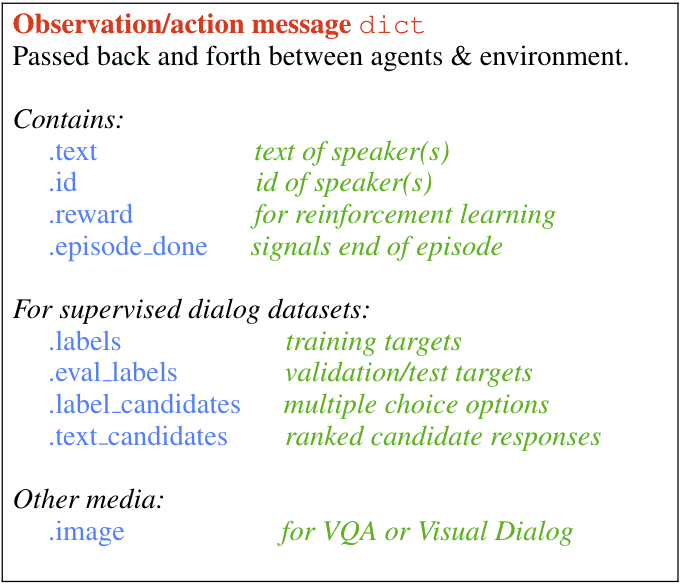
Message
- ‘-t babi’ sets up the
primary medium for information flow (messages between agents and the environment) in ParlAI
- a subclass of a python
dictcontaining the actions of an agent (observable by other agents or the environment) - The primary function of the
Messageobject is to ensure that agents do not unintentionally edit the fields within observations and actions. In order to edit the field of aMessageobject, one must callmessage.force_set(key, new_value).Data Handling, Batching, and Hogwild
basic flow of DialogPartnerWorld, a simple world with two conversing agents
Expanding to batching / hogwild using share()
实现share()方法,提供copy所需要的Agent0 = Agent(opt)...Agent1 = Agent(opt, Agent0.share())Agent2 = Agent(opt, Agent0.share())Agent3 = Agent(opt, Agent0.share())
Hogwild (multiprocessing)
Hogwild is initialized in the following way:
- We set up a starting instance of the world: that is, we use
create_taskto set up a base world with the appropriate agents and tasks. - We pass this world to a
HogwildWorld, which sets up a number of synchronization primitives - We launch
numthreadsthreads, each initialized from ashare()’d version of the world and the agents therein. - Once these threads and their world copies are all launched, we return control back
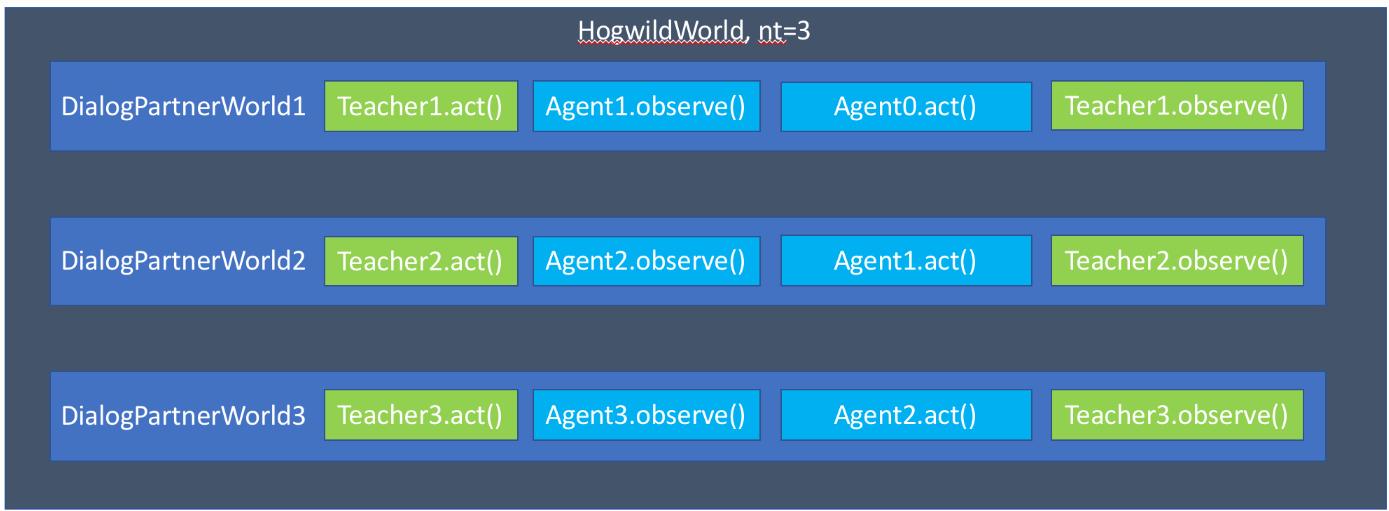
Now that this world is set up, every time we call parley on it, it will release one of its threads to do a parley with its copy of the original base world.
利用CPU的多线程,每个线程对应一个world,ParlAI实现好了同步机制
Batching
Batching is set up in the following way (the first step is the same as Hogwild):
- We set up a starting instance of the world: that is, we use
create_taskto set up a base world with the appropriate agents and tasks. - We pass this world to a
BatchWorld. - We create
batchsizeworlds, each initialized from ashare()’d version of the world and the agents therein.
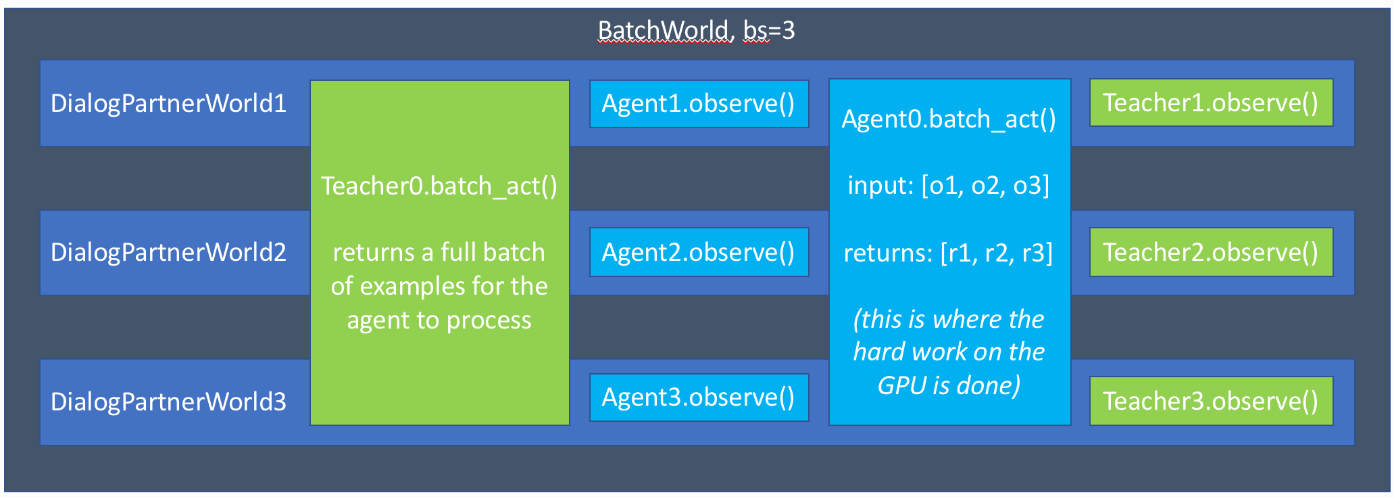
batch利用GPU并行的优势,同时对一个batch执行batch_act()方法,observe()依然是串行

若有收获,就点个赞吧
0 人点赞


