压缩包
一、认识Service
服务在后台默默的运行,是不可见的
二、startService和bindService的生命周期图
1.startService:服务由自身或客户端停止
2.bindService:通过调用unbindService()来解除所有客户端绑定

三、startService与生命周期
1.布局activity_main3.xml文件
<?xml version="1.0" encoding="utf-8"?><LinearLayout xmlns:android="http://schemas.android.com/apk/res/android"xmlns:app="http://schemas.android.com/apk/res-auto"xmlns:tools="http://schemas.android.com/tools"android:layout_width="match_parent"android:layout_height="match_parent"tools:context=".Main3Activity"android:orientation="vertical"><Buttonandroid:layout_width="wrap_content"android:layout_height="wrap_content"android:onClick="startService"android:text="STARTSERVICE"android:textSize="30sp"tools:ignore="OnClick" /><Buttonandroid:layout_width="wrap_content"android:layout_height="wrap_content"android:onClick="stopService"android:text="STOPSERVICE"android:textSize="30sp"tools:ignore="OnClick" /></LinearLayout>
2.MyService服务类文件代码
package com.example.test;import android.app.Service;import android.content.Intent;import android.os.IBinder;import android.util.Log;import androidx.annotation.Nullable;public class MyService extends Service {private final static String TAG=MyService.class.getSimpleName();@Overridepublic void onCreate() {super.onCreate();Log.d(TAG,"onCreate()...");}@Overridepublic void onStart(Intent intent, int startId) {super.onStart(intent, startId);Log.d(TAG,"onStart()...");}@Overridepublic int onStartCommand(Intent intent, int flags, int startId) {Log.d(TAG,"onStartCommand()...");return super.onStartCommand(intent, flags, startId);}@Overridepublic void onDestroy() {Log.d(TAG,"onDestroy()...");super.onDestroy();}@Nullable@Overridepublic IBinder onBind(Intent intent) {Log.d(TAG,"onBind()...");return null;}// @Override// public boolean onUnbind(Intent intent) {// Log.d(TAG,"onUnbind()...");// return super.onUnbind(intent);// }}
3.Main3Activity文件代码
package com.example.test;import androidx.appcompat.app.AppCompatActivity;import android.content.Intent;import android.os.Bundle;import android.view.View;public class Main3Activity extends AppCompatActivity {@Overrideprotected void onCreate(Bundle savedInstanceState) {super.onCreate(savedInstanceState);setContentView(R.layout.activity_main3);}public void startActivity(View view) {Intent intent = new Intent();intent.setClass(Main3Activity.this,MActivity.class);startActivity(intent);}//启动服务public void startService(View view) {startService(new Intent(this,MyService.class));}//停止服务public void stopService(View view) {stopService(new Intent(this,MyService.class));}}
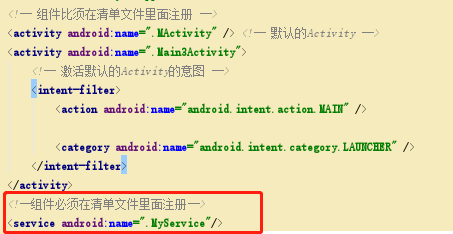
4.清单文件中注册服务类组件权限
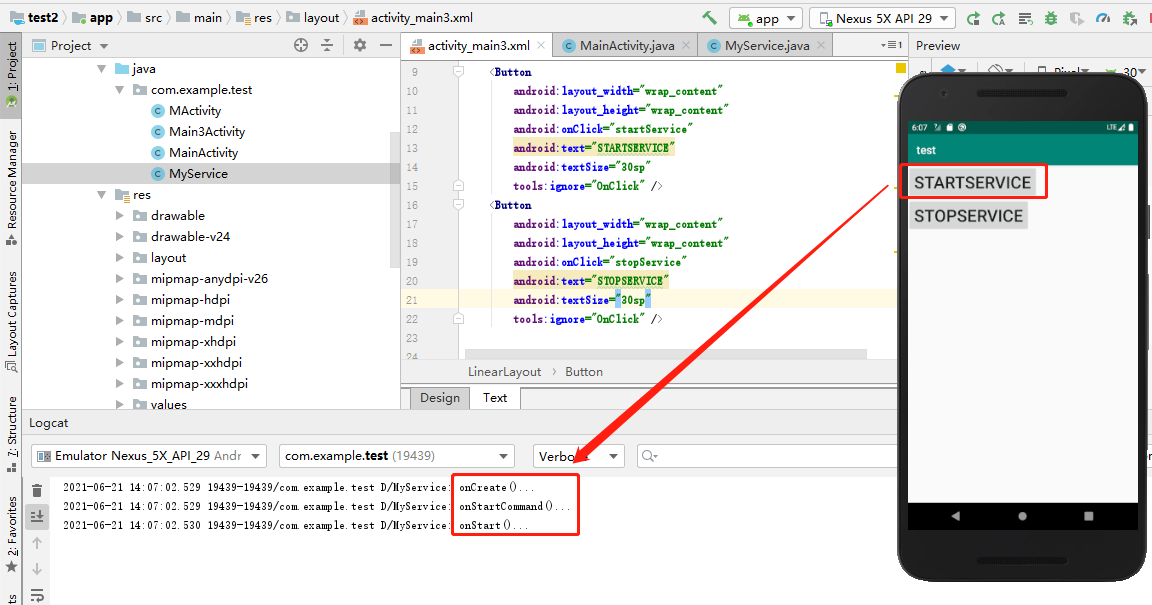
5.执行代码,点击启动服务按钮
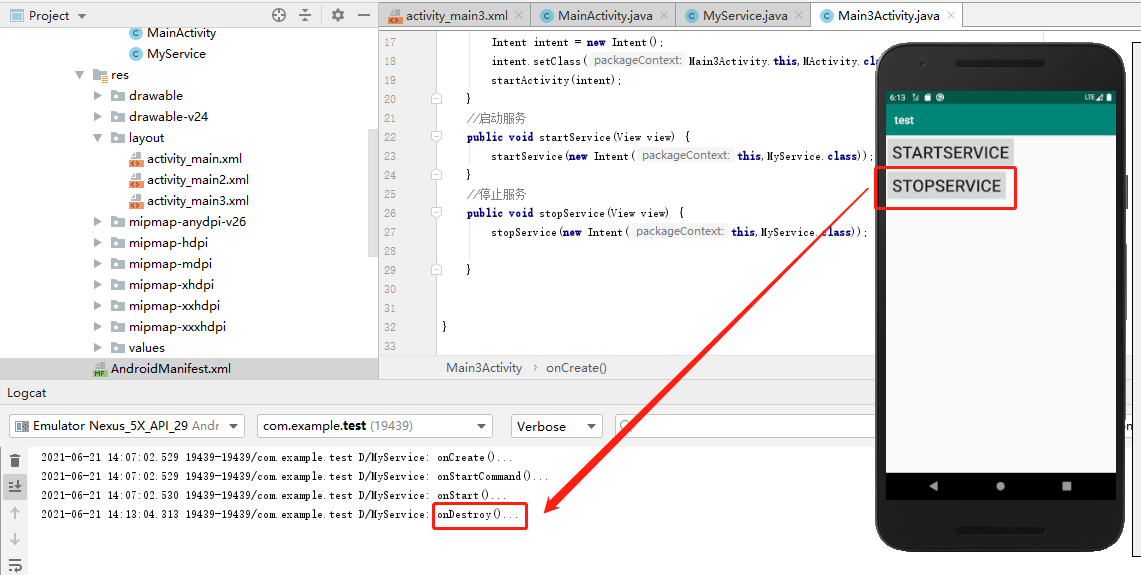
6.点击停止服务按钮
四、bindService与生命周期
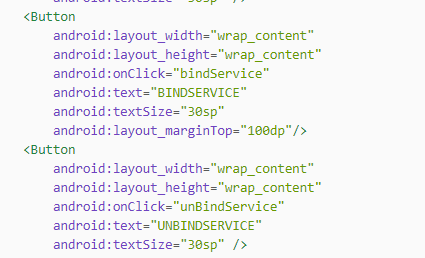
1.bind和unbind按钮的实现
2.构建绑定个解绑的桥梁
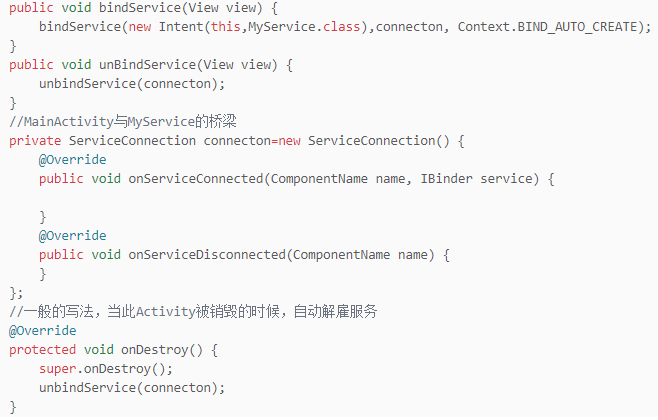
3.布局activity_main3.xml文件
<?xml version="1.0" encoding="utf-8"?><LinearLayout xmlns:android="http://schemas.android.com/apk/res/android"xmlns:app="http://schemas.android.com/apk/res-auto"xmlns:tools="http://schemas.android.com/tools"android:layout_width="match_parent"android:layout_height="match_parent"tools:context=".Main3Activity"android:orientation="vertical"><Buttonandroid:layout_width="wrap_content"android:layout_height="wrap_content"android:onClick="startService"android:text="STARTSERVICE"android:textSize="30sp" /><Buttonandroid:layout_width="wrap_content"android:layout_height="wrap_content"android:onClick="stopService"android:text="STOPSERVICE"android:textSize="30sp" /><Buttonandroid:layout_width="wrap_content"android:layout_height="wrap_content"android:onClick="bindService"android:text="BINDSERVICE"android:textSize="30sp"android:layout_marginTop="100dp"/><Buttonandroid:layout_width="wrap_content"android:layout_height="wrap_content"android:onClick="unBindService"android:text="UNBINDSERVICE"android:textSize="30sp" /></LinearLayout>
4.Main3Activity文件代码
package com.example.test;import androidx.appcompat.app.AppCompatActivity;import android.content.ComponentName;import android.content.Context;import android.content.Intent;import android.content.ServiceConnection;import android.os.Bundle;import android.os.IBinder;import android.view.View;public class Main3Activity extends AppCompatActivity {@Overrideprotected void onCreate(Bundle savedInstanceState) {super.onCreate(savedInstanceState);setContentView(R.layout.activity_main3);}public void startActivity(View view) {Intent intent = new Intent();intent.setClass(Main3Activity.this,MActivity.class);startActivity(intent);}//启动服务public void startService(View view) {startService(new Intent(this,MyService.class));}//停止服务public void stopService(View view) {stopService(new Intent(this,MyService.class));}public void bindService(View view) {bindService(new Intent(this,MyService.class),connecton, Context.BIND_AUTO_CREATE);}public void unBindService(View view) {unbindService(connecton);}//MainActivity与MyService的桥梁private ServiceConnection connecton=new ServiceConnection() {@Overridepublic void onServiceConnected(ComponentName name, IBinder service) {}@Overridepublic void onServiceDisconnected(ComponentName name) {}};//一般的写法,当此Activity被销毁的时候,自动解雇服务@Overrideprotected void onDestroy() {super.onDestroy();unbindService(connecton);}}
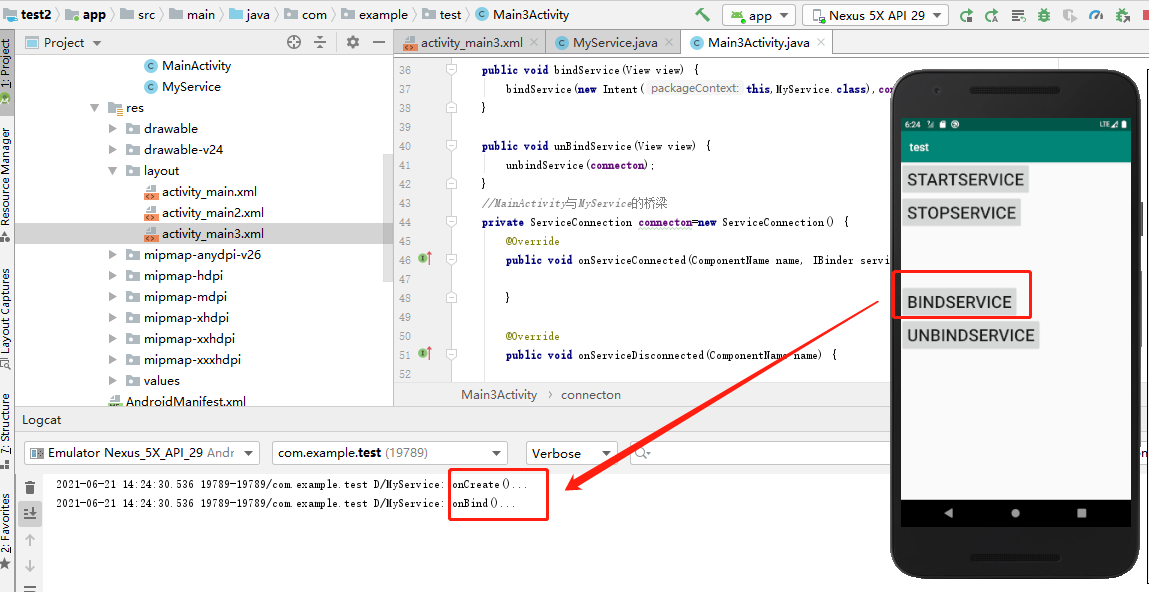
5.绑定之后实现的方法(onCreate()->onBind())
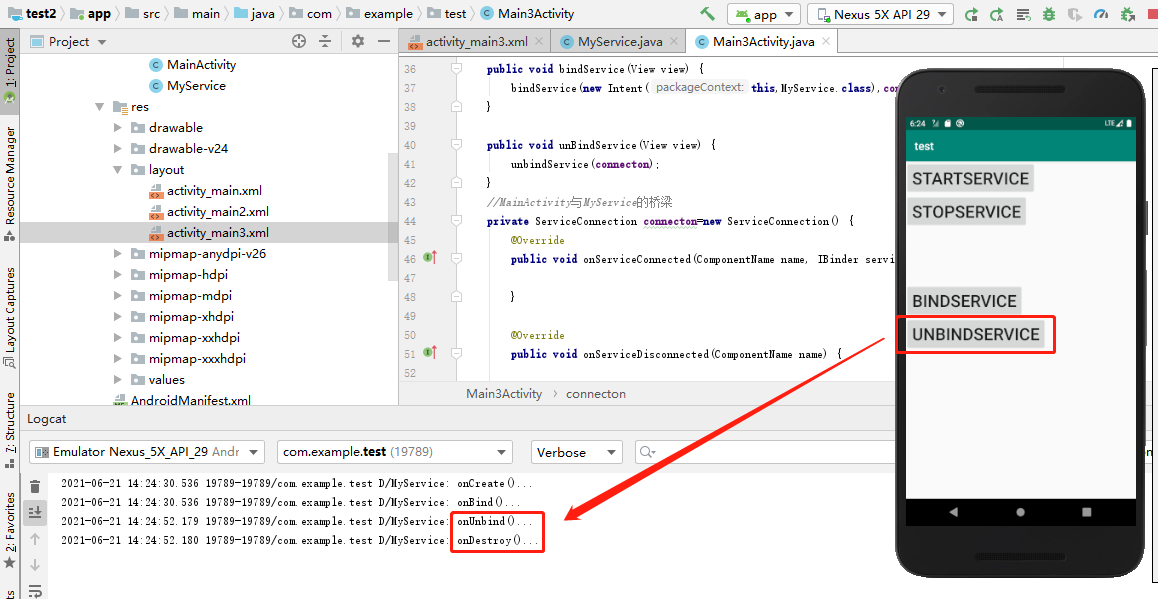
6.解绑之后执行的方法(onUnbind()->onDestroy())
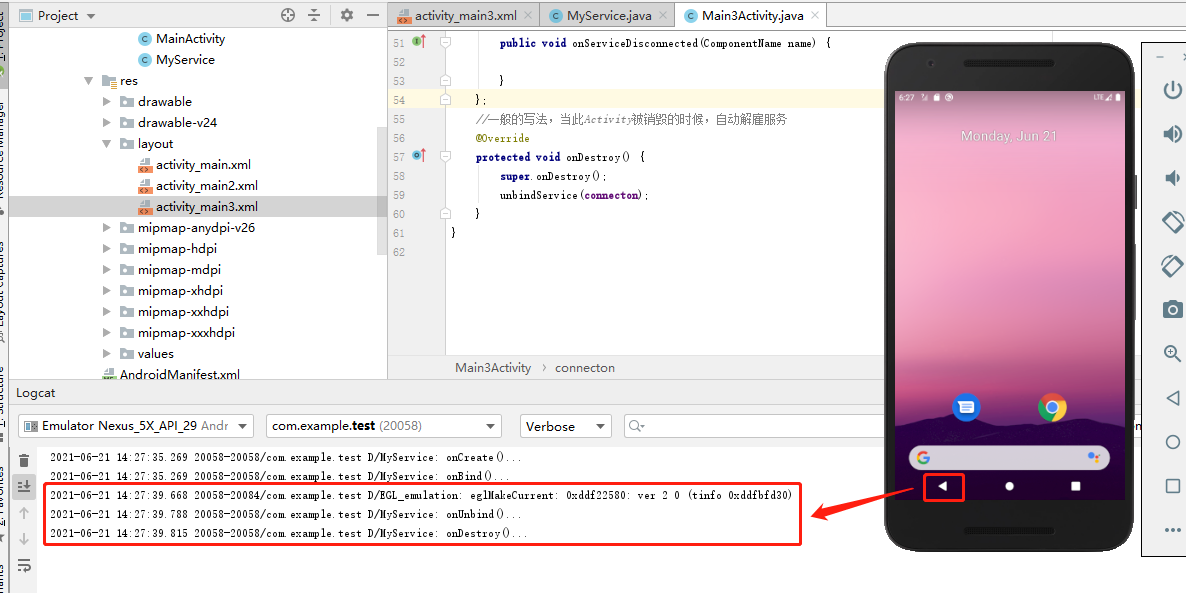
7.返回之后销毁服务(onUnbind()->onDestroy())

若有收获,就点个赞吧
0 人点赞


