一、popupWindow的常用方法
1.setContentView(View contentView): 设置PopupWindow显示的View<br /> 2.showAsDropDown(View anchor): 相对某个控件的位置(正左下方),无偏移<br /> 3.showAsDropDown(View anchor,int xoff,int yoff): 相对某个控件的位置,有偏移<br /> 4.setFocusable(boolean focusable) 设置是否获取焦点<br /> 5.setBackgroundDrawable(Drawable background) 设置背景<br /> 6.dismiss() 关闭弹窗<br /> 7.setAnimationStyle(int animationStyle) 设置加载动画<br /> 8.setTouchable(boolean touchable) 设置触摸使能<br /> 9.setOutsideTouchable(boolen touchable) 设置PopupWindow外面的触摸使能
二、popupWindow弹出窗口的实现
1.布局activity_main.xml代码
<?xml version="1.0" encoding="utf-8"?><LinearLayout xmlns:android="http://schemas.android.com/apk/res/android"xmlns:app="http://schemas.android.com/apk/res-auto"xmlns:tools="http://schemas.android.com/tools"android:layout_width="match_parent"android:layout_height="match_parent"tools:context=".MainActivity"><Buttonandroid:layout_width="wrap_content"android:layout_height="wrap_content"android:text="弹出popupwindow"android:onClick="btn_one"/></LinearLayout>
2.自定义弹窗布局popup_view.xml代码
<?xml version="1.0" encoding="utf-8"?><LinearLayout xmlns:android="http://schemas.android.com/apk/res/android"xmlns:app="http://schemas.android.com/apk/res-auto"xmlns:tools="http://schemas.android.com/tools"android:layout_width="match_parent"android:layout_height="match_parent"android:background="#ffff00"android:orientation="vertical"><Buttonandroid:id="@+id/btn_hangzhou"android:layout_width="wrap_content"android:layout_height="wrap_content"android:text="杭州"/><Buttonandroid:id="@+id/btn_xiamen"android:layout_width="wrap_content"android:layout_height="wrap_content"android:text="厦门"/></LinearLayout>
3.MainActivity文件代码
package com.example.mypopupwindow;import androidx.appcompat.app.AppCompatActivity;import android.os.Bundle;import android.view.View;import android.view.ViewGroup;import android.widget.Button;import android.widget.PopupWindow;import android.widget.Toast;public class MainActivity extends AppCompatActivity {@Overrideprotected void onCreate(Bundle savedInstanceState) {super.onCreate(savedInstanceState);setContentView(R.layout.activity_main);}public void btn_one(View view) {//2.创建popupView布局View popupView = getLayoutInflater().inflate(R.layout.popup_view, null);Button btn_hangzhou = popupView.findViewById(R.id.btn_hangzhou);Button btn_xiamen=popupView.findViewById(R.id.btn_xiamen);//1.创建popupWindow实例,将popupView布局放进去,自适应宽高final PopupWindow popupWindow = new PopupWindow(popupView,ViewGroup.LayoutParams.WRAP_CONTENT,ViewGroup.LayoutParams.WRAP_CONTENT,true);//4.设置背景色popupWindow.setBackgroundDrawable(getResources().getDrawable(R.drawable.ic_launcher_background));//3.显示popupWindow,显示在按钮下方popupWindow.showAsDropDown(view);//5.设置按钮点击btn_hangzhou.setOnClickListener(new View.OnClickListener() {@Overridepublic void onClick(View v) {Toast.makeText(MainActivity.this, "你是住在杭州吗", Toast.LENGTH_SHORT).show();//6.取消弹窗popupWindow.dismiss();}});btn_xiamen.setOnClickListener(new View.OnClickListener() {@Overridepublic void onClick(View v) {Toast.makeText(MainActivity.this, "你是住在厦门吗", Toast.LENGTH_SHORT).show();}});}}
4.效果图:<br />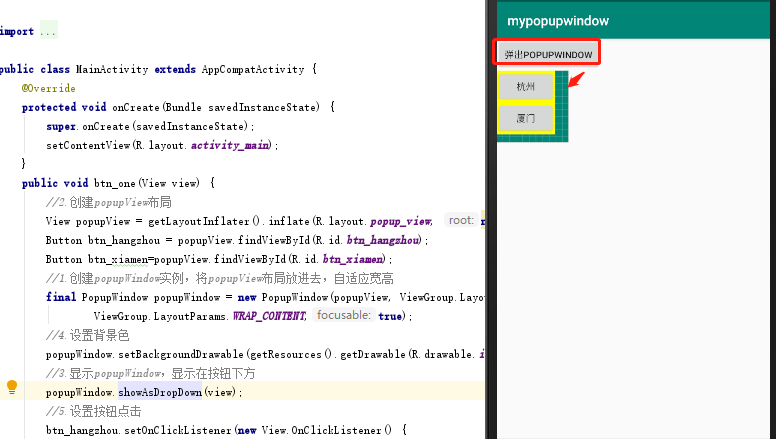

若有收获,就点个赞吧
0 人点赞


