一、表格布局的常见属性
1.android:collapseColumns 设置需要被隐藏的列的序号,从0开始<br /> 2.android:stretchColumns 设置允许被拉伸的列的列序号,从0开始(有一定的剩余空间才能被拉伸)<br /> 3.android:shrinkColumns 设置允许被收缩的列的列序号,从0开始 (有一定的超出范围才能被收缩)
子控件设置属性
1.android:layout_column 显示在第几列<br /> 2.android:layout_span 横向跨几列
二、表格布局的实现
1.布局tablelayout.xml文件
<?xml version="1.0" encoding="utf-8"?><TableLayout xmlns:android="http://schemas.android.com/apk/res/android"xmlns:app="http://schemas.android.com/apk/res-auto"xmlns:tools="http://schemas.android.com/tools"android:collapseColumns="2"android:stretchColumns="1"android:layout_width="match_parent"android:layout_height="match_parent"><TableRow><Buttonandroid:layout_width="wrap_content"android:layout_height="wrap_content"android:layout_column="3"android:layout_span="2"android:text="第1个"/><Buttonandroid:layout_width="wrap_content"android:layout_height="wrap_content"android:text="第2个"/></TableRow><TableRow><Buttonandroid:layout_width="wrap_content"android:layout_height="wrap_content"android:text="第1个"/><Buttonandroid:layout_width="wrap_content"android:layout_height="wrap_content"android:text="第2个"/><Buttonandroid:layout_width="wrap_content"android:layout_height="wrap_content"android:text="第3个"/><Buttonandroid:layout_width="wrap_content"android:layout_height="wrap_content"android:text="第4个"/><Buttonandroid:layout_width="wrap_content"android:layout_height="wrap_content"android:text="第5个"/></TableRow><Buttonandroid:layout_width="wrap_content"android:layout_height="wrap_content"android:text="第1个"/><Buttonandroid:layout_width="wrap_content"android:layout_height="wrap_content"android:text="第2个"/></TableLayout>
2.效果图:<br />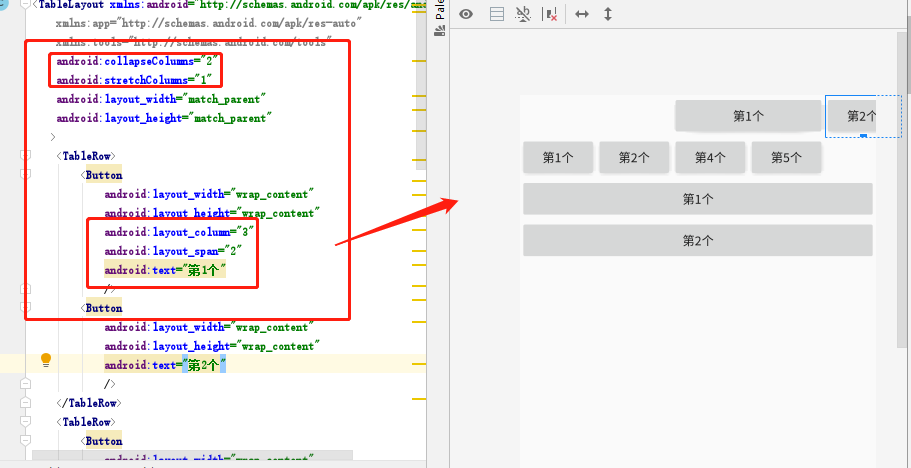

若有收获,就点个赞吧
0 人点赞


