压缩包
一、广播:分为系统广播,与用户自定义广播
二、静态注册接收广播
1.创建广播接收者的类继承广播
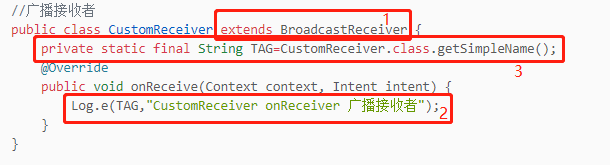
2.在清单文件注册该广播类

3.创建一个接口,定义静态注册和动态注册的变量

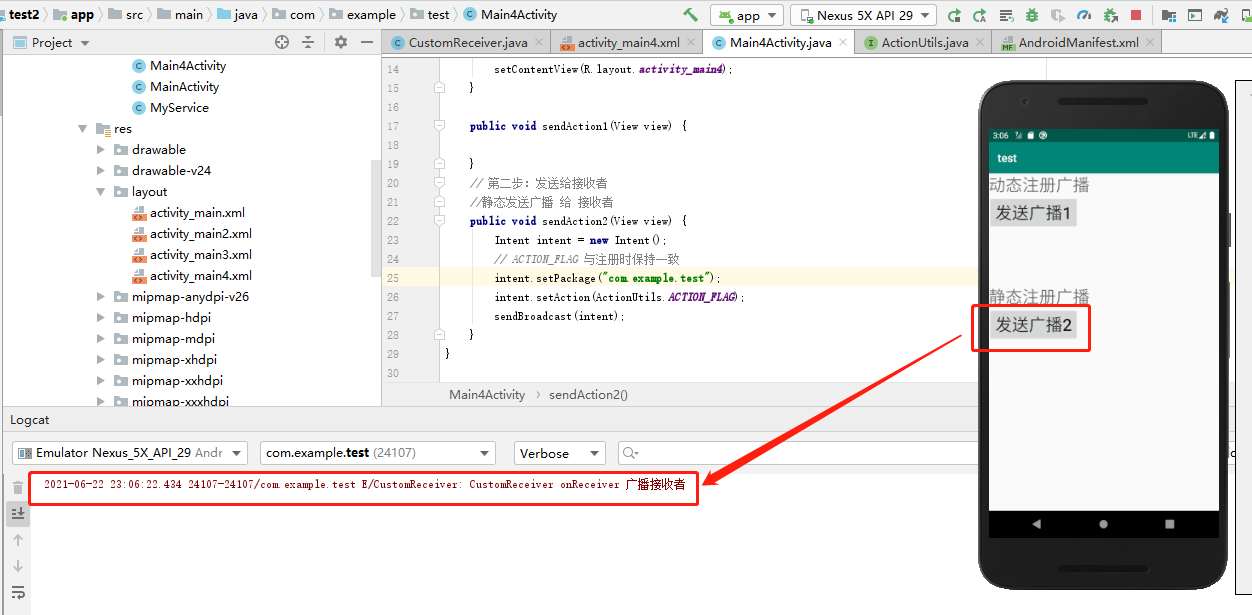
4.创建一个Main4Activity活动,定义布局,实现点击之后发送广播

三、静态注册接收广播的整体代码
1.布局activity_main4.xml文件
<?xml version="1.0" encoding="utf-8"?><LinearLayout xmlns:android="http://schemas.android.com/apk/res/android"xmlns:app="http://schemas.android.com/apk/res-auto"xmlns:tools="http://schemas.android.com/tools"android:layout_width="match_parent"android:layout_height="match_parent"tools:context=".Main4Activity"android:orientation="vertical"><TextViewandroid:layout_width="wrap_content"android:layout_height="wrap_content"android:text="动态注册广播"android:textSize="30dp"/><Buttonandroid:layout_width="wrap_content"android:layout_height="wrap_content"android:text="发送广播1"android:textSize="30sp"android:onClick="sendAction1"/><TextViewandroid:layout_marginTop="100dp"android:layout_width="wrap_content"android:layout_height="wrap_content"android:text="静态注册广播"android:textSize="30sp"/><Buttonandroid:layout_width="wrap_content"android:layout_height="wrap_content"android:text="发送广播2"android:textSize="30dp"android:onClick="sendAction2"/></LinearLayout>
2.清单AndroidManifest.xml文件
<?xml version="1.0" encoding="utf-8"?><manifest xmlns:android="http://schemas.android.com/apk/res/android"package="com.example.test"><applicationandroid:allowBackup="true"android:icon="@mipmap/ic_launcher"android:label="@string/app_name"android:roundIcon="@mipmap/ic_launcher_round"android:supportsRtl="true"android:theme="@style/AppTheme"><activity android:name=".Main3Activity"></activity><!-- 组件比须在清单文件里面注册 --><activity android:name=".MActivity" /><!-- 默认的Activity --><activity android:name=".Main4Activity"><!-- 激活默认的Activity的意图 --><intent-filter><action android:name="android.intent.action.MAIN" /><category android:name="android.intent.category.LAUNCHER" /></intent-filter></activity> <!-- 组件必须在清单文件里面注册 --><service android:name=".MyService" /><!-- 1.静态注册广播接收者 --><receiver android:name=".CustomReceiver"><!-- 标记 --><intent-filter><action android:name="com.derry.receiver_flag_" /></intent-filter></receiver></application></manifest>
3.CustomReceiver文件代码
package com.example.test;import android.content.BroadcastReceiver;import android.content.Context;import android.content.Intent;import android.util.Log;//广播接收者public class CustomReceiver extends BroadcastReceiver {private static final String TAG=CustomReceiver.class.getSimpleName();@Overridepublic void onReceive(Context context, Intent intent) {Log.e(TAG,"CustomReceiver onReceiver 广播接收者");}}
4.ActionUtils文件代码
package com.example.test;public interface ActionUtils {//广播注册时 与 发送广播时 的 唯一标识,必须要保持一致(给动态注册用)String ACTION_EQUES_UPDATE_IP="com.derry.receiver_study_";//广播注册时 与 发送广播时 的 唯一标识,必须要保持一致(给静态注册用)String ACTION_FLAG="com.derry.receiver_flag_";}
5.Main4Activity文件代码
package com.example.test;import androidx.appcompat.app.AppCompatActivity;import android.content.Intent;import android.os.Bundle;import android.view.View;public class Main4Activity extends AppCompatActivity {@Overrideprotected void onCreate(Bundle savedInstanceState) {super.onCreate(savedInstanceState);setContentView(R.layout.activity_main4);}public void sendAction1(View view) {}// 第二步:发送给接收者//静态发送广播 给 接收者public void sendAction2(View view) {Intent intent = new Intent();// ACTION_FLAG 与注册时保持一致intent.setPackage("com.example.test");intent.setAction(ActionUtils.ACTION_FLAG);sendBroadcast(intent);}}
6.效果图:
四、动态注册接收广播
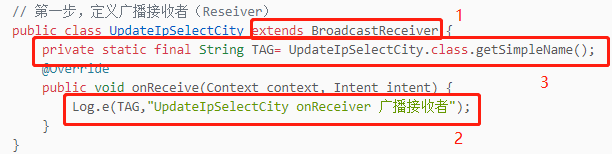
1.创建广播接收者的类继承广播
2.动态发送广播

五、动态注册接收广播的整体代码
1.UpdateIpSelectCity文件代码
package com.example.test;import android.content.BroadcastReceiver;import android.content.Context;import android.content.Intent;import android.util.Log;// 第一步,定义广播接收者(Reseiver)public class UpdateIpSelectCity extends BroadcastReceiver {private static final String TAG= UpdateIpSelectCity.class.getSimpleName();@Overridepublic void onReceive(Context context, Intent intent) {Log.e(TAG,"UpdateIpSelectCity onReceiver 广播接收者");}}
2.Main4Activity文件代码
package com.example.test;import androidx.appcompat.app.AppCompatActivity;import android.content.Intent;import android.content.IntentFilter;import android.os.Bundle;import android.view.View;public class Main4Activity extends AppCompatActivity {@Overrideprotected void onCreate(Bundle savedInstanceState) {super.onCreate(savedInstanceState);setContentView(R.layout.activity_main4);// Java 代码 来注册 刚刚的接收者即可// 第二步,在onCreate注册广播(订阅)// 动态使用Java代码注册一个广播接收者UpdateIpSelectCity updateIpSelectCity = new UpdateIpSelectCity();//固定器IntentFilter intentFilter = new IntentFilter();intentFilter.addAction(ActionUtils.ACTION_EQUES_UPDATE_IP);registerReceiver(updateIpSelectCity,intentFilter);}// 第三步// 发送给 动态注册的接收者public void sendAction1(View view) {Intent intent = new Intent();// ACTION_FLAG 与注册时保持一致intent.setPackage("com.example.test");intent.setAction(ActionUtils.ACTION_EQUES_UPDATE_IP);sendBroadcast(intent);}// 第二步:发送给接收者//静态发送广播 给 接收者public void sendAction2(View view) {Intent intent = new Intent();// ACTION_FLAG 与注册时保持一致intent.setPackage("com.example.test");intent.setAction(ActionUtils.ACTION_FLAG);sendBroadcast(intent);}}
3.效果图:


若有收获,就点个赞吧
0 人点赞


