一、帧布局的常用属性
1.android:foreground 设置前景
2.android:foregroundGravity 设置前景位置
二、帧布局的实现
注:帧布局是后者在前者的叠加下形成的,帧布局一般运用在渐变背景、片段页面。
1.布局framelayout.xml文件
<?xml version="1.0" encoding="utf-8"?><FrameLayout xmlns:android="http://schemas.android.com/apk/res/android"xmlns:app="http://schemas.android.com/apk/res-auto"xmlns:tools="http://schemas.android.com/tools"android:layout_width="match_parent"android:layout_height="match_parent"><FrameLayoutandroid:layout_width="400dp"android:layout_height="400dp"android:background="#ff0000"/><FrameLayoutandroid:layout_width="300dp"android:layout_height="300dp"android:background="#ffff00"android:foreground="@drawable/ic_launcher_background"android:foregroundGravity="right"/><FrameLayoutandroid:layout_width="200dp"android:layout_height="200dp"android:background="#ff00ff"/></FrameLayout>
2.效果图: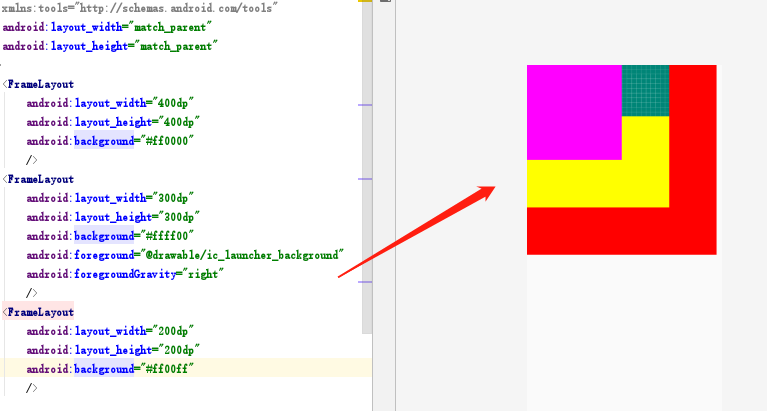

若有收获,就点个赞吧
0 人点赞


