先keyedBy 会每一种key生成一个window,并不是所有key在一个window里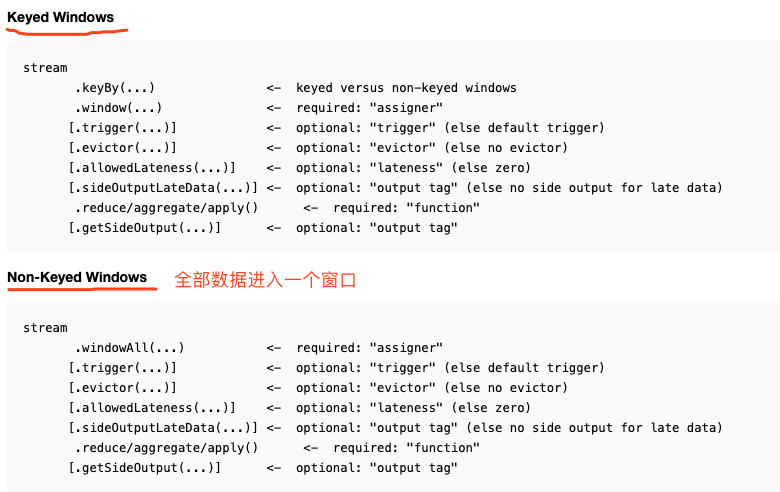
三种windows assiger:分配器
CountWindows
按照数据条数生成window。 是指相同key的数据条数 而不是所有数据条数
滚动窗口
input.keyBy("id").countWindow(15)//窗口长度
滑动窗口
input.keyBy("id").countWindow(15,5)//窗口长度、步长
TimeWindows
按照时间生成window
滚动窗口
input.keyBy("id").timeWindow(Time.seconds(15))或者input.keyBy("id").windows(TumblingEventTimeWindows.of(Time.minutes(1))) //窗口长度
滑动窗口
input.keyBy("id").timeWindow(Time.seconds(15), Time.seconds(5))或者input.keyBy("id").windows(SlidingEventTimeWindows.of(Time.minutes(1), Time.seconds(10))) //窗口长度、步长
会话窗口
非活动间隔 : 两次的活动间隔超过15秒,这个窗口就会关闭
map.keyBy(0).window(EventTimeSessionWindows.withGap(Time.seconds(15)))
全局窗口
map.keyBy(0).window(GlobalWindows.create())
窗口函数
keyBy-增量聚合函数
- 窗口内每来一条数据,就进行计算
- 如下三大类方法:
- .reduce(new ReduceFunction):输入输出类型一致,有限制
- .aggregate(new AggregateFunction):输入输出类型不一致,重写四个方法
- sum、min、max ```java sum\avg\min\max\maxBy等 也可以自己实现(如下)
// 用AggregateFunction 实现pv/uv stream .keyBy(event -> true) // 所有数据放入一个分区 .window(TumblingEventTimeWindows.of(Time.seconds(5))) .aggregate(new MyAggregateFunction()) .print();
// 实现pv/uv=人均访问次数
public static class MyAggregateFunction implements AggregateFunction
<a name="tviVG"></a>#### keyBy-全窗口函数- 1、窗口被触发时 才计算,全窗口数据储存下来 压力大。- 2、如下两种方法:ProcessWindowFunction、WindowFunction- .process(new ProcessWindowFunction)<输入、输出、key、本window>- 重写process方法(key、本context、输入、输出):拿到context的信息- .apply(new WindowFunction)<输入、输出、key、本window>- 重写apply方法(key、本window、输入、输出):拿到窗口的信息- 已逐渐弃用,用ProcessWindowFunction替代```java//用windowFuncation 实现count计数功能SingleOutputStreamOperator<Tuple3<String, Long, Integer>> apply = map.keyBy(0).timeWindow(Time.seconds(15)).apply(new WindowFunction<Sensorreading, Tuple3<String, Long, Integer>, Tuple, TimeWindow>() {@Overridepublic void apply(Tuple tuple, TimeWindow window, Iterable<Sensorreading> input, Collector<Tuple3<String, Long, Integer>> out) throws Exception {String field = tuple.getField(0);//获取key。keyBy("")那么key的类型就是tuplelong endTime = window.getEnd();int size = IteratorUtils.toList(input.iterator()).size();out.collect(new Tuple3<>(field, endTime, size));}});// ProcessWindowFunctionpublic static class UvCountByWindow extends ProcessWindowFunction<Event, String, Boolean, TimeWindow>{@Overridepublic void process(Boolean aBoolean, Context context, Iterable<Event> elements, Collector<String> out) throws Exception {HashSet<String> userSet = new HashSet<>();// 遍历所有数据,放到Set里去重for (Event event: elements){userSet.add(event.user);}// 结合窗口信息,包装输出内容Long start = context.window().getStart();Long end = context.window().getEnd();out.collect("窗口: " + new Timestamp(start) + " ~ " + new Timestamp(end)+ " 的独立访客数量是:" + userSet.size());}}
context、windows讲解
public abstract class Context implements java.io.Serializable {
  public abstract W window();

  public abstract long currentProcessingTime();
  public abstract long currentWatermark();

  public abstract KeyedStateStore windowState();
  public abstract KeyedStateStore globalState();
}
不keyBy-全窗口函数
reduce
- aggregate
- process
- apply(new AllWindowFunction) 废弃被process替代
```java
SingleOutputStreamOperator
uvStream = watermarkStream .filter(data -> "pv".equals(data.getBehavior())) .timeWindowAll(Time.hours(1)) .apply(new UvCountResult());
public static class UvCountResult implements AllWindowFunction
<a name="yAq0m"></a>
#### 增量、全窗口两种函数联合使用
增量聚合reduce()和.aggregate()时,可以添加第二个参数ProcessWindowFunction()或WindowFunction()

- 过程:每来一个数据就做一次聚合;等到窗口需要触发计算时,则调用第二个参数(全窗口函数)的处理逻辑输出结果。不再缓存所有数据了,而是将增量聚合函数的结果拿来当作Iterable 类型的输入。一般情况下可迭代集合只有一个元素
- 优点:既可以增量聚合,也可以访问Context的元数据信息(如开始结束时间、状态等)
```java
SingleOutputStreamOperator<ItemViewCount> windowStream = watermarkStream.filter(data -> "pv".equals(data.getBehavior()))
                .keyBy("itemId")
                .timeWindow(Time.hours(1), Time.minutes(5))
                .aggregate(new MyAggregateFunction(), new MyWindowFunction());

public static class MyAggregateFunction implements AggregateFunction<UserBehavior,Long,Long>{
    @Override
    public Long createAccumulator() {
        return 0L;
    }

    @Override
    public Long add(UserBehavior value, Long accumulator) {
        return accumulator + 1;
    }

    @Override
    public Long getResult(Long accumulator) {
        return accumulator;
    }

    @Override
    public Long merge(Long a, Long b) {
        return a + b;
    }
}

public static class MyWindowFunction implements WindowFunction<Long, ItemViewCount, Tuple, TimeWindow>{
    @Override
    public void apply(Tuple tuple, TimeWindow window, Iterable<Long> input, Collector<ItemViewCount> out) throws Exception {
        Long itemId = tuple.getField(0);
        long windowEnd = window.getEnd();
        Long count = input.iterator().next();//直接获取next即可
        out.collect(new ItemViewCount(itemId,windowEnd,count));
    }
}
其他可选api
.trigger() —— 触发器
- 定义 window 什么时候关闭,触发计算并输出结果
- CONTINUE(继续):什么都不做
- FIRE(触发):触发计算,输出结果
- PURGE(清除):清空窗口中的所有数据,销毁窗口
- FIRE_AND_PURGE(触发并清除):触发计算输出结果,并清除窗口
比如:窗口开的太大,计算pv需要10秒,但我们希望每1秒触发一次计算
public class TriggerTest {

public static void main(String[] args) throws Exception {
   StreamExecutionEnvironment env = StreamExecutionEnvironment.getExecutionEnvironment();
   DataStreamSource<Event> dataStreamSource = env.addSource(new ClickSource());

   // 创建一个watermark策略
   WatermarkStrategy<Event> watermarkStrategy = WatermarkStrategy
           .<Event>forMonotonousTimestamps()
           .withTimestampAssigner(new SerializableTimestampAssigner<Event>() {
               @Override
               public long extractTimestamp(Event event, long l) {
                   return event.timestamp;
               }
           });

   dataStreamSource
           .assignTimestampsAndWatermarks(watermarkStrategy)
           .keyBy(event -> event.url)
           .window(TumblingEventTimeWindows.of(Time.seconds(10)))
           .trigger(new MyTrigger())
           .process(new WindowsResult())
           .print();

   env.execute();
}

public static class WindowsResult extends ProcessWindowFunction<Event, UrlViewCount, String, TimeWindow> {
   @Override
   public void process(String s, Context context, Iterable<Event> iterable, Collector<UrlViewCount> collector) throws Exception {
       collector.collect(new UrlViewCount(
               s,
               iterable.spliterator().getExactSizeIfKnown(),// 获取迭代器中的元素个数
               context.window().getStart(),
               context.window().getEnd()
       ));
   }
}

/**
* 10秒一个窗口 每一秒执行一次
*  CONTINUE(继续):什么都不做
*  FIRE(触发):触发计算,输出结果
*  PURGE(清除):清空窗口中的所有数据,销毁窗口
*  FIRE_AND_PURGE(触发并清除):触发计算输出结果,并清除窗口
*/
public static class MyTrigger extends Trigger<Event, TimeWindow>{
   // 每一个元素到来都会调用本方法
   @Override
   public TriggerResult onElement(Event event, long l, TimeWindow timeWindow, TriggerContext triggerContext) throws Exception {
       ValueState<Boolean> isFirstEvent = triggerContext.getPartitionedState(new ValueStateDescriptor<Boolean>("first-event", Types.BOOLEAN));
       if (isFirstEvent.value() == null) {//如果是窗口的第一个元素则是null 因为有clear方法 以及下面的代码:update(true)
           for (long i = timeWindow.getStart(); i < timeWindow.getEnd(); i = i + 1000L) {
               triggerContext.registerEventTimeTimer(i);
           }
           isFirstEvent.update(true);
       }
       return TriggerResult.CONTINUE;
   }

   //当注册的处理时间定时器触发时,将调用这个方法
   @Override
   public TriggerResult onProcessingTime(long l, TimeWindow timeWindow, TriggerContext triggerContext) throws Exception {
       return TriggerResult.FIRE;
   }

   //当注册的事件时间定时器触发时,将调用这个方法
   @Override
   public TriggerResult onEventTime(long l, TimeWindow timeWindow, TriggerContext triggerContext) throws Exception {
       return TriggerResult.FIRE;
   }

   // 当窗口关闭时运行,一般用来清理状态
   @Override
   public void clear(TimeWindow timeWindow, TriggerContext triggerContext) throws Exception {
       ValueState<Boolean> isFirstEvent = triggerContext.getPartitionedState(new ValueStateDescriptor<Boolean>("first-event", Types.BOOLEAN));
       isFirstEvent.clear();
   }
}
}
.evitor() —— 移除器
- 定义移除某些数据的逻辑 ,两个方法:
- evictBefore():执行窗口函数之前的移除数据操作(默认 大部分)
- evictAfter() :执行窗口函数之后的移除数据操作
- .allowedLateness()
- 允许处理迟到的数据:默认0,这个时间内的数据会被再分配给窗口并调用窗口函数
- .sideOutputLateData()
- 将迟到的数据放入侧输出流
- .getSideOutput() 获取侧输出流
```java
//使用侧输出流案例:允许数据迟到1分钟 晚于一分钟的数据放入侧输出流
OutputTag
outputTag = new OutputTag (“late”) {};
SingleOutputStreamOperator
sumStream.getSideOutput(outputTag).print(“late”);
还需要把侧输出流和主流的sum结果数据 进行相同sum逻辑。
---

<a name="YcieJ"></a>
### windows的一些底层问题
<a name="JDbdn"></a>
#### 滑动窗口是通过复制来实现的
滑动窗口分配器可以创建许多窗口对象,并将每个事件复制到每个相关的窗口中。例如,如果您每隔 15 分钟就有 24 小时的滑动窗口,则每个事件将被复制到 4 * 24 = 96 个窗口中。
<a name="S6VvN"></a>
#### 时间窗口会和时间对齐
假设:一个小时的时间窗口、并在 12:05 开始运行您的应用程序,并不意味着第一个窗口将在 1:05 关闭。<br />因为:第一个窗口将长 55 分钟,并在 1:00 关闭。<br />详见 下面【窗口起始点、偏移量】
<a name="KIPRQ"></a>
#### 空的时间窗口不会输出结果
事件会触发窗口的创建。换句话说,如果在特定的窗口内没有事件,就不会有窗口,就不会有输出结果。
<a name="sfrpK"></a>
### 窗口起始点、偏移量
<a name="WTfDy"></a>
#### window的起始点
滚动窗口的窗口是如何分配的?<br /> --TumblingEventTimeWindows类,里有一个assignWindows方法,用途是分配窗口。方法里又调用了getWindowStartWithOffset方法,获取窗口的开始时间。

- 本质是:
   - 如果offset=0.则窗口开始时间=在timestamp前边,且最近的一个窗口长度的整倍数
   - 如果offset不是0,则窗口开始时间=在timestamp前边,且最近的一个(窗口长度的整倍数+offset)
```java
@Override
public Collection<TimeWindow> assignWindows(Object element, long timestamp, WindowAssignerContext context) {
    if (timestamp > Long.MIN_VALUE) {
        // Long.MIN_VALUE is currently assigned when no timestamp is present
        long start = TimeWindow.getWindowStartWithOffset(timestamp, offset, size);
        return Collections.singletonList(new TimeWindow(start, start + size));
    } else {
        throw new RuntimeException("Record has Long.MIN_VALUE timestamp (= no timestamp marker). " +
                "Is the time characteristic set to 'ProcessingTime', or did you forget to call " +
                "'DataStream.assignTimestampsAndWatermarks(...)'?");
    }
}

/**
     * Method to get the window start for a timestamp.
     *
     * @param timestamp epoch millisecond to get the window start.
     * @param offset The offset which window start would be shifted by.
     * @param windowSize The size of the generated windows.
     * @return window start
     */
    public static long getWindowStartWithOffset(long timestamp, long offset, long windowSize) {
        return timestamp - (timestamp - offset + windowSize) % windowSize;
    }
偏移量offset如何使用
举个栗子: 现在时间10、offset2、windowSize5 :10 -(10-2+5)% 5 = 7
- 一般用来处理不同时区的时间
- 因为北京时间比格林尼治时间早8小时,如果窗口长度为一天。
- 期望窗口为(北京时间0点-0点)
- 实际窗口时间为(格林尼治0点-0点)(也就是北京时间8点-8点)。这里要用offset。
//北京时间偏移到格林尼治时间
//窗口的开始时间从 北京8点调整到北京0点,需要 -8
.window(TumblingEventTimeWindows.of(Time.days(1),Time.hours(-8)))
- 因为北京时间比格林尼治时间早8小时,如果窗口长度为一天。
一些个人问题
- keyBy(“ID”).timeWindow(Time.Second(5)).min(“temperature”);
- sensor_1的窗口:195-210
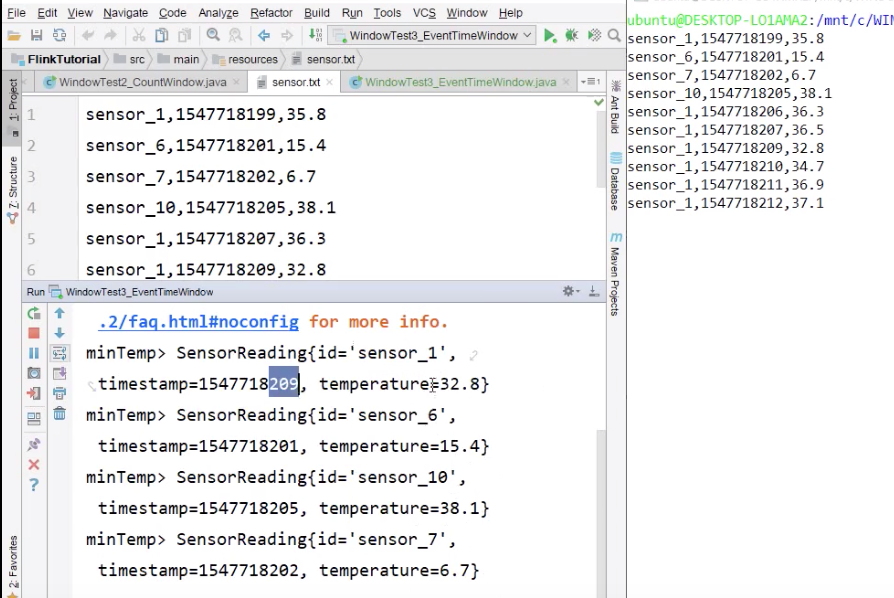
- 上述代码+图片中 按照id hash,hash分区后 多个id可能同时存在于一个分区,那么每一个分区一个watermark 还是每一个key一个watermar?
- 一个分区一个watermark!
- 上述代码+图片中 为什么一个key的watermark 到期,所有key的数据都会计算输出?
- 首先:问题表述的不对,不是【一个key的watermark 到期】,而是【一个分区的watermark 到期】。因为这里设置了并行度是1。
- 其次:图片中输入的第二个字段-时间,只有sensor_1这个key的时间最小,所以会以此作为窗口开始时间的里程碑,去寻找窗口开始时间
- 如果并行度大于1呢?
- 根据 滚动窗口,所有分区的窗口结束时间相同的原理:
- 如果并行度大于1,那么所有分区的watermark都到窗口结束时间才会计算本窗口并输出!

若有收获,就点个赞吧
0 人点赞


