一、基础使用
创建私有的pod索引仓库
1、在公司的git服务器上创建私有远程索引仓库。克隆地址如:[http://192.***.*.**:***/leelen-ios-platform/Leelen_specs.git](http://192.***.*.**:***/leelen-ios-platform/Leelen_specs.git)
2、新建pod spec索引仓库(将私有的远程仓库copy到本地)。命令如下:pod repo add LeelenIotPodSpecshttp://192.***.*.**:***/leelen-ios-platform/Leelen_specs.gitLeelenIotPodSpecs为pod spec索引仓库名称[http://192.***.*.**:***/leelen-ios-platform/Leelen_specs.git](http://192.***.*.**:***/leelen-ios-platform/Leelen_specs.git)为远程索引仓库克隆地址。
3、执行完毕后,在目录:/Users/admin/.cocoapods/repos 下会多出来一个LeelenIotPodSpecs文件夹,可使用pod repo命令查看。如下:
#自己创建的本地索引私有库LeelenIotPodSpecs- Type: git (master)- URL: http://192.***.*.**:***/leelen-ios-platform/Leelen_specs.git- Path: /Users/admin/.cocoapods/repos/LeelenIotPodSpecs#默认存在的git本地索引库trunk- Type: CDN- URL: https://cdn.cocoapods.org/- Path: /Users/admin/.cocoapods/repos/trunk2 repos
至此,私有远程索引仓库LeelenIotPodSpecs生成完成
创建网络模块LeelenNetwork私有库
1、在公司的 git 服务器上面创建 LeelenNetwork 的 git 远程仓库,克隆地址是:[http://192.***.*.**:****/leelen-ios-platform/LeelenNetwork.git](http://192.***.*.**:****/leelen-ios-platform/LeelenNetwork.git)
2、创建私有的pod组件库(如LeelenNetwork网络组件),执行如下命令:pod lib create LeelenNetwork。过程中需要填一些选项,按需选择即可。如下:
admindeiMac:~ admin$ pod lib create LeelenNetworkCloning `https://github.com/CocoaPods/pod-template.git` into `LeelenNetwork`.Configuring LeelenNetwork template.security: SecKeychainSearchCopyNext: The specified item could not be found in the keychain.------------------------------To get you started we need to ask a few questions, this should only take a minute.If this is your first time we recommend running through with the guide:- https://guides.cocoapods.org/making/using-pod-lib-create.html( hold cmd and double click links to open in a browser. )What platform do you want to use?? [ iOS / macOS ]> iOSWhat language do you want to use?? [ Swift / ObjC ]> ObjCWould you like to include a demo application with your library? [ Yes / No ]> YesWhich testing frameworks will you use? [ Specta / Kiwi / None ]> NoneWould you like to do view based testing? [ Yes / No ]> YesWhat is your class prefix?> LLsecurity: SecKeychainSearchCopyNext: The specified item could not be found in the keychain.security: SecKeychainSearchCopyNext: The specified item could not be found in the keychain.security: SecKeychainSearchCopyNext: The specified item could not be found in the keychain.security: SecKeychainSearchCopyNext: The specified item could not be found in the keychain.security: SecKeychainSearchCopyNext: The specified item could not be found in the keychain.security: SecKeychainSearchCopyNext: The specified item could not be found in the keychain.Running pod install on your new library.Analyzing dependenciesDownloading dependenciesInstalling FBSnapshotTestCase (2.1.4)Installing LeelenNetwork (0.1.0)Generating Pods projectIntegrating client project[!] Please close any current Xcode sessions and use `LeelenNetwork.xcworkspace` for this project from now on.Pod installation complete! There are 2 dependencies from the Podfile and 2 total pods installed.Ace! you're ready to go!We will start you off by opening your project in Xcodeopen 'LeelenPlatform/Example/LeelenNetwork.xcworkspace'To learn more about the template see `https://github.com/CocoaPods/pod-template.git`.To learn more about creating a new pod, see `https://guides.cocoapods.org/making/making-a-cocoapod`.admindeiMac:~ admin$
pod组件空模板创建成功后会自动打开工程。
3、删除ReplaceMe文件,将需要封装的文件(如网络组件相关文件)复制到 LeelenNetwork/LeelenNetwork/Classes中。如下:将LeelenNetworkManager复制到Classes中。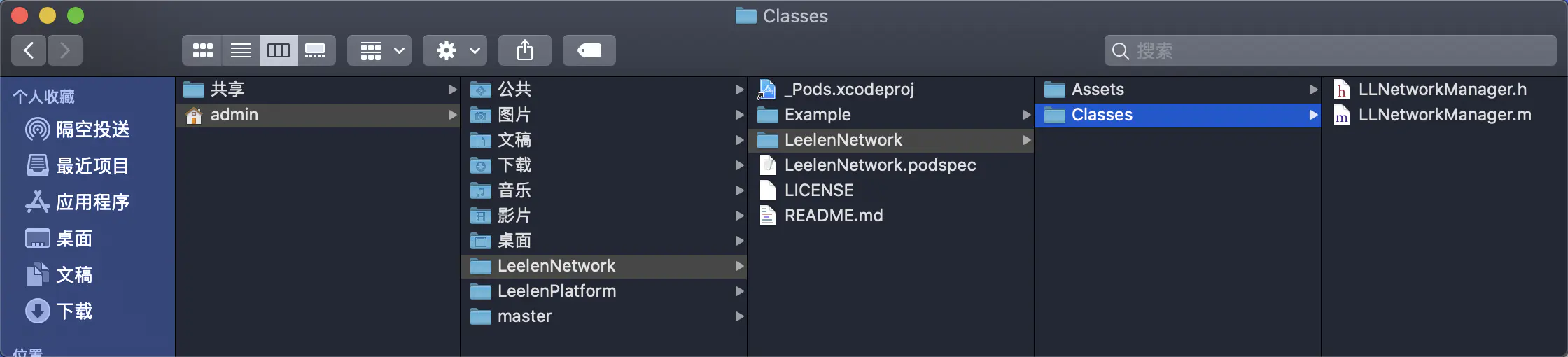
4、修改 LeelenNetwork.podspec 文件如下:
Pod::Spec.new do |s|s.name = 'LeelenNetwork' # 名称s.version = '1.0.1' # 版本号s.summary = '网络请求模块' # 概述s.homepage = 'https://github.com/hjq/LeelenNetwork' # 主页s.license = { :type => 'MIT', :file => 'LICENSE' } # license证书s.author = { 'hjq' => 'h*j*q*@leelen.cn' } # 作者s.source = { :git => 'http://192.***.*.**:****/leelen-ios-platform/LeelenNetwork.git', :tag => s.version.to_s } # 源代码地址s.ios.deployment_target = '10.0' # iOS版本s.source_files = 'LeelenNetwork/**/*.{h,m}' # 源码所在路径end
5、校验本地索引文件 LeelenNetwork.podspec
cd到LeelenNetwork.podspec所在文件夹下,执行pod lib lint --allow-warnings,该命令是检查本地索引文件是否符合推送规则。成功了会打印LeelenNetwork.podspec passed validation。如下:
admindeiMac:LeelenNetwork admin$ cd /Users/admin/LeelenNetworkadmindeiMac:LeelenNetwork admin$ pod lib lint --allow-warnings-> LeelenNetwork (1.0.1)- WARN | summary: The summary is not meaningful.- WARN | url: The URL (https://github.com/hjq/LeelenNetwork) is not reachable.- NOTE | xcodebuild: note: Using new build system- NOTE | xcodebuild: note: Building targets in parallel- NOTE | xcodebuild: note: Using codesigning identity override: -- NOTE | [iOS] xcodebuild: note: Planning build- NOTE | [iOS] xcodebuild: note: Constructing build description- NOTE | [iOS] xcodebuild: warning: Skipping code signing because the target does not have an Info.plist file and one is not being generated automatically. (in target 'App' from project 'App')LeelenNetwork passed validation.admindeiMac:LeelenNetwork admin$
如有报错,按提示修改。
pod lib lint参数解析:
—sources:需要引⽤的spec,默认只依赖master,如果当前pod依赖了私有库,需要将其对应的spec包含进来,不然会报找不到对应库的问题。参数可以是本地spec的名称,也可以是git地址。
—allow-warnings:有警告会通过不了,如果警告是⽆关紧要的,可以加上,让检测通过。
—verbose:打印详细的检验过程
—use-libraries:⼯程或者依赖⾥⾯了静态库(.a⽂件)或者是framework
*备注:
pod lib lint 表示在本地校验索引文件
pod spec lint 表示在本地和远程都校验索引文件
6、将1创建的远程仓库克隆下来,将2-5创建及修改后的LeelenPlatform放到克隆下来的文件夹中,运行工程,没问题后提交到git。如下:




7、上传 LeelenNetwork.podspec 索引文件到我们的私有远程索引仓库 LeelenIotPodSpecs,命令如下:pod repo push LeelenIotPodSpecs LeelenNetwork.podspec --allow-warnings
上面命令对 LeelenNetwork.podspec 文件做了两个操作:
- 一个是将其推送到私有的远程索引仓库,可以去公司的 git 上面 LeelenIotPodSpecs 索引仓库中查看;
- 另一个是将其 copy 到私有的本地索引仓库,这个可以去目录:/Users/admin/.cocoapods/repos/LeelenIotPodSpecs 下查看到。
终端显示如下:
admindeiMac:~ admin$ cd /Users/admin/Documents/LeeLen/LeelenNetworkadmindeiMac:LeelenNetwork admin$ pod repo push LeelenIotPodSpecs LeelenNetwork.podspec --allow-warningsValidating spec-> LeelenNetwork (1.0.1)- WARN | summary: The summary is not meaningful.- WARN | url: The URL (https://github.com/hjq/LeelenNetwork) is not reachable.- NOTE | xcodebuild: note: Using new build system- NOTE | xcodebuild: note: Building targets in parallel- NOTE | xcodebuild: note: Using codesigning identity override: -- NOTE | [iOS] xcodebuild: note: Planning build- NOTE | [iOS] xcodebuild: note: Constructing build description- NOTE | [iOS] xcodebuild: warning: Skipping code signing because the target does not have an Info.plist file and one is not being generated automatically. (in target 'App' from project 'App')Updating the `LeelenIotPodSpecs' repoAdding the spec to the `LeelenIotPodSpecs' repo- [Add] LeelenNetwork (1.0.1)Pushing the `LeelenIotPodSpecs' repo[!] 'LeelenNetwork' uses the unencrypted 'http' protocol to transfer the Pod. Please be sure you're in a safe network with only trusted hosts. Otherwise, please reach out to the library author to notify them of this security issue.admindeiMac:LeelenNetwork admin$
至此私有的组件库LeelenNetwork就创建完成了,可以在终端执行 pod search LeelenNetwork来查询它。
使用
在项目工程中修改podfile文件,并pod install
source 'http://192.***.*.**:***/leelen-ios-platform/Leelen_specs.git'source 'https://mirrors.tuna.tsinghua.edu.cn/git/CocoaPods/Specs.git'platform :ios, '10.0'target 'LeeLenIOT' dopod 'LeelenNetwork', '~>1.0.1'end
注意事项
1、操作的时候,先cd到对应的文件夹下
2、注意操作顺序
a、在develop分支开发、修改LeelenNetwork代码,修改 LeelenNetwork.podspec版本号,提交。
b、将develop分支合并到master。
c、在master打tag(如:1.0.1),注意这边的tag应与LeelenNetwork.podspec中的s.version 版本号一致。
二、依赖第三方库
当我们的私有库需要依赖其它第三方才可以正常使用时,我们就需要在spec索引文件中开启依赖。例如下面所示代码,表明当前仓库需要依赖AFNetworking和SDWebImage。
Pod::Spec.new do |s|s.name = 'LeelenNetwork's.version = '1.0.3's.summary = '网络请求模块's.license = { :type => 'MIT', :file => 'LICENSE' }s.author = { 'hjq' => 'h*j*q*@leelen.cn' }s.source = { :git => 'http://192.168.1.10:9099/leelen-ios-platform/LeelenNetwork.git', :tag => s.version.to_s }s.ios.deployment_target = '10.0's.source_files = 'LeelenNetwork/**/*.{h,m}'#设置第三方依赖#s.dependency 'AFNetworking's.dependency 'AFNetworking', '~> 3.2.0's.dependency 'SDWebImage', '~> 4.3.3'end
修改完spec索引之后,执行pod lib lint --allow-warnings检查本地索引文件是否符合推送规则。然后SourceTree提交代码,打tag(tag注意与LeelenNetwork.podspec文件内的s.version一致)。执行pod repo push LeelenIotPodSpecs LeelenNetwork.podspec --allow-warnings,上传 LeelenNetwork.podspec 索引文件到我们的私有远程索引仓库 LeelenIotPodSpecs。
三、设置子库Subspecs
为什么要设置子库
比如LLTool组件下,有两个功能,一个是网络请求模块NetworkManager,一个缓存模块CacheManager。假设有同事负责的模块只需要缓存的功能,此时他若pod一整LLTool的话,不但NetworkManager功能对他没用,而且还需要安装AFNetworking依赖库。设置子库可以很好的解决只使用LLTool组件下的CacheManager部分。
子库格式
s.subspec '子库名称' do |别名|end
子库的使用
1、在组件工程中创建子库
如:在组件LeelenNetwork中创建两个子库,分别是NetworkLog和NetworkManager,其中NetworkLog不需要依赖任何第三方库,内部只有一个log类方法,调用的时候输出”我不需要依赖别的第三方库”。NetworkManager依赖AFNetworking,内部有对get和post方法的二次封装,用于网络请求。
文件结构如下: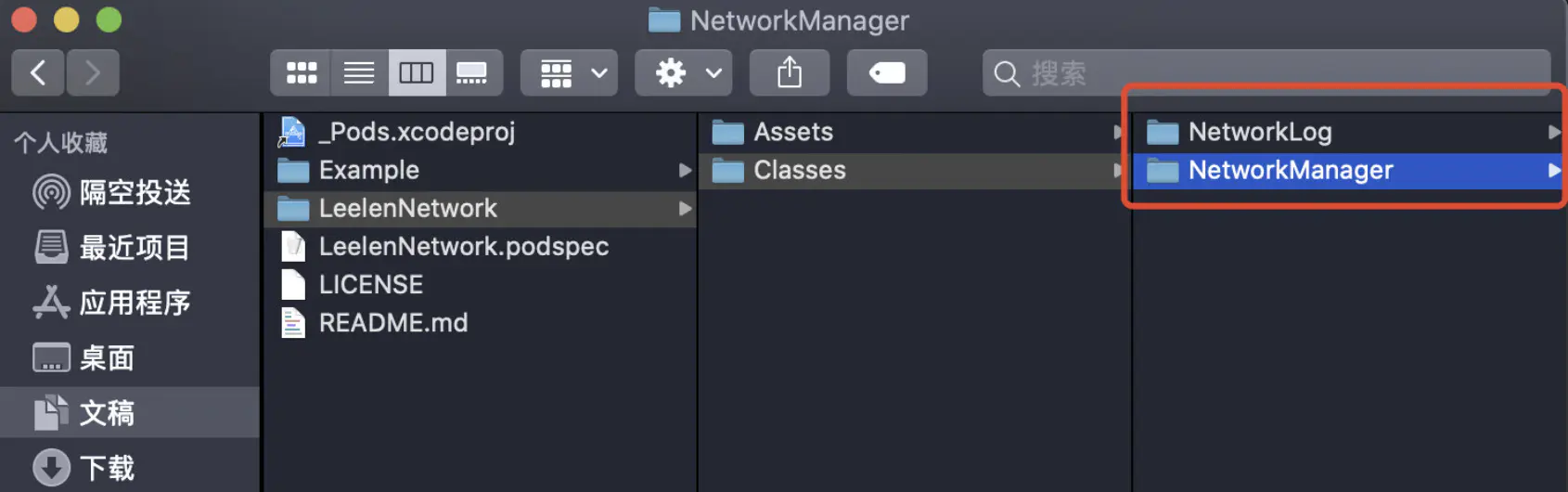
2、修改LeelenNetwork.podspec索引文件
Pod::Spec.new do |s|s.name = 'LeelenNetwork's.version = '1.0.4's.summary = '网络请求模块's.homepage = 'https://github.com/hjq/LeelenNetwork's.license = { :type => 'MIT', :file => 'LICENSE' }s.author = { 'hjq' => 'h*j*q*@leelen.cn' }s.source = { :git => 'http://192.168.1.10:9099/leelen-ios-platform/LeelenNetwork.git', :tag => s.version.to_s }s.ios.deployment_target = '10.0'#之前的样子#源文件#s.source_files = 'LeelenNetwork/**/*.{h,m}'#设置依赖库#s.dependency 'AFNetworking', '~> 3.2.0'#修改后的样子#设置子库(依赖AFNetworking)s.subspec 'NetworkManager' do |m|m.source_files = 'LeelenNetwork/Classes/NetworkManager/*.{h,m}'m.dependency 'AFNetworking'end#设置子库(不依赖其他第三方)s.subspec 'NetworkLog' do |l|l.source_files = 'LeelenNetwork/Classes/NetworkLog/*.{h,m}'endend
注意:设置子库时,subspec内使用的是别名,如:s.subspec 'NetworkManager' do |m|的别名是m,则subspec内写成m.dependency 'AFNetworking',如果写成s.dependency 'AFNetworking'会校验不过。
3、修改完spec索引文件之后,执行pod lib lint --allow-warnings检查本地索引文件是否符合推送规则。校验没问题后,SourceTree提交代码,打tag(tag注意与LeelenNetwork.podspec文件内的s.version一致)。执行pod repo push LeelenIotPodSpecs LeelenNetwork.podspec --allow-warnings操作,上传 LeelenNetwork.podspec 索引文件到我们的私有远程索引仓库 LeelenIotPodSpecs。
4、修改工程中的Podfile文件,cd到工程Podfile文件所在位置,执行pod install
使用NetworkLog功能的Podfile文件修改如下:
source 'http://192.***.*.**:***/leelen-ios-platform/Leelen_specs.git'platform :ios, '10.0'target 'LeeLenIOT' do#修改前#pod 'AFNetworking'#pod 'LeelenNetwork', '~>1.0.3'#修改后pod 'LeelenNetwork/NetworkLog', '~>1.0.4'end
使用NetworkManager功能的Podfile文件修改如下:
source 'http://192.***.*.**:***/leelen-ios-platform/Leelen_specs.git'platform :ios, '10.0'target 'LeeLenIOT' do#修改前#pod 'AFNetworking'#pod 'LeelenNetwork', '~>1.0.3'#修改后pod 'AFNetworking'pod 'LeelenNetwork/NetworkManager', '~>1.0.4'end
至此,子库的配置完成,可在工程中使用子库了。
注意:由于NetworkManager依赖AFNetworking,所以Podfile文件要pod ‘AFNetworking’
四、组件库中带有图片资源
1、将LoginImage文件夹放入/LeelenNetwork/Assets中,其中LoginImage文件夹内有login_logo@2x.png图片;
2、 修改LeelenNetwork.podspec索引文件
#设置子库(不依赖其他第三方)s.subspec 'NetworkLog' do |l|l.source_files = 'LeelenNetwork/Classes/NetworkLog/*.{h,m}'#添加图片资源l.resource_bundles = {'NetworkLog' => ['LeelenNetwork/Assets/LoginImage/*.png']}end
3、修改完spec索引文件之后,执行pod lib lint --allow-warnings检查本地索引文件是否符合推送规则。校验没问题后,SourceTree提交代码,打tag(tag注意与LeelenNetwork.podspec文件内的s.version一致)。执行pod repo push LeelenIotPodSpecs LeelenNetwork.podspec --allow-warnings操作,上传 LeelenNetwork.podspec 索引文件到我们的私有远程索引仓库 LeelenIotPodSpecs。
4、修改工程中的Podfile文件,cd到工程Podfile文件所在位置,执行pod install
5、pod install成功后,可以看到工程中多了一个Resources文件夹,里面有login_logo@2x.png图片,路径如下:Pods/LeelenNetwork/LeelenNetwork/Assets/LoginImage/login_logo@2x.png。以及Products文件夹下多了一个NetworkLog.bundle,查看包内容,发现里面也有login_logo@2x.png图片。
6、使用时,先拿到最外面的bundle,然后再去找下面指定名字的bundle对象,再搜索具体资源。如下:
NSBundle * currentBundle = [NSBundle bundleForClass:self.class];NSURL * bundleURL = [currentBundle URLForResource:@"NetworkLog" withExtension:@"bundle"];NSBundle * resourceBundle = [NSBundle bundleWithURL:bundleURL];UIImage * logoIcon = [UIImage imageNamed:@"login_logo" inBundle:resourceBundle compatibleWithTraitCollection:nil];
五、私有库依赖私有库
设置LeelenPlatform私有库依赖LeelenNetwork私有库
1、修改索引文件LeelenPlatform.podspec里面的依赖为:s.dependency 'LeelenNetwork'
Pod::Spec.new do |s|s.name = 'LeelenPlatform's.version = '1.0.1's.summary = '工具组件's.homepage = 'https://github.com/hjq/LeelenPlatform's.license = { :type => 'MIT', :file => 'LICENSE' }s.author = { 'hjq' => 'h*j*q*@leelen.cn' }s.source = { :git => 'http://192.***.*.**:****/leelen-ios-platform/LeelenPlatform.git', :tag => s.version.to_s }s.ios.deployment_target = '10.0's.source_files = 'LeelenPlatform/**/*.{h,m}'#依赖LeelenNetwork私有库s.dependency 'LeelenNetwork'end
A、修改完spec索引文件之后,执行pod spec lint命令报错:
- ERROR | [iOS] unknown: Encountered an unknown error (Unable to find a specification for `LeelenNetwork` depended upon by `LeelenPlatform`
即找不到LeelenNetwork依赖。
B、加上sources源:pod spec lint --sources=LeelenIotPodSpecs 报错:
- ERROR | [iOS] unknown: Encountered an unknown error (Unable to find a specification for `AFNetworking` depended upon by `LeelenNetwork/NetworkManager`
即找不到AFNetworking依赖。
C、sources源加上pod公有索引库地址,命令如下:pod spec lint LeelenPlatform.podspec --sources=http://192.***.*.**:***/leelen-ios-platform/Leelen_specs.git,https://github.com/CocoaPods/Specs.git
注释:sources后面跟的参数第一个表示LeelenIotPodSpecs私有索引库地址,第二个是pod公有索引库地址。
终端显示如下:
admindeiMac:LeelenPlatform admin$ pod spec lint LeelenPlatform.podspec --sources=http://192.***.*.**:***/leelen-ios-platform/Leelen_specs.git,https://github.com/CocoaPods/Specs.gitCloning spec repo `cocoapods` from `https://github.com/CocoaPods/Specs.git`
很慢…
D、更换国内镜像(清华园)
pod spec lint LeelenPlatform.podspec --sources=http://192.***.*.**:***/leelen-ios-platform/Leelen_specs.git,https://mirrors.tuna.tsinghua.edu.cn/git/CocoaPods/Specs.git --allow-warnings
成功,终端显示如下:
admindeiMac:LeelenPlatform admin$ pod spec lint LeelenPlatform.podspec --sources=http://192.***.*.**:***/leelen-ios-platform/Leelen_specs.git,https://mirrors.tuna.tsinghua.edu.cn/git/CocoaPods/Specs.git --allow-warnings-> LeelenPlatform (1.0.1)- WARN | url: The URL (https://github.com/hjq/LeelenPlatform) is not reachable.- NOTE | xcodebuild: note: Using new build system- NOTE | xcodebuild: note: Building targets in parallel- NOTE | xcodebuild: note: Using codesigning identity override: -- NOTE | [iOS] xcodebuild: note: Planning build- NOTE | [iOS] xcodebuild: note: Constructing build description- NOTE | [iOS] xcodebuild: warning: Skipping code signing because the target does not have an Info.plist file and one is not being generated automatically. (in target 'App' from project 'App')Analyzed 1 podspec.LeelenPlatform.podspec passed validation.[!] 'LeelenNetwork' uses the unencrypted 'http' protocol to transfer the Pod. Please be sure you're in a safe network with only trusted hosts. Otherwise, please reach out to the library author to notify them of this security issue.[!] 'LeelenPlatform' uses the unencrypted 'http' protocol to transfer the Pod. Please be sure you're in a safe network with only trusted hosts. Otherwise, please reach out to the library author to notify them of this security issue.admindeiMac:LeelenPlatform admin$
2、SourceTree提交代码,打tag(tag注意与LeelenPlatform.podspec文件内的s.version一致)。
3、上传 索引文件LeelenPlatform.podspec 到我们的私有远程索引仓库 LeelenIotPodSpecs,命令如下:pod repo push LeelenIotPodSpecs LeelenPlatform.podspec --sources=http://192.***.*.**:***/leelen-ios-platform/Leelen_specs.git,https://mirrors.tuna.tsinghua.edu.cn/git/CocoaPods/Specs.git --allow-warnings操作。
注释:命令需要带上LeelenIotPodSpecs私有索引库地址,和pod公有索引库地址。否则会报如下错误:
- ERROR | [iOS] unknown: Encountered an unknown error (An unexpected version directory `Classes` was encountered for the `/Users/admin/.cocoapods/repos/1-leelen-ios-platform-leelennetwork/LeelenNetwork` Pod in the `LeelenNetwork` repository.) during validation.
push成功后终端显示如下:
admindeiMac:LeelenPlatform admin$ pod repo push LeelenIotPodSpecs LeelenPlatform.podspec --sources=http://192.***.*.**:***/leelen-ios-platform/Leelen_specs.git,https://mirrors.tuna.tsinghua.edu.cn/git/CocoaPods/Specs.git --allow-warningsValidating spec-> LeelenPlatform (1.0.2)- WARN | url: The URL (https://github.com/hjq/LeelenPlatform) is not reachable.- NOTE | xcodebuild: note: Using new build system- NOTE | xcodebuild: note: Building targets in parallel- NOTE | xcodebuild: note: Using codesigning identity override: -- NOTE | [iOS] xcodebuild: note: Planning build- NOTE | [iOS] xcodebuild: note: Constructing build description- NOTE | [iOS] xcodebuild: warning: Skipping code signing because the target does not have an Info.plist file and one is not being generated automatically. (in target 'App' from project 'App')Updating the `LeelenIotPodSpecs' repoAdding the spec to the `LeelenIotPodSpecs' repo- [Update] LeelenPlatform (1.0.2)Pushing the `LeelenIotPodSpecs' repo[!] 'LeelenNetwork' uses the unencrypted 'http' protocol to transfer the Pod. Please be sure you're in a safe network with only trusted hosts. Otherwise, please reach out to the library author to notify them of this security issue.[!] 'LeelenPlatform' uses the unencrypted 'http' protocol to transfer the Pod. Please be sure you're in a safe network with only trusted hosts. Otherwise, please reach out to the library author to notify them of this security issue.admindeiMac:LeelenPlatform admin$
3、工程中使用LeelenPlatform库
A、Podfile文件添加清华园镜像,以及LeelenPlatform。修改如下:
source 'http://192.***.*.**:***/leelen-ios-platform/Leelen_specs.git'source 'https://mirrors.tuna.tsinghua.edu.cn/git/CocoaPods/Specs.git'platform :ios, '10.0'target 'LeeLenIOT' dopod 'LeelenNetwork/NetworkLog', '~>1.0.4'pod 'LeelenPlatform', '~>1.0.2'end
B、pod install 成功!可以愉快的使用了。终端显示如下:
admindeiMac:~ admin$ cd /Users/admin/Documents/LeeLen/LeeLenIOTadmindeiMac:LeeLenIOT admin$ pod installAnalyzing dependenciesDownloading dependenciesInstalling AFNetworking (4.0.1)Installing LeelenNetwork 1.0.4Installing LeelenPlatform (1.0.2)Generating Pods projectIntegrating client projectPod installation complete! There are 8 dependencies from the Podfile and 9 total pods installed.[!] 'LeelenNetwork' uses the unencrypted 'http' protocol to transfer the Pod. Please be sure you're in a safe network with only trusted hosts. Otherwise, please reach out to the library author to notify them of this security issue.[!] 'LeelenPlatform' uses the unencrypted 'http' protocol to transfer the Pod. Please be sure you're in a safe network with only trusted hosts. Otherwise, please reach out to the library author to notify them of this security issue.admindeiMac:LeeLenIOT admin$
参考

若有收获,就点个赞吧
0 人点赞


