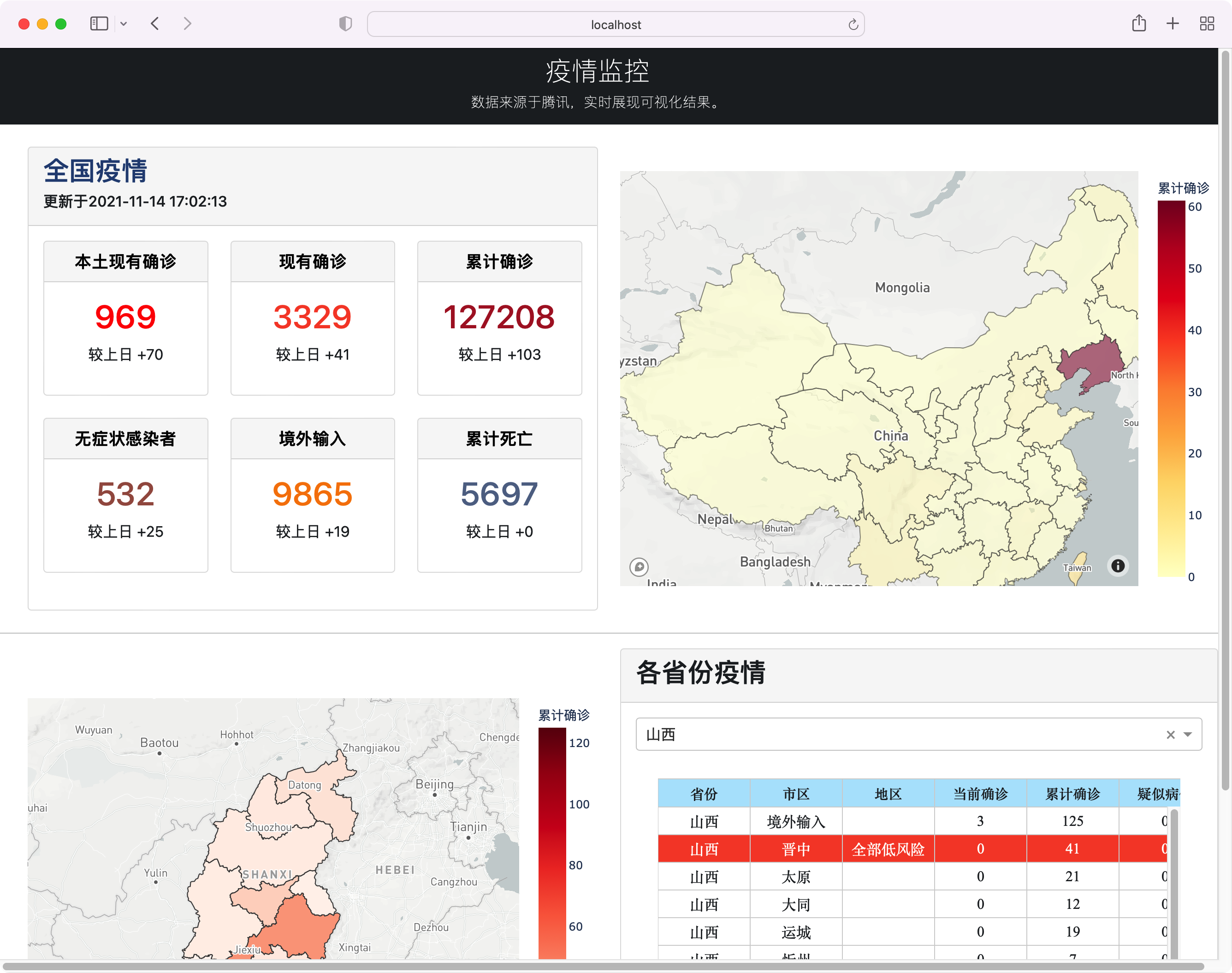
项目结构设计
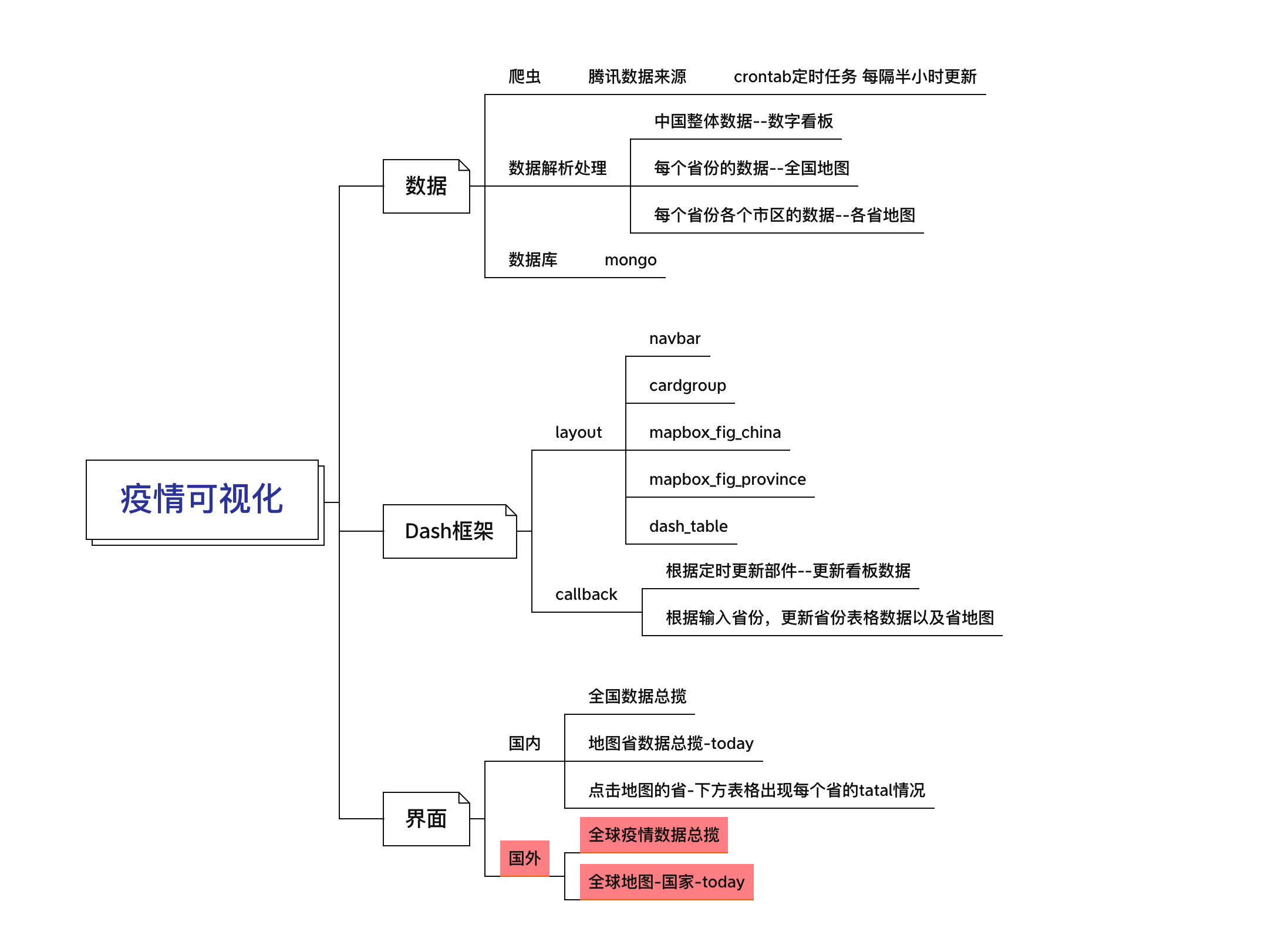
项目代码结构
.├── app.py├── requirements.txt├── server.py├── config.py├── assets│ └── chain_style.css├── callbacks│ ├── china.py├── data│ ├── crontab.sh│ ├── json│ │ ├── china_province.geojson│ │ ├── city.json│ │ └── province.json│ ├── nameMap.json│ └── tencent│ ├── data_today.json│ ├── global_data.json│ ├── hist_data.json│ └── last_data.json├── models│ ├── data_dump.py│ ├── db.py│ ├── log.log│ ├── province_geojson.py│ └── tencent_data.py├── utils│ ├── mapbox└── views├── china.py
具体代码可去github](https://github.com/Flionay/Dash_Poltly_CovID/tree/online))
云服务器部署
生成环境依赖requirement.txt
pip install pipreqspipreqs ./ --encoding=utf-8
Gunicorn
Gunicorn是一个unix上被广泛使用的高性能的Python WSGI UNIX HTTP Server。
和大多数的web框架兼容,并具有实现简单,轻量级,高性能等特点。
gunicorn 安装
pip install gunicorn
gunicorn 启动
Dash 应用启动,需要在APP中加入这一句,注明显式的server
server = app.server
然后利用命令行即可启动gunicorn多线程服务器:
gunicorn -w 8 -b 0.0.0.0:1919 app:server
Nginx
WSGI(Web Server Gateway Interface),即web服务器网关接口,是Web服务器和Web应用程序或框架之间的一种简单而通用的接口,它是一种协议,一种规范,专门用来解决众多Web服务器和Web应用程序或框架的兼容性问题。我们使用最常用的Gunicorn Server,和大多数的web框架兼容,并具有实现简单,轻量级,高性能等特点。
nginx是一个功能强大的反向代理服务器,我们使用nginx来转发gunicorn服务。为什么要在gunicorn之上再加层nginx呢?一方面nginx可以补充gunicorn在某些方面的不足,如SSL支持、高并发处理、负载均衡处理等,另一方面如果是做一个web网站,除了服务之外,肯定会有一些静态文件需要托管,这方面也是nginx的强项。
安装nginx使用sudo apt install即可。
使用nginx -t可查看nginx配置文件位置,以及检查nginx 配置是否正确。
修改/etc/nginx/sites-available\default文件为如下内容:
### You should look at the following URL's in order to grasp a solid understanding# of Nginx configuration files in order to fully unleash the power of Nginx.# https://www.nginx.com/resources/wiki/start/# https://www.nginx.com/resources/wiki/start/topics/tutorials/config_pitfalls/# https://wiki.debian.org/Nginx/DirectoryStructure## In most cases, administrators will remove this file from sites-enabled/ and# leave it as reference inside of sites-available where it will continue to be# updated by the nginx packaging team.## This file will automatically load configuration files provided by other# applications, such as Drupal or Wordpress. These applications will be made# available underneath a path with that package name, such as /drupal8.## Please see /usr/share/doc/nginx-doc/examples/ for more detailed examples.### Default server configuration## Default server configuration#server {listen 80 default_server;listen [::]:80 default_server;# SSL configuration## listen 443 ssl default_server;# listen [::]:443 ssl default_server;## Note: You should disable gzip for SSL traffic.# See: https://bugs.debian.org/773332## Read up on ssl_ciphers to ensure a secure configuration.# See: https://bugs.debian.org/765782## Self signed certs generated by the ssl-cert package# Don't use them in a production server!## include snippets/snakeoil.conf;root /var/www/html;# Add index.php to the list if you are using PHPindex index.html index.htm index.nginx-debian.html;server_name _;location / {# First attempt to serve request as file, then# as directory, then fall back to displaying a 404.# try_files $uri $uri/ =404;proxy_pass http://localhost:1919/;# proxy_redirect off;proxy_set_header Host $http_post;proxy_set_header X-Real-IP $remote_addr;proxy_set_header X-Forwarded-For $proxy_add_x_forwarded_for;}}
nginx常用命令
使用systemctl启动,停止和重新启动Nginx
SystemD是最新的Ubuntu 18.04/16.04,CentOS 7/8和Debian 10/9发行版的系统和服务管理器。
每当您对Nginx配置进行更改时,都需要重新启动或重新加载Web服务器进程。执行以下命令重新启动Nginx服务:
sudo systemctl restart nginx
添加或编辑server配置文件代码片段时,与restart相比,更倾向于reload。仅当进行重大修改(例如更改端口或接口)时,才重新启动服务。在reload时,Nginx加载新配置,使用新配置启动新的工作进程,并正常关闭旧的工作进程。
运行以下命令以重新加载Nginx服务:
sudo systemctl reload nginx
Nginx也可以通过信号直接控制。例如,要重新加载服务,可以使用以下命令:
sudo /usr/sbin/nginx -s reload
要启动Nginx服务,请执行以下命令:
sudo systemctl start nginx
执行以下命令以停止Nginx服务:
sudo systemctl stop nginx
使用SysVinit启动,停止和重新启动Nginx
较早的(EOLed)版本的Ubuntu,CentOS和Debian使用init.d脚本来启动,停止和重新启动Nginx守护程序。
重新启动Nginx服务:
sudo service nginx restart
启动Nginx服务:
sudo service nginx start
停止Nginx服务:
sudo service nginx stop
sudo /etc/init.d/nginx restart
supervisor
Supervisor是用Python开发的一套通用的进程管理程序,能将一个普通的命令行进程变为后台daemon,并监控进程状态,异常退出时能自动重启。它是通过fork/exec的方式把这些被管理的进程当作supervisor的子进程来启动,这样只要在supervisor的配置文件中,把要管理的进程的可执行文件的路径写进去即可。也实现当子进程挂掉的时候,父进程可以准确获取子进程挂掉的信息的,可以选择是否自己启动和报警。supervisor还提供了一个功能,可以为supervisord或者每个子进程,设置一个非root的user,这个user就可以管理它对应的进程。
sudo apt install supervisor
supervisor管理gunicorn和nginx
首先创建/etc/supervisor/conf.d/gunicorn.conf文件,这是gunicorn服务的配置文件
[program:gunicorn]command=/home/lighthouse/mambaforge-pypy3/bin/gunicorn -w 2 -b :1919 app:serverdirectory=/home/lighthouse/CovIdautostart=trueautorestart=trueuser=lighthouseredirect_stderr=true
接着还是同样的方法创建nginx的配置文件,/etc/supervisor/conf.d/nginx.conf,内容是
[program:nginx]command=/usr/sbin/nginx -g 'daemon on;'autostart=trueautorestart=trueuser=rootredirect_stderr=true
nginx是需要root权限的,所以user应该设置成root。最后就可以重启supervisor了
sudo /etc/init.d/supervisor restart
重启成功后,我们来查看下gunicorn和nginx是否启动正常
supervisor常用命令说明
supervisorctl status //查看所有进程的状态supervisorctl stop nginx //停止nginxsupervisorctl start nginx //启动nginxsupervisorctl restart //重启nginxsupervisorctl update //配置文件修改后使用该命令加载新的配置supervisorctl reload //重新启动配置中的所有程序
注:把nginx换成all可以管理配置中的所有进程。直接输入supervisorctl进入supervisorctl的shell交互界面,此时上面的命令不带supervisorctl可直接使用。

若有收获,就点个赞吧
0 人点赞


