Yolo v3 Object Detection Dash App
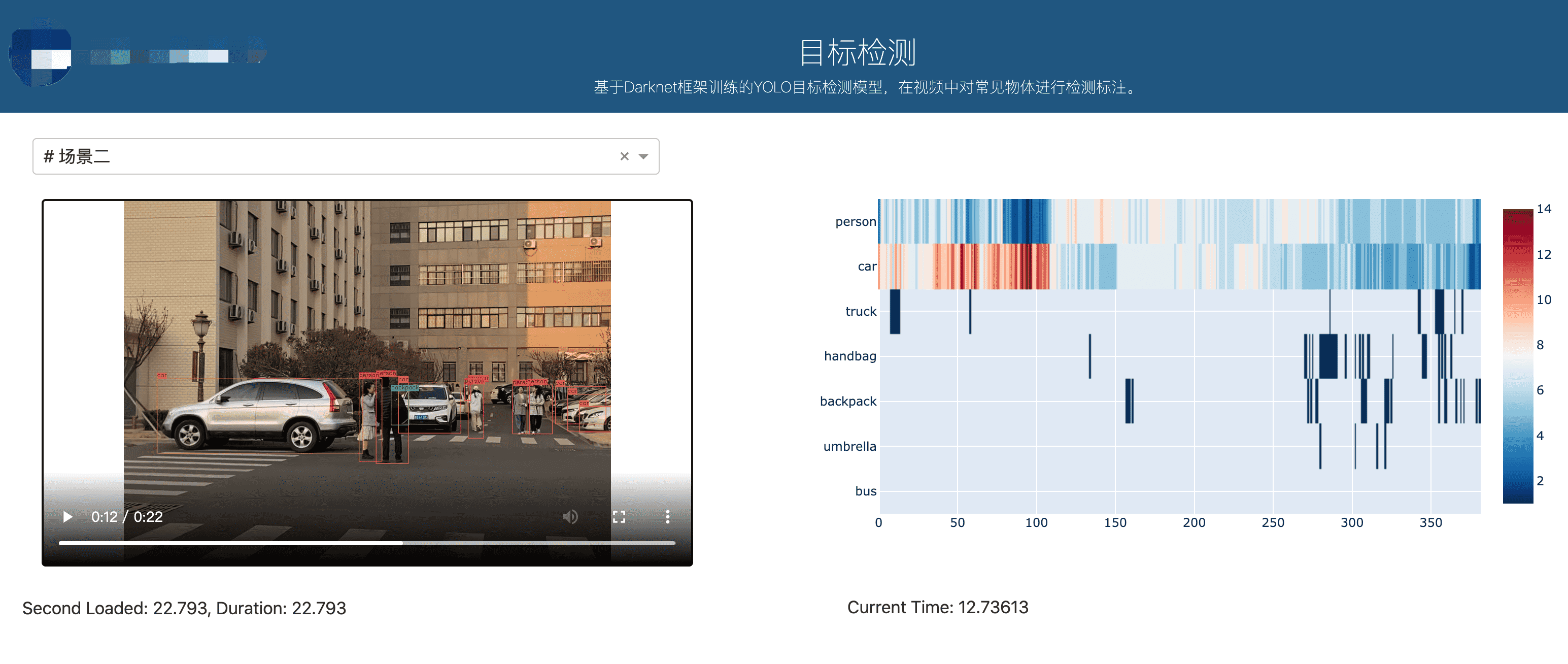
利用Dash poltly搭建的Yolo V3目标检测应用,web可视化检测结果。
Getting started
这里没有用Darknet,借助于Yolo-v3,利用Tensroflow构建的Yolo模型。不过TF的版本真的是最令人头痛的问题。
所以这里声明:
tensorflow-gpu==2.0.0CUDA 10.0CUDNN 7.4.2
下载预训练权重
下载coco数据集预训练的权重。
wget -P weights https://pjreddie.com/media/files/yolov3.weights
将权重转换为TF格式
Load the weights using load_weights.py script. This will convert the yolov3 weights into TensorFlow .ckpt model files!
python load_weights.py
Running the model
You can run the model using detect.py script. The script works on images, video or your webcam. Don’t forget to set the IoU (Intersection over Union) and confidence thresholds.
Usage
python detect.py <images/video/webcam> <iou threshold> <confidence threshold> <filenames>
Images example
Let’s run an example using sample images.
python detect.py images 0.5 0.5 data/images/dog.jpg data/images/office.jpg
Then you can find the detections in the detections folder.
Video example
视频更改了部分指令:
python detect.py video 0.5 0.5 data/video/shinjuku.mp4 outputfilename
这里遇到一个问题,opencv不能够编码X264. 而浏览器只能解析几个格式,这个问题还没有解决。
# fourcc = cv2.VideoWriter_fourcc(*'X264')fourcc = cv2.VideoWriter_fourcc(*'mp4v')# fourcc = cv2.VideoWriter_fourcc(*'vp09')fps = cap.get(cv2.CAP_PROP_FPS)# out = cv2.VideoWriter('./assets/detections/{}.webm'.format(outputname[0]), fourcc, fps,# (int(frame_size[0]), int(frame_size[1])))out = cv2.VideoWriter('./assets/detections/{}.mp4'.format(outputname[0]), fourcc, fps,(int(frame_size[0]), int(frame_size[1])))
- 保存实时的视频流检测结果。
在utils.py中添加自定义函数,将每个frame的检测结果和个数保存成字典,在detect .py while循环中将每一帧的结果保存下来。
def statis_frame(frame, boxes_dicts, class_names,):res = {}boxes_dict = boxes_dicts[0] # 检测结果for cls in range(len(class_names)): #80boxes = boxes_dict[cls]if np.size(boxes) != 0:res[class_names[cls]]=len(boxes)return res
import pandas as pdtry:res = []while True:ret, frame = cap.read()if not ret:breakresized_frame = cv2.resize(frame, dsize=_MODEL_SIZE[::-1],interpolation=cv2.INTER_NEAREST)detection_result = sess.run(detections,feed_dict={inputs: [resized_frame]})draw_frame(frame, frame_size, detection_result,class_names, _MODEL_SIZE)res.append(statis_frame(frame,detection_result,class_names))# cv2.imshow(win_name, frame)key = cv2.waitKey(1) & 0xFFif key == ord('q'):breakout.write(frame)finally:pd.DataFrame(res).to_csv('res_csv/{}.csv'.format(outputname[0]))cv2.destroyAllWindows()cap.release()print('Detections have been saved successfully.')
Webcam example
The script can also be ran using your laptops webcam as the input. Example command shown below.
python detect.py webcam 0.5 0.5
The detections will be saved as ‘detections.mp4’ in the data/detections folder.
Dash App

若有收获,就点个赞吧
0 人点赞


