一、看一个案例(说明二叉排序树可能的问题)
给你一个数列{1,2,3,4,5,6},要求创建一颗二叉排序树(BST), 并分析问题所在
左边 BST 存在的问题分析:
- 左子树全部为空,从形式上看,更像一个单链表.
- 插入速度没有影响
- 查询速度明显降低(因为需要依次比较), 不能发挥 BST 的优势,因为每次还需要比较左子树,其查询速度比 单链表还慢
二、基本介绍
平衡二叉树也叫平衡二叉搜索树(Self-balancing binary search tree)又被称为 AVL 树, 可以保证查询效率较高。
具有以下特点:
它是一 棵空树或它的左右两个子树的高度差的绝对值不超过 1,并且左右两个子树都是一棵 平衡二叉树。平衡二叉树的常用实现方法 有红黑树、AVL、替罪羊树、Treap、伸展树等。
举例说明, 看看下面哪些是 AVL 树, 为什么?
图1、图2是平衡二叉树,左右子树高度差的绝对值不超过1
图3 不是平衡二叉树
三、应用案例-单旋转(左旋转)
要求: 给你一个数列,创建出对应的平衡二叉树.数列 {4,3,6,5,7,8}
思路分析: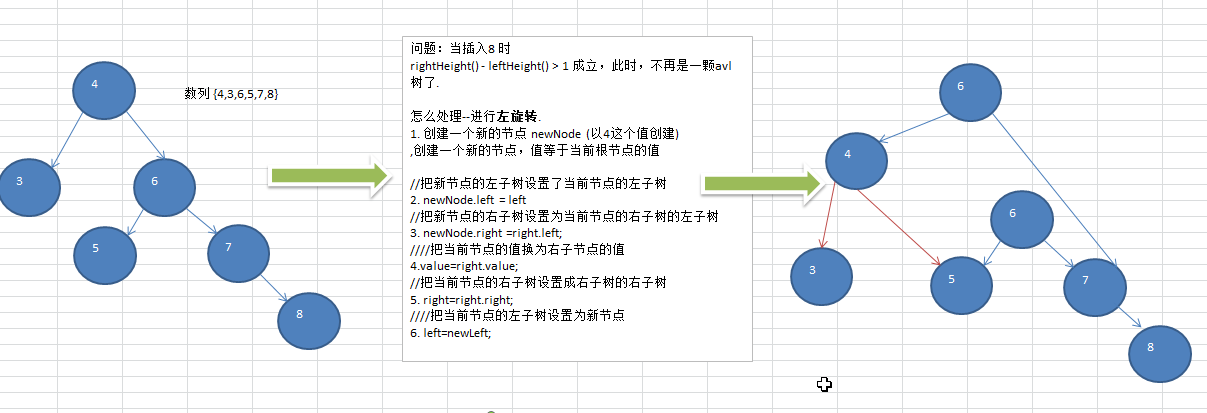
代码实现:(整合的代码放在最后面)
// Node 节点类中定义一个左旋转方法class Node {private int value;private Node left;private Node right;public Node(int value) {this.value = value;}/*** 左旋转*/public void leftRotate() {// 创建一个新节点值 = 当前节点Node newNode = new Node(this.value);// 新节点的左节点 = 当前节点的左节点newNode.setLeft(this.left);// 新节点的右节点 = 当前节点的右节点的左节点newNode.setRight(this.right.getLeft());// 当前节点的左节点 = 新节点this.left = newNode;// 当前节点的值 = 右节点的值this.value = this.right.getValue();// 当前节点的右节点 = 当前节点的右节点的右节点this.right = this.right.getRight();}public int getValue() {return value;}public void setValue(int value) {this.value = value;}public Node getLeft() {return left;}public void setLeft(Node left) {this.left = left;}public Node getRight() {return right;}public void setRight(Node right) {this.right = right;}@Overridepublic String toString() {return "Node{" +"value=" + value +'}';}}
四、应用案例-单旋转(右旋转)
要求: 给你一个数列,创建出对应的平衡二叉树.数列 {10,12, 8, 9, 7, 6}
思路分析:
代码实现:
// Node 节点类中定义一个右旋转方法
class Node {

    private int value;
    private Node left;
    private Node right;

    public Node(int value) {
        this.value = value;
    }

    /**
      * 右旋转
      */
    public void rightRotate() {
        // 创建一个 newNode 值为当前节点
        Node newNode = new Node(this.value);
        // newNode 的右节点 = 当前节点的右节点
        newNode.setRight(this.right);
        // newNode 的左节点 = 当前节点的左节点的右节点
        newNode.setLeft(this.left.getRight());
        // 当前节点的右节点 = newNode
        this.right = newNode;
        // 当前节点的值 = 当前节点的左节点的值
        this.value = this.left.getValue();
        // 当前节点的左节点 = 当前节点的左节点的左节点
        this.left = this.left.getLeft();
    }

    public int getValue() {
        return value;
    }

    public void setValue(int value) {
        this.value = value;
    }

    public Node getLeft() {
        return left;
    }

    public void setLeft(Node left) {
        this.left = left;
    }

    public Node getRight() {
        return right;
    }

    public void setRight(Node right) {
        this.right = right;
    }

    @Override
    public String toString() {
        return "Node{" +
            "value=" + value +
            '}';
    }
}
五、应用案例-双旋转
前面的两个数列,进行单旋转(即一次旋转)就可以将非平衡二叉树转成平衡二叉树,但是在某些情况下,单旋转 不能完成平衡二叉树的转换。
比如数列:
int[] arr = { 10, 11, 7, 6, 8, 9 }; 运行原来的代码可以看到,并没有转成 AVL 树
int[] arr = {2,1,6,5,7,3}; // 运行原来的代码可以看到,并没有转成 AVL 树
问题分析: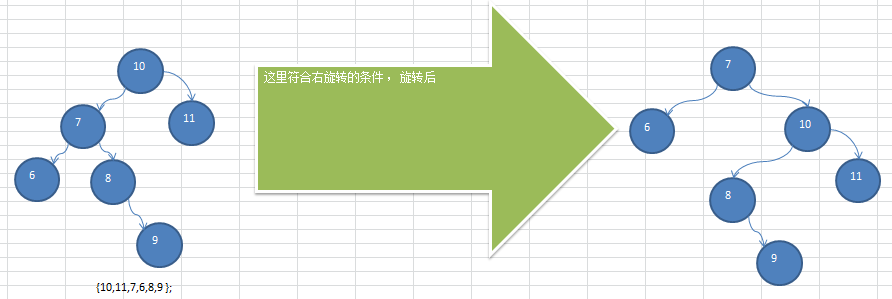
int[] arr = { 10, 11, 7, 6, 8, 9 } 在进行右旋转后还是一个非平衡二叉树
解决思路分析:
在满足右旋转条件时,要判断
- 如果是左子树的 右子树高度大于左子树的左子树时:
- 就是对当前根节点的左子树,先进行 左旋转,
- 然后在对当前根节点进行右旋转即可
否则,直接对当前节点(根节点)进行右旋转.即可
代码实现:( AVL 树的完整代码)
public class AVLTreeDemo {

    public static void main(String[] args) {
        //        int[] arr = {4, 3, 6, 5, 7, 8};
        //        int[] arr = {10, 12, 8, 9, 7, 6};
        int[] arr = {10, 11, 7, 6, 8, 9};
        //        int[] arr = {2, 1, 6, 5, 7, 3};
        AVLTree avlTree = new AVLTree();
        for (int i : arr) {
            avlTree.add(new Node(i));
        }
        System.out.println("平衡处理之后的 二叉树:");
        avlTree.infixOrder();
        Node root = avlTree.getRoot();
        System.out.println("root height:" + root.getHeight());
        System.out.println("root left height:" + root.getLeft().getHeight());
        System.out.println("root right height:" + root.getRight().getHeight());
    }
}

class AVLTree {

    private Node root;

    public void add(Node addNode) {
        if (root == null) {
            root = addNode;
            return;
        }
        root.add(addNode);

        // 如果右子树的高度 - 左子树的高度 > 1 进行左旋转
        if (this.root.getRightHeight() - this.root.getLeftHeight() > 1) {
            // 如果 右子树的左节点高度 > 右子树的右节点高度 那么先进行右旋转
            if (this.root.getRight().getLeftHeight() > this.root.getRight().getRightHeight()) {
                this.root.getRight().rightRotate();
            }
            this.root.leftRotate();
            return;
        }
        // 如果左子树的高度 - 右子树的高度 > 1 进行右旋转
        if (this.root.getLeftHeight() - this.root.getRightHeight() > 1) {
            // 如果左子树的右节点的高度 > 左子树的左节点的高度 那么要先进行左旋转
            if (this.root.getLeft().getRightHeight() > this.root.getLeft().getLeftHeight()) {
                this.root.getLeft().leftRotate();
            }
            // 进行右旋转
            this.root.rightRotate();
        }
    }

    public void infixOrder() {
        this.infixOrder(this.root);
    }

    private void infixOrder(Node node) {
        if (node.getLeft() != null) {
            infixOrder(node.getLeft());
        }
        System.out.println(node);
        if (node.getRight() != null) {
            infixOrder(node.getRight());
        }
    }

    public Node getRoot() {
        return root;
    }

    public void setRoot(Node root) {
        this.root = root;
    }
}

class Node {

    private int value;
    private Node left;
    private Node right;

    public Node(int value) {
        this.value = value;
    }

    /**
      * 左旋转
      */
    public void leftRotate() {
        // 创建一个新节点值 = 当前节点
        Node newNode = new Node(this.value);
        // 新节点的左节点 = 当前节点的左节点
        newNode.setLeft(this.left);
        // 新节点的右节点 = 当前节点的右节点的左节点
        newNode.setRight(this.right.getLeft());
        // 当前节点的左节点 = 新节点
        this.left = newNode;
        // 当前节点的值 = 右节点的值
        this.value = this.right.getValue();
        // 当前节点的右节点 = 当前节点的右节点的右节点
        this.right = this.right.getRight();
    }

    /**
      * 右旋转
      */
    public void rightRotate() {
        // 创建一个 newNode 值为当前节点
        Node newNode = new Node(this.value);
        // newNode 的右节点 = 当前节点的右节点
        newNode.setRight(this.right);
        // newNode 的左节点 = 当前节点的左节点的右节点
        newNode.setLeft(this.left.getRight());
        // 当前节点的右节点 = newNode
        this.right = newNode;
        // 当前节点的值 = 当前节点的左节点的值
        this.value = this.left.getValue();
        // 当前节点的左节点 = 当前节点的左节点的左节点
        this.left = this.left.getLeft();
    }

    public void add(Node addNode) {

        if (this.value > addNode.getValue()) {

            // 如果左边值 null 直接添加
            if (this.left == null) {
                left = addNode;
                return;
            }
            // 否则向左递归
            this.left.add(addNode);
        } else {

            // 如果右边值 null 直接添加
            if (this.right == null) {
                this.right = addNode;
                return;
            }
            // 否则向右递归
            this.right.add(addNode);
        }
    }

    public int getLeftHeight() {
        return this.getLeft() == null ? 0 : this.getLeft().getHeight();
    }

    public int getRightHeight() {
        return this.getRight() == null ? 0 : this.getRight().getHeight();
    }


    public int getHeight() {
        int height = Math.max(this.left == null ? 0 : this.left.getHeight(), this.right == null ? 0 : this.right.getHeight()) + 1;
        return height;
    }

    public int getValue() {
        return value;
    }

    public void setValue(int value) {
        this.value = value;
    }

    public Node getLeft() {
        return left;
    }

    public void setLeft(Node left) {
        this.left = left;
    }

    public Node getRight() {
        return right;
    }

    public void setRight(Node right) {
        this.right = right;
    }

    @Override
    public String toString() {
        return "Node{" +
            "value=" + value +
            '}';
    }
}

若有收获,就点个赞吧
0 人点赞


