数据缓存
uni.setStorage
官方文档:https://uniapp.dcloud.io/api/storage/storage?id=setstorage
将数据存储在本地缓存中指定的key中,会覆盖掉原来该key对应的内容,这是一个异步接口。
代码演示:
<template><view><button @click="getApi">发送get请求</button><button type="primary" @click='setStorge'>存储数据</button><button type="default" @click='getStorge'>获取数据</button><button type="default" @click='removeId'>移除数据</button><view>这是列表页面</view><view v-for="(item,index) in list" :key='index'>{{item}}<br></view><button type="default" @click="pullDown">下拉刷新</button></view></template><script>export default {data() {return {list:['前端','JAVA','UI','测试','大数据']}},onPullDownRefresh() {console.log('触发了下拉刷新')setTimeout(()=>{this.list = ['JAVA','UI','测试','大数据','前端'] //下拉刷新更新了数据,但是还在不停刷新uni.stopPullDownRefresh()},2000) //加了一个延时2秒},onReachBottom(){console.log('页面触底了')this.list = [...this.list,...['JAVA1','UI1','测试1','大数据1','前端1']]},methods: {pullDown(){//点击按钮触发下拉刷新uni.startPullDownRefresh()},getApi(){uni.request({url:'http://localhost:8082/api/getlunbo',success(res){console.log(res.data.message)}})},//存储数据setStorge(){// uni.setStorage({// key:'id',// data:80,// success(){// console.log('存储成功')// }// })//第二种方法uni.setStorageSync('id',110)},//获取数据getStorge(){// uni.getStorage({// key:'id',// success(res){// console.log("获取成功",res.data)// }// })//第二种方法const res = uni.getStorageSync('id')console.log(res)},//移除数据removeId(){// uni.removeStorage({// key:'id',// success(){// console.log('移除成功')// }// })//第二种方法uni.removeStorageSync('id')}}}</script><style></style>
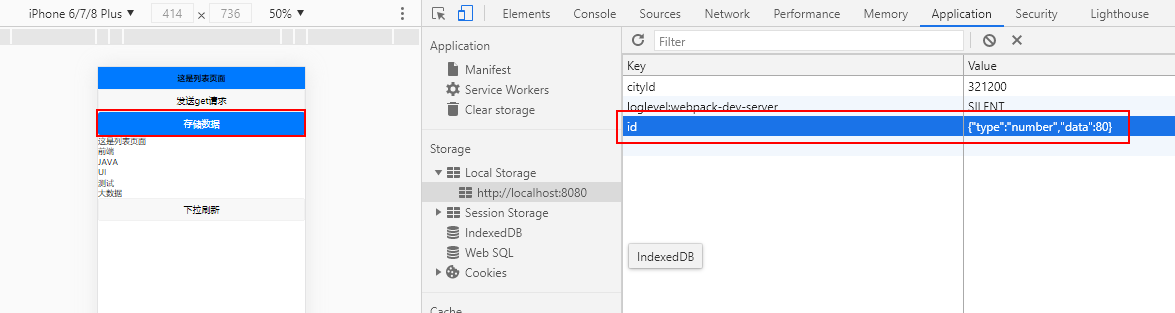
这里主要讲了 存储数据 获取数据 以及移除数据 三种方式
具体的可以看上面的代码

若有收获,就点个赞吧
0 人点赞


