条件注释实现跨端兼容
条件编译是用特殊的注释作为标记,在编译时根据这些特殊的注释,将注释里面的代码编译到不同平台。
写法:以#fidef 加平台标识 开头,以#endif结尾。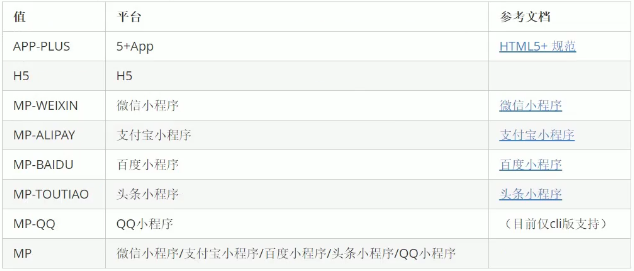
组件的条件注释
代码演示:
<template><view><button type="default" @click='chooseImg'>上传图片</button><image v-for='item in imgArr' :src="item" @click='previewImg(item)'></image><!-- #ifdef H5--><view>我希望只在h5页面中看见</view><!-- #endif --><!-- #ifdef MP-WEIXIN--><view>我希望只在微信小程序中看见</view><!-- #endif --></view></template><script>export default {data() {return {imgArr:[]}},methods: {chooseImg(){uni.chooseImage({count:5,//限制上传图片的数量success:res=>{this.imgArr = res.tempFilePaths}})},onLoad(){//#ifdef H5console.log('我希望h5中打印')//#endif//#ifdef MP-WEIXINconsole.log('我希望在微信小程序打印')//#endif},previewImg(current){//console.log(current) 拿到相应的图片路径uni.previewImage({current,urls:this.imgArr,loop:true,indicator:'number'})}}}</script><style>/* h5中的样式 *//* #ifdef H5 */view{color:hotpink;}/* #endif *//* #ifdef MP-WEIXIN */view{color:blue;}/* #endif */</style>
<!-- #ifdef H5-->
        <view>
            我希望只在h5页面中看见
        </view>
<!-- #endif -->
模板以及样式以及js都可以这样注释!

若有收获,就点个赞吧
0 人点赞


