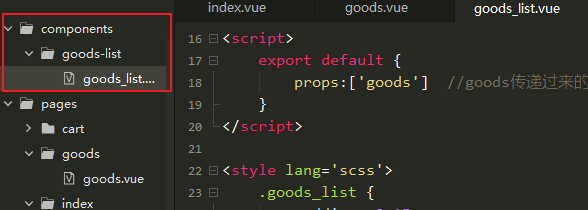
新建组件目录。goods_list的代码如下:
<template><view class='goods_list'><view class='goods_item' v-for="item in goods" :key="item.id"><image :src='item.img_url'></image><view class='price'><text>¥{{item.sell_price}}</text><text>¥{{item.market_price}}</text></view><view class="name">{{item.title}}</view></view></view></template><script>export default {props:['goods'] //goods传递过来的数据}</script><style lang='scss'>.goods_list {padding: 0 15rpx;display: flex;flex-wrap: wrap;justify-content: space-between;.goods_item {background: #fff;width: 355rpx;margin: 10rpx 0;padding: 15rpx;box-sizing: border-box; //不会撑开盒子了image {width: 95%;height: 200px;display: block;margin: 0 auto; //上面下面实现居中}.price {color: $shop-color;font-size: 36rpx;margin: 5rpx 0;text:nth-child(2) {color: #CCC;font-size: 28rpx;margin-left: 17rpx;text-decoration: line-through;}}.name {font-size: 22rpx;line-height: 40rpx;}}}</style>
原来主页的代码index.vue 如下:
<template><view class='home'><swiper indicator-dots circular><swiper-item v-for='item in swipers' :key='item.id'><image :src='item.img'></image></swiper-item></swiper><!--导航--><view class='nav'><view class='nav_item' v-for="(item,index) in navs" :key='index' @click="navItemClick(item.path)"><view :class='item.icon'></view><text>{{item.title}}</text></view></view><!--推荐商品--><view class='hot_goods'><view class='tit'>推荐商品</view><goods-list :goods='goods'></goods-list></view></view></template><script>import goodsList from '../../components/goods-list/goods_list.vue'export default {data() {return {swipers: [],goods: [],navs:[{icon:'iconfont icon-ziyuan',title:'黑马超市',path:'/pages/goods/goods'},{icon:'iconfont icon-guanyuwomen',title:'联系我们',path:'/pages/contact/contact'},{icon:'iconfont icon-tupian',title:'社区图片',path:'/pages/pics/pics'},{icon:'iconfont icon-shipin',title:'学习视频',path:'/pages//videos/videos'}]}},onLoad() { //监听页面加载this.getSwiper()this.getHotGoods()},components:{"goods-list":goodsList},methods: {//获取轮播数据async getSwiper() {const res = await this.$myRequest({url: '/api/getlunbo'})this.swipers = res.data.message},//获取热门商品列表数据async getHotGoods() {const res = await this.$myRequest({url: '/api/getgoods?pageindex=1'})this.goods = res.data.message},//导航点击的处理navItemClick(url){//console.log('跳转')uni.navigateTo({url})}}}</script><style lang="scss">.home {swiper {width: 750rpx;height: 380rpx;image {height: 100%;width: 100%;}}.nav {display: flex;.nav_item {width: 25%;text-align: center;view {width: 120rpx;height: 120rpx;background-color: $shop-color;border-radius: 60rpx;margin: 10px auto;line-height: 120rpx;color: #fff;font-size: 50rpx;}.icon-tupian {font-size: 45rpx;}text {font-size: 30rpx;}}}.hot_goods {background: #eee;overflow: hidden;margin-top: 10px;.tit {height: 50px;line-height: 50px;color: $shop-color;text-align: center;letter-spacing: 20px;font-size: 20px;margin: 7rpx 0;background: #fff;}}}</style>
商品列表页的代码如下:
<template><view class='goods_list'> <!--加入灰色的背景--><goods-list :goods="goods"></goods-list></view></template><script>import goodsList from '../../components/goods-list/goods_list.vue'export default {data() {return {pageindex:1,goods:[]};},components:{'goods-list':goodsList},methods:{//获取商品列表数据async getGoodsList(){const res = await this.$myRequest({url : '/api/getgoods?pageindex='+this.pageindex})this.goods = res.data.message}},onLoad(){this.getGoodsList()}}</script><style lang="scss">.goods_list{background: #eee;}</style>
注意上面获取商品的数据,还是调用了封装的方法!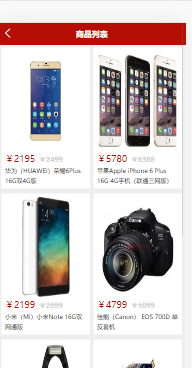

若有收获,就点个赞吧
0 人点赞


