<template><view class='goods_list'> <!--加入灰色的背景--><goods-list :goods="goods"></goods-list><view class='isOver' v-if='flag'>---我是有底线的---</view></view></template><script>import goodsList from '../../components/goods-list/goods_list.vue'export default {data() {return {pageindex:1,goods:[],flag:false};},components:{'goods-list':goodsList},methods:{//获取商品列表数据async getGoodsList(callback){const res = await this.$myRequest({url : '/api/getgoods?pageindex='+this.pageindex})//this.goods = res.data.messagethis.goods = [...this.goods,...res.data.message]callback && callback() //如果有这个回调函数就调用}},onLoad(){this.getGoodsList()},//下拉刷新onReachBottom() { //触底就会触发这个函数console.log('触底反弹')if(this.goods.length<10*(this.pageindex-1)){return this.flag = true}this.pageindex++ //页码书进行加1this.getGoodsList()},onPullDownRefresh() {console.log('下拉刷新了')this.pageindex = 1this.goods= []this.flag = falsesetTimeout(()=>{this.getGoodsList(()=>{uni.stopPullDownRefresh()})},1000)}}</script><style lang="scss">.goods_list{background: #eee;}.isOver{width:100%;height:50px;line-height: 50px;text-align: center;font-size:28px;}</style>
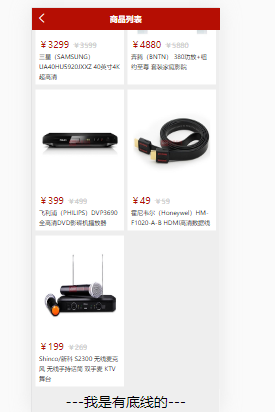
注意里面回调函数的应用!认真看代码

若有收获,就点个赞吧
0 人点赞


