在uni-app中,可以通过创建一个后缀名为vue的文件,即创建一个组件成功,其他组件可以将该组件通过import的方式导入,在通过components进行注册即可。
- 创建login组件,在component中创建login目录,然后新建login.vue

test.vue代码
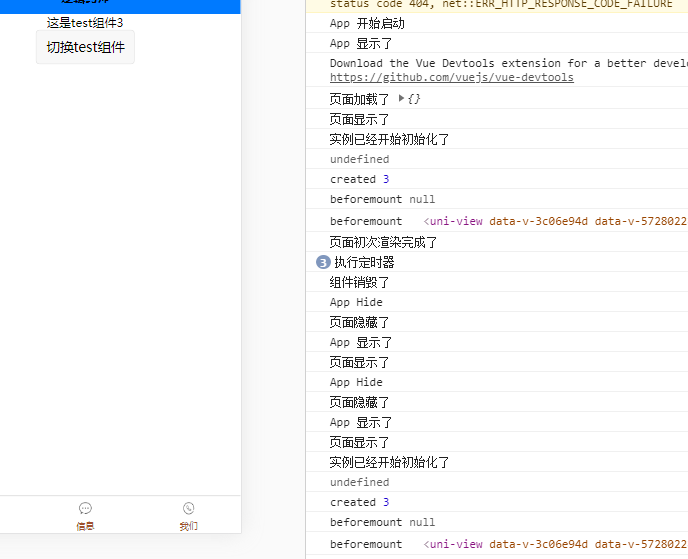
<template><view id='myView'>这是test组件{{num}}</view></template><script>export default {data() {return {num:3};},beforeCreate(){console.log("实例已经开始初始化了")console.log(this.num) //这里没有定义},created() { //一般用来数据的初始化console.log('created',this.num)this.intId = setInterval(()=>{console.log('执行定时器')},1000)},beforeMount() {console.log('beforemount',document.getElementById('myView'))},mounted() {console.log('beforemount',document.getElementById('myView'))},destroyed() {console.log('组件销毁了')clearInterval(this.intId) //清楚定时器}}</script><style lang="less"></style>
index.vue代码
<template>
    <view class="content">
        <test v-if="flag"></test>
        <button type="default" @click="checkTest">切换test组件</button>
    </view>
</template>

<script>
    import test from '../../components/test.vue'
    export default {
        data() {
            return {
                title: 'Hello',
                flag:true
            }
        },
        onLoad(options) {
            console.log('页面加载了',options)
        },
        onShow(){
            console.log('页面显示了')
        },
        onReady() {
            console.log('页面初次渲染完成了')
        },
        onHide() {
            console.log('页面隐藏了')
        },
        methods: {
            checkTest(){
                this.flag = !this.flag
            }
        },
        components:{
            test
        }
    }
</script>

<style>
    .content {
        display: flex;
        flex-direction: column;
        align-items: center;
        justify-content: center;
    }

    .logo {
        height: 200rpx;
        width: 200rpx;
        margin-top: 200rpx;
        margin-left: auto;
        margin-right: auto;
        margin-bottom: 50rpx;
    }

    .text-area {
        display: flex;
        justify-content: center;
    }

    .title {
        font-size: 36rpx;
        color: #8f8f94;
    }
</style>

若有收获,就点个赞吧
0 人点赞


