uni的生命周期
应用的生命周期
生命周期的概念:一个对象从创建、运行、销毁的整个过程被称为生命周期。
生命周期函数:在生命周期中每个阶段会伴随着每一个函数的触发,这些函数被称为生命中周期函数, uni-app 支持如下应用生命周期函数: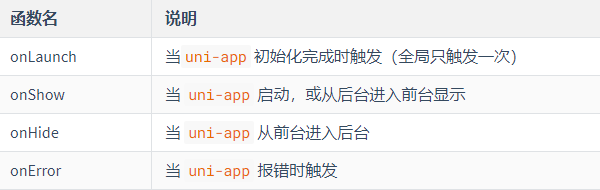
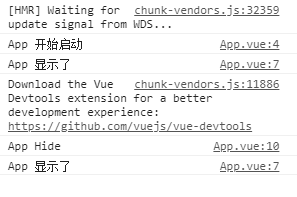
APP.vue代码
<script>export default {onLaunch: function() {console.log('App 开始启动')},onShow: function() {console.log('App 显示了')},onHide: function() {console.log('App Hide')},onError: function() {console.log('App Error')}}</script><style>/*每个页面公共css */@import url('./static/fonts/iconfont.css');.box1{background: #007AFF;padding:5rpx;}</style>
页面的生命周期
uni-app 支持如下页面生命周期函数: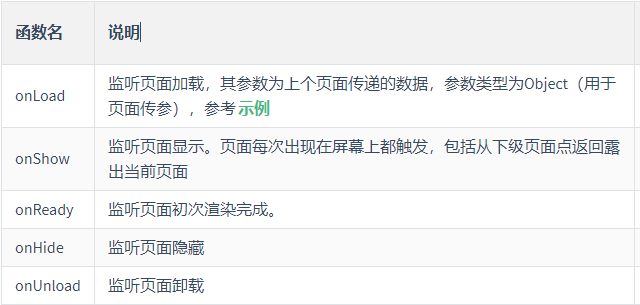
<template>
    <view class="content">
        <image class="logo" src="/static/logo.png"></image>
        <view class="text-area">
            <text class="title">{{title}}</text>
        </view>
    </view>
</template>

<script>
    export default {
        data() {
            return {
                title: 'Hello'
            }
        },
        onLoad(options) {
            console.log('页面加载了',options)
        },
        onShow(){
            console.log('页面显示了')
        },
        onReady() {
            console.log('页面初次渲染完成了')
        },
        onHide() {
            console.log('页面隐藏了')
        },
        methods: {

        }
    }
</script>

<style>
    .content {
        display: flex;
        flex-direction: column;
        align-items: center;
        justify-content: center;
    }

    .logo {
        height: 200rpx;
        width: 200rpx;
        margin-top: 200rpx;
        margin-left: auto;
        margin-right: auto;
        margin-bottom: 50rpx;
    }

    .text-area {
        display: flex;
        justify-content: center;
    }

    .title {
        font-size: 36rpx;
        color: #8f8f94;
    }
</style>
onShow 和 onHide 可以多次运行。

若有收获,就点个赞吧
0 人点赞


