安装java8环境
之前已经安装好的话可跳过这一步
使用root用户操作
下载Java 8SE
jdk-8u241-linux-x64.tar.gz
安装Java 8SE
cd /root/Desktop/1 #该目录是介质所在目录
tar xvfz jdk-8u241-linux-x64.tar.gz -C /usr
ln -s /usr/jdk1.8.0_241 /usr/jdk
cat>> **/etc/profile**<<EOF
JAVA_HOME=/usr/jdk
export JAVA_HOME
CLASSPATH=.:\$JAVA_HOME/lib:\$CLASSPATH
export CLASSPATH
PATH=\$JAVA_HOME/bin:\$PATH
export PATH
EOF
使配置文件生效
source /etc/profile
查看java是否安装成功
java -version
下载Hadoop 2.7.7源代码并编译
编译hadoop2.7.7可参考之前的文档:https://www.yuque.com/duyanyao/bn83p9/cg72bi
以root用户执行如下:
cd /opt
mkdir hadoop-2.7.7
chown hadoop.hadoop hadoop-2.7.7/
ln -s /opt/hadoop-2.7.7 /opt/hadoop
chown hadoop.hadoop hadoop
以hadoop用户执行如下:
cd /home/hadoop/Desktop/1
tar xvfz hadoop-2.7.7.tar.gz -C /opt
下载hadoop2x-eclipse-plugin源代码:
下载地址是https://github.com/winghc/hadoop2x-eclipse-plugin
以hadoop用户执行
cd /home/hadoop/Desktop/1
unzip hadoop2x-eclipse-plugin-master.zip
下载并安装eclipse
eclipse-java-oxygen-3a-linux-gtk-x86_64.tar.gz
创建Eclipse安装目录
以root用户的身份执行如下:
mkdir /opt/eclipse
chown -R hadoop.hadoop /opt/eclipse
解压Eclipse软件
用hadoop用户执行如下:
cd /home/hadoop/Desktop/1 #该目录是介质所在目录
tar xvfz eclipse-java-oxygen-3a-linux-gtk-x86_64.tar.gz -C /opt
cat>> /etc/profile<<EOF
export ECLIPSE_HOME=/opt/eclipse
export PATH=\$ECLIPSE_HOME:\$PATH
EOF
下载并安装Ant
下载地址:https://ant.apache.org/bindownload.cgi
apache-ant-1.9.4-bin.tar.gz
以root用户执行如下:
cd /root/Desktop/1
tar xvfz apache-ant-1.9.4-bin.tar.gz -C /usr
mv /usr/apache-ant-1.9.4 /usr/ant
cat>> /etc/profile<<EOF
export ANT_HOME=/usr/ant
export PATH=\$ANT_HOME/bin:\$PATH
EOF
使配置文件生效
source /etc/profile
查看ant版本:
ant -version
修改依赖包版本文件libraries.properties
参考目录/opt/hadoop/share/hadoop/common/lib中的文件,来修改libraries.properties相应的版本号。
cd /opt/hadoop/share/hadoop/common/lib
ls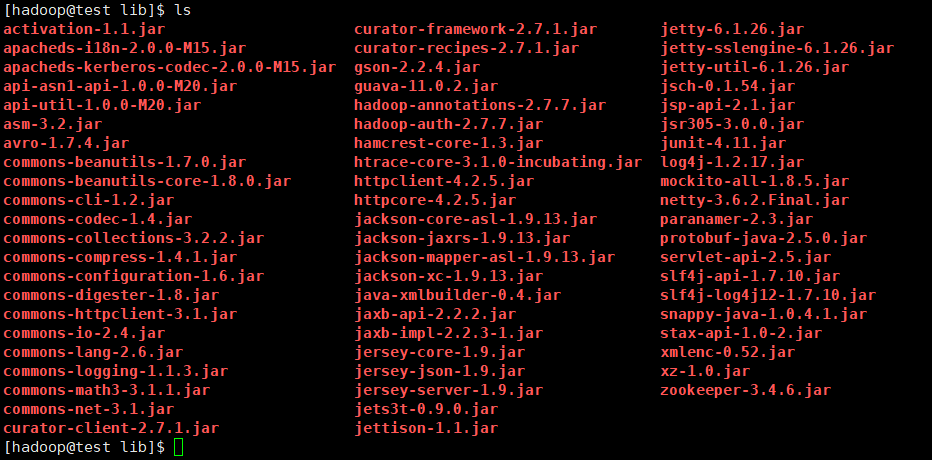
对 libraries.properties进行修改
cd /home/hadoop/Desktop/1/hadoop2x-eclipse-plugin-master/ivy
vi libraries.properties
编辑完成后查看该文件的内容
cat libraries.properties
# Licensed under the Apache License, Version 2.0 (the "License");# you may not use this file except in compliance with the License.# You may obtain a copy of the License at## http://www.apache.org/licenses/LICENSE-2.0## Unless required by applicable law or agreed to in writing, software# distributed under the License is distributed on an "AS IS" BASIS,# WITHOUT WARRANTIES OR CONDITIONS OF ANY KIND, either express or implied.# See the License for the specific language governing permissions and# limitations under the License.#This properties file lists the versions of the various artifacts used by hadoop and components.#It drives ivy and the generation of a maven POM# This is the version of hadoop we are generatinghadoop.version=2.7.7hadoop-gpl-compression.version=0.1.0#These are the versions of our dependencies (in alphabetical order)apacheant.version=1.9.4ant-task.version=2.0.10asm.version=3.2aspectj.version=1.6.5aspectj.version=1.6.11checkstyle.version=4.2commons-cli.version=1.2commons-codec.version=1.4commons-collections.version=3.2.2commons-configuration.version=1.6commons-daemon.version=1.0.13commons-httpclient.version=3.1commons-lang.version=2.6commons-logging.version=1.1.3commons-logging-api.version=1.1.3commons-math.version=3.1.1commons-el.version=1.0commons-fileupload.version=1.2commons-io.version=2.4commons-net.version=3.1core.version=3.1.1coreplugin.version=1.3.2hsqldb.version=1.8.0.10htrace.version=3.1.0ivy.version=2.1.0jasper.version=5.5.12jackson.version=1.9.13#not able to figureout the version of jsp & jsp-api version to get it resolved throught ivy# but still declared here as we are going to have a local copy from the lib folderjsp.version=2.1jsp-api.version=2.1jsp-api-2.1.version=6.1.14jsp-2.1.version=6.1.14jets3t.version=0.9.0jetty.version=6.1.26jetty-util.version=6.1.26jersey-core.version=1.8jersey-json.version=1.8jersey-server.version=1.8junit.version=4.11jdeb.version=0.8jdiff.version=1.0.9json.version=1.0kfs.version=0.1log4j.version=1.2.17lucene-core.version=2.3.1mockito-all.version=1.8.5jsch.version=0.1.42oro.version=2.0.8rats-lib.version=0.5.1servlet.version=4.0.6servlet-api.version=2.5slf4j-api.version=1.7.10slf4j-log4j12.version=1.7.10wagon-http.version=1.0-beta-2xmlenc.version=0.52xerces.version=1.4.4protobuf.version=2.5.0guava.version=11.0.2netty.version=3.6.2.Final
修改build.xml文件
cd /home/hadoop/Desktop/1/hadoop2x-eclipse-plugin-master/src/contrib/eclipse-plugin
vi build.xml
添加以下绿色的行(如果有就不需要!)
删除替换**
删除以下行
替换成
删除lib的最后一行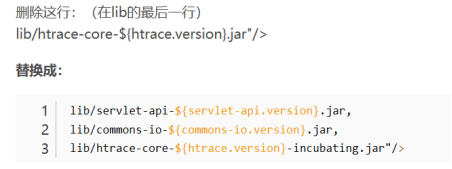
lib/servlet-api-${servlet-api.version}.jar
lib/commons-io-${commons-io.version}.jar
lib/htrace-core-${htrace.version}-incubating.jar”/>
修改代码
修改文件build.xml(位置:…\hadoop2x-eclipse-plugin-master\src\contrib\eclipse-plugin)
把这一行(大概在68行左右)原来的target中的depends=“init, ivy-retrieve-common” 去掉其中的 ivy-retrieve-common后重新编译
cd /home/hadoop/Desktop/1/hadoop2x-eclipse-plugin-master/src/contrib/eclipse-plugin
vi build.xml
set nu #显示行号
编译eclipse插件
cd /home/hadoop/Desktop/1/hadoop2x-eclipse-plugin-master/src/contrib/eclipse-plugin
ant jar -Dversion=2.7.7 -Dhadoop.version=2.7.7 -Declipse.home=/opt/eclipse -Dhadoop.home=/opt/hadoop -debug
version: plugin version
hadoop.version: hadoop version you want to compiled with
eclipse.home: path of eclipse home
hadoop.home: path of hadoop 2.x home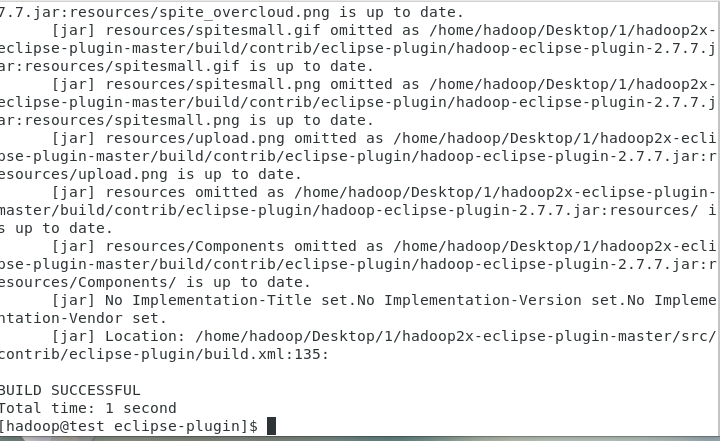
编译好的jar包
cd /home/hadoop/Desktop/1/hadoop2x-eclipse-plugin-master/build/contrib/eclipse-plugin
ls
错误:
1.bash: ls: command not found…
Similar command is: ‘lz
https://blog.csdn.net/u013129944/article/details/53906148
解决办法:
使用绝对命令vi打开profile
/bin/vi /etc/profile
添加:
export PATH=/usr/local/sbin:/usr/local/bin:/sbin:/bin:/usr/sbin:/usr/bin:/root/bin

若有收获,就点个赞吧
0 人点赞


