资料区
Json的jar包:gson-2.2.4.jar (使用其中的Gson)
可以查看ajax的文档:
一、什么是 JSON?
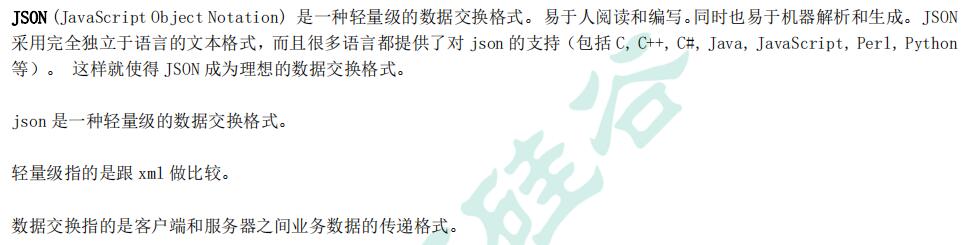
1. json 的定义

json定义示例
下面演示了,对应value可以是数字、字符串、boolean类型,数组(包含基本类型)、json、数组(包含多个json)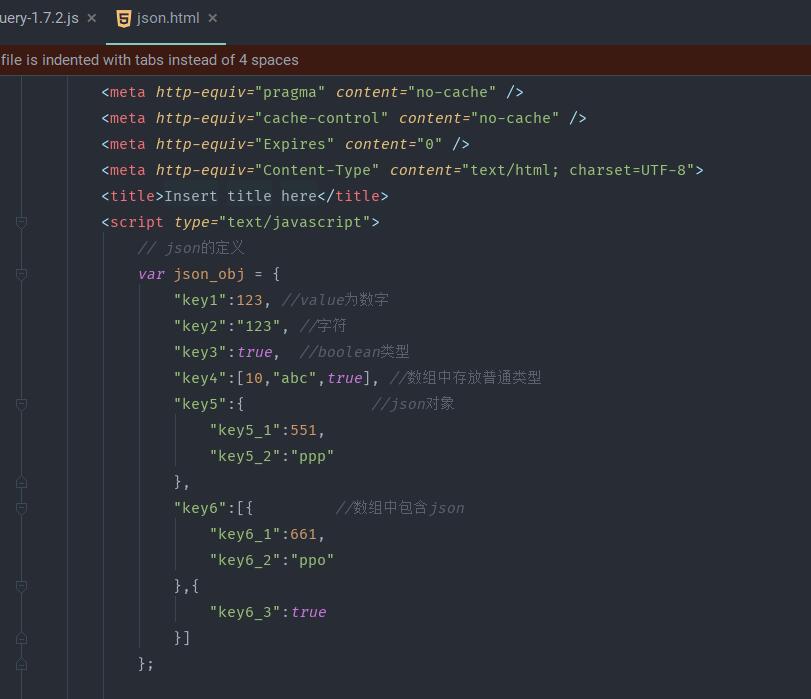
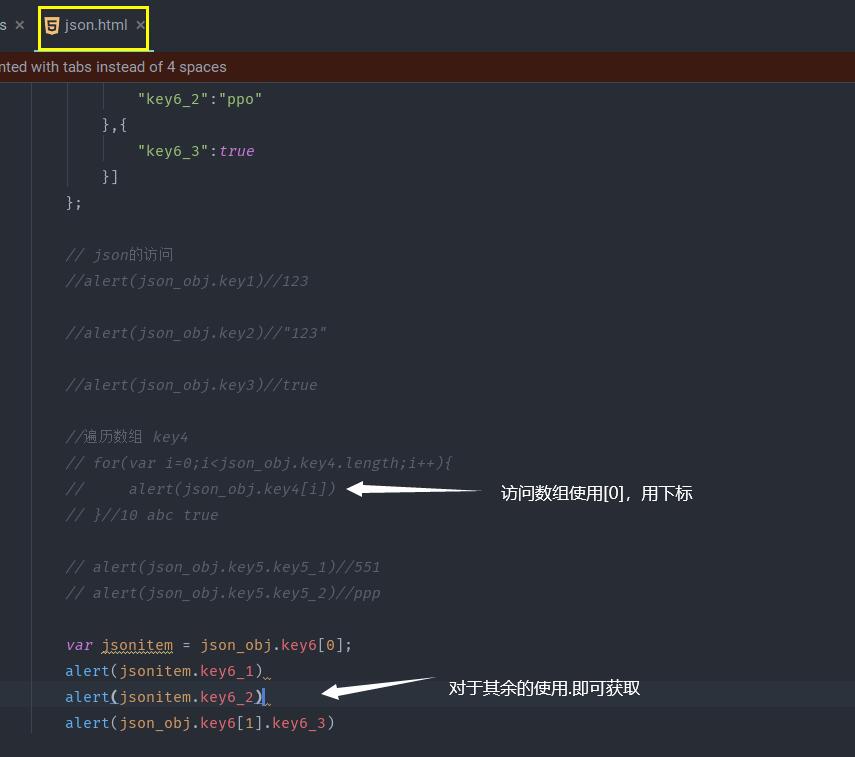
2. json 的访问
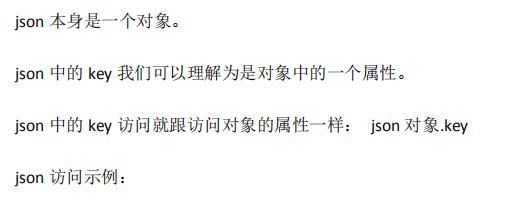
访问示例演示
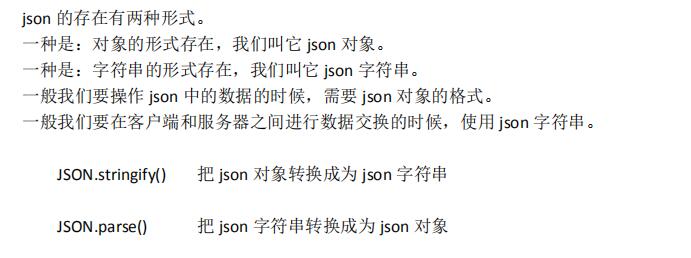
3. json 的两个常用方法
存在的形式以及方法的使用
示例代码:
<!DOCTYPE html PUBLIC "-//W3C//DTD HTML 4.01 Transitional//EN" "http://www.w3.org/TR/html4/loose.dtd"><html><head><meta http-equiv="pragma" content="no-cache" /><meta http-equiv="cache-control" content="no-cache" /><meta http-equiv="Expires" content="0" /><meta http-equiv="Content-Type" content="text/html; charset=UTF-8"><title>Insert title here</title><script type="text/javascript">// json的定义var json_obj = {"key1":123, //value为数字"key2":"123", //字符"key3":true, //boolean类型"key4":[10,"abc",true], //数组中存放普通类型"key5":{ //json对象"key5_1":551,"key5_2":"ppp"},"key6":[{ //数组中包含json"key6_1":661,"key6_2":"ppo"},{"key6_3":true}]};// json对象转字符串//直接打印演示alert(json_obj) //[object Object]var jsonString = JSON.stringify(json_obj);alert(jsonString) //特别像java中对应一个对象使用toString()方法// json字符串转json对象var json_obj1 = JSON.parse(jsonString);//转换为json对象alert(json_obj1.key1) //123alert(json_obj1.key2) //123</script></head><body></body></html>
这是打印转为字符串的: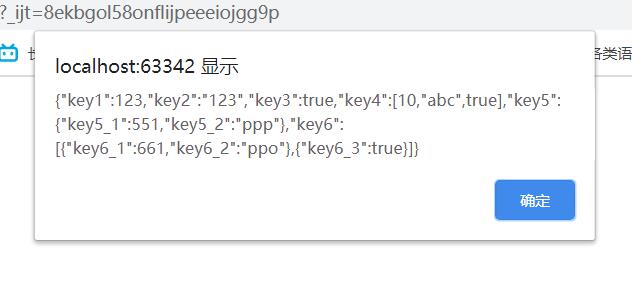
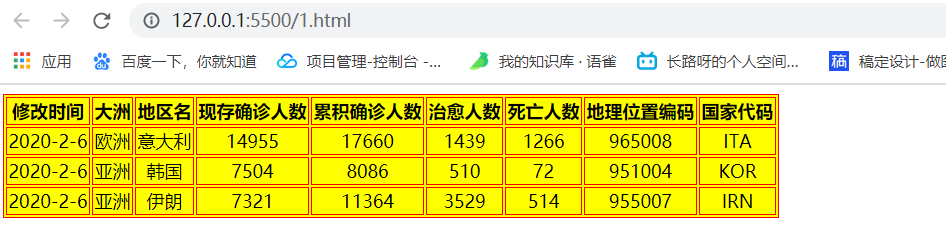
例子
<!DOCTYPE html><html lang="en"><head><meta charset="UTF-8"><meta http-equiv="X-UA-Compatible" content="IE=edge"><meta name="viewport" content="width=device-width, initial-scale=1.0"><title>Document</title></head><body><table id="conTable" class="text-align:center"><tr><th>修改时间</th><th>大洲</th><th>地区名</th><th>现存确诊人数</th><th>累积确诊人数</th><th>治愈人数</th><th>死亡人数</th><th>地理位置编码</th><th>国家代码</th></tr></table><script>var jsonData = {"code": 200,"msg": "success","newslist": [{"modifyTime": 1584169662000,"continents": "欧洲","provinceName": "意大利","currentConfirmedCount": 14955,"confirmedCount": 17660,"curedCount": 1439,"deadCount": 1266,"locationId": 965008,"countryShortCode": "ITA"},{"modifyTime": 1584169662000,"continents": "亚洲","provinceName": "韩国","currentConfirmedCount": 7504,"confirmedCount": 8086,"curedCount": 510,"deadCount": 72,"locationId": 951004,"countryShortCode": "KOR"},{"modifyTime": 1584169662000,"continents": "亚洲","provinceName": "伊朗","currentConfirmedCount": 7321,"confirmedCount": 11364,"curedCount": 3529,"deadCount": 514,"locationId": 955007,"countryShortCode": "IRN"}]}//转换日志格式(传入时间戳)function dateFormat(longTypeDate) {var dateType = "";var date = new Date();date.setTime(longTypeDate);dateType = date.getFullYear(date) + "-" + date.getMonth(date) + "-" + date.getDay(date);//yyyy-MM-dd格式日期return dateType;}//获取到body中的table元素var table = document.getElementById("conTable");//获取json中的key为newslist的value值var newsList = jsonData.newslist;//遍历数组中的内容(单个数组中包含多个key、value)for (var i = 0; i < newsList.length; i++) {//定义一个tr标签var newTr = document.createElement("tr");newTr.setAttribute("center", "align");//获取到数组指定下标是一堆键值对,所以我们可以使用for in来遍历所有的keyvaluefor (key in newsList[i]) {//这里key对应数组下标中的key值//console.log(newsList[i][key])//newsList[0][key]获取指定key的value值//创建一个td标签var newTd = document.createElement("td");newTd.innerHTML = key == "modifyTime" ? dateFormat(newsList[i][key]) : newsList[i][key];//在td标签中添加内容//将td标签插入到tr中newTr.appendChild(newTd);}table.appendChild(newTr);//插入到表格中}</script><style>table,th,td {border: 1px solid red;background-color: yellow;text-align: center;}</style></body></html>
4. JSON 在 java 中的使用
说明:进行转换之前需要进行导包,是资料区的jar包
① javaBean 和 json 的互转
说明:首先需要创建Gson的实例
1.JavaBean转为Json 使用toJson(person)
2.Json转为JavaBean,使用fromJson(str,class
package com.mjj.test;

import com.google.gson.Gson;
import com.mjj.bean.Person;
import org.junit.Test;

/**
 * @anthor changlu
 * @create 2020-08-03-16:31
 */
public class JSONTest {

    @Test
    //JavaBean与Json互转
    public void test01() {
        Person person = new Person(12, "长路");
        //创建Gson实例
        Gson gson = new Gson();
        //1.使用toJson将JavaBean转为Json格式的字符串
        String PersonToJson = gson.toJson(person);
        System.out.println(PersonToJson);//                {"id":12,"name":"长路"}

        //2.使用fromJson将Json转为JavaBean
        // 第一个参数是 json 字符串
        // 第二个参数是转换回去的 Java 对象类型
        Person JsonToPerson = gson.fromJson(PersonToJson, person.getClass());
        System.out.println(JsonToPerson);//                Person{id=12, name='长路'}

    }

}
② List 和 json 的互转
说明:
① 对于list转为json还是直接使用gson.toJson(list)即可转换
② 对于json转为list,需要使用到 fromJson(String json, Type typeOfT)这个方法,传入的参数为Type类型,那么我们需要自己创建一个类并继承Gson这个jar包中的TypeToken
创建一个类:为之后json转为list作准备
package com.mjj.bean;

import com.google.gson.reflect.TypeToken;

import java.util.ArrayList;

/**
 * @anthor changlu
 * @create 2020-08-03-17:02
 */
public class PersonListType extends TypeToken<ArrayList<Person>> {
}
TypeToken类说明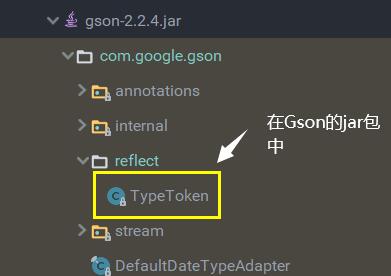
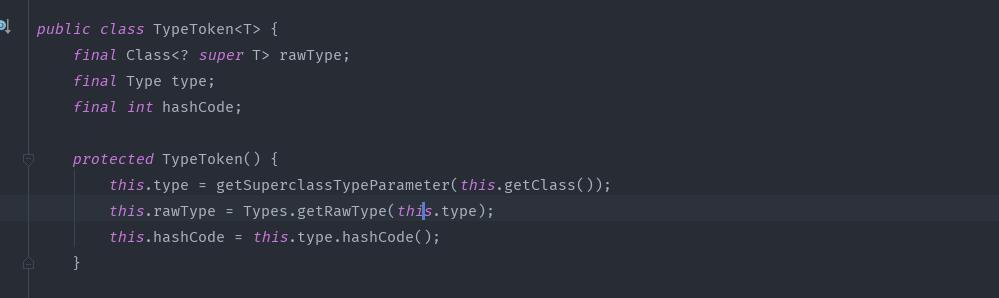

注意:需要注意的是json转为list,需要创建一个类来继承jar包中的类进行
    @Test
    //list与Json进行互转
    public void test02(){
        List<Person> list = new ArrayList<>();
        list.add(new Person(1,"长路"));
        list.add(new Person(2,"林儿"));

        Gson gson = new Gson();
        //1.将list转为Json
        String toJson = gson.toJson(list);
        System.out.println(toJson);//          [{"id":1,"name":"长路"},{"id":2,"name":"林儿"}]

        //2.将json转为list,使用fromJson(str,Type)
        List<Person> personList = gson.fromJson(toJson, new PersonListType().getType());
        System.out.println(personList);//     [Person{id=1, name='长路'}, Person{id=2, name='林儿'}]
        System.out.println(personList.get(0));//  Person{id=1, name='长路'}
    }
③ map 和 json 的互转
Map转为Json:依旧使用toJson(Object src)
Json转为Map:使用fromJson(String json, Type typeOfT),和List相似
说明:这里使用了匿名内部类的方式调用方法获取到Type类型
    @Test
    //Map与Json进行相互转换
    public void test03(){
        Map<Integer,Person> map = new HashMap<>();
        map.put(1,new Person(1,"changlu"));
        map.put(2,new Person(2,"linling"));

        Gson gson = new Gson();
        //1.将Map类型转为Json
        String toJson = gson.toJson(map);
        System.out.println(toJson);//        {"1":{"id":1,"name":"changlu"},"2":{"id":2,"name":"linling"}}

        //2.将Json类型转为Map  这里使用到了匿名内部类
        Map<Integer,Person> map1 = gson.fromJson(toJson, new TypeToken<HashMap<Integer, Person>>() {
        }.getType());

        System.out.println(map1);//          {1=Person{id=1, name='changlu'}, 2=Person{id=2, name='linling'}}
        System.out.println(map1.get(1));//   Person{id=1, name='changlu'}
    }
总结说明
对于单个JavaBean对象JSON格式为:{“id”:12,”name”:”长路”}
对于List的Json格式为: [{“id”:1,”name”:”长路”},{“id”:2,”name”:”林儿”}] ,像数组一样包裹
对于map的Json格式为:{“1”:{“id”:1,”name”:”changlu”},”2”:{“id”:2,”name”:”linling”}} 通过Json格式一样包裹
二、AJAX 请求
1. 什么是 AJAX 请求

异步:不会像之前发送请求到servlet一样(同步),浏览器框中内容也不会进行更改
异步请求比同步请求好的地方是,可以同时处理不一样的事情,同步只能处理一个事情,体验就会不好,相对于其他方面功能使用性就不强了。
2. 原生 AJAX 请求的示例:
可以查看对应API的Ajax文档:
对应目录位置: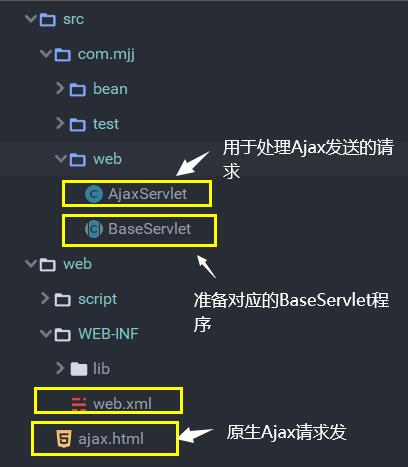
AjaxServlet程序
说明:将javaBean转换为json字符串来传回到对应的页面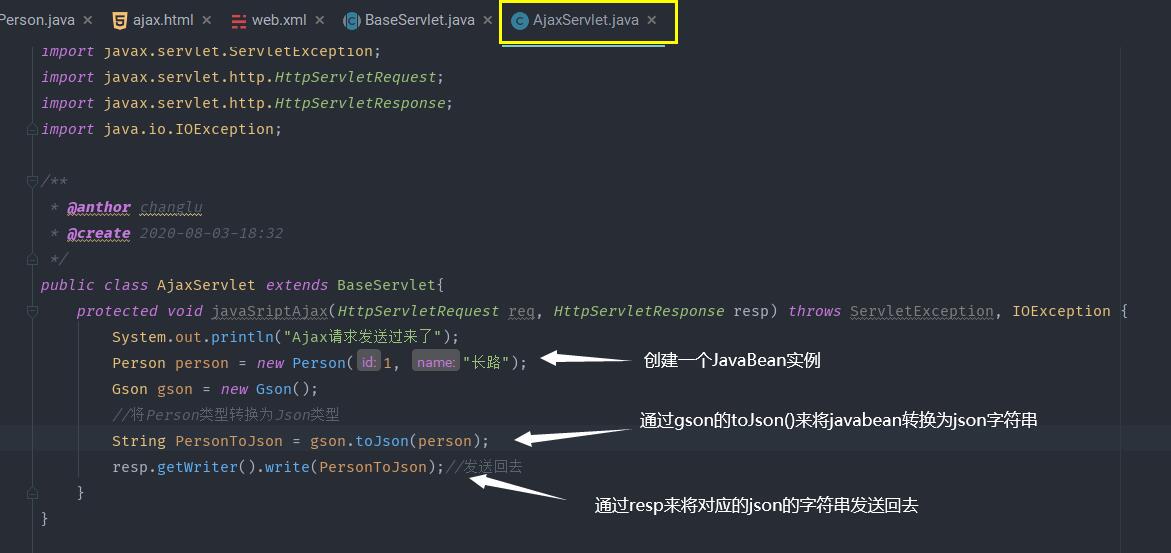
ajax.html
<!DOCTYPE html PUBLIC "-//W3C//DTD HTML 4.01 Transitional//EN" "http://www.w3.org/TR/html4/loose.dtd">
<html>
    <head>
        <meta http-equiv="pragma" content="no-cache" />
        <meta http-equiv="cache-control" content="no-cache" />
        <meta http-equiv="Expires" content="0" />
        <meta http-equiv="Content-Type" content="text/html; charset=UTF-8">
        <title>Insert title here</title>
        <script type="text/javascript">
            function ajaxRequest() {
//                 1、我们首先要创建XMLHttpRequest
                var xmlhttprequest = new XMLHttpRequest();

//                 2、调用open方法设置请求参数
                xmlhttprequest.open("GET","http://localhost:8080/16_JSON_Ajax/ajaxServlet?action=javaSriptAjax",true);

//                 4、在send方法前绑定onreadystatechange事件,处理请求完成后的操作。
                xmlhttprequest.onreadystatechange = function () {
                    if(xmlhttprequest.readyState == 4 && xmlhttprequest.status == 200){
                        var responsetext = JSON.parse(xmlhttprequest.responseText)
                        document.getElementById("div01").innerHTML = "id编号:"+responsetext.id+"姓名:"+responsetext.name;
                    }
                };

//                 3、调用send方法发送请求
                xmlhttprequest.send();

            }
        </script>
    </head>
    <body>
        <button onclick="ajaxRequest()">ajax request</button>
        <div id="div01">
        </div>
    </body>
</html>
对应代码示例说明: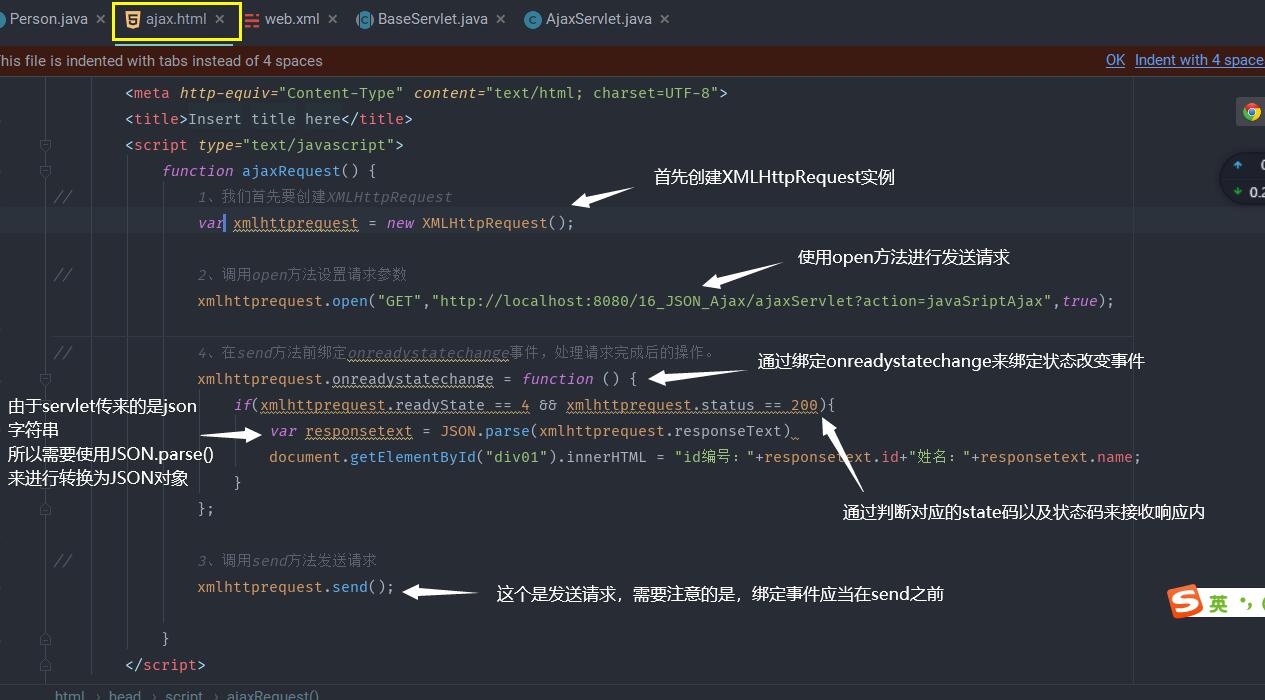
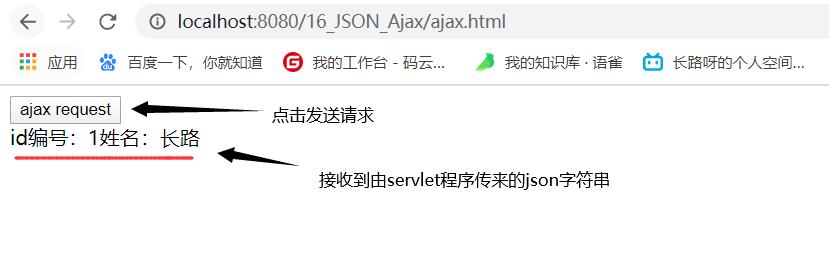
运行结果
3. jQuery 中的 AJAX 请求
可以查看文档: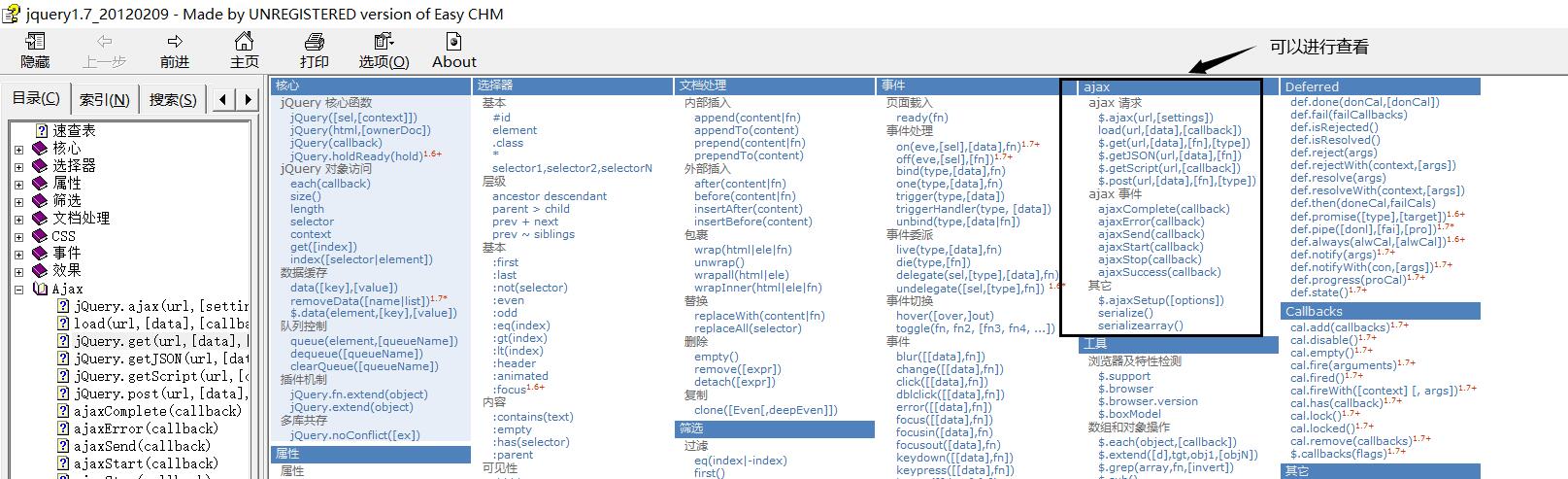
对应页面说明:
<!DOCTYPE html PUBLIC "-//W3C//DTD HTML 4.01 Transitional//EN" "http://www.w3.org/TR/html4/loose.dtd">
<html>
    <head>
        <meta http-equiv="pragma" content="no-cache" />
        <meta http-equiv="cache-control" content="no-cache" />
        <meta http-equiv="Expires" content="0" />
        <meta http-equiv="Content-Type" content="text/html; charset=UTF-8">
        <title>Insert title here</title>
        <script type="text/javascript" src="script/jquery-1.7.2.js"></script>
        <script type="text/javascript">
            $(function(){
                //ajax请求
                $("#ajaxBtn").click(function(){

                });

                // ajax--get请求
                $("#getBtn").click(function(){

                    alert(" get btn ");

                });

                // ajax--post请求
                $("#postBtn").click(function(){
                    // post请求
                    alert("post btn");

                });

                // ajax--getJson请求
                $("#getJSONBtn").click(function(){
                    // 调用
                    alert("getJSON btn");

                });

                // ajax请求
                $("#submit").click(function(){
                    // 把参数序列化
                    alert("serialize()");
                });

            });
        </script>
    </head>
    <body>
        <div>
            <button id="ajaxBtn">$.ajax请求</button>
            <button id="getBtn">$.get请求</button>
            <button id="postBtn">$.post请求</button>
            <button id="getJSONBtn">$.getJSON请求</button>
        </div>
        <!--用于输出对应返回的内容-->
        <div id="msg">

        </div>
        <br/><br/>
        <form id="form01" >
            用户名:<input name="username" type="text" /><br/>
            密码:<input name="password" type="password" /><br/>
            下拉单选:<select name="single">
                  <option value="Single">Single</option>
                  <option value="Single2">Single2</option>
            </select><br/>
              下拉多选:
              <select name="multiple" multiple="multiple">
                <option selected="selected" value="Multiple">Multiple</option>
                <option value="Multiple2">Multiple2</option>
                <option selected="selected" value="Multiple3">Multiple3</option>
              </select><br/>
              复选:
             <input type="checkbox" name="check" value="check1"/> check1
             <input type="checkbox" name="check" value="check2" checked="checked"/> check2<br/>
             单选:
             <input type="radio" name="radio" value="radio1" checked="checked"/> radio1
             <input type="radio" name="radio" value="radio2"/> radio2<br/>
        </form>
        <button id="submit">提交--serialize()</button>
    </body>
</html>
注意:**下面所有演示方法的servlet程序中的内容与上面原生Ajax请求servlet程序的内容基本一致都是返回一个json字符串类型(Person转换的)。**
① $.ajax方法(说明+演示)
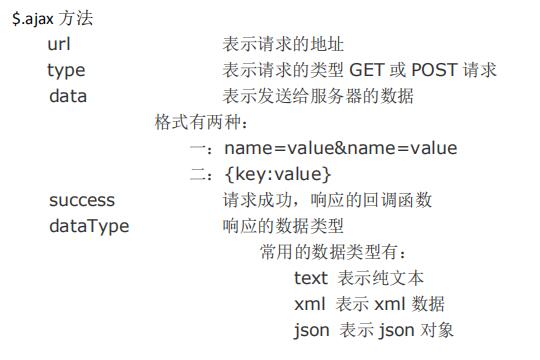
代码演示:
说明:
① 其中data是用来设置参数的,有两个设置的方式;
② success:function(msg){} 其中msg的类型与dataType设置的有关。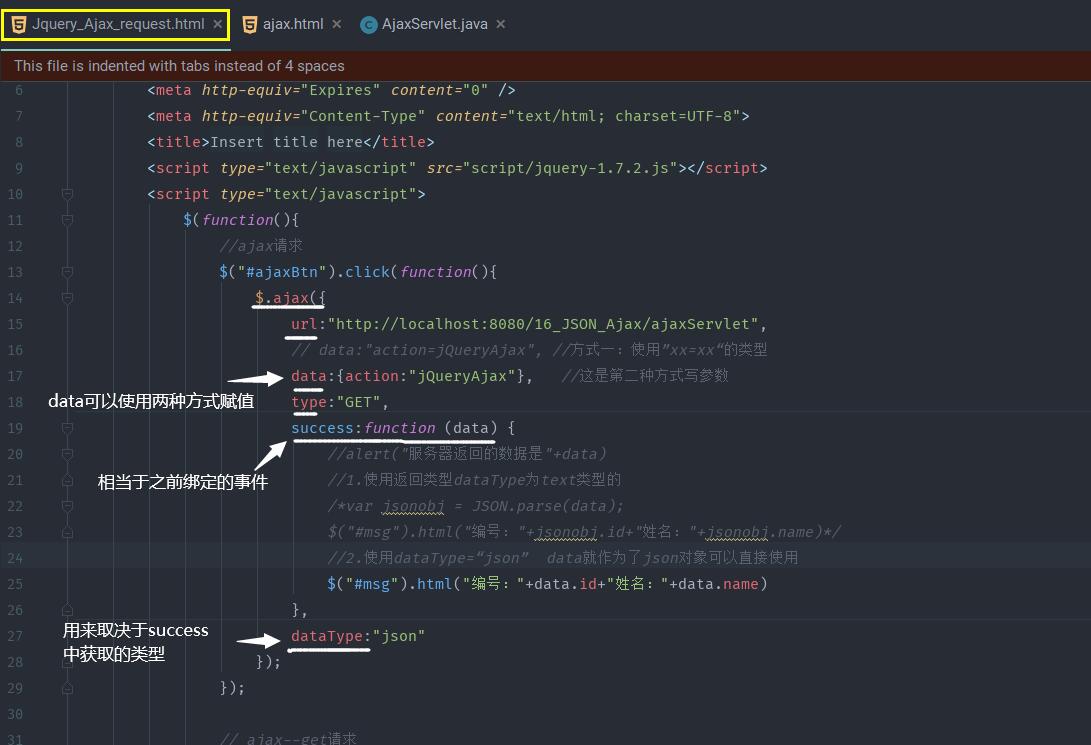
运行结果: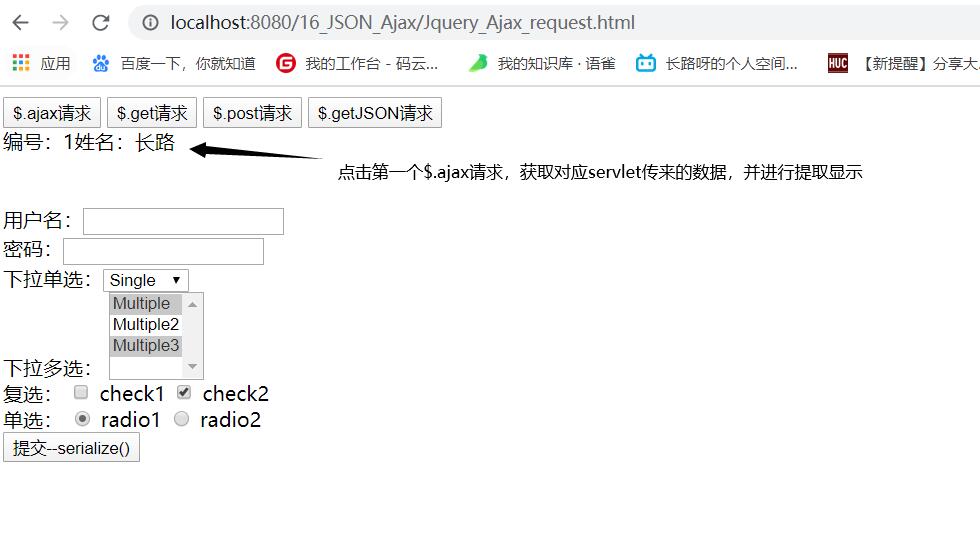
② $.get 方法和$.post 方法(简化了$.ajax)
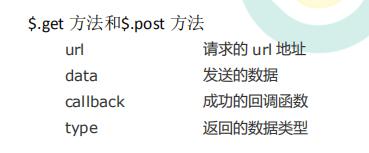
代码演示:
说明:可以直接将对应参数填入,而不像$.ajax一样需要有对应keyvalue,相当于简化了许多。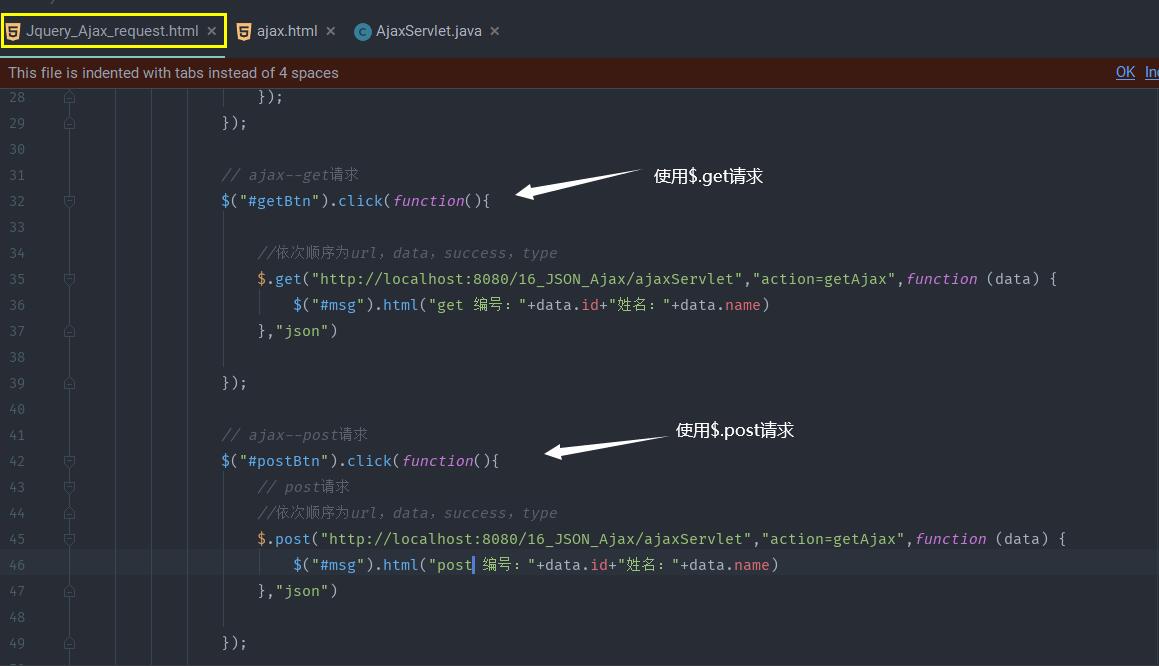 **
运行结果:
点击两个按钮的不同情况**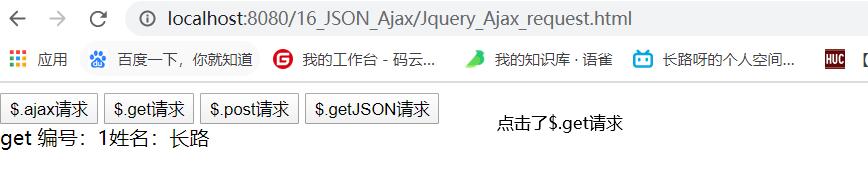
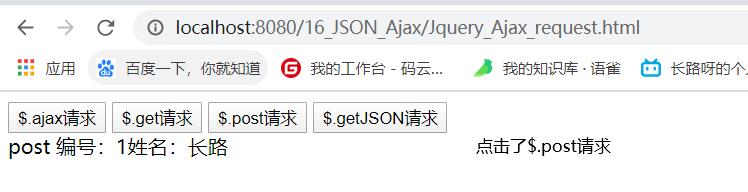
③ $.getJSON 方法(只需要三个参数)
说明:相当于$.get以及$.post省略了返回的类型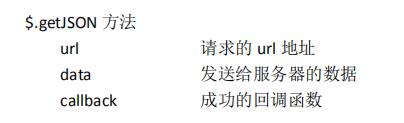
代码演示: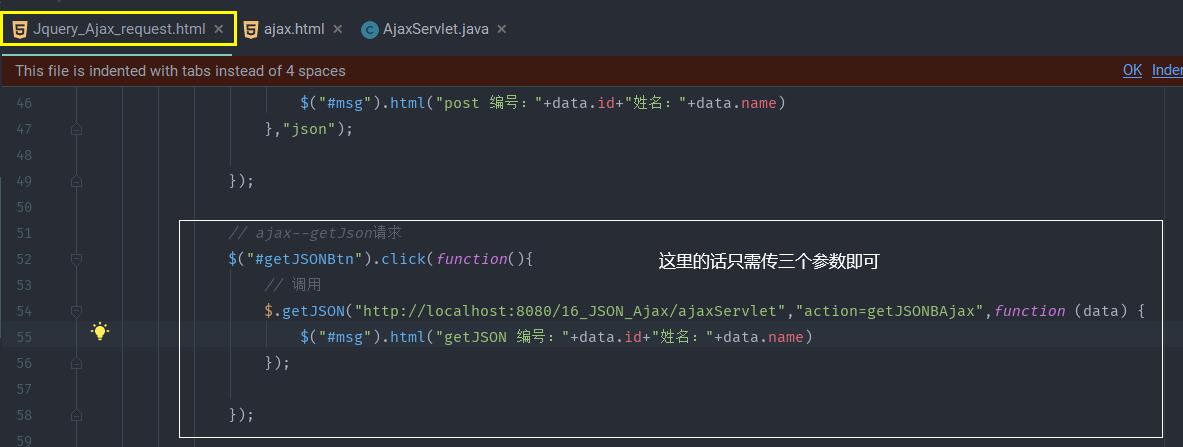
运行结果:
④ 表单序列化 serialize()

如要查询form表单中的内容:**$(“#form”).serialize()**
代码演示:
需要注意的是在action=getSerialize后加上&,因为连接上对应声明的参数刚开始没有&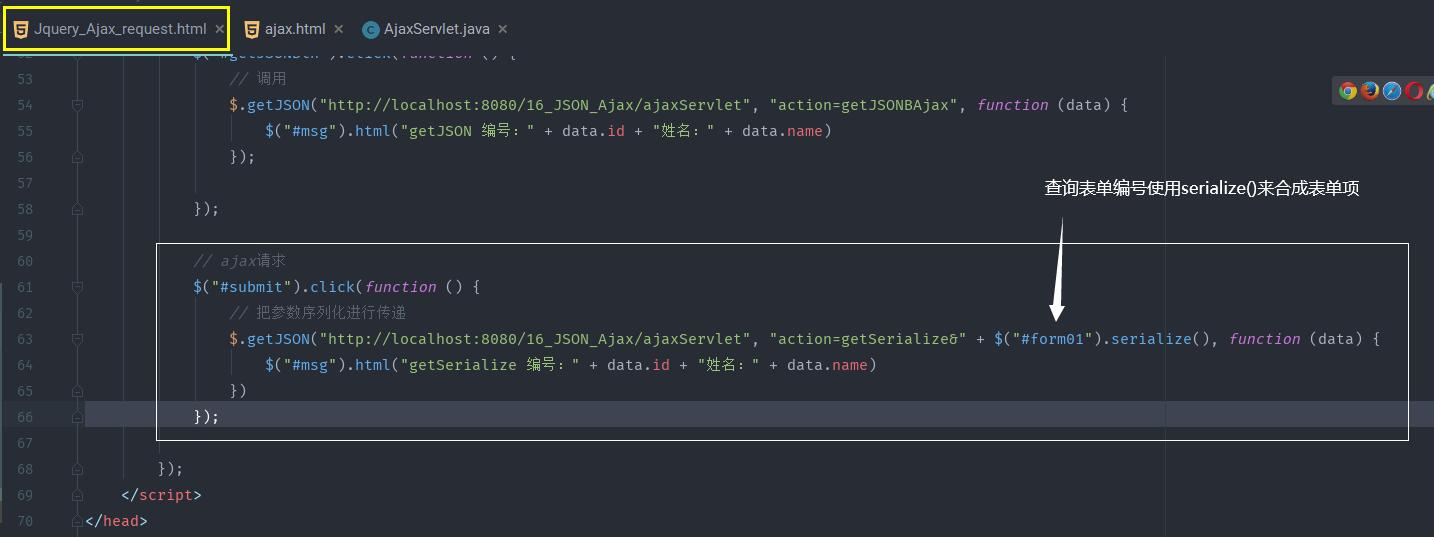
之后我们可以在servlet程序中来进行获取使用。**
运行结果: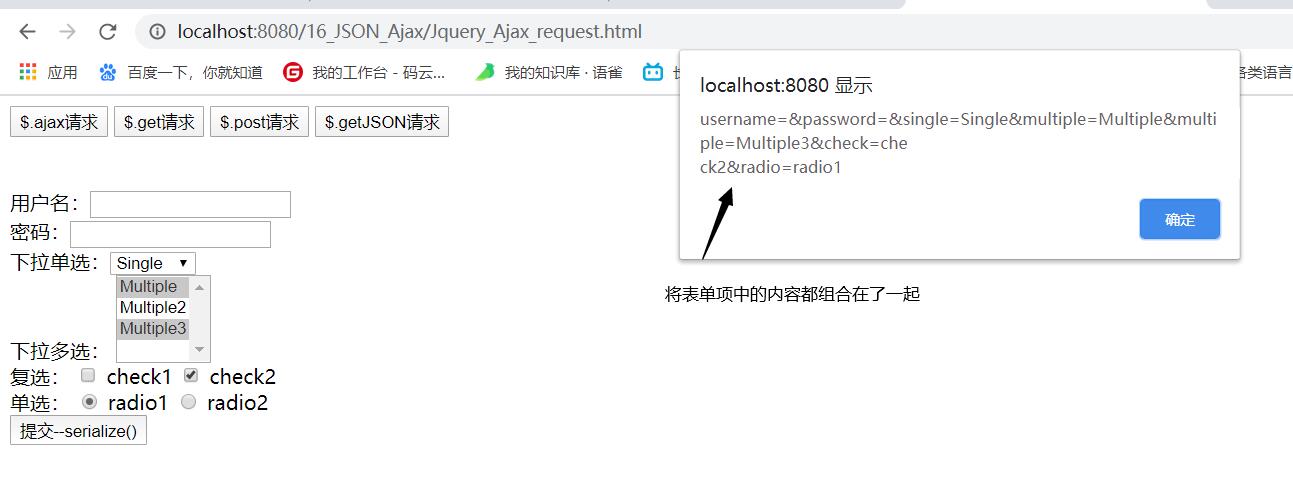
整理者:长路 时间:2020/8/3-2020/8/4

若有收获,就点个赞吧
0 人点赞


