阿里云的centos镜像站:https://developer.aliyun.com/mirror/?spm=a2c6h.13651104.0.d1002.341b12b29ntJ2N
1、yum出现[Errno 14] PYCURL ERROR 56 - “Failure when receiving data from the peer”尝试其他镜像。
参考文章:https://www.cnblogs.com/alantop/p/13456268.html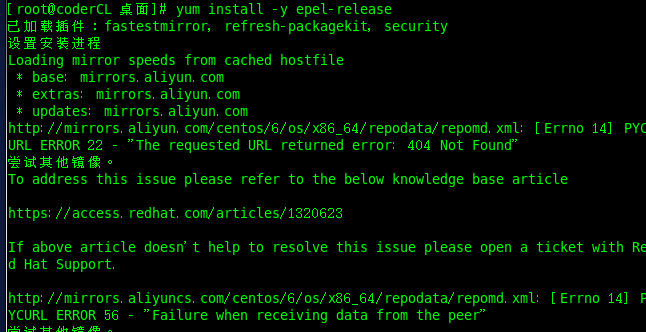
① 删除老仓库文件在/etc/yum.repos.d目录中
cd /etc/yum.repos.d
rm -rf *
② .卸载yum包
查询yum包组件:rpm -qa yum
③ 我们通过下面两个路径去找
http://mirrors.163.com/centos/7/os/x86_64/Packages/
这个网址中找不到6.8的,有下面提示信息:
This directory (and version of CentOS) is deprecated. For normal users,you should use /6/ and not /6.8/ in your path. Please see this FAQconcerning the CentOS release scheme:https://wiki.centos.org/FAQ/GeneralIf you know what you are doing, and absolutely want to remain at the 6.8level, go to http://vault.centos.org/ for packages.Please keep in mind that 6.0, 6.1, 6.2, 6.3, 6.4 , 6.5, 6.6, 6.7 and 6.8 no longer gets any updates, norany security fix's.
https://vault.centos.org/6.8/os/x86_64/Packages/
最终解决方法:重装了一个Centos7,来进行下载即可!!!
将yum-plugin-fastestmirror-1.1.30-37.el6.noarch.rpm
yum-metadata-parser-1.1.2-16.el6.x86_64.rpm
yum-3.2.29-73.el6.centos.noarch.rpm(这个我已经安装好了) 使用XFtp来传入到/opt中
接着我们进行安装 rpm -ivh yum-*
使用rpm -qa | grep yum 查看下是否安装成功!
④ 导入证书
rpm --import http://mirror.centos.org/centos/RPM-GPG-KEY-CentOS-6
⑤ 添加阿里的源
wget -O /etc/yum.repos.d/CentOS-Base.repohttps://mirrors.aliyun.com/repo/Centos-6.repo
这里-O 表示写入到指定目录中并名为CentOS-Base.repo
还是不行,等待解决!

若有收获,就点个赞吧
0 人点赞


