Eureka简介
SpringCloud封装了Netflix公司开发的Eureka模块来实现服务注册与发现
Eureka采用了 C-S 的设计架构。Eureka Server作为服务注册功能的服务器,它是服务注册中心
而系统中的其他微服务,使用Eureka的客户端连接到Eureka Server并维持心跳连接。这样,系统的维护人员就可以通过Eureka Server来监控系统中各个微服务是否正常运行。SpringCloud的一些其他模块(例如Zuul)就可以通过Eureka Server来发现系统中其他微服务,并执行相关的逻辑
基本架构

三大角色
| Eureka Server | 提供服务注册与发现 |
|---|---|
| Server Provider | 服务提供方将自身服务注册到Eureka,从而使服务消费方能够找到 |
| Server Consumer | 服务消费方从Eureka获取注册服务列表,从而能够消费服务 |
自我保护机制
某时某刻,一个微服务不可用了,Eureka不会立即清理,依旧会对该微服务的信息进行保存Eureka在CAP理论当中是属于AP , 也就说当产生网络分区时,Eureka保证系统的可用性,但不保证系统里面数据的一致性,举个例子。当发生网络分区的时候,Eureka-Server和client端的通信被终止,server端收不到大部分的client的续约,这个时候,如果直接将没有收到心跳的client端自动剔除,那么会将可用的client端剔除,这不符合AP理论,所以Eureka宁可保留也许已经宕机了的client端,也不愿意将可以用的client端一起剔除。 从这一点上,也就保证了Eureka程序的健壮性,符合AP理论
重要变量
this.expectedNumberOfRenewsPerMin = count * 2;
this.numberOfRenewsPerMinThreshold =(int) (this.expectedNumberOfRenewsPerMin * serverConfig.getRenewalPercentThreshold());

expectedNumberOfRenewsPerMin :每分钟最大的续约数量,由于客户端是每30秒续约一次,一分钟就是续约2次,
count代表的是客户端数量,所以这个变量的计算公式:客户端数量*2 numberOfRenewsPerMinThreshold : 每分钟最小续约数量,
使用expectedNumberOfRenewsPerMin * serverConfig.getRenewalPercentThreshold()
serverConfig.getRenewalPercentThreshold()的默认值为0.85,也就是说每分钟的续约数量要大于85%
Eureka的自我保护机制,都是围绕这两个变量来实现的,如果每分钟的续约数量小于numberOfRenewsPerMinThreshold,就会开启自动保护机制。
在此期间,不会再主动剔除任何一个客户端。
Eureka服务注册中心搭建
创建项目 eureka-server
在原始SpringBoot项目的基础上进行创建(针对于SpringBoot2.1.X版本,其他版本需查看版本对应情况)
引入依赖
<?xml version="1.0" encoding="UTF-8"?>
<project xmlns="http://maven.apache.org/POM/4.0.0" xmlns:xsi="http://www.w3.org/2001/XMLSchema-instance"
    xsi:schemaLocation="http://maven.apache.org/POM/4.0.0 https://maven.apache.org/xsd/maven-4.0.0.xsd">
    <modelVersion>4.0.0</modelVersion>
    <parent>
        <groupId>org.springframework.boot</groupId>
        <artifactId>spring-boot-starter-parent</artifactId>
        <version>2.1.6.RELEASE</version>
        <relativePath/> <!-- lookup parent from repository -->
    </parent>
    <groupId>com.springcloud</groupId>
    <artifactId>eureka_server</artifactId>
    <version>0.0.1-SNAPSHOT</version>
    <name>eureka-server</name>
    <description>Demo project for Spring Boot</description>

    <properties>
        <java.version>1.8</java.version>
    </properties>

  <!-- spring-cloud -->
    <dependencyManagement>
        <dependencies>
            <dependency>
                <groupId>org.springframework.cloud</groupId>
                <artifactId>spring-cloud-dependencies</artifactId>
                <version>Greenwich.SR2</version>
                <type>pom</type>
                <scope>import</scope>
            </dependency>
        </dependencies>
    </dependencyManagement>

    <dependencies>
        <dependency>
            <groupId>org.springframework.boot</groupId>
            <artifactId>spring-boot-starter-web</artifactId>
        </dependency>

        <!-- eureka-server -->
        <dependency>
            <groupId>org.springframework.cloud</groupId>
            <artifactId>spring-cloud-starter-netflix-eureka-server</artifactId>
        </dependency>

        <dependency>
            <groupId>org.springframework.boot</groupId>
            <artifactId>spring-boot-starter-test</artifactId>
            <scope>test</scope>
        </dependency>
    </dependencies>

    <build>
        <plugins>
            <plugin>
                <groupId>org.springframework.boot</groupId>
                <artifactId>spring-boot-maven-plugin</artifactId>
            </plugin>
        </plugins>
    </build>

</project>
application.yml
server:
  port: 10000
spring:
  application:
    name: eureka_server
# 因为是单机的eureka,所以需要做一些配置
eureka:
  instance:
    hostname: 127.0.0.1
  client:
    register-with-eureka: false   #表示是否将自己注册在EurekaServer上,默认为true。由于当前应用就是EurekaServer,所以置为false
    fetch-registry: false   #表示表示是否从EurekaServer获取注册信息,默认为true。单节点不需要同步其他的EurekaServer节点的数据
    #如果服务注册中心为高可用集群时,多个注册中心地址以逗号分隔
    #如果服务注册中心加入了安全验证,这里配置的地址格式为:http://<username>:<password>@localhost:8761/eureka
    #其中<username> 为安全校验的用户名 <password> 为该用户的密码
    service-url:
      defaultZone: http://${eureka.instance.hostname}:${server.port}/eureka/
启动类上添加注解
@EnableEurekaServer
运行项目
http://127.0.0.1:10000

开启Eureka安全认证
pom依赖
<!-- security - eureka安全认证使用 -->
<dependency>
    <groupId>org.springframework.boot</groupId>
    <artifactId>spring-boot-starter-security</artifactId>
</dependency>
application.yml文件(只贴了需要修改的部分)
spring:
  security:
    user:
      name: root
      password: 123456

service-url:
    # url修改成带账号密码的
    defaultZone: http://${spring.security.user.name}:${spring.security.user.password}@${eureka.instance.hostname}:${server.port}/eureka/
启动类
@EnableEurekaServer
@SpringBootApplication
public class EurekaServerApplication {

    public static void main(String[] args) {
        SpringApplication.run(EurekaServerApplication.class, args);
    }

    //如果不去除csrf拦截,客户端连接会报错
    //原因是 2.1版本的security默认加上了 csrf 拦截, 所以需要通过重写方法, 把csrf拦截禁用
    @EnableWebSecurity
    static class WebSecurityConfig extends WebSecurityConfigurerAdapter {
        @Override
        protected void configure(HttpSecurity http) throws Exception {
            http.csrf().disable()
                    .authorizeRequests()
                    .anyRequest()
                    .authenticated()
                    .and()
                    .httpBasic();
        }
    }
}
创建项目 eureka-client
引入依赖
<!-- eureka-client -->
<dependency>
    <groupId>org.springframework.cloud</groupId>
    <artifactId>spring-cloud-starter-netflix-eureka-client</artifactId>
</dependency>
application.yml
eureka:
  client:
    service-url:
      defaultZone: http://root:123456@127.0.0.1:10000/eureka/
启动类上添加注解
@EnableEurekaClient
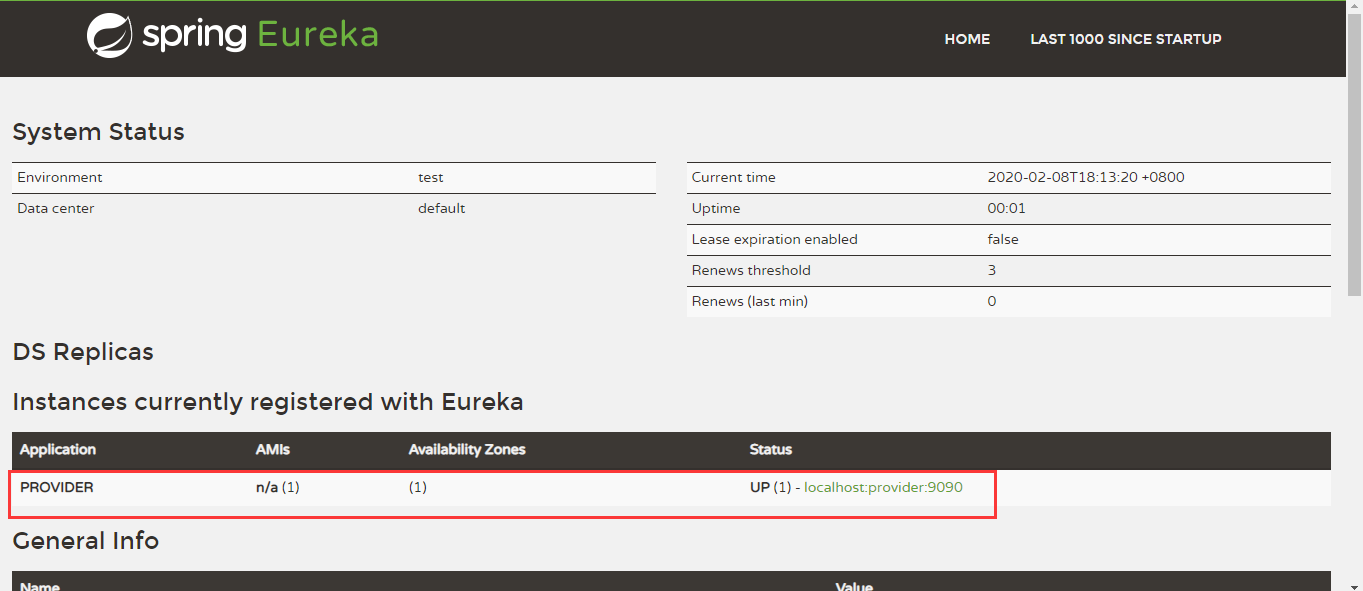
运行项目(同时运行服务端和客户端)
EurekaServer高可用
采取相互注册的方式,完成高可用集群
(EurekaServer它作为服务端的同时也是一个客户端,也就是需要将自己也注册进去)
创建3个eurekaserver项目,分别配置application.yml
application.yml - 第一个
server:
  port: 10001
spring:
  application:
    name: eureka_ha
  security:
    user:
      name: root
      password: 123456
eureka:
  instance:
    hostname: eureka01.com
  client:
    service-url:
      defaultZone: http://root:123456@eureka02.com:10002/eureka/,http://root:123456@eureka03.com:10003/eureka/
application.yml - 第二个
server:
  port: 10002
spring:
  application:
    name: eureka_ha
  security:
    user:
      name: root
      password: 123456
eureka:
  instance:
    hostname: eureka02.com
  client:
    service-url:
      defaultZone: http://root:123456@eureka01.com:10001/eureka/,http://root:123456@eureka03.com:10003/eureka/
application.yml - 第三个
server:
  port: 10003
spring:
  application:
    name: eureka_ha
  security:
    user:
      name: root
      password: 123456
eureka:
  instance:
    hostname: eureka03.com
  client:
    service-url:
      defaultZone: http://root:123456@eureka01.com:10001/eureka/,http://root:123456@eureka02.com:10002/eureka/
各个启动类一致
@EnableEurekaServer
@SpringBootApplication
public class EurekaServer3Application {
    @EnableWebSecurity
    static class WebSecurityConfig extends WebSecurityConfigurerAdapter {
        @Override
        protected void configure(HttpSecurity http) throws Exception {
            http.csrf().disable()
                    .authorizeRequests()
                    .anyRequest()
                    .authenticated()
                    .and()
                    .httpBasic();
        }
    }

    public static void main(String[] args) {
        SpringApplication.run(EurekaServer3Application.class, args);
    }

}
启动测试


若有收获,就点个赞吧
0 人点赞


