什么是虚拟Dom (Virtual DOM)
- vue2.x才有虚拟Dom
-
虚拟Dom在vue中做什么
掘金DOM和DOM-diff- https://juejin.cn/post/6844903806132568072#heading-9
vue的渲染过程:
将真实Dom转换为虚拟Dom(js对象)=>这一步拖慢了页面渲染速度,但提供了虚拟dom更新时对比
- 更新时进行对比
虚拟Dom转换为真实Dom 初始化patch
vue 中初始化方法
patch(container, vnode)(容器,虚拟Dom)
过程图
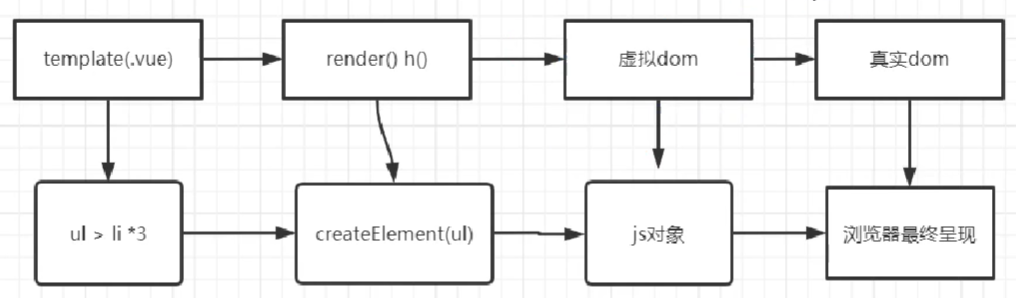
代码
创建虚拟Dom的js对象
// element.js//type: 指定元素的标签类型,如'li', 'div', 'a'等//props: 表示指定元素身上的属性,如class, style, 自定义属性等//children: 表示指定元素是否有子节点,参数以数组的形式传入// 虚拟DOM元素的类,构建实例对象,用来描述DOMclass Element {constructor(type, props, children) {this.type = type;this.props = props;this.children = children;}}// 创建虚拟DOM,返回虚拟节点(object)function createElement(type, props, children) {return new Element(type, props, children);}export {Element,createElement}
调用生成一个虚拟Dom的js对象
// index.js// 首先引入对应的方法来创建虚拟DOMimport { createElement } from './element';let virtualDom = createElement('ul', {class: 'list'}, [createElement('li', {class: 'item'}, ['周杰伦']),createElement('li', {class: 'item'}, ['林俊杰']),createElement('li', {class: 'item'}, ['王力宏'])]);console.log(virtualDom);
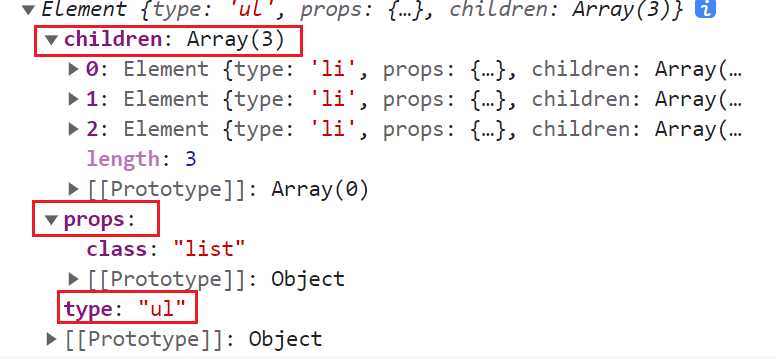
渲染虚拟Dom 转换为真实Dom
document.createElement设置属性node.setAttribute
// element.jsclass Element {// 省略}function createElement() {// 省略}// render方法可以将虚拟DOM转化成真实DOMfunction render(domObj) {// 根据type类型来创建对应的元素let el = document.createElement(domObj.type);// 再去遍历props属性对象,然后给创建的元素el设置属性for (let key in domObj.props) {// 设置属性的方法setAttr(el, key, domObj.props[key]);}// 遍历子节点// 如果是虚拟DOM,就继续递归渲染// 不是就代表是文本节点,直接创建domObj.children.forEach(child => {child = (child instanceof Element) ? render(child) : document.createTextNode(child);// 添加到对应元素内el.appendChild(child);});return el;}// 设置属性function setAttr(node, key, value) {switch(key) {case 'value':// node是一个input或者textarea就直接设置其value即可if (node.tagName.toLowerCase() === 'input' ||node.tagName.toLowerCase() === 'textarea') {node.value = value;} else {node.setAttribute(key, value);}break;case 'style':// 直接赋值行内样式node.style.cssText = value;break;default:node.setAttribute(key, value);break;}}// 将元素插入到页面内function renderDom(el, target) {target.appendChild(el);}export {Element,createElement,render,setAttr,renderDom};
调用结果
// index.js// 引入createElement、render和renderDom方法import { createElement, render, renderDom } from './element';let virtualDom = createElement('ul', {class: 'list'}, [createElement('li', {class: 'item'}, ['周杰伦']),createElement('li', {class: 'item'}, ['林俊杰']),createElement('li', {class: 'item'}, ['王力宏'])]);console.log(virtualDom);// +++let el = render(virtualDom); // 渲染虚拟DOM得到真实的DOM结构console.log(el);// 直接将DOM添加到页面内renderDom(el, document.getElementById('root'));
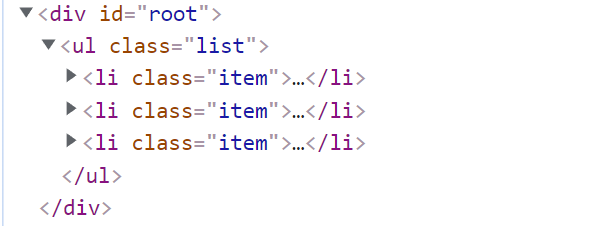
简易整体思路代码
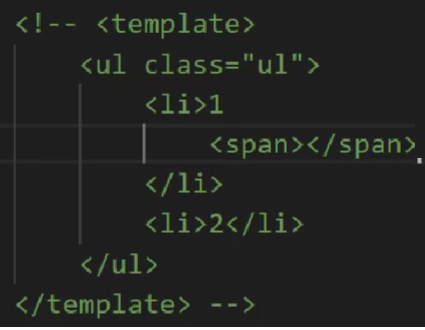

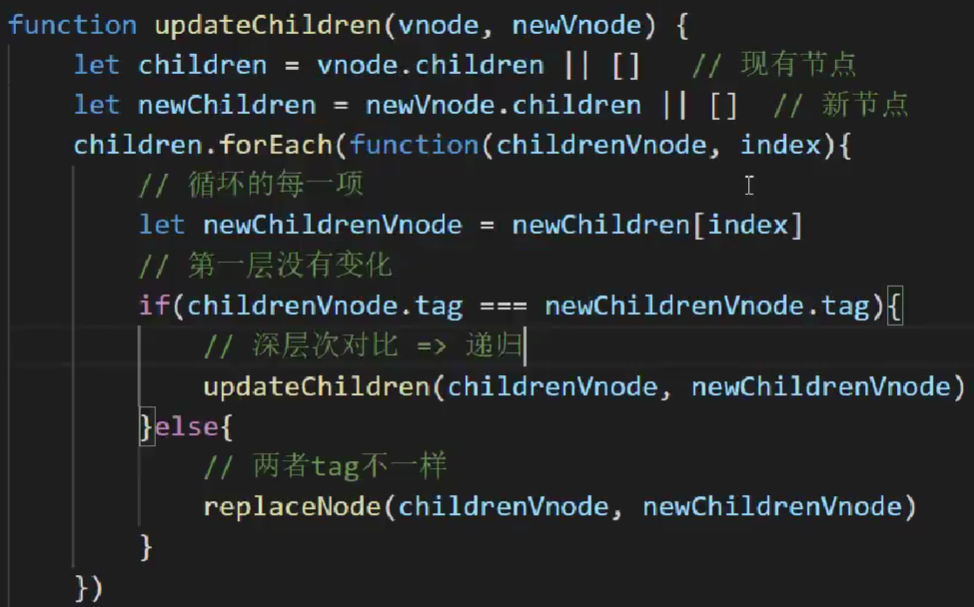
虚拟Dom更新对比 更新update
vue 中更新方法
update(oldVnode,newVnode)
- 局部更新(节点数据)
- DOM-diff比较两个虚拟DOM的区别,也就是在比较两个对象的区别。
对比过程图
虚拟Dom直接进行对比
代码
DOM-diff那一定要清楚其存在的意义,给定任意两棵树,采用先序深度优先遍历的算法找到最少的转换步骤 DOM-diff比较两个虚拟DOM的区别,也就是在比较两个对象的区别。 作用: 根据两个虚拟对象创建出补丁,描述改变的内容,将这个补丁用来更新DOM
// diff.jsfunction diff(oldTree, newTree) {// 声明变量patches用来存放补丁的对象let patches = {};// 第一次比较应该是树的第0个索引let index = 0;// 递归树 比较后的结果放到补丁里walk(oldTree, newTree, index, patches);return patches;}function walk(oldNode, newNode, index, patches) {// 每个元素都有一个补丁let current = [];if (!newNode) { // rule1current.push({ type: 'REMOVE', index });} else if (isString(oldNode) && isString(newNode)) {// 判断文本是否一致if (oldNode !== newNode) {current.push({ type: 'TEXT', text: newNode });}} else if (oldNode.type === newNode.type) {// 比较属性是否有更改let attr = diffAttr(oldNode.props, newNode.props);if (Object.keys(attr).length > 0) {current.push({ type: 'ATTR', attr });}// 如果有子节点,遍历子节点diffChildren(oldNode.children, newNode.children, patches);} else { // 说明节点被替换了current.push({ type: 'REPLACE', newNode});}// 当前元素确实有补丁存在if (current.length) {// 将元素和补丁对应起来,放到大补丁包中patches[index] = current;}}function isString(obj) {return typeof obj === 'string';}function diffAttr(oldAttrs, newAttrs) {let patch = {};// 判断老的属性中和新的属性的关系for (let key in oldAttrs) {if (oldAttrs[key] !== newAttrs[key]) {patch[key] = newAttrs[key]; // 有可能还是undefined}}for (let key in newAttrs) {// 老节点没有新节点的属性if (!oldAttrs.hasOwnProperty(key)) {patch[key] = newAttrs[key];}}return patch;}// 所有都基于一个序号来实现let num = 0;function diffChildren(oldChildren, newChildren, patches) {// 比较老的第一个和新的第一个oldChildren.forEach((child, index) => {walk(child, newChildren[index], ++num, patches);});}// 默认导出export default diff;
patch补丁更新 打补丁需要传入两个参数,一个是要打补丁的元素,另一个就是所要打的补丁了
import { Element, render, setAttr } from './element';let allPatches;let index = 0; // 默认哪个需要打补丁function patch(node, patches) {allPatches = patches;// 给某个元素打补丁walk(node);}function walk(node) {let current = allPatches[index++];let childNodes = node.childNodes;// 先序深度,继续遍历递归子节点childNodes.forEach(child => walk(child));if (current) {doPatch(node, current); // 打上补丁}}function doPatch(node, patches) {// 遍历所有打过的补丁patches.forEach(patch => {switch (patch.type) {case 'ATTR':for (let key in patch.attr) {let value = patch.attr[key];if (value) {setAttr(node, key, value);} else {node.removeAttribute(key);}}break;case 'TEXT':node.textContent = patch.text;break;case 'REPLACE':let newNode = patch.newNode;newNode = (newNode instanceof Element) ? render(newNode) : document.createTextNode(newNode);node.parentNode.replaceChild(newNode, node);break;case 'REMOVE':node.parentNode.removeChild(node);break;default:break;}});}export default patch;
调用
// index.js

import { createElement, render, renderDom } from './element';
// +++ 引入diff和patch方法
import diff from './diff';
import patch from './patch';
// +++

let virtualDom = createElement('ul', {class: 'list'}, [
    createElement('li', {class: 'item'}, ['周杰伦']),
    createElement('li', {class: 'item'}, ['林俊杰']),
    createElement('li', {class: 'item'}, ['王力宏'])
]);

let el = render(virtualDom);
renderDom(el, window.root);

// +++
// 创建另一个新的虚拟DOM
let virtualDom2 = createElement('ul', {class: 'list-group'}, [
    createElement('li', {class: 'item active'}, ['七里香']),
    createElement('li', {class: 'item'}, ['一千年以后']),
    createElement('li', {class: 'item'}, ['需要人陪'])
]);
// diff一下两个不同的虚拟DOM
let patches = diff(virtualDom, virtualDom2);
console.log(patches);
// 将变化打补丁,更新到el
patch(el, patches);
// +++
简易整体思路代码

若有收获,就点个赞吧
0 人点赞


