程序运行内存分配
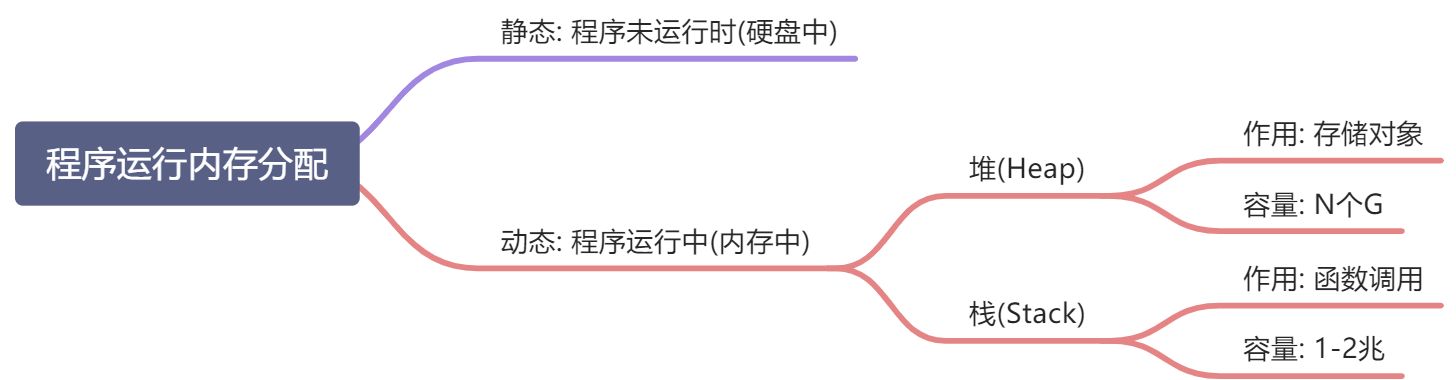
观察内存的使用(性能监视器)
观察内存的使用(性能监视器): cmd->perfmon->+->process->private Bytes->选择选定对象(已执行起来的文件)->添加->确定
Debug
1.Call stack:查看当前断点下的其他调用
2.Step-out:shift+F11跳到调用当前方法的方法中
3.Locals:观察局部变量的值与变化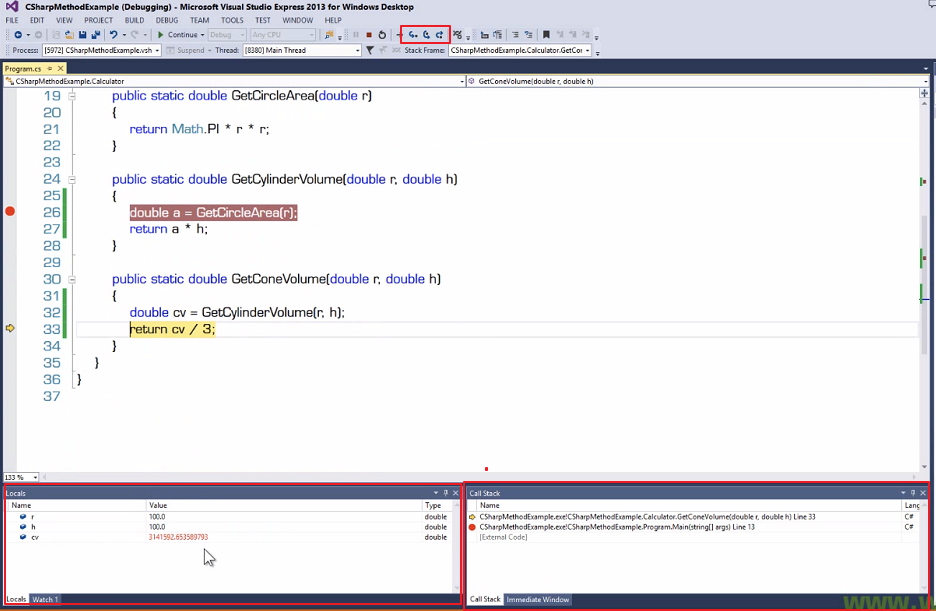
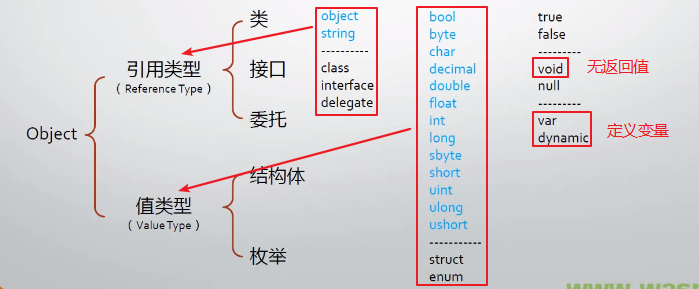
数据5大数据类型
class: 类
struct:结构体
enum: 枚举类型
interfaces:接口
delegates:委托
C#类型的派生谱系
变量
什么是变量
变量名表示(对应着) 变量的值在内存中的存储位置
变量=以变量名所对应的内存地址为起点、一其数据类型所要求的存储空间为长度的一块内存区域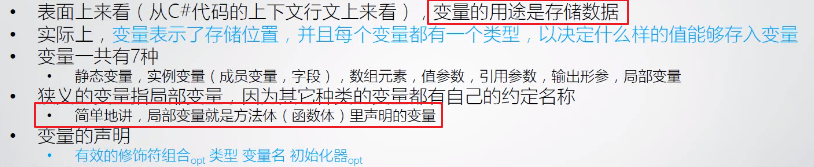
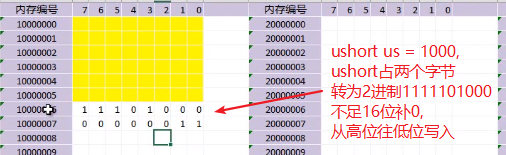
值类型的变量

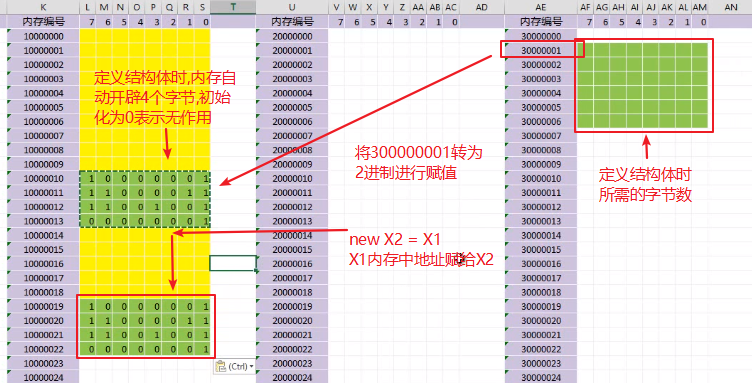
引用类型的变量

常量 const int = 100
int = int32(内存中32比特位) , long = int64
方法的声明与调用
方法的重载


类型转换
隐式类型转换

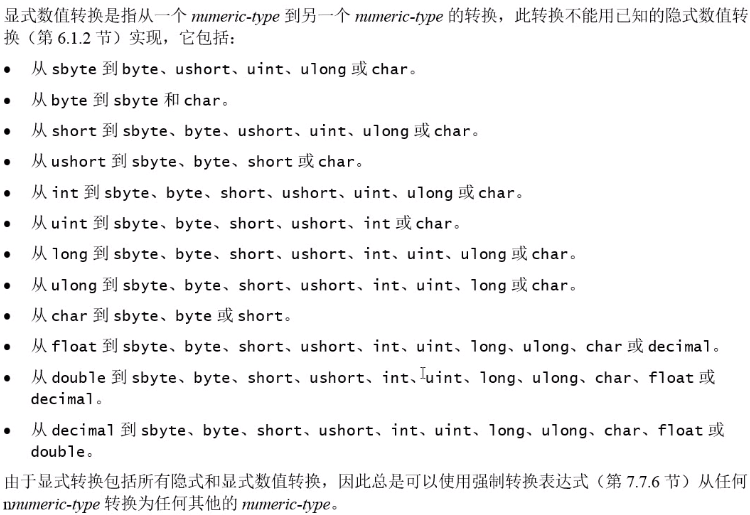
显示类型转换

Conver/Parse/TryParse
ConVert.ToInt32("12")double a = int.Parse("12")double a = int.TypeParse("12")
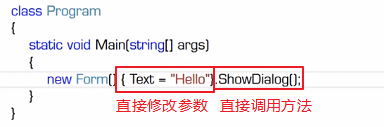
new
default
default获得类型缺省值:1. Console.WriteLine(default(int));//02. Console.WriteLine(default(string));//3. Console.WriteLine(default(Form));//null
typeof
用于获取类型的 System.Type 对象Typt t = typeof(int)Console.WriteLine(t.Namespace) //SystemConsole.writeLine(t.FullName) //System.Int32Console.writeLine(t.Name) //Int32
继承(基类)
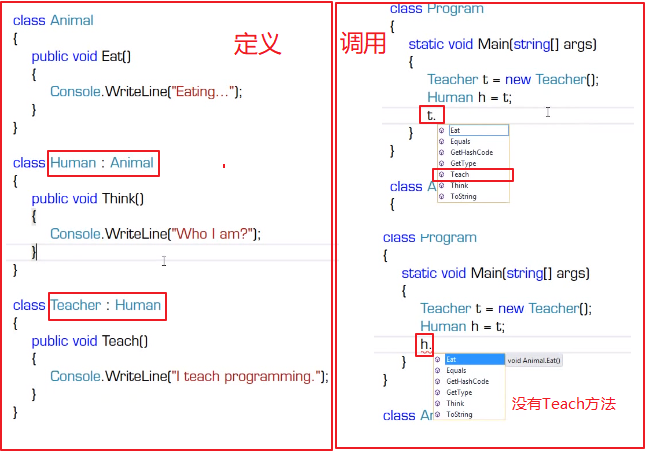
修饰符
public:公有访问,不受任何限制。
private:私有访问,只限于本类成员访问,子类、实例都不能访问。
protected:保护访问,只限于本类和子类访问,实例不能访问。internal:内部访问,只限于本项目内访问,其他不能访问。
static(静态的) 声明的方法和属性,不需要实例化就能被调用,当然也有公有和私有之分.
public人缘好,跟谁都好,protect只和熟人好,private比较自闭.不过他们是三胞胎.class是他们的爹。
private
private:私有访问,只限于本类成员访问,子类、实例都不能访问。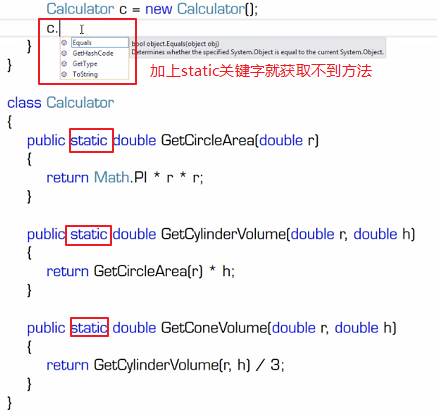
判断
IsNullOrWhiteSpace
string.IsNullOrWhiteSpace() 判断null或空
Where
IList<SYS_Parameters> PList = SYS_ParameterService.GetListAll();item["NextID"] = 'xxx'SYS_Parameters NextProcess = ParaList.Where(p => p.ParameterID == ht["NextID"].ToString()).FirstOrDefault();if (NextProcess != null){}else{};
DataTable -> Hashtable:
DataTable dt = null;dt = UniversalService.GetListAdvancedV3();return ToHashtableList(dt);
DateTime
public DateTime? ExecutionTime { get; set; } ExecutionTime 可以为null的写法DateTime Date = DateTime.Now; 获取当前时间DataTime dt = DateTime.Now.ToString('yyyy-MM-dd HH:mm:ss') 初始化
DateTime a = MAuthService.GetDeliteLogTime();//时间1DateTime b = DateTime.Now;//获取当前时间if (a.ToString("yyyy-MM-dd HH:mm:ss") == b.ToString("yyyy-MM-dd HH:mm:ss"))//判断时间相等
String String[] List
- String[]是定长的,String[]一般是在确定字符串数组的长度的情况下使用
- List< String >一般在数组的长度会发生变化的情况下使用,例如在数组中间插入一个字符串
List<string> RecipientIDs = new List<string>();RecipientIDs.Add()RecipientIDs.Remove()
Dictionary
```csharp //定义 Dictionary
//直接实例化定义
private static Dictionary
//添加元素 pList.Add(“Item1”, “ZheJiang”);
//删除元素 pList.Remove(“Item1”);
//判断是否存在相应的key并显示 if (pList.ContainsKey(“Item1”)) { Console.WriteLine(“Output: “ + pList[“Item1”]); }
//遍历Key foreach (var key in pList.Keys) { Console.WriteLine(“Output Key: {0}”, key); }
//遍历Value foreach (String value in pList.Values) { Console.WriteLine(“Output Value: {0}”, value); }
//遍历Key和Value foreach (var dic in pList) { Console.WriteLine(“Output Key : {0}, Value : {1} “, dic.Key, dic.Value); } ```
Convert
Convert 类常用的类型转换方法如下表所示。
| 方法 | 说明 |
|---|---|
| Convert.ToInt16() | 转换为整型(short) |
| Convert.ToInt32() | 转换为整型(int) |
| Convert.ToInt64() | 转换为整型(long) |
| Convert.ToChar() | 转换为字符型(char) |
| Convert.ToString() | 转换为字符串型(string) |
| Convert.ToDateTime() | 转换为日期型(datetime) |
| Convert.ToDouble() | 转换为双精度浮点型(double) |
| Conert.ToSingle() | 转换为单精度浮点型(float) |
对于整型和浮点型的强制数据类型操作也可以使用 Convert 方法代替,但是依然会损失存储范围大的数据类型的精度。

若有收获,就点个赞吧
0 人点赞


