[TOC]
set & data中数据增删改
<!DOCTYPE html>
<html>
    <body>
        <!--
            Vue监视数据的原理:
                1. vue会监视data中所有层次的数据。

                2. 如何监测对象中的数据?
                    通过setter实现监视,且要在new Vue时就传入要监测的数据。
                        (1).对象中后追加的属性,Vue默认不做响应式处理
                        (2).如需给后添加的属性做响应式,请使用如下API:
                            Vue.set(target,propertyName/index,value) 或
                            vm.$set(target,propertyName/index,value)

                3. 如何监测数组中的数据?
                    通过包裹数组更新元素的方法实现,本质就是做了两件事:
                        (1).调用原生对应的方法对数组进行更新。
                        (2).重新解析模板,进而更新页面。

                4.在Vue修改数组中的某个元素一定要用如下方法:
                    1.使用这些API:push()、pop()、shift()、unshift()、splice()、sort()、reverse()
                    2.Vue.set() 或 vm.$set()

                特别注意:Vue.set() 和 vm.$set() 不能给vm 或 vm的根数据对象 添加属性!!!
        -->
        <!-- 准备好一个容器-->
        <div id="root">
            <h1>学生信息</h1>
            <button @click="student.age++">年龄+1岁</button> <br/>
            <button @click="addSex">添加性别属性,默认值:男</button> <br/>
            <button @click="student.sex = '未知' ">修改性别</button> <br/>
            <button @click="addFriend">在列表首位添加一个朋友</button> <br/>
            <button @click="updateFirstFriendName">修改第一个朋友的名字为:张三</button> <br/>
            <button @click="addHobby">添加一个爱好</button> <br/>
            <button @click="updateHobby">修改第一个爱好为:开车</button> <br/>
            <button @click="removeSmoke">过滤掉爱好中的抽烟</button> <br/>
            <h3>姓名:{{student.name}}</h3>
            <h3>年龄:{{student.age}}</h3>
            <h3 v-if="student.sex">性别:{{student.sex}}</h3>
            <h3>爱好:</h3>
            <ul>
                <li v-for="(h,index) in student.hobby" :key="index">
                    {{h}}
                </li>
            </ul>
            <h3>朋友们:</h3>
            <ul>
                <li v-for="(f,index) in student.friends" :key="index">
                    {{f.name}}--{{f.age}}
                </li>
            </ul>
        </div>
    </body>

    <script type="text/javascript">
        Vue.config.productionTip = false //阻止 vue 在启动时生成生产提示。

        const vm = new Vue({
            el:'#root',
            data:{
                student:{
                    name:'tom',
                    age:18,
                    hobby:['抽烟','喝酒','烫头'],
                    friends:[
                        {name:'jerry',age:35},
                        {name:'tony',age:36}
                    ]
                }
            },
            methods: {
                addSex(){
          //this.student.sex = '男' //错误
                    // Vue.set(this.student,'sex','男')
                    this.$set(this.student,'sex','男')
                },
                addFriend(){
                    this.student.friends.unshift({name:'jack',age:70})
                },
                updateFirstFriendName(){
                    this.student.friends[0].name = '张三'
                },
                addHobby(){
                    this.student.hobby.push('学习')
                },
                updateHobby(){
          // this.student.hobby[0]='开车'//错误
                    // this.student.hobby.splice(0,1,'开车')
                    // Vue.set(this.student.hobby,0,'开车')
                    this.$set(this.student.hobby,0,'开车')
                },
                removeSmoke(){
                    this.student.hobby = this.student.hobby.filter((h)=>{
                        return h !== '抽烟'
                    })
                }
            }
        })
    </script>
</html>
列表功能实现
列表过滤
输入关键字过滤出对应数据
方式一 : 利用watch实现
方式二: computed实现
<!DOCTYPE html>
<html>
    <head>
        <meta charset="UTF-8" />
        <title>列表过滤</title>
        <script type="text/javascript" src="../js/vue.js"></script>
    </head>
    <body>
        <!-- 准备好一个容器-->
        <div id="root">
            <h2>人员列表</h2>
            <input type="text" placeholder="请输入名字" v-model="keyWord">
            <ul>
                <li v-for="(p,index) of filPerons" :key="index">
                    {{p.name}}-{{p.age}}-{{p.sex}}
                </li>
            </ul>
        </div>

        <script type="text/javascript">
            Vue.config.productionTip = false

            //用watch实现
            //#region
            /* new Vue({
                el:'#root',
                data:{
                    keyWord:'',
                    persons:[
                        {id:'001',name:'马冬梅',age:19,sex:'女'},
                        {id:'002',name:'周冬雨',age:20,sex:'女'},
                        {id:'003',name:'周杰伦',age:21,sex:'男'},
                        {id:'004',name:'温兆伦',age:22,sex:'男'}
                    ],
                    filPerons:[]
                },
                watch:{
                    keyWord:{
                        immediate:true,
                        handler(val){
                            this.filPerons = this.persons.filter((p)=>{
                                return p.name.indexOf(val) !== -1
                            })
                        }
                    }
                }
            }) */
            //#endregion

            //用computed实现
            new Vue({
                el:'#root',
                data:{
                    keyWord:'',
                    persons:[
                        {id:'001',name:'马冬梅',age:19,sex:'女'},
                        {id:'002',name:'周冬雨',age:20,sex:'女'},
                        {id:'003',name:'周杰伦',age:21,sex:'男'},
                        {id:'004',name:'温兆伦',age:22,sex:'男'}
                    ]
                },
                computed:{
                    filPerons(){
                        return this.persons.filter((p)=>{
                            return p.name.indexOf(this.keyWord) !== -1
                        })
                    }
                }
            })
        </script>
</html>
列表排序
- Array.sort
- computed
return arr
<!DOCTYPE html>
<html>
 <head>
     <meta charset="UTF-8" />
     <title>列表排序</title>
     <script type="text/javascript" src="../js/vue.js"></script>
 </head>
 <body>
     <!-- 准备好一个容器-->
     <div id="root">
         <h2>人员列表</h2>
         <input type="text" placeholder="请输入名字" v-model="keyWord">
         <button @click="sortType = 2">年龄升序</button>
         <button @click="sortType = 1">年龄降序</button>
         <button @click="sortType = 0">原顺序</button>
         <ul>
             <li v-for="(p,index) of filPerons" :key="p.id">
                 {{p.name}}-{{p.age}}-{{p.sex}}
                 <input type="text">
             </li>
         </ul>
     </div>

     <script type="text/javascript">
         Vue.config.productionTip = false

         new Vue({
             el:'#root',
             data:{
                 keyWord:'',
                 sortType:0, //0原顺序 1降序 2升序
                 persons:[
                     {id:'001',name:'马冬梅',age:30,sex:'女'},
                     {id:'002',name:'周冬雨',age:31,sex:'女'},
                     {id:'003',name:'周杰伦',age:18,sex:'男'},
                     {id:'004',name:'温兆伦',age:19,sex:'男'}
                 ]
             },
             computed:{
                 filPerons(){
                     const arr = this.persons.filter((p)=>{
                         return p.name.indexOf(this.keyWord) !== -1
                     })
                     //判断一下是否需要排序
                     if(this.sortType){
                         arr.sort((p1,p2)=>{
                             return this.sortType === 1 ? p2.age-p1.age : p1.age-p2.age
                         })
                     }
                     return arr
                 }
             }
         })

     </script>
</html>
todoist案例
总结TodoList案例
组件化编码流程:
(1).拆分静态组件:组件要按照功能点拆分,命名不要与html元素冲突。
(2).实现动态组件:考虑好数据的存放位置,数据是一个组件在用,还是一些组件在用:
1).一个组件在用:放在组件自身即可。
2). 一些组件在用:放在他们共同的父组件上(状态提升)。
(3).实现交互:从绑定事件开始。- props适用于:
(1).父组件 ==> 子组件 通信
(2).子组件 ==> 父组件 通信(要求父先给子一个函数) - 使用v-model时要切记:v-model绑定的值不能是props传过来的值,因为props是不可以修改的!
- props传过来的若是对象类型的值,修改对象中的属性时Vue不会报错,但不推荐这样做。
案例效果图
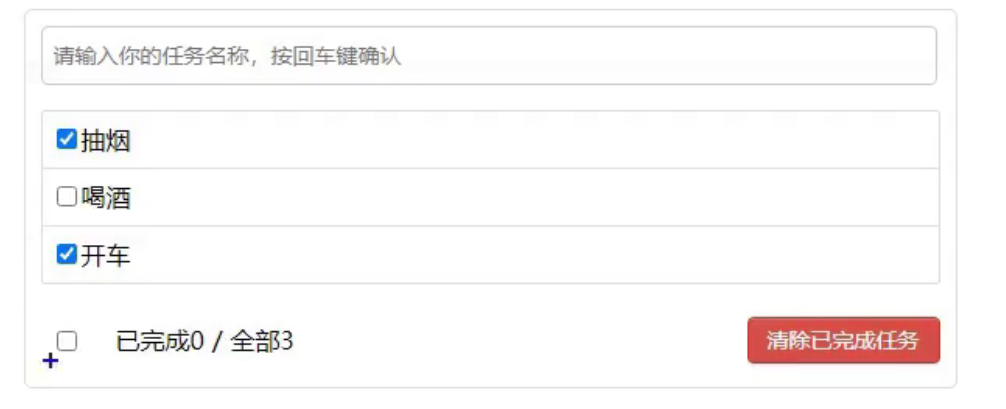
统计完成数
- computed
- Array.reduce ```vue 已完成{{doneTotal}} / 全部{{total}}
<a name="vrNXS"></a>
### CheckBox 已完成的全选

1. v-model
1. computed
```vue
<template>
            <input type="checkbox" v-model="isAll"/>
</template>

<script>
    export default {
        computed: {
            isAll:{
                //全选框是否勾选
                get(){
          //doneTotal: 已完成数, total: 总数
                    return this.doneTotal === this.total && this.total > 0
                },
                //isAll被修改时set被调用
                set(value){

                }
            }
        },
    }
</script>
input 添加一条数据
- v-model
- methods
```vue
<a name="scaUb"></a>
### 增加 删除 修改 勾选 全选
<a name="Y2YdF"></a>
#### 子组件
实现 span-input编辑

   1. <span v-show="!todo.isEdit"> <input  v-show="todo.isEdit" >
   1. 编辑 => todo.isEdit = true
   1. 编辑时获取焦点 this.$nextTick ==>focus

实现数据写入<br />失去焦点回调 e.target.value修改data数据
```vue
<template>
    <li>
        <label>
            <input type="checkbox" :checked="todo.done" @change="handleCheck(todo.id)"/>
            <!-- 如下代码也能实现功能,但是不太推荐,因为有点违反原则,因为修改了props -->
            <!-- <input type="checkbox" v-model="todo.done"/> -->
            <span v-show="!todo.isEdit">{{todo.title}}</span>
            <input
                type="text"
                v-show="todo.isEdit"
                :value="todo.title"
                @blur="handleBlur(todo,$event)"
                ref="inputTitle"
            >
        </label>
        <button class="btn btn-danger" @click="handleDelete(todo.id)">删除</button>
        <button v-show="!todo.isEdit" class="btn btn-edit" @click="handleEdit(todo)">编辑</button>
    </li>
</template>

<script>
    import pubsub from 'pubsub-js'
    export default {
        name:'MyItem',
        //声明接收todo
        props:['todo'],
        methods: {
            //勾选or取消勾选
            handleCheck(id){
                //通知App组件将对应的todo对象的done值取反
                // this.checkTodo(id)
                this.$bus.$emit('checkTodo',id)
            },
            //删除
            handleDelete(id){
                if(confirm('确定删除吗?')){
                    //通知App组件将对应的todo对象删除
                    // this.deleteTodo(id)
                    // this.$bus.$emit('deleteTodo',id)
                    pubsub.publish('deleteTodo',id)
                }
            },
            //编辑
            handleEdit(todo){
                if(todo.hasOwnProperty('isEdit')){
                    todo.isEdit = true
                }else{
                    // console.log('@')
                    this.$set(todo,'isEdit',true)
                }
                this.$nextTick(function(){
                    this.$refs.inputTitle.focus()
                })
            },
            //失去焦点回调(真正执行修改逻辑)
            handleBlur(todo,e){
                todo.isEdit = false
                if(!e.target.value.trim()) return alert('输入不能为空!')
                this.$bus.$emit('updateTodo',todo.id,e.target.value)
            }
        },
    }
</script>
父组件 data拥有者
    export default {
        methods: {
            //添加一个todo
            addTodo(todoObj){
                this.todos.unshift(todoObj)
            },
            //勾选or取消勾选一个todo
            checkTodo(id){
        //将对应的todo对象的done值取反
                this.todos.forEach((todo)=>{
                    if(todo.id === id) todo.done = !todo.done
                })
            },
            //更新一个todo的title
            updateTodo(id,title){
                this.todos.forEach((todo)=>{
                    if(todo.id === id) todo.title = title
                })
            },
            //删除一个todo
            deleteTodo(_,id){
                this.todos = this.todos.filter( todo => todo.id !== id )
            },
            //全选or取消全选
            checkAllTodo(done){
                this.todos.forEach((todo)=>{
                    todo.done = done
                })
            },
            //清除所有已经完成的todo
            clearAllTodo(){
                this.todos = this.todos.filter((todo)=>{
                    return !todo.done
                })
            }
        }
    }

若有收获,就点个赞吧
0 人点赞


