生命周期函数(旧)
- 初始化阶段: 由ReactDOM.render()触发—-初次渲染
- constructor()
- componentWillMount()
- render()
- componentDidMount() =====> 常用
一般在这个钩子中做一些初始化的事,例如:开启定时器、发送网络请求、订阅消息
- 更新阶段: 由组件内部this.setSate()或父组件render触发
- componentWillReceiveProps -
props发生改变才会触发 只有组件内部state修改不会触发 - shouldComponentUpdate() - 组件是否应该被更新
return true/false - componentWillUpdate()
- render() =====> 必须使用的一个
- componentDidUpdate()
- componentWillReceiveProps -
卸载组件: 由ReactDOM.unmountComponentAtNode()触发
- componentWillUnmount() =====> 常用
一般在这个钩子中做一些收尾的事,例如:关闭定时器、取消订阅消息
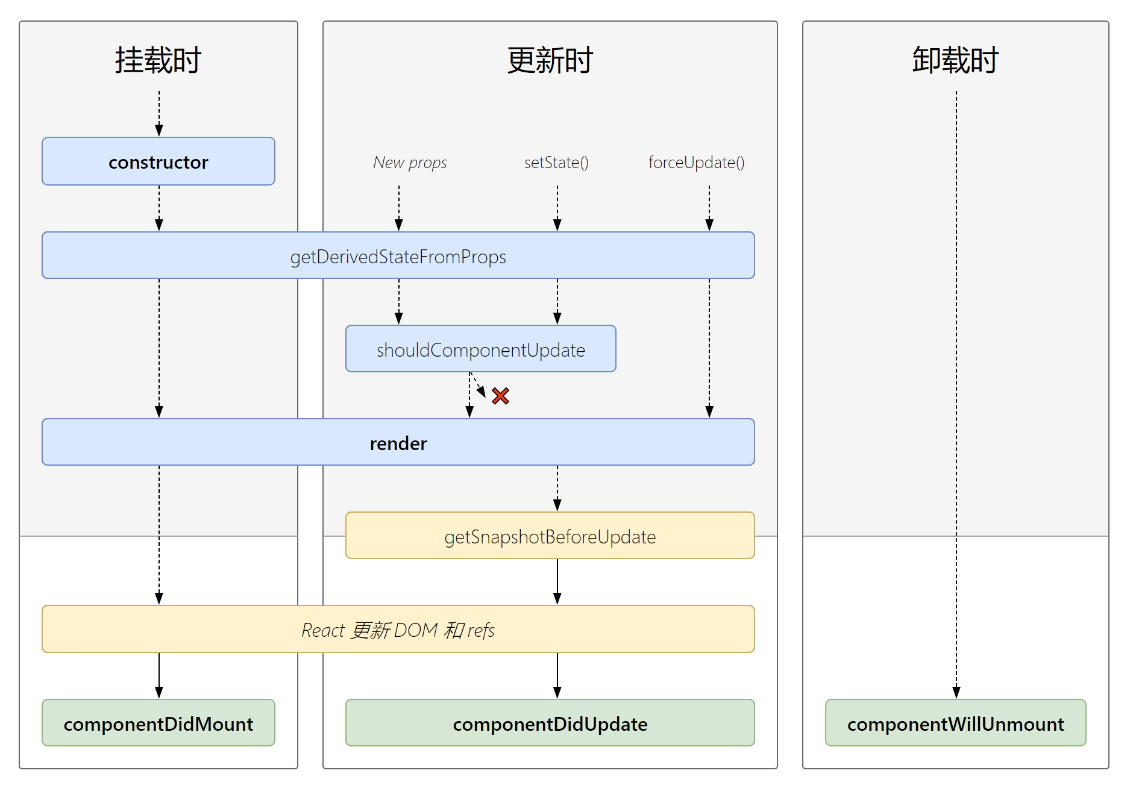
生命周期函数(新)v16.2
- componentWillUnmount() =====> 常用
初始化阶段: 由ReactDOM.render()触发—-初次渲染
- constructor() - 初始化state [ 只执行一次 ]
- getDerivedStateFromProps - 初始化执行[一次] 后续更新(包括自身状态更新以及父传子)[N次]
- render() - 每次组件渲染触发N次
- componentDidMount() =====> 常用 成功render并渲染真实Dom[一次]
一般在这个钩子中做一些初始化的事,例如:开启定时器、发送网络请求、订阅消息

更新阶段: 由组件内部this.setSate()或父组件重新render触发
- getDerivedStateFromProps - 初始化执行[一次] 后续更新(包括自身状态更新以及父传子)[N次]
- shouldComponentUpdate() - 组件是否应该被更新,返回
false组件render调用 - render()
- getSnapshotBeforeUpdate
- componentDidUpdate() - 组件(Dom)更新后[N次],这里调用setData会导致递归更新,应给setData做if判断 ```javascript // scu 性能优化函数 shouldComponentUpdate(nextProps,nextState){ // return true; //应该更新 //return false;; //阻止更新 // this.state 老的状态 // nextState 新的状态 if(JSON.stringify(this.state)!== JSON.stringify(nextState)){ return true }
return false }
//根据父组件传入props决定一些逻辑 componentDidUpdate(prevProps,prevState) { // 做法:比较更新前后的props是否相同,来决定是否重新渲染组件 console.log(‘上一次的props:’, prevProps, ‘, 当前的props:’, this.props) if (prevProps.count !== this.props.count) { // this.setState({}) } }
3. 卸载组件: 由ReactDOM.unmountComponentAtNode()触发1. componentWillUnmount() =====> 常用<br />一般在这个钩子中做一些收尾的事,例如:关闭定时器、取消订阅消息```javascriptcomponentWillUnmount(){console.log("componentWillUnmount")window.onresize = nullclearInterval(this.timer)}
即将废弃的勾子
componentWillMount -组件即将挂载[一次] render之后最后一次修改state的机会。
- 原因: 在ssr中 这个方法将会被多次调用, 所以会重复触发多遍,同时在这里如果绑定事件, 将无法解绑,导致内存泄漏 , 变得不够安全高效逐步废弃。
- getDerivedStateFromProps可代替该函数 因为会初始化执行一次
componentWillReceiveProps - [N次]
- 原因: 外部组件多次频繁更新传入多次不同的 props,会导致不必要的异步请求 .
- getDerivedStateFromProps可代替该函数 因为每次更新(包括自身状态更新以及父传子)都会执行 ```javascript componentWillReceiveProps(nextProps){ console.log(“componentWillReceiveProps”,nextProps)
// 最先获得父组件传来的属性, 可以利用属性进行ajax或者逻辑处理。 … // 把属性转化成孩子自己的状态。 this.setState({ title:nextProps.text+”kerwin” }) } ```
componentWillUpdate - 不能修改props和state[N次],
- 原因:更新前记录 DOM 状态, 可能会做一些处理,与componentDidUpdate相隔时间如果过 长, 会导致 状态不太信
- getSnapshotBeforeUpdate可代替该函数 ,触发时间为update发生的时候,在render之后 dom渲染之前返回一个值,作为componentDidUpdate的第三个参数。
现在使用会出现警告,下一个大版本需要加上UNSAFE_前缀才能使用,以后可能会被彻底废弃,不建议使用。(
UNSAFE_componentWillMount)getDerivedStateFromProps
第一次的初始化组件以及后续的更新过程中(包括自身状态更新以及父传子) , 返回一个对象作为新的state,返回null则说明不需要在这里更新state
使用场景:
- 若state的值在任何时候都取决于props,那么可以使用getDerivedStateFromProps
注意:
- 必须写static
- 必须有return,return的跟state中某个属性一样 则无论怎么修改都是return 的值 ```javascript //做一个根据父组件props.type决定获取数据的案例 state = { list:[],//用于渲染的列表 type:1 //决定list渲染数据的flag }
static getDerivedStateFromProps(props,state){ //拿到的是最新的props和state console.log(‘getDerivedStateFromProps’,props,state); return { type:nextProps.type //修改state.type为props决定的type } }
componentDidUpdate(prevProps,prevState){ if(this.state.type===prevState.type){ return } //根据state.type(由getDerivedStateFromProps提供)获取数据 if(this.state.type===1){ axios() }else{ axios() } }
<a name="heayX"></a>
### getSnapshotBeforeUpdate
>  取代了 componetWillUpdate ,触发时间为update发生的时候,在render之后 dom渲染之前返回一个值,作为componentDidUpdate的第三个参数。

**使用场景:**

1. 不断获取新闻 界面一直定位在滚动条位置
```jsx
<!DOCTYPE html>
<html lang="en">
  <head>
    <meta charset="UTF-8">
      <title>4_getSnapShotBeforeUpdate的使用场景</title>
      <style>
        .list{
          width: 200px;
          height: 150px;
          background-color: skyblue;
          overflow: auto;
        }
        .news{
          height: 30px;
        }
      </style>
      </head>
    <body>
      <!-- 准备好一个“容器” -->
      <div id="test"></div>

      <!-- 引入react核心库 -->
      <script type="text/javascript" src="../js/17.0.1/react.development.js"></script>
      <!-- 引入react-dom,用于支持react操作DOM -->
      <script type="text/javascript" src="../js/17.0.1/react-dom.development.js"></script>
      <!-- 引入babel,用于将jsx转为js -->
      <script type="text/javascript" src="../js/17.0.1/babel.min.js"></script>

      <script type="text/babel">
        class NewsList extends React.Component{

          state = {newsArr:[]}

          componentDidMount(){
            setInterval(() => {
              //获取原状态
              const {newsArr} = this.state
              //模拟一条新闻
              const news = '新闻'+ (newsArr.length+1)
              //更新状态
              this.setState({newsArr:[news,...newsArr]})
            }, 1000);
          }

          getSnapshotBeforeUpdate(){
            return this.refs.list.scrollHeight
          }

          componentDidUpdate(preProps,preState,height){
            this.refs.list.scrollTop += this.refs.list.scrollHeight - height
          }

          render(){
            return(
              <div className="list" ref="list">
                {
                  this.state.newsArr.map((n,index)=>{
                    return <div key={index} className="news">{n}</div>
                  })
                }
              </div>
            )
          }
        }
        ReactDOM.render(<NewsList/>,document.getElementById('test'))
      </script>
    </body>
</html>

若有收获,就点个赞吧
0 人点赞


