library
导出library
将代码打包生成各种library
准备一个用于导出的js文件
src/index.js
export const add = (x, y) => {return x + y}
以script标签引入 生成
dist/mylib.js打包整个库后向外暴露的变量名"webpackNumbers"
module.exports = {mode: 'production',entry: './src/index.js',output: {path: path.resolve(__dirname, 'dist'),filename: 'mylib.js',//打包整个库后向外暴露的变量名(一般结合dll暴露某个库)library: "webpackNumbers"}}
调用
<script src="../dist/mylib.js"></script><script>console.log(webpackNumbers.add(5,6))</script>
CommonJS
module.exports = {mode: 'production',entry: './src/index.js'output: {path: path.resolve(__dirname, 'dist'),filename: 'mylib.js',library: {//写了name 调用时就要const { add } = require(); webpackNumbers.add()//name:"webpackNumbers",type: 'commonjs'}}}
调用
const { add } = require('../dist/mylib')console.log(add(5, 6))
启动 :node app.js
esmodule
module.exports = {mode: 'production',entry: './src/index.js',//必须添加这个experiments: {outputModule: true,},output: {path: path.resolve(__dirname, 'dist'),filename: 'mylib.js',library: {type: 'module'}}}
调用
<script type="module">
  import { add } from '../dist/mylib.js'
  console.log(add(5, 6))
</script>
通用配置 可以通过CommonJS、AMD 以及 script 标签使用 目前不支持esmodule
const path = require("path");

module.exports = {
  mode: 'production',
  entry: './src/index.js',
  output: {
    path: path.resolve(__dirname, 'dist'),
    filename: 'mylib.js',
    library: {
      name: 'mylib',
      type: 'umd',
    },
    globalObject: 'globalThis'
  }
}
发布为 npm package
准备工作
1.编写方法
src/index.js 做一个数字和英文互转的方法
import _ from 'lodash'
import numRef from './ref.json'

export function numToWord(num) {
  return _.reduce(numRef, (accum, ref) => {
    return ref.num === num ? ref.word : accum
  }, '')
}

export function wordToNum(word) {
  return _.reduce(numRef, (accum, ref) => {
    return ref.word === word && word.toLowerCase() ? ref.num : accum
  }, -1)
}
src/ref.json
[
  { "num": 1,"word": "One"},{"num": 2,"word": "Two"},{ "num": 3,"word": "Three" },
  { "num": 4, "word": "Four"},{"num": 5,"word": "Five"},{ "num": 0, "word": "Zero" }
]
2.编写配置
webpack.config.js
const path = require("path");

module.exports = {
  mode: 'production',
  entry: './src/index.js',
  output: {
    path: path.resolve(__dirname, 'dist'),
    filename: 'webpack-numbers.js',
    library: {
      name: 'webpackNumbers',
      type: 'umd'
    },
    globalObject: 'globalThis'
  },
  //不打包 而是引入
  externals: {
    lodash: {
      commonjs: 'lodash',
      commonjs2: 'lodash',
      amd: 'lodash',
      root: '_'
    }
  }
}
package.json
{
  //发布的包名
  "name": "dan-webpack-numbers",
  //包的版本
  "version": "1.0.1",
  //注意这里要这样写,让webpack 去该路径载入包
  "main": "dist/webpack-numbers.js",
  ...
  "devDependencies": {
    "lodash": "^4.17.21",
    "webpack": "^5.61.0",
    "webpack-cli": "^4.9.1"
  }
}
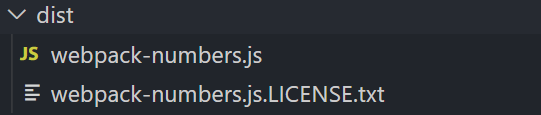
3.打包效果
4.本地导入测试
node app.js
const webpackNumbers = require('../dist/webpack-numbers')
console.log(webpackNumbers.numToWord(3))
发布使用流程
发布
注册npm账号后在对应文件夹下执行以下命令
- 确认连接到npm官网
- 填写用户名密码邮箱
- 发布

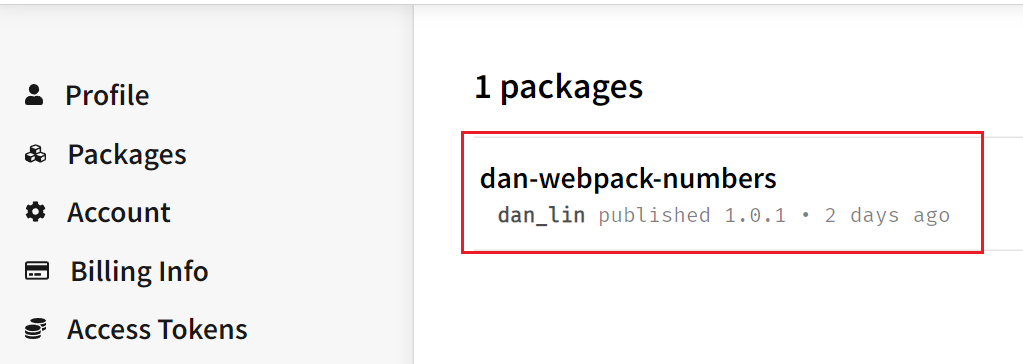
发布后账号查看packages
导入发布的库
npm i dan-webpack-numbers -D- 再下载库需要对应的包,即可使用

若有收获,就点个赞吧
0 人点赞


