这个对象是用来获取系统或者是指定的系统时间。
创建Date对象的方法:
- Date( ):将系统当前时间封装为一个时间对象。
- Date( year , month ,date ,hours ,minutes ,seconds ,milliseconds ):将参数中指定的日期时间封装为一个日期对象并且将其返回。
- Date( milliseconds ):根据毫秒值将其转换为距离1970/1/1 0:0:0的日期对象。
- Date( date String):将参数中的日期字符串封装为一个日期对象。
注意:
- 参数中的日期可以不用传完整的,会默认按照参数的顺序来赋值。
- 当年份为一位数或者两位数时,表示19XX年。
比如:let date = new Date(1) 表示1901年的时间。
常用方法:
| 方法 | 描述 |
|---|---|
| getDate()(注意不是getDay) | 以数值返回天(1-31) |
| getDay() | 以数值获取周名(0-6) |
| getFullYear() | 获取四位的年(yyyy) |
| getHours() | 获取小时(0-23) |
| getMilliseconds() | 获取毫秒(0-999) |
| getMinutes() | 获取分(0-59) |
| getMonth() | 获取月(0-11) |
| getSeconds() | 获取秒(0-59) |
| getTime() | 获取时间(从 1970 年 1 月 1 日至今) |
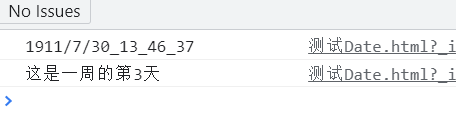
根据Date对象获取时间的演示:
<script>let date = new Date(11,7,30,13,46,37,330);console.log(date.getFullYear() + '/' + date.getMonth() + '/' + date.getDate() + '_' + date.getHours() + '_' +date.getMinutes() + '_' + date.getSeconds());console.log('这是一周的第' + date.getDay()+'天')</script>
date参数:
let date = new Date(“2021-08-31T13:14:35”);
let date = new Date(“2021-08-31”);(默认是早上8:00)
let date = new Date(“2021/08/31”);(默认是早上8:00)

若有收获,就点个赞吧
0 人点赞


