Swagger用来提供api文档
bootstrapUI相比swagger自带的ui而言更直观人性化
Maven依赖
<properties><!-- 斯瓦格api版本配置 --><springfox-swagger2.version>2.9.2</springfox-swagger2.version><!-- 斯瓦格注解包版本配置 --><swagger-annotations.verion>1.5.20</swagger-annotations.verion><!-- 斯瓦格bootstrap UI版本配置 --><swagger-bootstrap-ui.version>1.9.6</swagger-bootstrap-ui.version></properties><!-- 集成RESTFUL API文档插件依赖 --><dependency><groupId>io.springfox</groupId><artifactId>springfox-swagger2</artifactId><version>${springfox-swagger2.version}</version></dependency><!-- 定义swagger核心注解插件依赖 --><dependency><groupId>io.swagger</groupId><artifactId>swagger-annotations</artifactId><version>${swagger-annotations.verion}</version></dependency><!-- 集成swagger-bootstrap-ui文档插件依赖 --><dependency><groupId>com.github.xiaoymin</groupId><artifactId>swagger-bootstrap-ui</artifactId><version>${swagger-bootstrap-ui.version}</version></dependency>
配置类
前后端分离项目中,在请求头中使用令牌请求接口,一定要配置token
@Configuration
@EnableSwagger2
@EnableSwaggerBootstrapUI
public class SwaggerConfig {

    /**
     * 创建SwaggerApi
     *
     * @return springfox.documentation.spring.web.plugins.Docket
     * @author YangYudi
     * @date 2020/12/14 14:02
     */
    @Bean
    public Docket createRestApi() {
        return new Docket(DocumentationType.SWAGGER_2)
                .apiInfo(apiInfo())
                .select()
                .apis(RequestHandlerSelectors.basePackage("com.halayang.server"))
                .paths(PathSelectors.any())
                .build()
                .securitySchemes(Lists.newArrayList(apiKey()));
    }

    /**
     * Swagger API基本信息
     *
     * @return springfox.documentation.service.ApiInfo
     * @author YangYudi
     * @date 2020/12/14 14:02
     */
    private ApiInfo apiInfo() {
        Contact contact = new Contact("yudi", "http://localhost:9000/doc.html", "529699377@qq.com");
        return new ApiInfoBuilder()
                .title("course-online-swagger-ui RESTFul APIs")
                .description("course-online-swagger-ui")
                .termsOfServiceUrl("http://localhost:9000/")
                .contact(contact)
                .version("1.0")
                .build();
    }

    /**
     * 配置token类型为Bearer
     *
     * @return springfox.documentation.service.ApiKey
     * @author YangYudi
     * @date 2020/12/14 14:02
     */
    private ApiKey apiKey() {
        return new ApiKey("BearerToken", "Authorization", "header");
    }

}
界面直观简洁
鉴权的令牌配置
配置Security不对swagger页面拦截
在security配置类相应方法中进行配置
@Override
public void configure(HttpSecurity http) throws Exception {
    // 过滤不需要认证的资源
    http.authorizeRequests()
            .antMatchers("/doc.html", "/swagger-resources/**", "/v2/api-docs/**", "/webjars/**", "/actuator", "/actuator/**")
            .permitAll()
            .anyRequest().authenticated();
}
Spring Cloud Gateway聚合swagger
现在都喜欢搞微服务项目,项目会比较多,每个项目都配置了swagger之后,都需要重新输入网址,就比较麻烦了
在gateway项目中聚合所有接入网关的项目swagger
maven依赖
使用nacos为注册中心
<dependencies>
    <!--服务注册-->
    <dependency>
        <groupId>com.alibaba.cloud</groupId>
        <artifactId>spring-cloud-starter-alibaba-nacos-discovery</artifactId>
    </dependency>
    <!--  gateway依赖,该依赖中已经引入了web相关依赖了  -->
    <dependency>
        <groupId>org.springframework.cloud</groupId>
        <artifactId>spring-cloud-starter-gateway</artifactId>
    </dependency>
    <!-- 集成RESTFUL API文档插件依赖 -->
    <dependency>
        <groupId>io.springfox</groupId>
        <artifactId>springfox-swagger2</artifactId>
    </dependency>
    <!-- 集成swagger-bootstrap-ui档插件依赖 -->
    <dependency>
        <groupId>com.github.xiaoymin</groupId>
        <artifactId>swagger-bootstrap-ui</artifactId>
    </dependency>
</dependencies>
配置类
配置路由断点
@Component
@Primary
public class SwaggerProvider implements SwaggerResourcesProvider {

    public static final String API_URI = "/v2/api-docs";

    private final RouteLocator routeLocator;

    private final GatewayProperties gatewayProperties;

    @Autowired
    public SwaggerProvider(RouteLocator routeLocator, GatewayProperties gatewayProperties) {
        this.routeLocator = routeLocator;
        this.gatewayProperties = gatewayProperties;
    }

    @Override
    public List<SwaggerResource> get() {
        List<SwaggerResource> resources = new ArrayList<>();
        List<String> routes = new ArrayList<>();
        //取出gateway的route
        routeLocator.getRoutes().subscribe(route -> routes.add(route.getId()));
        //结合配置的route-路径(Path),和route过滤,只获取有效的route节点
        gatewayProperties.getRoutes().stream()
                .filter(routeDefinition -> routes.contains(routeDefinition.getId()))
                .forEach(routeDefinition -> routeDefinition.getPredicates().stream()
                        .filter(predicateDefinition -> ("Path").equalsIgnoreCase(predicateDefinition.getName()))
                        .forEach(predicateDefinition ->
                                resources.add(swaggerResource(routeDefinition.getId(),
                                        predicateDefinition.getArgs().get(NameUtils.GENERATED_NAME_PREFIX + "0")
                                                .replace("/**", API_URI)))));
        return resources;
    }

    private SwaggerResource swaggerResource(String name, String location) {
        SwaggerResource swaggerResource = new SwaggerResource();
        swaggerResource.setName(name);
        swaggerResource.setLocation(location);
        swaggerResource.setSwaggerVersion("2.0");
        return swaggerResource;
    }
}
配置swagger资源,写一个controller类
@RestController
public class SwaggerHandlerController {

    private final SwaggerResourcesProvider swaggerResources;

    public SwaggerHandlerController(SwaggerResourcesProvider swaggerResources) {
        this.swaggerResources = swaggerResources;
    }

    @GetMapping("/swagger-resources")
    public Mono<ResponseEntity<?>> swaggerResources() {
        return Mono.just((new ResponseEntity<>(swaggerResources.get(), HttpStatus.OK)));
    }

}
效果
在左上角选择接入网关的服务,展示对应服务的swagger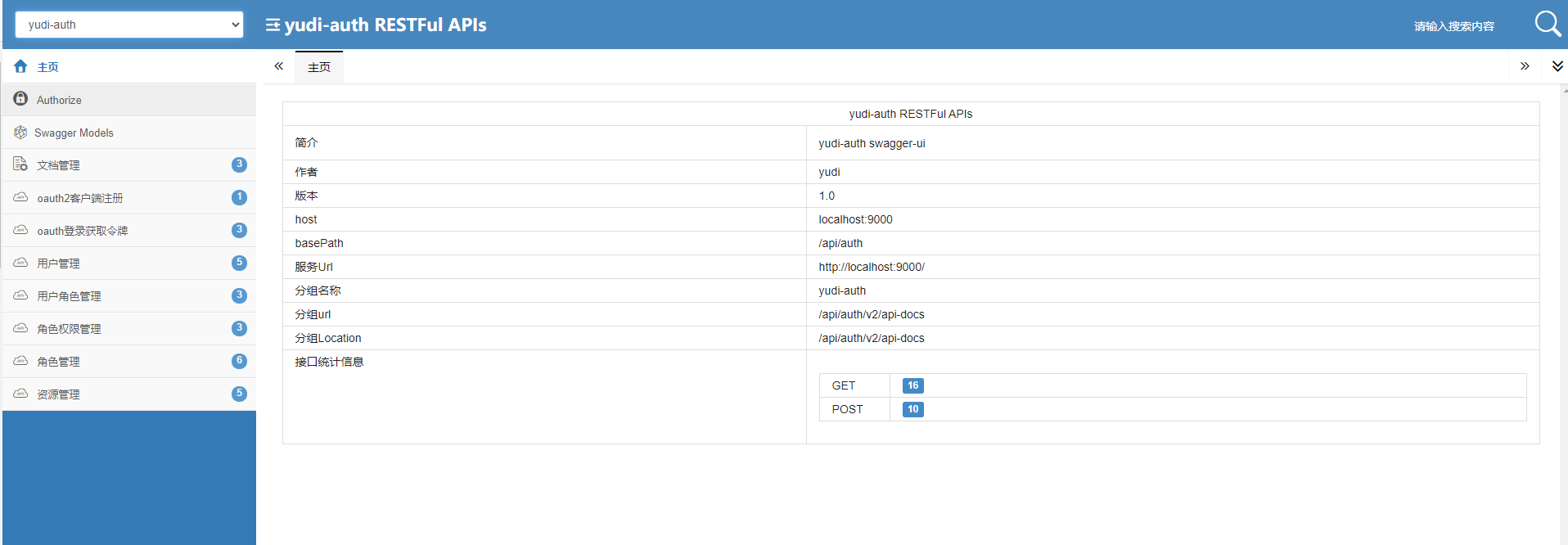


若有收获,就点个赞吧
0 人点赞


