打包成war时的启动类和maven配置文件编写
将SpringBoot打包成war包时启动类需继承SpringBootServletInitializer类
@SpringBootApplication注解会自动扫描到当前目录下的所有类,所以启动类要放在所有层的父包中
@SpringBootApplicationpublic class App extends SpringBootServletInitializer {/*** main方法执行SpringBoot启动类** @param args*/public static void main(String[] args) {SpringApplication.run(App.class, args);}/*** 注意这里要指向原先用main方法执行的Application启动类** @param builder* @return builder*/@Overrideprotected SpringApplicationBuilder configure(SpringApplicationBuilder builder) {return builder.sources(App.class);}}
在pom.xml的配置文件中需写入如下配置
<build><plugins><plugin><groupId>org.springframework.boot</groupId><artifactId>spring-boot-maven-plugin</artifactId><!-- 这里写的是启动类的路径 --><configuration><mainClass>com.example.App</mainClass></configuration><executions><execution><goals><goal>repackage</goal></goals></execution></executions></plugin></plugins></build>
MVC配置扩展
静态资源的访问
在SpringBoot1.5版本中只需要在resources下面新建一个static文件夹就可以直接访问静态资源了,而在2.0及以上的版本如果不配置是不能直接访问的,在此需要写一个配置类,此类实现WebMvcConfigurer 接口,为什么不继承WebMvcConfigurationSupport类呢,因为SpringBoot底层自动装配webmvc的条件就是没有其他的WebMvcConfigurationSupport类型的bean,自动装配的MVC功能才能生效,实现WebMvcConfigurer 接口切记不要使用@EnableWebMvc 注解,不然也会生成该类的bean
@Configuration
public class MyWebMvcConfig implements WebMvcConfigurer {...}
在此类中重写一个配置静态文件路径的方法
@Override
public void addResourceHandlers(ResourceHandlerRegistry registry) {
   //需要告知系统,这是要被当成静态文件的!
   registry.addResourceHandler("/**").addResourceLocations("classpath:/static/");
}
这样在静态页面中就直接写/来访问静态资源
设置SpringBoot项目的首页
在此类中重写一个方法进行配置
@Override
public void addViewControllers(ViewControllerRegistry registry) {
     registry.addViewController("/").setViewName("forward:/index");
     registry.setOrder(Ordered.HIGHEST_PRECEDENCE);
}
对FastJson进行配置
Springboot默认支持jackson作为json数据格式的序列化方案
但是想用fastjson也不是不行,仍然是在此类中重写一个方法进行配置
@Override
public void configureMessageConverters(List<HttpMessageConverter<?>> converters) {
    FastJsonHttpMessageConverter converter = new FastJsonHttpMessageConverter();
    FastJsonConfig config = new FastJsonConfig();
    config.setSerializerFeatures(SerializerFeature.DisableCircularReferenceDetect, SerializerFeature.WriteMapNullValue);
    //设置json时间格式
    config.setDateFormat("yyyy-MM-dd HH:mm:ss");
    converter.setFastJsonConfig(config);
    List<MediaType> fastMediaTypes = new ArrayList<>();
    //设置编码格式
    fastMediaTypes.add(MediaType.APPLICATION_JSON_UTF8);
    converter.setSupportedMediaTypes(fastMediaTypes);
    converter.setFastJsonConfig(config);
    converters.add(converter);
}
Jackson配置
相比于fastjson,其实更推荐使用jackson
springbootwe starter默认导了jackson依赖,配置序列化也只用改配置文件就行了
spring:
  jackson:
    # 日期格式化
    date-format: yyyy-MM-dd HH:mm:ss
    serialization:
      # 格式化输出
      indent_output: false
      # 忽略无法转换的对象
      fail_on_empty_beans: true
    # 设置空如何序列化
    defaultPropertyInclusion: NON_EMPTY
    deserialization:
      # 允许对象忽略json中不存在的属性
      fail_on_unknown_properties: false
    parser:
      # 允许出现特殊字符和转义符
      allow_unquoted_control_chars: true
      # 允许出现单引号
      allow_single_quotes: true
配置好之后,Jackson的ObjectMapper类直接就配置好了,序列化反序列化直接用
@Autowired
private ObjectMapper objectMapper;
添加拦截器
先写一个拦截器的类,需要实现HandlerInterceptor接口
@Component
public class MyInterceptor implements HandlerInterceptor {

    @Override
    public boolean preHandle(HttpServletRequest request, HttpServletResponse response, Object o) throws Exception {
        //在这里写拦截器的具体代码
        //System.out.println("拦截器测试!!!");

        return true;
    }

    @Override
    public void postHandle(HttpServletRequest httpServletRequest, HttpServletResponse httpServletResponse, Object
            o, ModelAndView modelAndView) throws Exception {

    }

    @Override
    public void afterCompletion(HttpServletRequest httpServletRequest, HttpServletResponse
            httpServletResponse, Object o, Exception e) throws Exception {

    }
}
然后在上面继承WebMvcConfigurer 接口的配置类中就可以添加自己写的拦截器类了,仍然是需要重写一个方法进行添加拦截器
@Autowired
private MyInterceptor myInterceptor;

@Override
public void addInterceptors(InterceptorRegistry registry) {
    //配置拦截路径
    registry.addInterceptor(myInterceptor).addPathPatterns("/admin/**");
}
使用IDEA 进行Springboot项目热部署
先添加maven依赖
<dependency>
    <groupId>org.springframework.boot</groupId>
    <artifactId>spring-boot-devtools</artifactId>
    <scope>runtime</scope>
    <optional>true</optional>
</dependency>
设置maven插件
<build>
    <plugins>
        <plugin>
            <groupId>org.springframework.boot</groupId>
            <artifactId>spring-boot-maven-plugin</artifactId>
            <configuration>
                <fork>true</fork>
                <addResources>true</addResources>
            </configuration>
        </plugin>
    </plugins>
</build>
idea设置
按下快捷键组合键位ctrl+shift+alt+/,出来这个界面点击Registry
勾选
整合SpringBoot的Junit测试类
一般写测试类直接在测试的方法上添加@Test注解就可以解决,但如果测试的方法需要用到SpringBoot的一些配置,只有@Test注解就不行了,这时在对应的测试类上添加两个注解就可以解决
这里的App.class指的是自己写的SpringBoot项目的启动类webEnvironment = SpringBootTest.WebEnvironment.RANDOM_PORT 用于SpringBoot项目中集成了WebSocket后提供测试环境
@SpringBootTest(classes = App.class, webEnvironment = SpringBootTest.WebEnvironment.RANDOM_PORT)
public class Test {
    @Test
    public void test1(){
        //...
    }
    //...
}
SpringBoot配置项目自定义报错页面
这里就需要写一个配置类配置各种报错代码的显示页面
例如/error/404指的就是404的URL访问路径
但是这个方案只能用作非前后端分离而且是用内嵌的tomcat作为web容器的项目
更推荐使用全局异常
@Configuration
public class WebServerAutoConfiguration {
    @Bean
    public ConfigurableServletWebServerFactory webServerFactory() {
        TomcatServletWebServerFactory factory = new TomcatServletWebServerFactory();
        ErrorPage errorPage400 = new ErrorPage(HttpStatus.BAD_REQUEST, "/error/400");
        ErrorPage errorPage401 = new ErrorPage(HttpStatus.UNAUTHORIZED, "/error/401");
        ErrorPage errorPage403 = new ErrorPage(HttpStatus.FORBIDDEN, "/error/403");
        ErrorPage errorPage404 = new ErrorPage(HttpStatus.NOT_FOUND, "/error/404");
        ErrorPage errorPage415 = new ErrorPage(HttpStatus.UNSUPPORTED_MEDIA_TYPE, "/error/415");
        ErrorPage errorPage500 = new ErrorPage(HttpStatus.INTERNAL_SERVER_ERROR, "/error/500");
        factory.addErrorPages(errorPage400, errorPage401, errorPage403, errorPage404, errorPage415, errorPage500);
        return factory;
    }
}
全局异常配置
现在做项目都倾向于前后端分离了,这里就用@RestControllerAdvice注解,返回json格式
当然,实际写代码肯定不能这么捞,要做个自定义返回类型
CommonResult类是我自定义的一个返回结果的类,与前端交互更方便
@RestControllerAdvice
@Slf4j
public class GlobalExceptionHandler {

    @ExceptionHandler(Exception.class)
    public CommonResult error(Exception e) {
        log.error(e.getMessage());
        e.printStackTrace();
        return CommonResult.error();
    }

}
SpringBoot的异步任务调用
首先在SpringBoot启动类上添加@EnableAsync 注解使项目开启异步
@SpringBootApplication
@EnableAsync
public class AsyncspringbootApplication {

    public static void main(String[] args) {
        SpringApplication.run(AsyncspringbootApplication.class, args);
    }

}
无返回值的异步方法
在Service层中相应的想要实现的异步方法上添加@Async 注解,这里我模拟一个异步发送短信的方法,此方法无返回值
    /**
     * 模拟短信验证码
     * @throws Exception
     */
    @Async
    public void sendSms() throws Exception {
        System.out.println("模拟短信验证码...");
        Long startTime = System.currentTimeMillis();
        Thread.sleep(5000);
        Long endTime = System.currentTimeMillis();
        System.out.println("短信业务完成耗时:" + (endTime - startTime));
    }
在Controller层中写一个方法调用Service层中的异步方法,这样写主要是为了查看调用异步方法的效果
    @GetMapping("/sendSMS")
    public String sendSms() throws Exception {
        Long startTime = System.currentTimeMillis();
        asyncService.sendSms();
        Long endTime = System.currentTimeMillis();
        return "短信业务主流程耗时:" + (endTime - startTime);
    }
**当异步的方法没有返回值时,不管异步的方法是否执行完,主流程在执行异步方法时不会阻塞,继续向下执行主流程程序,直接向页面响应结果,而调用的异步方法会作为一个子线程单独执行,直到异步方法执行完成。**
有返回值的异步方法
若异步方法有返回值,事例的Service层代码如下,写了两个带有返回值的异步方法
   /**
     * 模拟有返回值的异步任务处理
     *
     * @return
     * @throws Exception
     */
    @Async
    public Future<Integer> processA() throws Exception {
        System.out.println("开始分析并统计业务A数据...");
        Long startTime = System.currentTimeMillis();
        Thread.sleep(4000);
        // 模拟定义一个假的统计结果
        int count = 123456;
        Long endTime = System.currentTimeMillis();
        System.out.println("业务A数据统计耗时:" + (endTime - startTime));
        return new AsyncResult<>(count);
    }

    @Async
    public Future<Integer> processB() throws Exception {
        System.out.println("开始分析并统计业务B数据...");
        Long startTime = System.currentTimeMillis();
        Thread.sleep(5000);
        // 模拟定义一个假的统计结果
        int count = 654321;
        Long endTime = System.currentTimeMillis();
        System.out.println("业务B数据统计耗时:" + (endTime - startTime));
        return new AsyncResult<>(count);
    }
在Controller层调用Service层中的异步方法
    @GetMapping("/statistics")
    public String statistics() throws Exception {
        Long startTime = System.currentTimeMillis();
        Future<Integer> futureA = asyncService.processA();
        Future<Integer> futureB = asyncService.processB();
        int total = futureA.get() + futureB.get();
        System.out.println("异步任务数据统计汇总结果: " + total);
        Long endTime = System.currentTimeMillis();
        System.out.println("主流程耗时: " + (endTime - startTime));
        return "异步任务数据统计汇总结果: " + total;
    }
**像这样调用有返回值的异步方法时,主流程在执行异步方法时会有短暂阻塞,需要等待并获取异步方法的返回结果,而调用的两个异步方法会作为两个子线程并行执行,直到异步方法执行完成并返回结果,这样主流程会在最后一个异步方法返回结果后跳出阻塞状态。**
SpringBoot的定时任务
首先在SpringBoot项目启动类上添加@EnableScheduling 注解开启定时操作
@SpringBootApplication
@EnableScheduling
public class AsyncspringbootApplication {

    public static void main(String[] args) {
        SpringApplication.run(AsyncspringbootApplication.class, args);
    }

}
然后在Service层中写相应的定时操作的方法,都是用@Scheduled 注解,主要是该注解里的参数不同,如下有三种方式
    @Scheduled(fixedRate = 60000)
    public void scheduledTaskImmediately() {
        System.out.println(String.format("fixedRate第%s次执行,当前时间为:%s", count1++, dateFormat.format(new Date())));
    }

    @Scheduled(fixedDelay = 60000)
    public void scheduledTaskAfterSleep() throws InterruptedException {
        System.out.println(String.format("fixedDelay第%s次执行,当前时间为:%s", count2++, dateFormat.format(new Date())));
    }

    @Scheduled(cron = "0 * * * * *")
    public void scheduledTaskCron() {
        System.out.println(String.format("cron第%s次执行,当前时间为:%s", count3++, dateFormat.format(new Date())));
    }
配置@Scheduled注解的fixedRate和fixedDelay属性的定时方法会立即执行一次
这里所写的表达式配置cron属性的定时方法会在整数分钟时间点首次执行
配置fixedRate和cron属性的方法会每隔1分钟重复执行一次定时任务
而配置fixedDelay属性的方法是在上一次方法执行完成后再相隔1分钟重复执行一次定时任务。
cron表达式可能用到的会比较多
cron表达式格式:
{秒} {分} {时} {日} {月} {周} {年(可选)}
如有更多需求可以使用在线cron表达式生成器https://cron.qqe2.com/
SpringBoot发送邮件
配置文件
先在pom.xml中导入依赖
        <dependency>
            <groupId>org.springframework.boot</groupId>
            <artifactId>spring-boot-starter-mail</artifactId>
        </dependency>
        <!-- 利用Thymeleaf发送有模板的邮件的必备依赖 -->
        <dependency>
            <groupId>net.sourceforge.nekohtml</groupId>
            <artifactId>nekohtml</artifactId>
        </dependency>
application.properties中写入相应配置
# 邮件发送配置
spring.mail.host=smtp.qq.com
# 发送者的邮箱地址
spring.mail.username=xxxxxxxx@qq.com
# 邮箱授权码(pop3/smtp)
spring.mail.password=xxnfjwtqwrfdeaba
spring.mail.default-encoding=UTF-8
spring.mail.properties.mail.smtp.auth=true
spring.mail.properties.mail.smtp.starttls.enable=true
spring.mail.properties.mail.smtp.starttls.required=true
发送简单的只有文本的邮件
在Service层中写相应的发送邮件的代码
    //发送人邮箱地址
    @Value("${spring.mail.username}")
    private String emailFrom;
    @Autowired
    private JavaMailSender mailSender;

    /**
     * 发送简单的文本邮件
     * @param sendTo  收件人邮箱地址
     * @param title   邮件标题
     * @param content 邮件内容
     */
    @Override
    public void sendMail(String sendTo, String title, String content) {
        SimpleMailMessage mailMessage = new SimpleMailMessage();
        mailMessage.setFrom(emailFrom);
        mailMessage.setTo(sendTo);
        mailMessage.setSubject(title);
        mailMessage.setText(content);

        mailSender.send(mailMessage);
    }
然后直接在Controller层中调用该方法即可发送邮件,Controller的代码在此就不列出了
发送带有附件的邮件
除方法里的实现代码外与上一致
    /**
     * 发送有附件的邮件
     * @param sendTo   收件人邮箱地址
     * @param title    邮件标题
     * @param content  邮件内容
     * @param file     附件的File类对象
     * @param fileName 文件名
     * @throws Exception
     */
    @Override
    public void sendAttachmentMail(String sendTo, String title, String content, File file, String fileName) throws Exception {
        MimeMessage mailMessage = mailSender.createMimeMessage();

        MimeMessageHelper helper = new MimeMessageHelper(mailMessage, true);
        helper.setFrom(emailFrom);
        helper.setTo(sendTo);
        helper.setSubject(title);
        helper.setText(content);
        //设置邮件附件
        FileSystemResource resource = new FileSystemResource(file);

        //附件名称
        helper.addAttachment(fileName, resource);

        mailSender.send(mailMessage);

    }
发送有模板的邮件
需要用到模板引擎,这里以thymeleaf为模板引擎举例
除方法里的实现代码外还需要导入TemplateEngine类对象的依赖
    //发送人邮箱地址
    @Value("${spring.mail.username}")
    private String emailFrom;
    @Autowired
    private JavaMailSender mailSender;
    @Autowired
    private TemplateEngine templateEngine;

   /**
     * 发送模板邮件
     * @param sendTo  收件人邮箱地址
     * @param title   邮件标题
     * @throws Exception
     */
    @Override
    public void sendTemplateMail(String sendTo, String title) throws Exception {
        MimeMessage mimeMessage = mailSender.createMimeMessage();
        MimeMessageHelper helper = new MimeMessageHelper(mimeMessage, true);
        helper.setFrom(emailFrom);
        helper.setTo(sendTo);
        helper.setSubject(title);
        Map<String, Object> model = new HashMap<>();
        model.put("username", "YANG");
        //模板引擎全局变量
        Context context = new Context();
        context.setLocale(Locale.CHINA);
        context.setVariables(model);
        //得到模板
        helper.setText(templateEngine.process("sheet", context), true);

        mailSender.send(mimeMessage);
    }
这里的templateEngine.process方法里的第一个参数”sheet”是SpringBoot项目中resources文件夹下面的templates的文件夹里的html文件 sheet.html ,context.setVariables(model) 里的model是因为sheet.html里使用Thymeleaf动态显示字符串,所以在此传入
SpringBoot配置国际化
使用thymeleaf模板引擎有如下页面代码login.html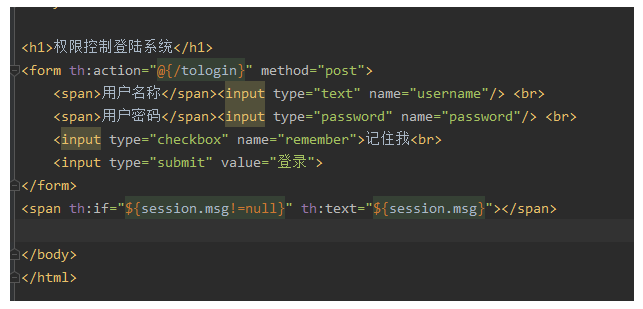
来配置国际化,SpringBoot已做自动配置,只需要改配置文件即可
创建i18n文件夹,根据login页面创建如下三种配置文件,login.properties表示本地,其他的表示国际化的
要注意命名规则

使用idea自带的插件Resource Bundle可以快速更改配置文件
想要国际的内容都改好之后再application.properties加一条配置
# 根据配置文件来
spring.messages.basename=i18n.login
然后在模板引擎中根据语法来使用 #{xxx}与配置文件对应

若有收获,就点个赞吧
0 人点赞


