Hystrix断路器
当访问的服务处于挂了的状态,那整个项目就可能会”雪崩“,这时就需要用到Hystrix.
Springcloud使用hystrix时的application.properties配置文件没有特别的东西就只是注册到eureka服务就行了,这里就不列出
一、maven依赖
<dependency><groupId>org.springframework.cloud</groupId><artifactId>spring-cloud-starter-netflix-hystrix</artifactId></dependency><dependency><groupId>org.springframework.boot</groupId><artifactId>spring-boot-starter-actuator</artifactId></dependency>
二、项目启动类所需注解
使用@EnableCircuitBreaker注解启用熔断
@SpringBootApplication
@EnableEurekaClient
@EnableCircuitBreaker
public class ConsumerOrderHyStrixApplication {

    public static void main(String[] args) {
        SpringApplication.run(ConsumerOrderHyStrixApplication.class, args);
    }

}
三、最简单的熔断使用
假设在“消费者”项目中运行“生产者”的接口,但是生产者项目挂了,这时直接在消费者的controller中写相应的代码就行了
@RestController
public class OrderController {

    @Autowired
    private EurekaClient eurekaClient;

    /**
     * spring提供的一个用于访问rest接口的对象
     */
    @Autowired
    private RestTemplate restTemplate;

    /**
     * HystrixCommand注解 fallbackMethod属性为失败后执行的方法
     * 失败后执行的方法应与本方法返回值类型 形参全都一样
     * 默认的HystrixCommand注解是另开一个线程执行失败后执行的方法
     * 下面在注解中设置的属性是让失败后执行的方法在同一线程中执行
     *
     * @param id id
     * @return 对象
     */
    @GetMapping("/order/{id}")
    @HystrixCommand(fallbackMethod = "fallBacker")
//    @HystrixCommand(fallbackMethod = "fallBacker", commandProperties = {
//            @HystrixProperty(name = "execution.isolation.strategy", value = "SEMAPHORE")
//    })
    public User getOrder(@PathVariable Integer id) {
        //找提供者
        InstanceInfo instanceInfo = eurekaClient.getNextServerFromEureka("PROVIDER", false);
        String url = instanceInfo.getHomePageUrl();
        return restTemplate.getForObject(url + "/user/" + id, User.class);
    }

    /**
     * 失败后执行的方法
     *
     * @param id id
     * @return user
     */
    public User fallBacker(Integer id) {
        User user = new User();
        user.setId(-1L);
        return user;
    }
}
四、Feign和Hystrix整合
4.1 feign和hystrix所需的maven依赖
        <dependency>
            <groupId>org.springframework.cloud</groupId>
            <artifactId>spring-cloud-starter-openfeign</artifactId>
        </dependency>
        <dependency>
            <groupId>org.springframework.cloud</groupId>
            <artifactId>spring-cloud-starter-netflix-hystrix</artifactId>
        </dependency>
        <dependency>
            <groupId>org.springframework.boot</groupId>
            <artifactId>spring-boot-starter-actuator</artifactId>
        </dependency>
        <!-- 开启监控 -->
        <dependency>
            <groupId>org.springframework.cloud</groupId>
            <artifactId>spring-cloud-netflix-hystrix-dashboard</artifactId>
        </dependency>
4.2 application.properties配置文件编写
# 端口
server.port=9800
# 应用别名
spring.application.name=consumer-feign-hystrix
#eureka.client.service-url.defaultZone=http://localhost:10000/eureka
eureka.client.service-url.defaultZone=http://user:123@localhost:8761/eureka/,http://user:123@localhost:8762/eureka/,http://user:123@localhost:8763/eureka/

# 给指定的 feign设置日志
logging.level.com.halayang.feign.MyFeignClient=debug
# 设置feign超时
feign.httpclient.connection-timeout=10000

feign.hystrix.enabled=true
4.3 启动类所需注解
一并启用检测页面
@SpringBootApplication
@EnableEurekaClient
@EnableFeignClients
@EnableCircuitBreaker
@EnableHystrixDashboard
public class ConsumerOrderFeignHystrixApplication {

    public static void main(String[] args) {
        SpringApplication.run(ConsumerOrderFeignHystrixApplication.class, args);
    }

    @Bean
    public ServletRegistrationBean getServlet() {
        HystrixMetricsStreamServlet streamServlet = new HystrixMetricsStreamServlet();
        ServletRegistrationBean registrationBean = new ServletRegistrationBean(streamServlet);
        registrationBean.setLoadOnStartup(1);
        registrationBean.addUrlMappings("/hystrix.stream");
        registrationBean.setName("HystrixMetricsStreamServlet");
        return registrationBean;
    }

}
4.4 Feign接口的编写
除了针对提供者的接口,还需要写相应的fallback类,和自定义配置类都在@FeignClient注解里配置
@FeignClient(name = "PROVIDER", configuration = FeignClientConfig.class, fallback = FeignClientHyStrix.class)
public interface MyFeignClient {

    /**
     * 获取对象
     * 可以使用feign提供的注解 第一个参数是请求方式 第二是路径 用空格分隔
     * 如果使用RequestLine注解则 需要与@Param注解结合使用
     *
     * @param id id
     * @return user对象
     */
//    @GetMapping("/user/{id}")
    @RequestLine("GET /user/{id}")
//    User getOrder(@PathVariable Integer id);
    User getOrder(@Param("id") Integer id);

    /**
     * 如果传递的是复杂参数 Feign都会以post方式发出 提供者必须是post方式
     * 获取user
     *
     * @param user 传入复杂的参数
     * @return user对象
     */
//    @PostMapping("/getUser")
    @RequestLine("POST /getUser")
    User getUser(User user);

}
相应的fallback类,在这里写失败后执行的方法
@Component
public class FeignClientHyStrix implements MyFeignClient {
    @Override
    public User getOrder(Integer id) {
        return new User(-100L, null);
    }

    @Override
    public User getUser(User user) {
        return new User(-100L, null);
    }

}
还可以用Hystrix工厂类来写fallback方法
@Component
public class FeignClientHyStrixFactory implements FallbackFactory<MyFeignClient> {

    @Override
    public MyFeignClient create(Throwable throwable) {
        return new MyFeignClient() {
            @Override
            public User getOrder(Integer id) {
                return new User(-100L, null);
            }

            @Override
            public User getUser(User user) {
                return new User(-100L, null);
            }
        };
    }

}
Feign接口的注解也要相应的改一下
@FeignClient(name = "PROVIDER", configuration = FeignClientConfig.class, fallbackFactory = FeignClientHyStrixFactory.class)
public interface MyFeignClient {
    //...
}
五、Hystrix Dashboard监控以及turbine的使用
Hystrix dashboard 可用来监控单个服务的,但是微服务架构中会使用集群这时候就需要使用turbine来进行监控
5.1 所需maven依赖
所有被监控的项目也要求导入 actuator 的依赖
    <dependencies>
        <dependency>
            <groupId>org.springframework.cloud</groupId>
            <artifactId>spring-cloud-starter-netflix-eureka-client</artifactId>
        </dependency>
        <dependency>
            <groupId>org.springframework.cloud</groupId>
            <artifactId>spring-cloud-starter-netflix-hystrix</artifactId>
        </dependency>
        <dependency>
            <groupId>org.springframework.boot</groupId>
            <artifactId>spring-boot-starter-actuator</artifactId>
        </dependency>
        <!-- 开启监控 -->
        <dependency>
            <groupId>org.springframework.cloud</groupId>
            <artifactId>spring-cloud-netflix-hystrix-dashboard</artifactId>
        </dependency>
        <dependency>
            <groupId>org.springframework.cloud</groupId>
            <artifactId>spring-cloud-starter-netflix-turbine</artifactId>
        </dependency>
    </dependencies>
5.2 application.properties配置文件
# 端口
server.port=9900
# 应用别名
spring.application.name=consumer-turbine
#eureka.client.service-url.defaultZone=http://localhost:10000/eureka
eureka.client.service-url.defaultZone=http://user:123@localhost:8761/eureka/,http://user:123@localhost:8762/eureka/,http://user:123@localhost:8763/eureka/
eureka.instance.home-page-url-path=/
# 给指定的 feign设置日志
#logging.level.com.halayang.feign.MyFeignClient=debug
# turbine监控单个项目配置 CONSUMER-FEIGN-HYSTRIX
#turbine.aggregator.cluster-config=CONSUMER-FEIGN-HYSTRIX
#turbine.app-config=consumer-feign-hystrix
# turbine监控多个项目的配置
turbine.aggregator.cluster-config=default
# 配置监控服务的列表,表明监控哪些服务多个使用","分割
turbine.app-config=consumer-feign-hystrix
turbine.cluster-name-expression="default"
# turbine在收集的时候由于访问的是/hystrix.stream,默认是/actuator/hystrix.stream在此修改
turbine.instanceUrlSuffix=/hystrix.stream
5.3 主类所需代码
**@EnableTurbine**是turbine提供的注解
@SpringBootApplication
@EnableEurekaClient
@EnableHystrixDashboard
@EnableCircuitBreaker
@EnableTurbine
public class TurbineApplication {

    public static void main(String[] args) {
        SpringApplication.run(TurbineApplication.class, args);
    }

    @Bean
    public ServletRegistrationBean getServlet() {
        HystrixMetricsStreamServlet streamServlet = new HystrixMetricsStreamServlet();
        ServletRegistrationBean registrationBean = new ServletRegistrationBean(streamServlet);
        registrationBean.setLoadOnStartup(1);
        registrationBean.addUrlMappings("/hystrix.stream");
        registrationBean.setName("HystrixMetricsStreamServlet");
        return registrationBean;
    }

}
做好上述准备工作之后就可以通过浏览器输入项目ip地址和端口/hystrix就可以访问,被监控的服务也要求配置好hystrix.stream
例如:http://localhost:9900/hystrix,这是HystrixDashboard项目的页面
访问到如下界面输入想要监测的项目hystrix.stream就可以进行监控,例如服务的hystrix.stream地址为:http://localhost:9800/hystrix.stream 这样就可以对单个服务进行监控,如果要对集群进行监控配置好turbine之后输入http://localhost:9900/turbine.stream即可对集群进行监控
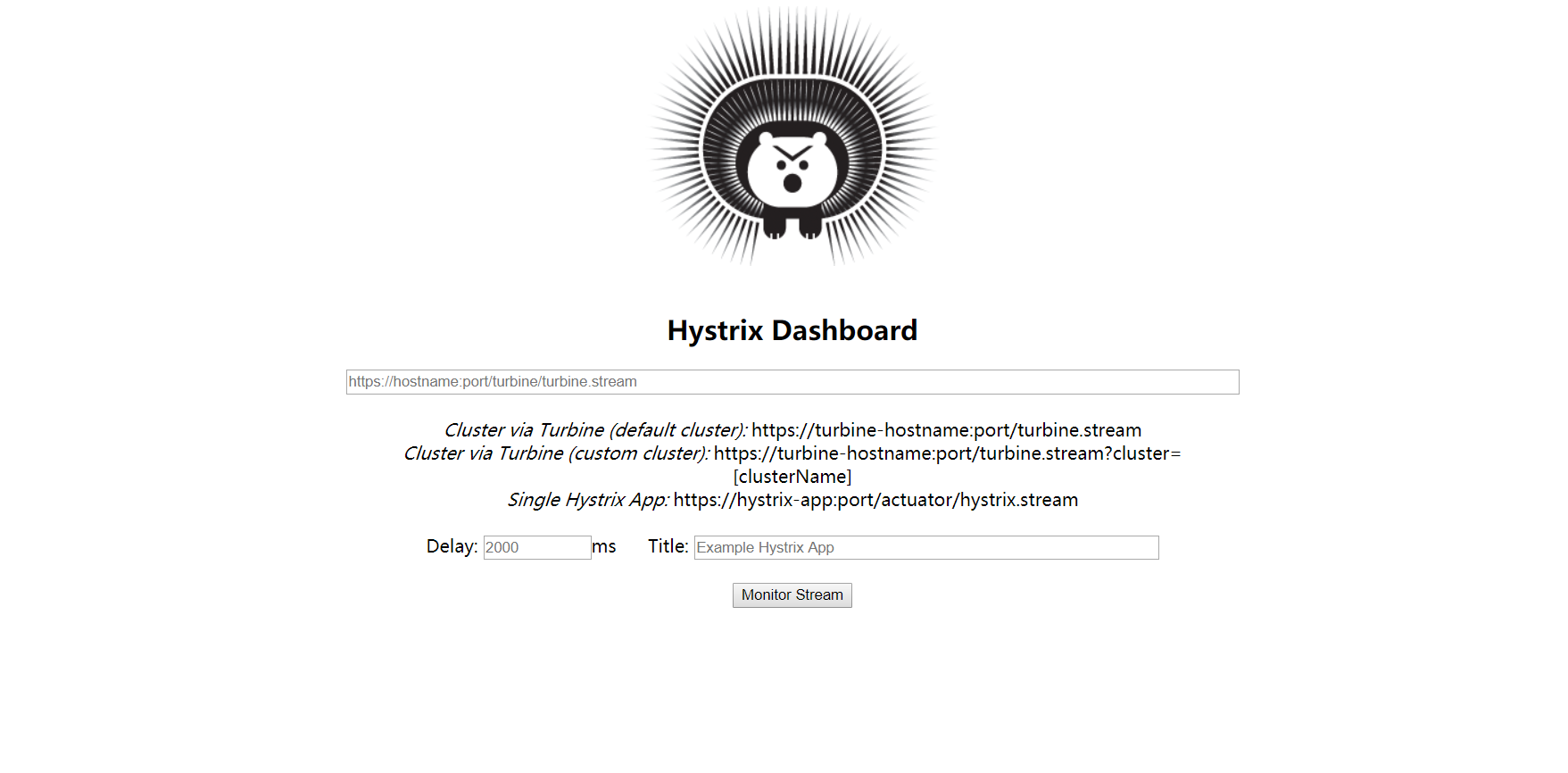
实时监控页面


若有收获,就点个赞吧
0 人点赞


