feign接口调用是基于http协议的,请求效率很慢,使用gzip进行压缩,提高效率
Spring Cloud使用gzip
Maven依赖
<!-- Spring Cloud OpenFeign的Starter的依赖 --><dependency><groupId>org.springframework.cloud</groupId><artifactId>spring-cloud-starter-openfeign</artifactId></dependency><!-- 集成feign httpclient依赖 --><dependency><groupId>io.github.openfeign</groupId><artifactId>feign-httpclient</artifactId></dependency>
application.yml配置文件修改
server:
  port: 8000
  compression:
    enabled: true
    mime-types: application/json,application/xml,text/html,text/xml,text/plain


# Feign 配置
feign:
  httpclient:
    enabled: true
  compression:
    request:
      # 开启请求压缩
      enabled: true
      # 配置压缩的 MIME TYPE
      mime-types: text/xml,application/xml,application/json
      # 配置压缩数据大小的下限
      min-request-size: 1024
    response:
      # 开启响应压缩
      enabled: true
      useGzipDecoder: true
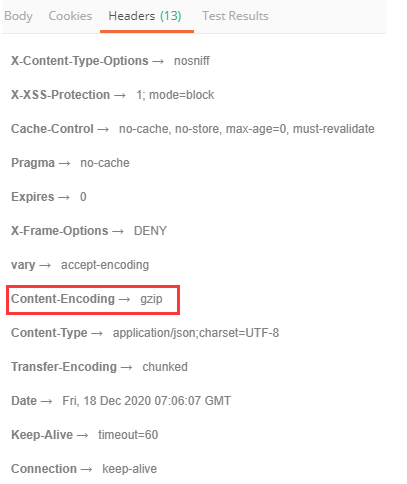
- 使用postman测试,如果出现下图,则表示后端gzip压缩配置成功
nginx使用gzip
修改nginx.conf文件,以开启gzip压缩,该配置位于http代码段中
http{
    gzip on;
    gzip_static on;
    gzip_min_length  1024;
    gzip_buffers     4 16k;
    gzip_http_version 1.1;
    gzip_comp_level 2;
    gzip_types     text/plain application/javascript application/x-javascript text/javascript text/css application/xml;
    gzip_vary on;
    gzip_proxied   expired no-cache no-store private auth;
    gzip_disable   "MSIE [1-6]\.";
}

若有收获,就点个赞吧
0 人点赞


