安装
官网参考文档:mod_unimrcp
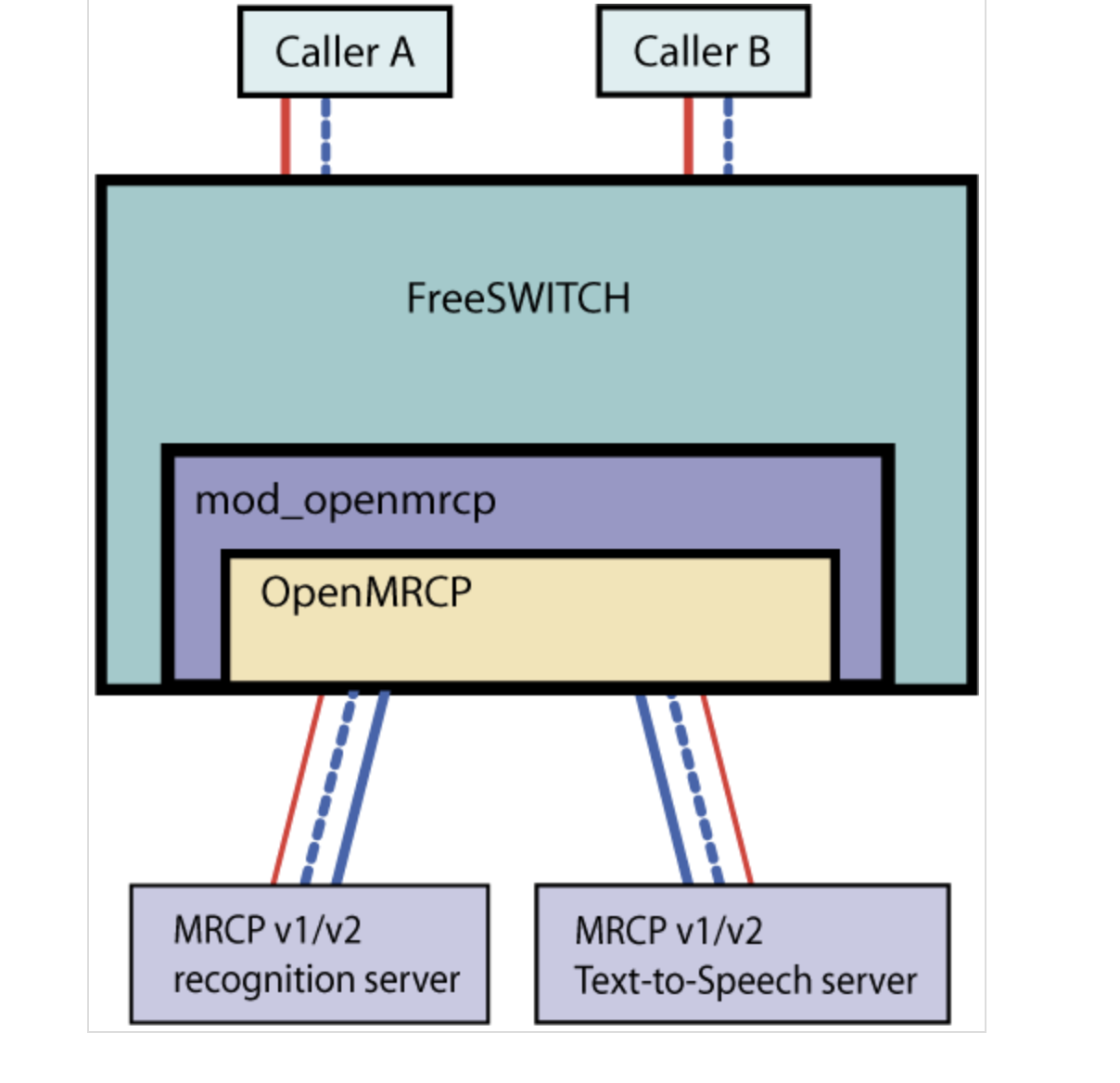
mod_unimrcp 安装
加载非默认模块的方法:
- 编辑freeswitch/modules.conf文件,找到要安装的模块,去掉前面的注释符号#。
- 在命令行执行make mod_xxx-install命令,这样就编译相应模块,并把编译后的动态库安装的/usr/local/freeswitch/mod目录下了。
- 如果想启动freeswitch的时候就自动加载,修改/usr/local/freeswitch/conf/autoload_configs/modules.conf.xml,去掉注释符号就可以了。
按照上面步骤安装 mod_unimrcp 即可。
mrcp_profiles/unimrcpserver-mrcp-v2.xml
配置外网ip、修改端口号
conf/unimrcpserver.xml配置中配置外网ip方法,配置并打开以下参数注释
<sip-uas id="SIP-Agent-1" type="SofiaSIP"><sip-ip>本机内网地址</sip-ip><sip-ext-ip>本机外网地址</sip-ext-ip></sip-uas>
sip端口修改:
<sip-port>8060</sip-port>替换成设置参数rtp ip&端口范围修改:<rtp-factory id="RTP-Factory-1"><rtp-ip>10.10.0.1</rtp-ip> 本机内网ip<rtp-ext-ip>a.b.c.d</rtp-ext-ip> 本机外网ip<rtp-port-min>5000</rtp-port-min> rtp端口下限<rtp-port-max>6000</rtp-port-max> rtp端口上限</rtp-factory>
在mrcp_profiles目录新建unimrcpserver-mrcp-v2.xml配置文件:
<!-- FreeSWITCH IP、端口以及 SIP 传输方式 --><param name="client-ip" value="192.168.1.153" /><param name="client-port" value="5069"/><param name="sip-transport" value="udp"/><param name="speechsynth" value="speechsynthesizer"/><param name="speechrecog" value="speechrecognizer"/><!--param name="rtp-ext-ip" value="auto"/--><param name="rtp-ip" value="192.168.1.153"/><param name="rtp-port-min" value="4000"/><param name="rtp-port-max" value="5000"/><param name="codecs" value="PCMU PCMA L16/96/8000"/><!-- Add any default MRCP params for SPEAK requests here --><synthparams></synthparams><!-- Add any default MRCP params for RECOGNIZE requests here --><recogparams><!--param name="start-input-timers" value="false"/--></recogparams>
修改unimrcp.conf.xml,将”default-tts-profile”、”default-asr-profile”修改为我们上面配置的”unimrcpserver-mrcp2”(注意是 name 值而不是文件名),这样我们后面使用的时候可以不指定配置名直接使用默认配置:
<param name="max-connection-count" value="100"/><param name="offer-new-connection" value="1"/><param name="request-timeout" value="3000"/>
智能 IVR 脚本
在scripts目录下新增names.lua脚本:
session:answer()--freeswitch.consoleLog("INFO", "Called extension is '".. argv[1]"'\n")welcome = "ivr/ivr-welcome_to_freeswitch.wav"menu = "ivr/ivr-this_ivr_will_let_you_test_features.wav"--grammar = "hello"no_input_timeout = 80000recognition_timeout = 80000confidence_threshold = 0.2--session:streamFile(welcome)--freeswitch.consoleLog("INFO", "Prompt file is \n")tryagain = 1while (tryagain == 1) do--session:execute("play_and_detect_speech",menu .. "detect:unimrcp {start-input-timers=false,no-input-timeout=" .. no_input_timeout .. ",recognition-timeout=" .. recognition_timeout .. "}" .. grammar)xml = session:getVariable('detect_speech_result')--if (xml == nil) thenfreeswitch.consoleLog("CRIT","Result is 'nil'\n")tryagain = 0elsefreeswitch.consoleLog("CRIT","Result is '" .. xml .. "'\n")tryagain = 0endend---- put logic to forward call here--session:sleep(250)session:set_tts_parms("unimrcp", "xiaofang");session:speak("今天天气不错啊");session:hangup()
同时我们需要在grammar目录新增hello.gram语法文件,可以为空语法文件须满足语音识别语法规范1.0标准(简称SRGS1.0),该语法文件 ASR 引擎在进行识别时可以使用。如:
<?xml version="1.0" encoding="utf-8" ?><grammar version="1.0" xml:lang="zh-cn" root="Menu" tag-format="semantics/1.0"xmlns=http://www.w3.org/2001/06/grammarxmlns:sapi="http://schemas.microsoft.com/Speech/2002/06/SRGSExtensions"><!- 这些都是必不可少的--><rule id="city" scope="public"><one-of> <!-- 匹配其中一个短语--><item>北京</item><item>上海</item></one-of></rule><rule id="cross" scope="public"><one-of><item>到</item><item>至</item><item>飞往</item></one-of></rule><rule id="Menu" scope="public"><item><ruleref uri="#date"/> <!--指定关联的其他规则的节点--><tag>out.date = reles.latest();</tag></item><item repeat="0-1">从</item> <!--显示1次或0次--><item><ruleref uri="#city"/><tag>out.city = rulels.latest();</tag></item><item><ruleref uri="#cross"/><tag>out.cross = rulels.latest();</tag></item><item><ruleref uri="#city"/><tag>out.city = rulels.latest();</tag></item></rule></grammar>
脚本中,我们使用 unimrcp 默认配置,”play_and_detect_speech” 调用了 ASR 服务,”speak” 调用了 TTS 服务。你可以在循环中,尝试分析解析到的语句,根据内容进行导航、反馈。
最终测试
SIP 客户端登陆后拨打 5001 分机,就可以听到我们配置的导航内容了。
参考
https://github.com/wangkaisine/mrcp-plugin-with-freeswitch
https://freeswitch.org/confluence/display/FREESWITCH/mod_unimrcp
https://github.com/sunguangyong/freeswitch_unimrcp_xfyun
https://cotin.tech/AI/UniMRCPASR/
https://mp.weixin.qq.com/s/FSyoNXShmKz3bAAAeVyUBg
https://blog.csdn.net/zjzfb/article/details/94393487
https://blog.csdn.net/initiallht/category_10759863.html

若有收获,就点个赞吧
0 人点赞


