GitHub和SourceTree入门教程 - 冰冻火山 - 博客频道 - CSDN.NET
Friday, May 20, 2016
5:39 PM
GitHub和SourceTree入门教程
.
标签: sourcetreegithubsourcetree教程sourcetree使用
2014-09-14 01:12 142145人阅读 评论(28) 收藏 举报
.
本文章已收录于:
Git知识库

分类:
Java(13)

.
版权声明:本文为博主原创文章,未经博主允许不得转载。
—>本教程适用于主流的开源网站github和bitbucket,个人认为sourceTree还是比较好用的git客户端,支持windows和mac os。
—>soureceTree的最新版本可能与此教程的screenshot有些许不同,但大同小异(sourceTree的最新版本操作上更人性化)
—>大家可以先看个关于git工作流程的视频,先了解一下,被youku转码了,不太清楚,将就看吧,点这里
—>在github上注册一个账号,然后登陆。
—>在github上点击create new, new repository, 随便输入一个项目名称即可,注意选上init this repository with readme(不选择也可以,事后再自己编辑),如下图。
关于git流程,给个不错的参考链接,点我打开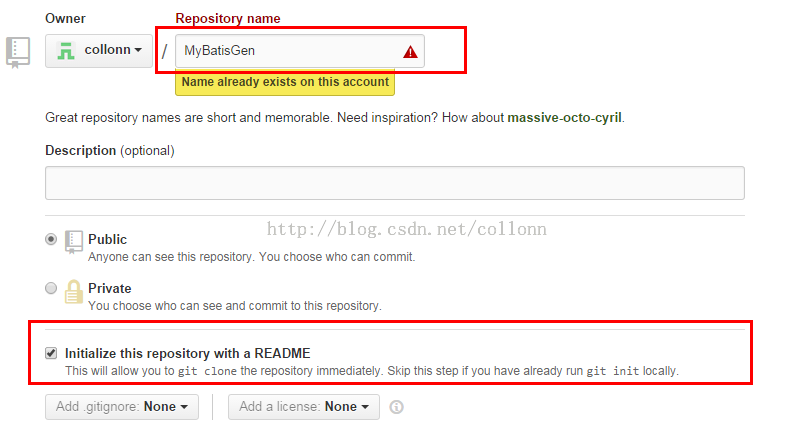
—>如果想删除刚创建的项目,可以,点右下角的setting,如下图。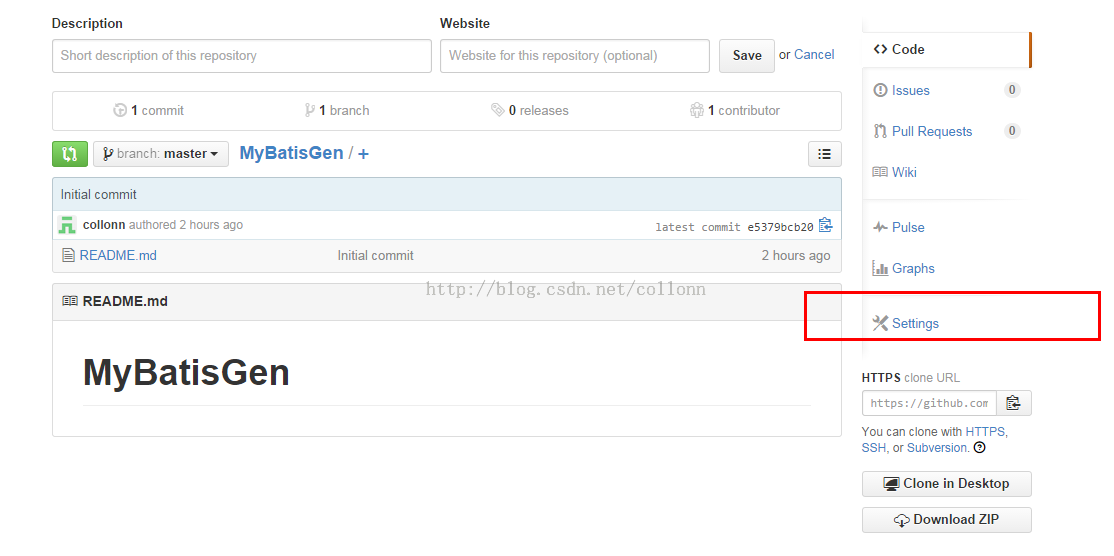
—>将页面拉到最下边,点击delete this repository,在弹出层中输入项目名称,点击删除即可,如下图。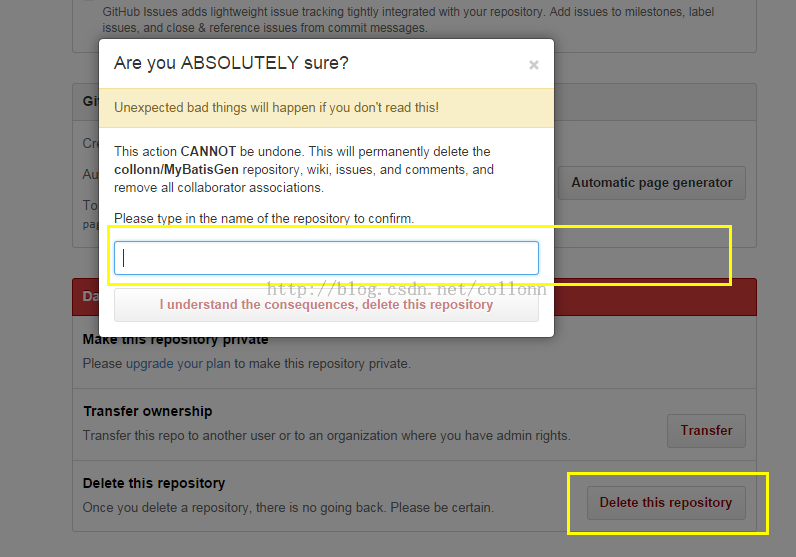
—>现在要在本地clone出远程的项目,在github上点击刚才创建的项目,进行项目详情,在右下角有一块信息,复制https连接,如下图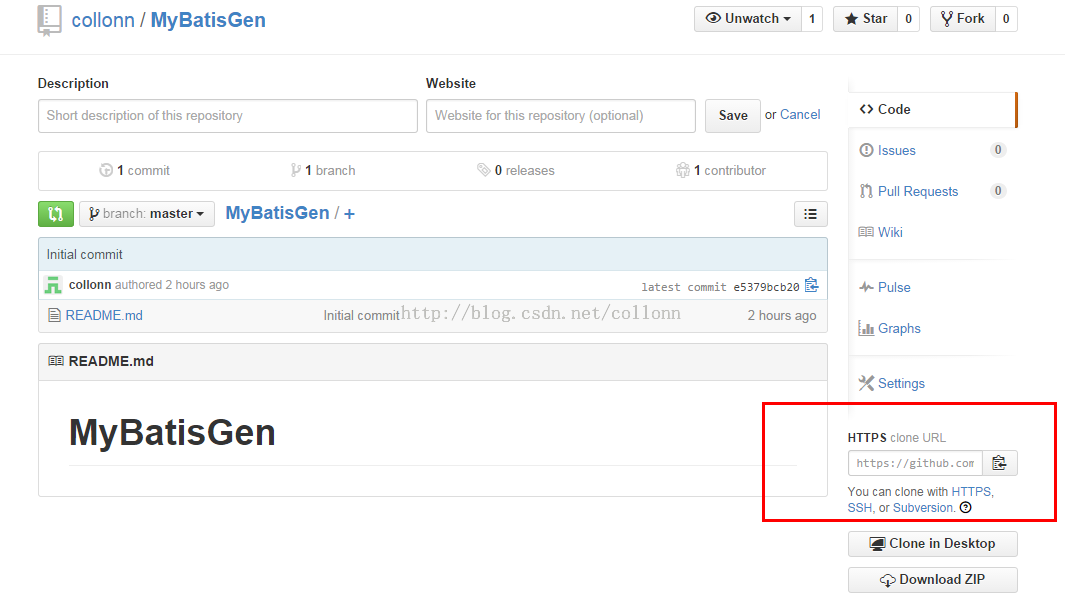
—>在本地随便一个目录下,输入以下命令,git clone https://github.com/collonn/MyBatisGen.git,(这里用了一个我的开源项目做为示例),
—>我们可以看到,新建的项目除了一个readme文件,什么也没有,你可以随便将一个maven项目的内容copy到此目录下,编译正确后,就可以提交了,下面我们以SourceTree为例,来演示怎么用可视化GUI工具提交修改。
—下载并安装SourceTree,以windows版本为例,安装完成后,打开sourcetree,如下图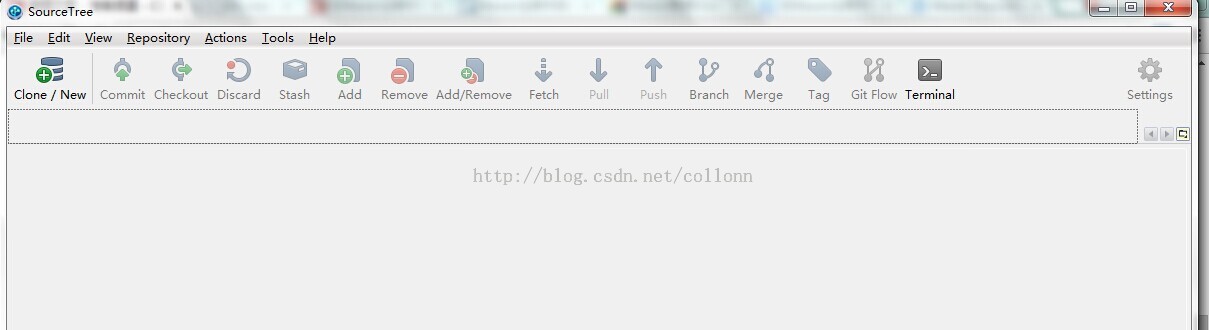
—>点击file-open,选择我们刚才clone出来的项目的根目录后,打开后,如下图,可以看到,branches只有一个master, 点击右边的Uncommited changes,会显示你所有有改动但未提交的文件。![计算机生成了可选文字: SourceTree file Edit View Repository Actions 1001s Help Clone / New Commit Checkout Di sca rd Stash Add Re move Ad d/ Re move Fetch pull Push Bra nch Merge Tag Git Flow My8atisGen File Status @Working Copy Branches Tags Remotes orgn Show Remote Branches Date Order Terminal 14 2014 0:35 13 2014 22:4 Setti ng s Jump to: Commit e5379bc Graph uncommitted changes origin/ master origin/HEAD Pending files, sorted by file status • C\] Staged files C\] Unstaged files C\] MyBatisGen.iml 00 ta rget/classes/ftl / model.ftl 00 ta rget/classes/ftl / ma pper.ftl ta rget/cla sses/ftl 'common.ftl File Status Log / H i story Search Description master Initial commit Author collonn <collonn http : // blog. csdn. net/ collonn MyEatisGen.imI File Contents Search Stage hu Oxml •:mdule org.jetbrains.idea.maven.project.MavenPr05ectsManager.ism (component (output DRS/ target/classes](/uploads/projects/wsbo@ekqhd3/7f9505472239ae670b5e13755aa7347f.jpeg) (output-test DIPS/ target/ test-classes” (content (sourceFoIder (sourceFoIder (sourceFoIder (sourceFoIder (excludeFoIder / content> •:orderEntD’ type” inheritedJdk” / > DIRS/src/main/resource” ty DIRS/src/test/resource” ty DIRS/src/main/5ava” isTes DIRS/src/test/5ava” isTes DIRS/target” (orderEntD’ / > (orderEntD’ type” library” scope” TEST” junit:juni Atlassian Clean 28 master” class=”align-none”>
(output-test DIPS/ target/ test-classes” (content (sourceFoIder (sourceFoIder (sourceFoIder (sourceFoIder (excludeFoIder / content> •:orderEntD’ type” inheritedJdk” / > DIRS/src/main/resource” ty DIRS/src/test/resource” ty DIRS/src/main/5ava” isTes DIRS/src/test/5ava” isTes DIRS/target” (orderEntD’ / > (orderEntD’ type” library” scope” TEST” junit:juni Atlassian Clean 28 master” class=”align-none”>
—>看Unstaged files这一块内容,我们按住shift,选择所有你要提交的文件,然后再点鼠标右键,选择add(意思就是add到本地的索引库),操作完成后,Staged files这块内容就会出现我们刚才选择的所有文件,如下图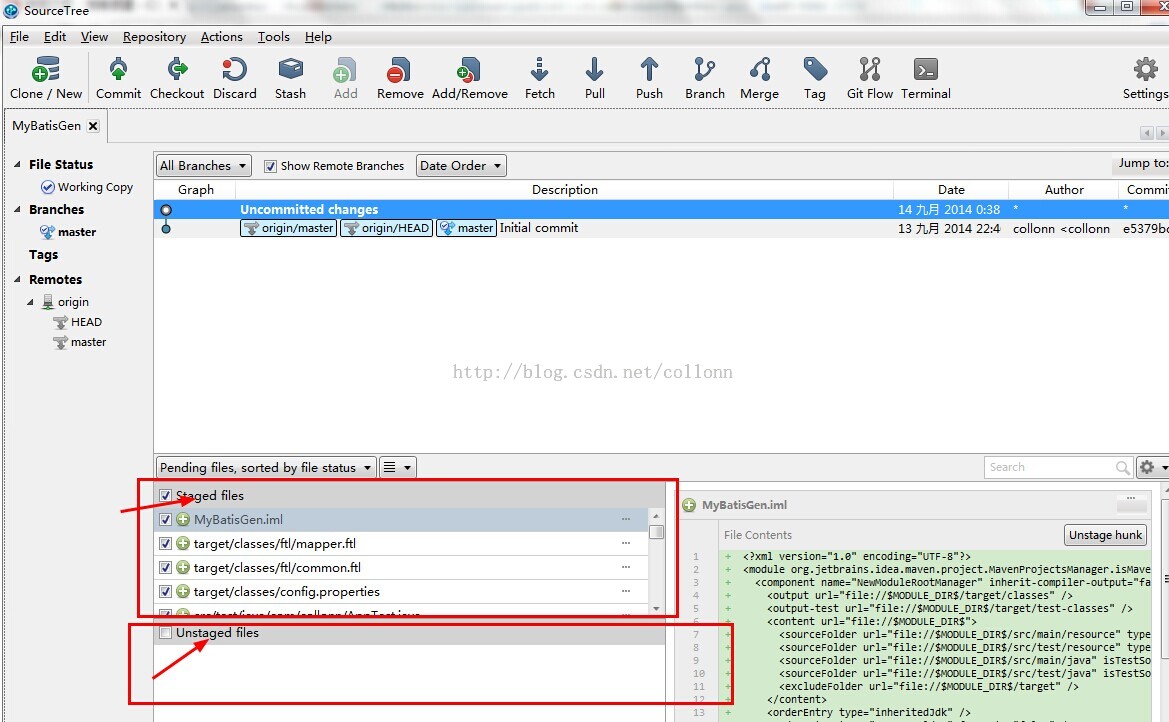 (orderEntN,’ type” inheritedJdk” / > DIRS/src/main/resource” ty DIRS/src/test/resource” type isTestSo DIRS/src/test/5ava” isTestSo 01%/ target” / >” class=”align-none”>
—>在我们提交到本地repo前,我们先在sourcetree中设置一下通用information,当commit到本地时,这个infomation会当做通用的提交信息,点击tool->options,在full name和email address中输入你的github账号信息,如下图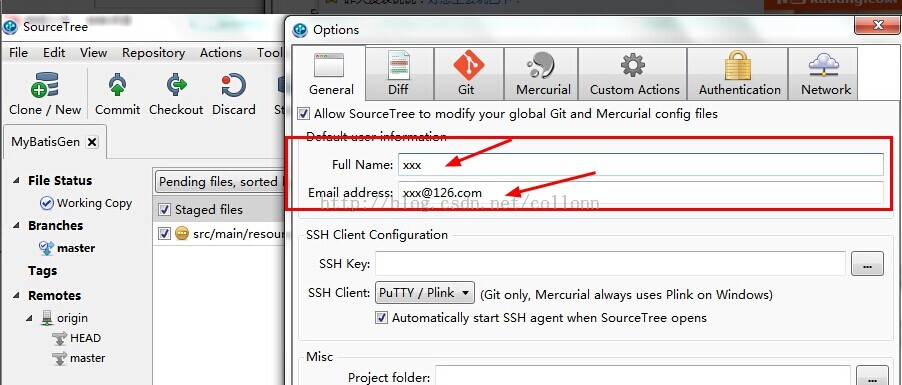
—>返回到我们刚才那一点,在Staged files中选择要提交到本地仓库的文件后,点击sourcetree左上角的commit之后,会让我们输入comments about this commit,输入后,点提交,可能会提示你再输入github的用户名和密码,如下图![计算机生成了可选文字: ource File Edit Clone / N Commit •tory Actions 1001s Help heckout Discard Stash Add Remove Ad d/ Re move Fetch pull Push 1.9 Bra nch Merge Tag Git Flow MyBatisGen File Status @Working Copy Branches Tags origin Pending files, sorted by file status @ Staged files 4\] src/main/resource/readme.txt Unstaged files ta a rea d me.txt collonn <collonn@126.com> ode refactori target/classes/ read me.txt Hunk I: Lines 14 - need help, you -->anything need help, qq: 19S3S838S enail : collonn@126.com Terminal Search can contact me: contact me via: http . • csdn„ net. collonn Setti ng s Commit optionsm C\] Push changes immediately to origin/master File Status Log / History Search Commit Cancel Atlassian 02 *master](/uploads/projects/wsbo@ekqhd3/76f83505d67703239e5389a29080275c.jpeg)
—>至此,我们只是提交到了本地仓库,最后一步就是如提交到远程仓库了,点击工具栏的push按钮,就可以提交到远程仓库(push到远程前,最好先从远程pull一把)。点击pull,即可从远程仓库下载最新的别人提交的修改了,如下图 Copy Branches master Tags Remotes origin Show Remote Branches Date Order • Graph uncommitted changes code refactor I ahead master Description MyBatisGen code refactor Initial commit http : //blog. csdn. net/ collonn Term na Date 14 2014 1:05 14 2014 1:05 14 2014 0:51 13 2014 22:4 Author collonn <collonn collonn <collonn collonn <collonn Setti ngs Jump to: Commit 542adeü 654eIdI e5379bc Q. Pending files, sorted by file status [Z] Staged files Search target/classes/ readme .txt Hunk I Lines 14 - - >anything need help, -->anything need help, you c an contact Discard hu n k contact me: me Via:](/uploads/projects/wsbo@ekqhd3/9a92095c4a2484cb495b441cca35af26.jpeg)
—>点击push后,会让你选择提交到远程仓库的哪个分支,自己决定吧,提交到远程仓库后,github上就可以看到你提交的内容了,如下图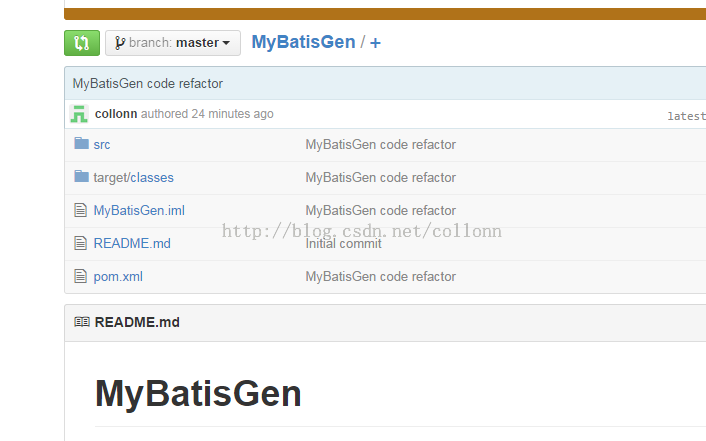
—>在分支1上的修改可以通过cherry pick,直接将修改的代码commit到分支2上。
也可以在分支2上去过merge操作来获取其它分支的commit,但是要通过intellij idea去进行merge。
注意cherry pick只用直接取到你本次提交的代码,另人在你提交之前的提交不会搞过来,而merge则会把你提交前别人提交也也搞过来。
intellij ide操作如下图: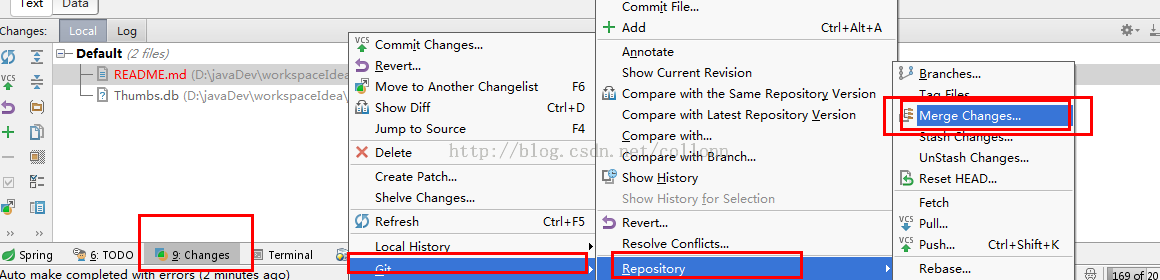
—>sourcetree左边栏的Branches,可以随便删除,再重新从Remotes中选择你要check out的分支,clone到本地仓库。
—>对于当前的所有本地改动,都可以用Stash功能将改动暂时保存,在任何时候都可以进行apply stash to current work branch。
—>至此,githut和sourcetree的使用,就结束了,工具只是方便大众化,不排斥只用command line操作,自己玩吧。。。
.
顶
30
踩
3
.
上一篇Apple Swift 中文教程 快速参考 基本语法
下一篇jQuery-DesktopGrid
.
我的同类文章
Java(13)
- •CentOS6.x安装memcaches1.4.x2015-11-15阅读190
- •用Intellij Idea创建maven项目2015-06-08阅读1077
- •Intellij Idea注册机及日常使用2014-05-20阅读2597
- •ThreadLocal解析2014-02-28阅读820
- •ActiveMQ基本教程 ActiveMQ持久化 ActiveMQ安全2013-11-07阅读1808
- •JSongTaste2015-06-15阅读190
- •关于MySQL Java Driver 的 useOldAliasMetadataBehavior2015-06-05阅读950
- •java wait notifyAll 生产者 消费者 BlockingDeque2014-05-02阅读1405
- •关于Java中的equals()方法与hashCode()方法2014-02-08阅读1198
- •myeclipse使用相关2013-03-24阅读1674
更多文章
已使用 Microsoft OneNote 2016 创建。

若有收获,就点个赞吧
0 人点赞


