基本配置
设置编辑器
git config --global core.editor "code"git config --global init.defaultBranch "main"
远程仓库
添加
git remote add [remote_name] [remote_url]
添加远程仓库 example ,并给它起个别名 origin :
git remote add origin git@github.com:Dragonphy/example
推送
提交 cloud 分支到Github的 cloud 仓库:
git push -u origin cloud
修改
可以用 git remote add ,如果想替换 origin 这个远程仓库链接,使用 git remote set-url :
git remote set-url origin [remote_url]
下载远程仓库代码
git clone git@github.com:Dragonphy/nacos-docker-public.git
一般有 HTTP 和 SSH 两种方式,上述是通过ssh下载的,这种方式的好处是能够通过添加SSH的公钥直接下载私有仓库,而HTTP方式需要在下载私有仓库时输入账号密码(上述方式仅针对Github,Gitee HTTP下载公有仓库代码也需要输入账号密码)。
合并远程代码
git pull 默认采用git merge合并代码,不自动生成一条类似 Merge branches 'master' and 'master' of ……的commit记录 ,可通过指定为 rebase 解决
git pull origin main --rebase
- 若从未提交到远程仓库,而远程仓库已有文件:
Git refusing to merge unrelated histories on rebase
一般发生在首次提交到代码仓库时:远程仓库有提交,本地仓库也有提交,但本地从未提交到过远程仓库,此时两个不相关的项目合并就会报错。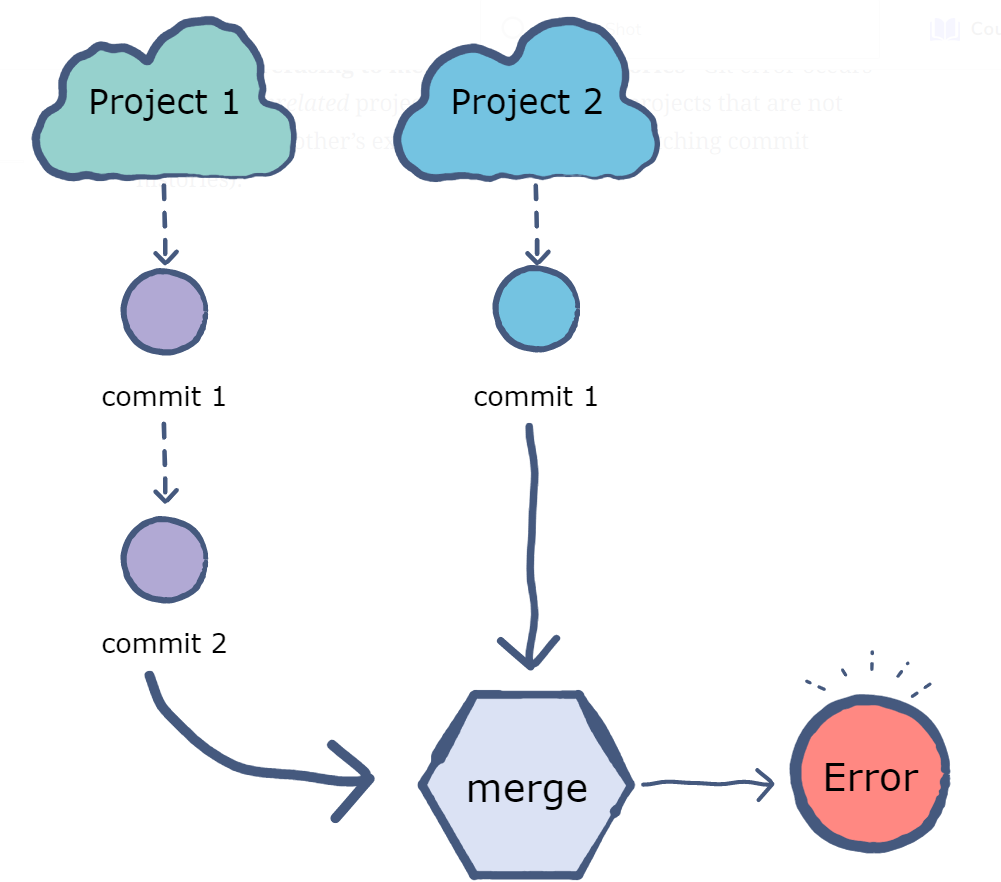
git pull origin main --allow-unrelated-histories
删除远程分支
git push origin --delete [branch_name]
checkout
git checkout常用来切换分支,如 git checkout main,但它还可以切换 HEAD 的指向,如 git checkout main^,将HEAD指向了当前main分支的父节点提交
Tag
tag是分支(branch)的某次提交(commit),是某次提交的特殊记号。比如发布大版本v3.0,你就可以在最后一次大版本提交上打上标签v3.0
切换tag
git checkout tags/<tag_name> -b <branch_name>
暂存当前修改的文件
当需要紧急修复某个 bug 时,我们需要把手头的工作暂存,修复已经提交文件中的 bug,使用 git stash 可以暂存当前所有修改文件,当需要时使用 git stash pop 再恢复之前的工作。
git stash 仅暂存已追踪到的(tracked)文件,对于 untracked 文件,采用:
git stash --include-untracked
修改中间commit
- 找到出错的commit_id
- git rebase -i commit_id
- 将出错的提交由pick改为drop
- 保存退出,更新提交信息
-
忽略文件/文件夹
设置全局忽略文件/文件夹
vim ~/.gitignore_global
```
Ignore the node_modules directory
node_modules/
Ignore Logs
logs *.log
Ignore the build directory
/dist
The file containing environment variables
.env
Ignore IDE specific files
.idea/ .vscode/ .sw
```shellgit config --global core.excludesfile ~/.gitignore_global
- 忽略已经提交的文件
去掉—cached,也会删除本地文件
git rm --cached [file]

若有收获,就点个赞吧
0 人点赞


