一、Web基础
1.1 HTTP
HTTP(HyperText Transfer Protocol),超文本传输协议,利用TCP在Web服务器和客户端之间传输信息,客户端使用Web浏览器发起HTTP请求给Web服务器,Web服务器发送被请求的信息给客户端。
HTTP基本原理:
当在浏览器输入URL后,浏览器会先请求DNS服务器,获得请求站点的IP地址,然后发送一个HTTP Request给拥有该IP的主机,接着就会接收到服务器返回的HTTP Response,浏览器经过渲染后,以一种较好的状态呈现给用户。
1.2 Web服务器
Web 服务器的工作原理:
1.建立连接:客户端通过TCP/IP协议建立到服务器的TCP连接
2.请求过程:客户端向服务器发送HTTP协议请求包,请求服务器里的资源文档
3.应答过程:服务器向客户端发送HTTP协议应答包,如果请求的资源包含动态语言的内容跟,那么服务器会调用动态语言的解释引擎负责处理“动态内容”,并将处理后得到的数据返回给客户端。由客户端解释HTML文档,在客户端屏幕上渲染图形结果。
4.关闭连接:客户端与服务器断开。
1.3 创建静态服务器
创建一个静态服务器,通过该服务器,可以访问静态页面。
#coding:utf-8import socket ##导入socket模块from multiprocessing import Process ##导入Process多进程模块HTML_ROOT_DIR = './views' ##设置静态文件根目录class HTTPServer(object):def __init__(self):##初始化方法self.server_socket = socket.socket(socket.AF_INET, socket.SOCK_STREAM) ##创建Socket对象,使用TCP/IP协议def start(self):##开始方法self.server_socket.listen(128) ##设置最大连接数为128print('服务端等待客户端连接……')print(' '*50)##执行死循环while True:client_socket,client_address = self.server_socket.accept() ##建立客户端连接print("[%s,%s]用户连接上了"%client_address)print(' '*50)##实例化进程类handle_client_process = Process(target=self.handle_client, args=(client_socket,))handle_client_process.start() ##开启线程client_socket.close() ##关闭客户端Socketdef handle_client(self,client_socket):##处理客户端请求##获取客户端请求request_data = client_socket.recv(1024) ##获取客户端请求数据print('request data:', request_data)request_line = request_data.splitlines() ##按照行('\r','\r\n','\n')分割##输出每行信息for line in request_line:print(line)request_start_line = request_line[0] ##解析请求报文print(' '*50)print('*'*50)print(request_start_line.decode('utf-8'))try:file = open(HTML_ROOT_DIR+'/index.html','rb')except IOError:##如果存在异常,返回404response_start_line = "HTTP/1.1 404 Not Found\r\n"response_headers = "Server:My Server\r\n"response_body = "The file is not found !"else:##读取内容file_data = file.read()file.close()##构造响应response_start_line = "HTTP/1.1 200 OK\r\n"response_headers = "Server:My Server\r\n"response_body = file_data.decode("utf-8")##拼接返回数据response = response_start_line+response_headers+'\r\n'+response_bodyprint("response data响应数据是:",response)client_socket.send(bytes(response,"utf-8")) ##向客户端返回响应数据client_socket.close() ##关闭客户端连接def bind(self,port):##绑定端口self.server_socket.bind(('',port))def main():##主函数http_server = HTTPServer() ##实例化HTTPServer类http_server.bind(8000) ##绑定端口http_server.start() ##调用start方法if __name__ == '__main__':main()
<!DOCTYPE html><html lang="utf-8"><head><meta http-equiv="Content-Type" content="text/html; charset=utf-8"><meta htt-equiv="X-UA-Compatible" content="IE=edge"><meta name="viewport" content="width=device-width, initial-scale=1"><title>明日科技</title><!--Bootstrap core CSS--><link rel="stylesheet" href="https://cdn.bootcss.com/bootstrap/3.3.7/css/bootstrap.min.css"></head><body class = 'bs-docs-home'><!--Docs master nav--><header class = 'navbar navbar-static-top bs-docs-nav' id = 'top'><div class = 'container'><a href = '/' class = 'navbar-brand'>明日学院</a></div><nav id = 'bs-navbar' class = 'collapse navbar-collapse'><ul class = 'nav navbar-nav'><li><a href ='https://www.mingrisoft.com/selfCourse.html'>课程</a></li><li><a href ='https://www.mingrisoft.com/book.html'>读书</a></li><li><a href = 'https://www.mingrisoft.com/bbs.html'>社区</a></li><li><a href = 'https://www.mingrisoft.com/servicecenter.html'>服务</a></li><li><a href = '/contact.html'>contact us</a></li></ul></nav></header><!-- Page Content of course!--><main class="bs-docs-masthead" id="content" tabindex="-1"><div class="container"><span class="bs-docs-bootion bs-docs-bootion-lg bs-docs-bootion-outline">OS</span><p class = 'lead'>Open Source China (OSC) founded in August 2008 is the largest open source community in China. It has more than 3 million registered members and Alexa ranking 837 in the world. OSC provides multiple channels including news, forum, code sharing, blogs, and translation, etc to help local developers study and utilize open soure technology .In 2013, OSC established a large scale software developement cloud to provide a full stack of SAAS services such as source code management, project management, team collabration, code review, demonstration PAAS platform, etc.We always spare no efforts to keep providing development cloud services to improve local open source eco-system.</p><a href = '/contact.html' class="btn btn-outline-inverse btn-lg">联系我们</a></div></main></body></html>

二、WSGI接口
2.1 介绍
GCI :https://www.yuque.com/lhuan/kb/fedi6h
FastCGI使用进程/线程池来处理一连串的请求,这些进程/线程由FastCGI服务器管理,而不是Web服务器,FastCGI致力于减少网页服务器与CGI程序之间交互的开销,从而使服务器可以同时处理多个网页请求。
https://docs.python.org/3/library/wsgiref.html
wsgi.readthedocs.io
WSGI(Web Server Gateway Interface),服务器网关接口,是Web 服务器和Web 应用程序或框架之间的一种简单又通用的接口。
从层级上来讲要比CGI/FastCGI高级。
WSGI中存在两种角色,接收请求的Server(服务器)和处理请求的Application(应用),它们底层是通过FastCGI沟通的,当Server收到一个请求后,可以通过Socket把环境变量和一个Callback回调函数传给后端Application,Application在完成页面组装后通过Callback把内容返回给Server,最后Server再将响应返回给Client。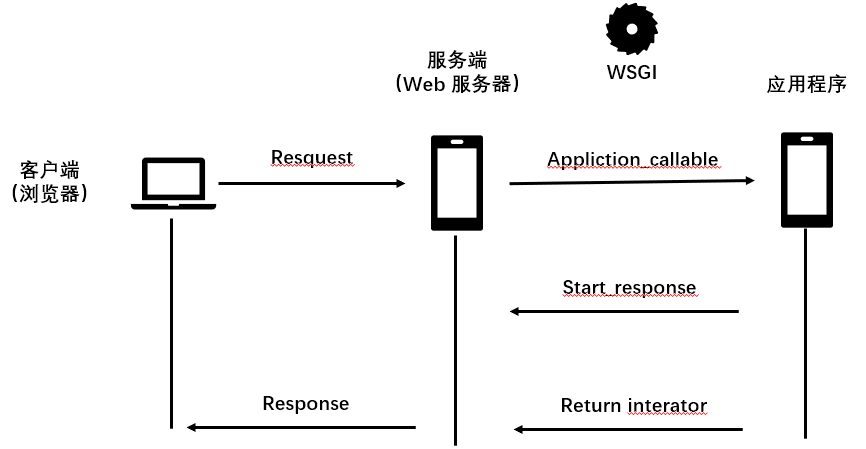
2.2 定义WSGI接口
http://wsgi.tutorial.codepoint.net/application-interface
WSGI应用程序接口被实现为可调用对象、函数,方法,类或带有object.call()方法的实例。
def application (environ,start_response):##使用提供的环境字典构建响应主体response_body = 'Request method: %s' % environ['REQUEST_METHOD']##HTTP响应代码和消息status = '200 OK'##客户端期望的HTTP标头response_headers = [('Content-Type', 'text/plain'),('Content-Length', str(len(response_body)))]##发送到服务器start_response(status, response_headers)##返回响应主体return [response_body]
environ:一个包含所有HTTP请求的字典对象
start_reponse:一个发送HTTP请求响应的函数
environ和start_reponse两个参数需要从服务器获取,application() 函数必须由WSGI服务器来调用。
很多服务器都符合WSGI规范,eg:Nginx服务器、Apache服务器等。
2.3 运行WSGI服务
使用python的wsgiref模块可以不考虑服务器和客户端的连接、数据的发送和接收问题,而专注于逻辑的实现,仅供开发和测试使用。
创建一个views文件夹,里面放置下面的文件
course.html
application.py 用于实现Web应用程序的WSGI处理函数
web_server.py 用于启动WSGI服务器,加载application() 函数
##index.html<!DOCTYPE html><html lang="utf-8"><head><meta http-equiv="Content-Type" content="text/html; charset=utf-8"><meta htt-equiv="X-UA-Compatible" content="IE=edge"><meta name="viewport" content="width=device-width, initial-scale=1"><title>明日科技</title><!--Bootstrap core CSS--><link rel="stylesheet" href="https://cdn.bootcss.com/bootstrap/3.3.7/css/bootstrap.min.css"></head><body class = 'bs-docs-home'><!--Docs master nav--><header class = 'navbar navbar-static-top bs-docs-nav' id = 'top'><div class = 'container'><a href = '/' class = 'navbar-brand'>明日学院</a></div><nav id = 'bs-navbar' class = 'collapse navbar-collapse'><ul class = 'nav navbar-nav'><li><a href ='/course.html'>课程</a></li><li><a href ='https://www.mingrisoft.com/book.html'>读书</a></li><li><a href = 'https://www.mingrisoft.com/bbs.html'>社区</a></li><li><a href = 'https://www.mingrisoft.com/servicecenter.html'>服务</a></li><li><a href = '/contact.html'>contact us</a></li></ul></nav></header><!-- Page Content of course!--><main class="bs-docs-masthead" id="content" tabindex="-1"><div class="container"><span class="bs-docs-bootion bs-docs-bootion-lg bs-docs-bootion-outline">OS</span><p class = 'lead'>Open Source China (OSC) founded in August 2008 is the largest open source community in China. It has more than 3 million registered members and Alexa ranking 837 in the world. OSC provides multiple channels including news, forum, code sharing, blogs, and translation, etc to help local developers study and utilize open soure technology .In 2013, OSC established a large scale software developement cloud to provide a full stack of SAAS services such as source code management, project management, team collabration, code review, demonstration PAAS platform, etc.We always spare no efforts to keep providing development cloud services to improve local open source eco-system.</p><a href = '/contact.html' class="btn btn-outline-inverse btn-lg">联系我们</a></div></main></body></html>
##course.html<!DOCTYPE html><html lang="utf-8"><head><meta http-equiv="Content-Type" content="text/html; charset=utf-8"><meta htt-equiv="X-UA-Compatible" content="IE=edge"><meta name="viewport" content="width=device-width, initial-scale=1"><title>明日科技</title><!--Bootstrap core CSS--><link rel="stylesheet" href="https://cdn.bootcss.com/bootstrap/3.3.7/css/bootstrap.min.css"></head><body class = 'bs-docs-home'><!--Docs master nav--><header class = "navbar navbar-static-top bs-docs-nav" id="top"><div class = "container"><div class = "navbar-header"><a href = "/"class="navbar-brand">明日学院</a></div><nav id = "bs-navbar" class = "collapse navbar-collapse"><ul class = "nav navbar-nav"><li ><a href = "/curse.html">课程</a></li><li ><a href = "/curse.html">课程</a></li><li ><a href = "/curse.html">课程</a></li><li ><a href = "/curse.html">课程</a></li><li ><a href = "/contact.html">课程</a></li></ul></nav></div></header><!--Page content of course!--><main class="bs-docs-masthead" id = "content" tanindex = "-1"><div class="container"><div class="jumbotron"><h1 style = "color: #573e7d;">明日课程</h1><p style = "color:antiquewhite">lhuanlhuanlhuan</p><p><a class = "btn btn-primary btn-lg " href="http://www.baidu.com" role="button">开始学习</a></p></div></div></main></body></html>
##application.py##用于实现Web应用程序的WSGI处理函数def application(environ, start_response):start_response("200 OK",[('Content-Type','text/html')]) ##响应信息file_name = environ['PATH_INFO'][1:] or 'index.html' ##获取URL参数HTML_ROOT_DIR = './views/' ##设置HTML文件目录try:file = open(HTML_ROOT_DIR+file_name,'rb') ##打开文件except IOError:response = "The file is not found!" ##如果异常,返回404else:file_data = file.read() ##读取文件内容file.close() ##关闭文件response = file_data.decode('utf-8') ##构造响应数据return [response.encode('utf-8')] ##返回数据
##web_server.py##从wsgiref模块导入from wsgiref.simple_server import make_server##导入编写的application函数from application import application##创建一个服务器,IP地址为空,端口为8090,处理函数是applicationhttpd = make_server('',8090,application)print("Serving HTTP on port 8090...")##开始监听HTTP请求httpd.serve_forever()
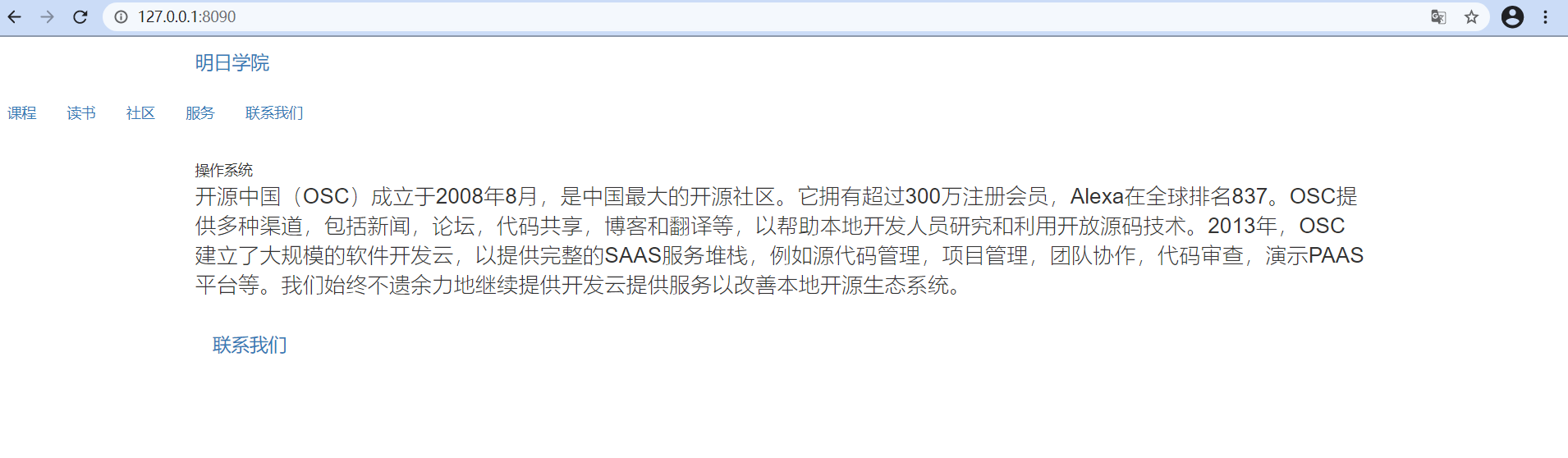 点击课程跳转到下面的界面。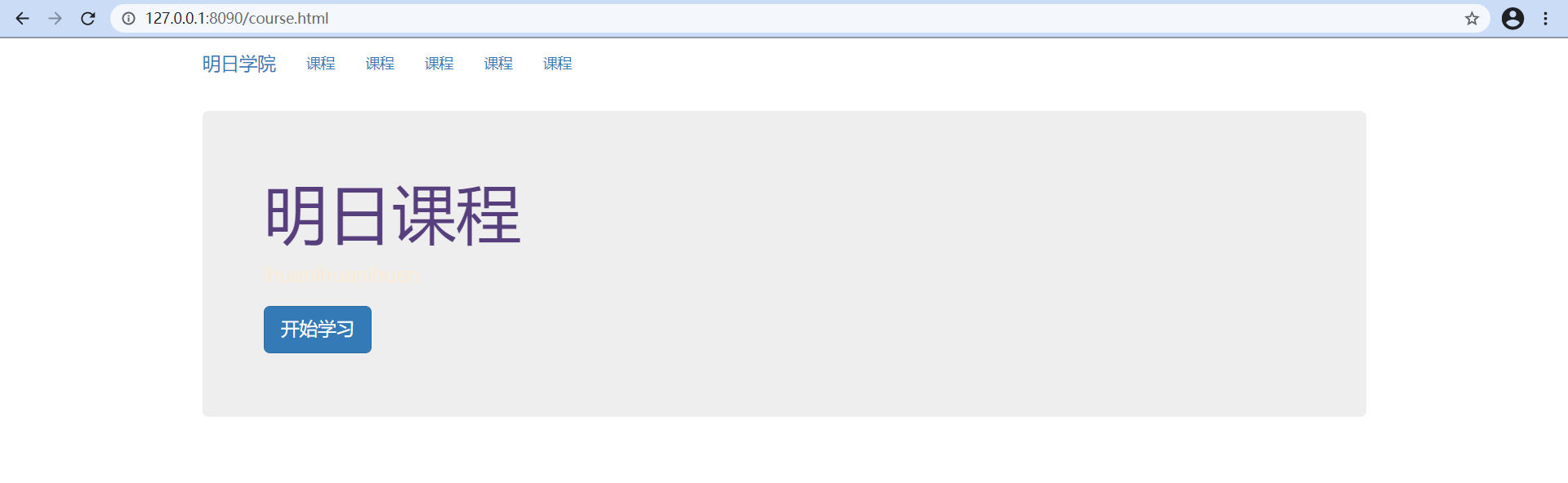

三、Web框架
3.1 介绍
Web框架是用来简化Web开发的软件框架,常用功能:管理路由、访问数据库、管理会话和Cookines、创建模板来显示HTML、促进代码的重用。
3.2 常用web框架
WSGI(服务器网关接口),是Web服务器和Web应用程序或框架之间的一种简单而通用的接口,只要遵循WSGI接口规则,就可以自主开发Web框架。
3.2.1 Django
使用最广泛,有世界上最大的社区和最多的包,文档完善,提供了一站式的解决方案,包括缓存、ORM、管理后台、验证、表单处理等,使得开发复杂的数据库驱动的网站变得简单,但是Django系统耦合度较高,替换掉内置的功能比较麻烦。
3.2.2 Flask
Flask是一个轻量级的Web应用框架,把Werkzeug或Jinja黏合再一起,很容器被拓展,有很完善的文档,容易使用。
使用装饰器来定义路径。
3.2.3 Bottle
是一个新的微框架,只有4500行代码,除了Python标准库之外,没有其他的依赖。
文档详细,使用装饰器来定义路径。
3.2.4 Tornado
Tornado不只是一个框架,还是一个Web服务器。
一开始为FriendFeed开发,后来在2009年也给Facebook使用,是为了解决实时服务诞生的,使用了异步阻塞IO,运行速度非常快。

若有收获,就点个赞吧
0 人点赞


