- 一、时间的表示方式
- 二、 日历模块
- 1. calendar.calendar(year,w=2,l=1,c=6)
- calendar.prcal(year,w=2,l=1,c=6)
- 2. calendar.firstweekday()
- 3. calendar.isleap(year)
- 4. calendar.leapdays(year1,year2)
- 5. calendar.month(year,month,w=2,l=1)
- calendar.prmonth(year,month,w=2,l=1)
- 6. calendar.monthcalendar(year,month)
- 7. calendar.monthrange(year,month)
- 8. calendar.setfirstweekday(num)
- 9. calendar.timegm(tupletime)
- 10. calendar.weekday(year,month,day)
- 三、 time模块
- 四、 datetime模块
- 五、时间和日期的常用操作
- 六、 时间格式转换
一、时间的表示方式
1.1 时间戳
时间戳是指格林尼治时间1970.1.1 00:00:00即背景时间1970.1.1 08:00:00 起至现在的总秒数。
##获取当前的时间戳import timeprint(time.time())##结果1606881800.904816
时间戳是以秒为单位的浮点小数,从1970年开始算起。
时间戳用于做日期的加减运算。计算两个时间的间隔,可以将两个时间转化成时间戳再进行减法运算。
1.2 时间元组 (struct_time 元组)
struct_time 元组共有9组数字处理时间,即年、月、日、时、分、秒、一周中的周几、一年中第几天、是否为夏令时。
import timet =time.time()tt = time.localtime(t) ## localtime()函数将时间戳转换为时间元组print(tt)##结果time.struct_time(tm_year=2020, tm_mon=12, tm_mday=2, tm_hour=12, tm_min=6, tm_sec=8, tm_wday=2, tm_yday=337, tm_isdst=0)
| 序号 | 字段 | 属性 | 值 |
|---|---|---|---|
| 1 | 4位年数 | tm_year | eg:2020 |
| 2 | 月 | tm_mon | 1~12 |
| 3 | 日 | tm_mday | 1~31 |
| 4 | 时 | tm_hour | 0~23 |
| 5 | 分 | tm_min | 0~59 |
| 6 | 秒 | tm_sec | 0~61 |
| 7 | 一周中的周几 | tm_wday | 0~6(0是周一) |
| 8 | 一年中的第几天 | tm_yday | 1~366 |
| 9 | 夏令时 | tm_isdst | 是否位夏令时,值为1的时候是夏令时,值为0的时候,不是夏令时 |
1.3 格式化时间
在Python语言中,使用time模块的strftime()函数来格式化时间
time.strftime(format [,tuple]) 将日期和时间元组转换为一个格式为format的字符串。
Python时间的格式化符号
| 格式 | 说明 |
|---|---|
| %a | 星期简称 |
| %A | 星期完整名称 |
| %b | 月份简称 |
| %B | 月份完整名称 |
| %c | 日期时间格式 |
| %d | 月中的日志,十进制数 [01,31] |
| %H | 小时(24小时制),十进制数 [00,23] |
| %I | 小时(12小时制),十进制数 [01,12] |
| %j | 年中的日期,十进制数[001,366] |
| %m | 月份,十进制数 [01,12] |
| %M | 分钟,十进制数 [00,59] |
| %p | AM 或PM |
| %S | 秒,十进制[00,61] (加上闰秒和双闰秒) |
| %U | 年中的星期,十进制数[01,53] (以星期天作为每周的第一天) |
| %w | 星期,十进制[0,6],星期天为0 |
| %W | 年中的星期,十进制数[01,53] (以星期一作为每周的第一天) |
| %x | 日期 |
| %X | 时间 |
| %y | 无世纪的年份,十进制数 |
| %Y | 有世纪的年份,十进制数 |
| %Z | 时区名称 |
| %% | %字符 |
import timeprint(time.strftime('%Y',time.localtime())) ##获取完整年份print(time.strftime('%y',time.localtime())) ##获取简写年份print(time.strftime('%m',time.localtime())) ##获取月print(time.strftime('%d',time.localtime())) ##获取日print(time.strftime('%Y-%m-%d',time.localtime())) ##获取-年-月-日print(time.strftime('%H',time.localtime())) ##获取时,24小时制print(time.strftime('%I',time.localtime())) ##获取时,12小时制print(time.strftime('%M',time.localtime())) ##获取分print(time.strftime('%S',time.localtime())) ##获取秒print(time.strftime('%H:%M:%S',time.localtime())) ##获取-时-分-秒print(time.strftime('%a',time.localtime())) ##简化星期print(time.strftime('%A',time.localtime())) ##完整星期print(time.strftime('%b',time.localtime())) ##简化月print(time.strftime('%B',time.localtime())) ##完整月cprint(time.strftime('%c',time.localtime())) ##本地日期和时间的显示print(time.strftime('%j',time.localtime())) ##一年中的第几天print(time.strftime('%p',time.localtime())) ##PM或AMprint(time.strftime('%U',time.localtime())) ##一年中的第几个星期,星期天为星期的开始print(time.strftime('%w',time.localtime())) ##星期几,星期天为星期的开始print(time.strftime('%W',time.localtime())) ##一年中的第几个星期,星期一为星期的开始print(time.strftime('%x',time.localtime())) ##本地日期表示print(time.strftime('%X',time.localtime())) ##本地时间表示print(time.strftime('%Z',time.localtime())) ##获取当前时区print(time.strftime('%%',time.localtime())) ##输出%print(time.strftime('%Y-%m-%d %H:%M:%S %w-%Z',time.localtime())) ##获取当前时区##结果20202012022020-12-021212333312:33:33WedWednesdayDecDecemberWed Dec 2 12:33:33 2020337PM4834812/02/2012:33:33?D1¨²¡À¨º¡Á?¨º¡À??%2020-12-02 12:33:33 3-?D1¨²¡À¨º¡Á?¨º¡À??
可以使用asctime()函数获取可读的时间模块
import timeprint(time.asctime(time.localtime()))##结果Wed Dec 2 12:37:17 2020
二、 日历模块
1. calendar.calendar(year,w=2,l=1,c=6)
calendar.prcal(year,w=2,l=1,c=6)
返回一个多行字符串格式的year年年历,三个月一行,间隔距离为c,每日宽度间隔为w。
每行长度为21w+18+2c,1是每星期的行数。
import calendarprint(calendar.calendar(2020,w=2,l=1,c=6))##结果2020January February MarchMo Tu We Th Fr Sa Su Mo Tu We Th Fr Sa Su Mo Tu We Th Fr Sa Su1 2 3 4 5 1 2 16 7 8 9 10 11 12 3 4 5 6 7 8 9 2 3 4 5 6 7 813 14 15 16 17 18 19 10 11 12 13 14 15 16 9 10 11 12 13 14 1520 21 22 23 24 25 26 17 18 19 20 21 22 23 16 17 18 19 20 21 2227 28 29 30 31 24 25 26 27 28 29 23 24 25 26 27 28 2930 31April May JuneMo Tu We Th Fr Sa Su Mo Tu We Th Fr Sa Su Mo Tu We Th Fr Sa Su1 2 3 4 5 1 2 3 1 2 3 4 5 6 76 7 8 9 10 11 12 4 5 6 7 8 9 10 8 9 10 11 12 13 1413 14 15 16 17 18 19 11 12 13 14 15 16 17 15 16 17 18 19 20 2120 21 22 23 24 25 26 18 19 20 21 22 23 24 22 23 24 25 26 27 2827 28 29 30 25 26 27 28 29 30 31 29 30July August SeptemberMo Tu We Th Fr Sa Su Mo Tu We Th Fr Sa Su Mo Tu We Th Fr Sa Su1 2 3 4 5 1 2 1 2 3 4 5 66 7 8 9 10 11 12 3 4 5 6 7 8 9 7 8 9 10 11 12 1313 14 15 16 17 18 19 10 11 12 13 14 15 16 14 15 16 17 18 19 2020 21 22 23 24 25 26 17 18 19 20 21 22 23 21 22 23 24 25 26 2727 28 29 30 31 24 25 26 27 28 29 30 28 29 3031October November DecemberMo Tu We Th Fr Sa Su Mo Tu We Th Fr Sa Su Mo Tu We Th Fr Sa Su1 2 3 4 1 1 2 3 4 5 65 6 7 8 9 10 11 2 3 4 5 6 7 8 7 8 9 10 11 12 1312 13 14 15 16 17 18 9 10 11 12 13 14 15 14 15 16 17 18 19 2019 20 21 22 23 24 25 16 17 18 19 20 21 22 21 22 23 24 25 26 2726 27 28 29 30 31 23 24 25 26 27 28 29 28 29 30 3130print(calendar.calendar(2020,w=2,l=3,c=6))一星期占三行##结果2020January February MarchMo Tu We Th Fr Sa Su Mo Tu We Th Fr Sa Su Mo Tu We Th Fr Sa Su1 2 3 4 5 1 2 16 7 8 9 10 11 12 3 4 5 6 7 8 9 2 3 4 5 6 7 813 14 15 16 17 18 19 10 11 12 13 14 15 16 9 10 11 12 13 14 1520 21 22 23 24 25 26 17 18 19 20 21 22 23 16 17 18 19 20 21 2227 28 29 30 31 24 25 26 27 28 29 23 24 25 26 27 28 2930 31April May JuneMo Tu We Th Fr Sa Su Mo Tu We Th Fr Sa Su Mo Tu We Th Fr Sa Su1 2 3 4 5 1 2 3 1 2 3 4 5 6 76 7 8 9 10 11 12 4 5 6 7 8 9 10 8 9 10 11 12 13 1413 14 15 16 17 18 19 11 12 13 14 15 16 17 15 16 17 18 19 20 2120 21 22 23 24 25 26 18 19 20 21 22 23 24 22 23 24 25 26 27 2827 28 29 30 25 26 27 28 29 30 31 29 30July August SeptemberMo Tu We Th Fr Sa Su Mo Tu We Th Fr Sa Su Mo Tu We Th Fr Sa Su1 2 3 4 5 1 2 1 2 3 4 5 66 7 8 9 10 11 12 3 4 5 6 7 8 9 7 8 9 10 11 12 1313 14 15 16 17 18 19 10 11 12 13 14 15 16 14 15 16 17 18 19 2020 21 22 23 24 25 26 17 18 19 20 21 22 23 21 22 23 24 25 26 2727 28 29 30 31 24 25 26 27 28 29 30 28 29 3031October November DecemberMo Tu We Th Fr Sa Su Mo Tu We Th Fr Sa Su Mo Tu We Th Fr Sa Su1 2 3 4 1 1 2 3 4 5 65 6 7 8 9 10 11 2 3 4 5 6 7 8 7 8 9 10 11 12 1312 13 14 15 16 17 18 9 10 11 12 13 14 15 14 15 16 17 18 19 2019 20 21 22 23 24 25 16 17 18 19 20 21 22 21 22 23 24 25 26 2726 27 28 29 30 31 23 24 25 26 27 28 29 28 29 30 3130import calendarprint(calendar.prcal(2020,w=2,l=1,c=6))##结果2020January February MarchMo Tu We Th Fr Sa Su Mo Tu We Th Fr Sa Su Mo Tu We Th Fr Sa Su1 2 3 4 5 1 2 16 7 8 9 10 11 12 3 4 5 6 7 8 9 2 3 4 5 6 7 813 14 15 16 17 18 19 10 11 12 13 14 15 16 9 10 11 12 13 14 1520 21 22 23 24 25 26 17 18 19 20 21 22 23 16 17 18 19 20 21 2227 28 29 30 31 24 25 26 27 28 29 23 24 25 26 27 28 2930 31April May JuneMo Tu We Th Fr Sa Su Mo Tu We Th Fr Sa Su Mo Tu We Th Fr Sa Su1 2 3 4 5 1 2 3 1 2 3 4 5 6 76 7 8 9 10 11 12 4 5 6 7 8 9 10 8 9 10 11 12 13 1413 14 15 16 17 18 19 11 12 13 14 15 16 17 15 16 17 18 19 20 2120 21 22 23 24 25 26 18 19 20 21 22 23 24 22 23 24 25 26 27 2827 28 29 30 25 26 27 28 29 30 31 29 30July August SeptemberMo Tu We Th Fr Sa Su Mo Tu We Th Fr Sa Su Mo Tu We Th Fr Sa Su1 2 3 4 5 1 2 1 2 3 4 5 66 7 8 9 10 11 12 3 4 5 6 7 8 9 7 8 9 10 11 12 1313 14 15 16 17 18 19 10 11 12 13 14 15 16 14 15 16 17 18 19 2020 21 22 23 24 25 26 17 18 19 20 21 22 23 21 22 23 24 25 26 2727 28 29 30 31 24 25 26 27 28 29 30 28 29 3031October November DecemberMo Tu We Th Fr Sa Su Mo Tu We Th Fr Sa Su Mo Tu We Th Fr Sa Su1 2 3 4 1 1 2 3 4 5 65 6 7 8 9 10 11 2 3 4 5 6 7 8 7 8 9 10 11 12 1312 13 14 15 16 17 18 9 10 11 12 13 14 15 14 15 16 17 18 19 2019 20 21 22 23 24 25 16 17 18 19 20 21 22 21 22 23 24 25 26 2726 27 28 29 30 31 23 24 25 26 27 28 29 28 29 30 3130
2. calendar.firstweekday()
返回当前每周起始日期的设置。
import calendarprint(calendar.firstweekday())##结果0默认情况下,首次载入calendar模块的时候返回0,即星期一
3. calendar.isleap(year)
判断是否为闰年,如果是闰年的话,就返回True,如果不是的话,就返回False
import calendarprint(calendar.isleap(2020))print(calendar.isleap(2021))##结果TrueFalse
4. calendar.leapdays(year1,year2)
返回再year1和year2两年之间的闰年总数
import calendarprint(calendar.leapdays(2000,2021))##结果6
5. calendar.month(year,month,w=2,l=1)
calendar.prmonth(year,month,w=2,l=1)
返回一行多行字符串格式的year年month月日历,两行标题,一周一行,每日宽度间隔为w字符,每行的长度为7*w+6,l是每星期的行数。
import calendarprint(calendar.month(2020,12,w=2,l=1))print(calendar.month(2020,12,w=4,l=1))##结果December 2020Mo Tu We Th Fr Sa Su1 2 3 4 5 67 8 9 10 11 12 1314 15 16 17 18 19 2021 22 23 24 25 26 2728 29 30 31December 2020Mon Tue Wed Thu Fri Sat Sun1 2 3 4 5 67 8 9 10 11 12 1314 15 16 17 18 19 2021 22 23 24 25 26 2728 29 30 31import calendarprint(calendar.prmonth(2020,12,w=2,l=1))##结果December 2020Mo Tu We Th Fr Sa Su1 2 3 4 5 67 8 9 10 11 12 1314 15 16 17 18 19 2021 22 23 24 25 26 2728 29 30 31None
6. calendar.monthcalendar(year,month)
返回一个整数的单层嵌套列表。
每个子列表装载代表一个星期的整数。year年month月外的日期都设为0,范围内的日子都有该月第几日标识,从1开始。
import calendarprint(calendar.monthcalendar(2020,12))##结果[[0, 1, 2, 3, 4, 5, 6], [7, 8, 9, 10, 11, 12, 13], [14, 15, 16, 17, 18, 19, 20], [21, 22, 23, 24, 25, 26, 27], [28, 29, 30, 31, 0, 0, 0]]
7. calendar.monthrange(year,month)
返回两个整数,第一个是该月的星期几的星期码,第二个是该月的日期码。日从0(星期一)开始到6(星期日),月从1到12
import calendarprint(calendar.monthrange(2020,12))print(calendar.monthrange(2020,8))##结果(1, 31)(5, 31)
8. calendar.setfirstweekday(num)
设置每周的起始日期码,0(星期一)到6(星期日)
import calendarprint(calendar.setfirstweekday(2)) ##设置每周的起始日期码为周三print(calendar.firstweekday())calendar.prmonth(2020,12,w=2,l=1)##结果None2December 2020We Th Fr Sa Su Mo Tu12 3 4 5 6 7 89 10 11 12 13 14 1516 17 18 19 20 21 2223 24 25 26 27 28 2930 31
9. calendar.timegm(tupletime)
接收一个时间元组,返回该时刻的时间戳(1970纪元后经过的浮点秒数)
10. calendar.weekday(year,month,day)
返回给定日期的日期码,0(星期一)到6(星期日),月份从1(一月)到12(12月)
import calendarprint(calendar.weekday(2020,12,5))##结果5
三、 time模块
1.localtime([secs]) 函数
locatime() 将以秒为单位的时间转换为本地时间。该函数的返回值是一个元组。
语法格式:time.localtime([secs])
time是时间模块,secs是需要转化的时间。如果没有设置secs参数,则使用当前的时间。
import timeprint(time.localtime())##结果time.struct_time(tm_year=2020, tm_mon=12, tm_mday=11, tm_hour=11, tm_min=31, tm_sec=34, tm_wday=4, tm_yday=346, tm_isdst=0)
2.gmtime([secs]) 函数
gmtime() 将以秒为单位的时间转换为代表UTC(格里尼治时间)的元组,该函数返回值是一个元组。
语法格式:time.gmtime([ secs ])
time是time模块,secs指需要转化的时间。如果没有设置secs参数,则使用当前的时间。
import timeprint(time.gmtime())##结果time.struct_time(tm_year=2020, tm_mon=12, tm_mday=11, tm_hour=4, tm_min=46, tm_sec=24, tm_wday=4, tm_yday=346, tm_isdst=0)
3.mktime([secs]) 函数
time.mktime()将time.gmtime() 或 time.localtime() 函数返回的tuple的转换为以秒为单位的浮点数。
语法格式:time.mktime ([tuple ])
import timet = time.localtime()print(time.mktime(t))tt = (2020,10,10,12,25,39,6,40,0)print(time.mktime(tt))##结果1607662531.01602303939.0
4.ctime([secs]) 函数
ctime() 的作用是把一个时间戳(按秒计算的浮点数)转化为time.asctime()的形式,如果不指定参数secs的值或者参数为None,就会默认将time.time() 作为参数。
ctime() 相当于asctime(localtime(secs))
语法格式:time.ctime ([secs])
import timeprint("time.ctime():%s" % time.ctime())##结果time.ctime():Fri Dec 11 13:07:06 2020
5.sleep([secs]) 函数
sleep() 将目前进行置入睡眠状态,睡眠时间为secs秒。
语法格式:time.sleep(secs)
import timeprint("开始时间:%s"% time.ctime())time.sleep(15)print("结束时间:%s"% time.ctime())##结果开始时间:Fri Dec 11 13:19:57 2020结束时间:Fri Dec 11 13:20:12 2020
6.strptime(string [,format]) 函数
strptime() 函数用于根据指定的格式把一个时间字符串转化为struct_time元组。
语法格式:time.strptime(string [,format] )
time指的是time模块,string指时间字符串,format指格式化字符串。
该函数返回struct_time元组对象,format默认为 “ %a %b %d %H:%M:%S %Y “
import timeprint(time.strptime('2020-12-15 16:25:25','%Y-%m-%d %X'))##结果time.struct_time(tm_year=2020, tm_mon=12, tm_mday=15, tm_hour=16, tm_min=25, tm_sec=25, tm_wday=1, tm_yday=350, tm_isdst=-1)
四、 datetime模块
datetime 包括 date 和 time的所有信息,支持0001年到9999年。
datetime模块定义了两个常量:datetime.MINYEAR 和datetime.MAXYEAR。这两个常量分别定义了最小、最大年份。MINYEAR代表1,MAXTEAR代表9999。
datetime模块定义了5个类
1.date:表示日期的类,常用的属性有year、month和day
2.time:表示时间的类,常用的属性有hour、minute、second、microsecond和tzinfo
3.datetime:表示日期和时间的组合类,常用的属性有year、month、day、hour、minute、second、microsecond和tzinfo
4.timedelta类:表示时间间隔类,即两个时间点之间的长度
5.tzinfo类:表示时区信息类
4.1 date类
date类的属性由year年份、month月份及day日期三部分构成。
import datetimea = datetime.date.today()print(a)print(a.year)print(a.month)print(a.day)##结果2020-12-1120201211import datetimea = datetime.date.today()print(a)print(a.__getattribute__('year'))print(a.__getattribute__('month'))print(a.__getattribute__('day'))##结果2020-12-1120201211上面两种方式输出结果相同
4.1.1 用于比较日期大小的方法
1.eq():判断两个日期是否相等
2.ge():判断两个日期是否大于等于
3.gt():判断两个日期是否大于
4.le():判断两个日期是否小于等于
5.lt():判断两个日期是否小于
6.ne():判断两个日期是否不等于
import datetimea = datetime.date(2020,12,12)b = datetime.date(2020,11,11)print(a.__eq__(b))print(a.__ne__(b))print(a.__ge__(b))print(a.__lt__(b))print(a.__gt__(b))print(a.__le__(b))##结果FalseTrueTrueFalseTrueFalse
4.1.2 计算两个日期相差多少天
1.sub():x.sub(y) 等价于x-y
2.rsub():x.rsub(y) 等价于y-x
import datetimea = datetime.date(2020,12,12)b = datetime.date(2020,11,11)print(a.__sub__(b))print(a.__rsub__(b).days)print(b.__sub__(a))print(b.__rsub__(a).days)##结果31 days, 0:00:00 ##计算结果的返回类型为datetime.timedelta类型-31 ##.days可以返回整数类型,rsub必须加这个才可以-31 days, 0:00:0031
4.1.3 ISO标准化日期
1.isocalendar()
返回一个包含三个值的元组。year年份、week number 周数、weekday星期数
import datetimea = datetime.date(2020,12,12)print(a.isocalendar())print(a.isocalendar()[0])print(a.isocalendar()[1])print(a.isocalendar()[2])##结果(2020, 50, 6)2020506
2.isoformat()
返回符合 ISO8601 标准(YYYY-MM-DD)的日期字符串
import datetimea = datetime.date(2020,12,12)print(a.isoformat())##结果2020-12-12
3.isoweekday()
返回符合 ISO8601 标准的指定日期所在的日期数(周一为1,周日为7)
import datetimea = datetime.date(2020,12,12)print(a.isoweekday())##结果6
3.isoweekday()
返回符合 ISO8601 标准的指定日期所在的日期数(周一为0,周日为6)
import datetimea = datetime.date(2020,12,12)print(a.weekday())##结果5
4.2 time类
time类由hour 小时、miunte 分钟、second 秒、microsecond 毫秒、tzinfo 时区组成。
import datetimea = datetime.time(12,12,12,500)print(a.hour)print(a.minute)print(a.second)print(a.microsecond)print(a.tzinfo)##结果121212500None
4.2.1 比较时间的大小
1.eq():判断两个时间是否相等
2.ge():判断两个时间是否大于等于
3.gt():判断两个时间是否大于
4.le():判断两个时间是否小于等于
5.lt():判断两个时间是否小于
6.ne():判断两个时间是否不等于
import datetimeimport timea = datetime.time(12,12,59,888)b = datetime.time(11,11,59,888)print(a.__eq__(b))print(a.__ge__(b))print(a.__gt__(b))print(a.__le__(b))print(a.__lt__(b))print(a.__ne__(b))##结果FalseTrueTrueFalseFalseTrue
4.2.2 时间的最大值和最小值
max 表示时间的最大值 min 表示时间的最小值
import datetimeprint(datetime.time.max)print(datetime.time.min)##结果23:59:59.99999900:00:00
4.2.3 将时间以字符串格式输出
使用 format() 函数,通过指定的格式可以将时间对象转化成字符串。
import datetimea = datetime.time(12,12,12,888)print(a.__format__('%H:%M:%S'))##结果12:12:12
4.2.4 ISO标准输出
使用isoformat() 函数可以将时间转化为符合ISO标准的格式。
使用str() 函数可以将时间转化成简单的字符串格式。
import datetimea = datetime.time(12,12,12,888)print(a.isoformat())print(a.__str__())##结果12:12:12.00088812:12:12.000888
4.3 datetime类
datetime类可以看作是date类和time类的合体。
datetime类的属性有year、month、day、hour、minute、second、microsecond、tzinfo
import datetimea = datetime.datetime.now()print(a)print(a.year)print(a.month)print(a.day)print(a.second)print(a.microsecond)print(a.tzinfo)print(a.date())##结果2020-12-12 16:13:11.9740382020121211974038None2020-12-12
1.now()
返回当前日期时间的datetime对象
语法格式:datetime.datetime.now()
import datetimea = datetime.datetime.now()print(a)##结果2020-12-12 18:00:04.650149
2.time()
返回当前datetime对象的时间部分
语法格式:datetime.datetime.time()
import datetimea = datetime.datetime.now()print(a.time())##结果18:03:36.956604
3.combine()
将一个date对象和一个time对象合并生成一个datetime对象。
语法格式:datetime.datetime.time()
import datetimea = datetime.datetime.now()print(datetime.datetime.combine(a.date(),a.time()))##结果2020-12-12 18:06:47.828219
3.combine()
将一个date对象和一个time对象合并生成一个datetime对象。
语法格式:datetime.datetime.time()
import datetimea = datetime.datetime.now()print(datetime.datetime.combine(a.date(),a.time()))##结果2020-12-12 18:06:47.828219
4.utctimetuple()
返回UTC时间元组
语法格式:datetime.datetime.utctimetuple()
import datetimea = datetime.datetime.now()print(a.utctimetuple())##结果time.struct_time(tm_year=2020, tm_mon=12, tm_mday=13, tm_hour=10, tm_min=32, tm_sec=28, tm_wday=6, tm_yday=348, tm_isdst=0)
5.utcnow()
返回当前日期时间的UTC datetime对象
语法格式:datetime.datetime.utcnow()
import datetimea = datetime.datetime.now()print(a.utcnow())##结果2020-12-13 02:34:33.172432
6.utcnow()
根据string、format两个参数,返回一个对应的datetime对象
语法格式:datetime.datetime.strptime(string, [,format])
import datetimea = datetime.datetime.strptime("2020-12-13 02:34",'%Y-%m-%d %H:%M')print(a)##结果2020-12-13 02:34:00
4.4 timedalta类
timedalta类用于计算两个datetime对象的差值
days 天数
microseconds:微秒数(大于等于0并且小于1秒)
seconds:秒数(大于等于0并且小于1秒)
两个date或datetime对象相减就可以返回一个timedalta对象
import datetimenow = datetime.datetime.now()print(now)delta=datetime.timedelta(days=100)print(delta)newtime = now - deltaprint(newtime)##结果2020-12-13 10:44:46.582897100 days, 0:00:002020-09-04 10:44:46.582897
4.5 tzinfo类
tzinfo类是关于时区信息的类,是一个抽象类,不能直接被实例化。
from datetime import datetime,tzinfo,timedeltaclass UTC(tzinfo):"UTC"def __init__(self,offset = 0):self._offset = offsetdef utcoffset(self,dt):return timedelta(hours=self._offset)def tzname(self,dt):return "UTC + %s" %self._offsetdef dst(self,dt):return timedelta(hours=self._offset)##北京时间beijing = datetime(2018,11,11,0,0,0,tzinfo=UTC(8))###曼谷时间Bangkok = datetime(2018,11,11,0,0,0,tzinfo=UTC(7))##计算时间差timespen = beijing - Bangkokprint(timespen)##结果-1 day, 23:00:00
五、时间和日期的常用操作
5.1 获取当前的日期和时间
import datetimenow = datetime.datetime.now()today = datetime.datetime.today()print(now)print(today)print(now.day)print(today.time())##结果2020-12-13 11:28:11.0007962020-12-13 11:28:11.0007961311:28:11.000796
5.2 获取上个月第一天和最后一天的日期
import datetimetoday = datetime.datetime.today()mlast_day = datetime.date(today.year,today.month,1)-datetime.timedelta(1)print(mlast_day)mfirst_day = datetime.date(mlast_day.year,mlast_day.month,1)print(mfirst_day)##结果2020-11-302020-11-01
5.3 获取时间差
import datetime,timestart_time = datetime.datetime.now()time.sleep(3)end_time = datetime.datetime.now()print(start_time-end_time)##结果-1 day, 23:59:56.993418
5.4 计算当前时间向后10个小时的时间
import datetimed1 = datetime.datetime.now()d2 = d1+ datetime.timedelta(hours=10)print(d2)d3 = d1+ datetime.timedelta(hours=-10)print(d3)##结果2020-12-13 22:52:25.5402112020-12-13 02:52:25.540211
5.5 计算上周一和周日的日期
import datetimetoday = datetime.datetime.today()print(today)today_weekday = today.isoweekday()last_sunday = today-datetime.timedelta(days=today_weekday)last_monday = last_sunday-datetime.timedelta(days=6)print(last_sunday)print(last_monday)##结果2020-12-13 12:55:33.2576372020-12-06 12:55:33.2576372020-11-30 12:55:33.257637
5.6 计算指定日期当月最后一天的日期和本月天数
import datetimedate = datetime.date(2020,12,12)def eomonth(date_object):if date_object.month == 12:next_month_first_date = datetime.date(date_object.year+1,1,1)else:next_month_first_date = datetime.date(date_object.year,date_object.month+1,1)return next_month_first_date-datetime.timedelta(1)print(eomonth(date))print(eomonth(date).day)##结果2020-12-3131
5.7 计算指定日期下个月当天的日期
import datetimedate = datetime.date(2020,12,12)def eomonth(date_object):if date_object.month == 12:next_month_first_date = datetime.date(date_object.year+1,1,1)else:next_month_first_date = datetime.date(date_object.year,date_object.month+1,1)return next_month_first_date-datetime.timedelta(1)def edate(date_object):if date_object.month == 12:next_month_date = datetime.date(date_object.year+1,1,date_object.day)else:next_month_date = datetime.date(date_object.year,date_object.month+1,date_object.day)return next_month_dateprint(edate(date))##结果2021-01-12
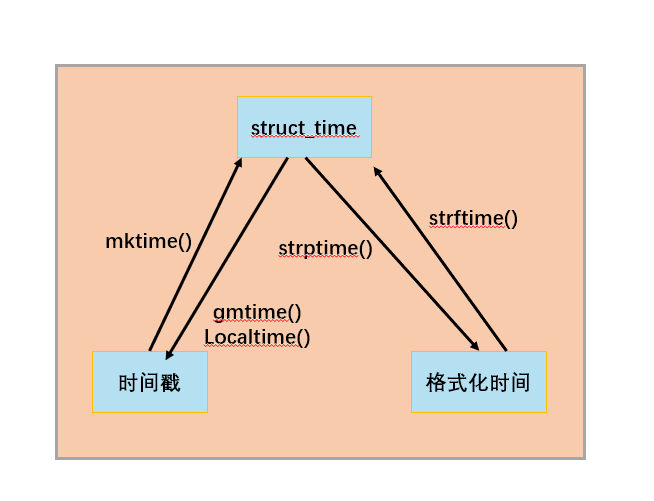
六、 时间格式转换


若有收获,就点个赞吧
0 人点赞


