- 一、模块
- 二、类库
- 三、模块和类库的基本操作
- 四、模块的名称空间
- 五、自定义模块
- 六、将模块打包
- 七、运行期服务模块组
- 八、字符串处理模块
一、模块
模块(Module)是由一组类、函数与变量所组成的,这些类都存储在文本文件中。
py是Python程序代码文件的拓展名,模块可能是C或Python写成的。模块文件的拓展名可能是.py(原始文本文件)或.pyc(编译过的.py)文件。
在Python目录的lib目录下,可以找到这些.py文件
在使用某个模块之前,需要使用import语句加载这个模块。
import <模块名称>
也可以使用一个import语句加载多个模块,模块名称之间以逗号(,)隔开
import os,sys,types
使用内置的函数dir() 可以找到模块内定义的所有名称。
import osprint(dir(os))##结果['DirEntry', 'F_OK', 'MutableMapping', 'O_APPEND', 'O_BINARY', 'O_CREAT', 'O_EXCL', 'O_NOINHERIT', 'O_RANDOM', 'O_RDONLY', 'O_RDWR', 'O_SEQUENTIAL', 'O_SHORT_LIVED', 'O_TEMPORARY', 'O_TEXT', 'O_TRUNC', 'O_WRONLY', 'P_DETACH', 'P_NOWAIT', 'P_NOWAITO', 'P_OVERLAY', 'P_WAIT', 'PathLike', 'R_OK', 'SEEK_CUR', 'SEEK_END', 'SEEK_SET', 'TMP_MAX', 'W_OK', 'X_OK', '_Environ', '__all__', '__builtins__', '__cached__', '__doc__', '__file__', '__loader__', '__name__', '__package__', '__spec__', '_execvpe', '_exists', '_exit', '_fspath', '_get_exports_list', '_putenv', '_unsetenv', '_wrap_close', 'abc', 'abort', 'access', 'altsep', 'chdir', 'chmod', 'close', 'closerange', 'cpu_count', 'curdir', 'defpath', 'device_encoding', 'devnull', 'dup', 'dup2', 'environ', 'error', 'execl', 'execle', 'execlp', 'execlpe', 'execv', 'execve', 'execvp', 'execvpe', 'extsep', 'fdopen', 'fsdecode', 'fsencode', 'fspath', 'fstat', 'fsync', 'ftruncate', 'get_exec_path', 'get_handle_inheritable', 'get_inheritable', 'get_terminal_size', 'getcwd', 'getcwdb', 'getenv', 'getlogin', 'getpid', 'getppid', 'isatty', 'kill', 'linesep', 'link', 'listdir', 'lseek', 'lstat', 'makedirs', 'mkdir', 'name', 'open', 'pardir', 'path', 'pathsep', 'pipe', 'popen', 'putenv', 'read', 'readlink', 'remove', 'removedirs', 'rename', 'renames', 'replace', 'rmdir', 'scandir', 'sep', 'set_handle_inheritable', 'set_inheritable', 'spawnl', 'spawnle', 'spawnv', 'spawnve', 'st', 'startfile', 'stat', 'stat_result', 'statvfs_result', 'strerror', 'supports_bytes_environ', 'supports_dir_fd', 'supports_effective_ids', 'supports_fd', 'supports_follow_symlinks', 'symlink', 'sys', 'system', 'terminal_size', 'times', 'times_result', 'truncate', 'umask', 'uname_result', 'unlink', 'urandom', 'utime', 'waitpid', 'walk', 'write']
二、类库
类库(Package)是由一组想通过文件夹的模块做组成的,类库的名称必须是sys.path所列文件夹的子文件夹。每一个类库的文件夹中必须至少由一个init.py 文件。
类库可以包含子类库,子类库的文件夹位于该文件夹下,子类库的文件夹中也必须至少有一个init.py文件。
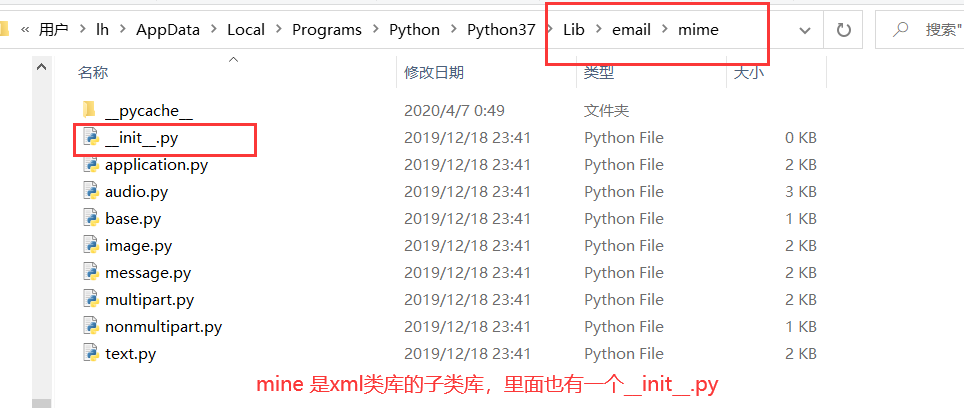
加载类库中的模块
import 类库.模块 eg:import xml.dom
当加载一个类库的时候,此类库的子类库不会随之加载,需要在此类库的init.py文件中加上下面的话
import 子类库1,子类库2,……
三、模块和类库的基本操作
3.1 模块改名
import 模块 as 新名称 或 from 模块 import 函数 as 新名称
##将sys模块改名为newSysimport sysnewSys = sys
3.2 模块的内置方法
3.2.1 m.dict
显示模块的字典
import typesprint(types.__dict__)##结果{'__name__': 'types', '__doc__': "\nDefine names for built-in types that aren't directly accessible as a builtin.\n", '__package__': '', '__loader__': <_frozen_importlib_external.SourceFileLoader object at 0x0000020F5F60F608>, '__spec__': ModuleSpec(name='types', loader=<_frozen_importlib_external.SourceFileLoader object at 0x0000020F5F60F608>, origin='C:\\Users\\lh\\AppData\\Local\\Programs\\Python\\Python37\\lib\\types.py'), '__file__': 'C:\\Users\\lh\\AppData\\Local\\Programs\\Python\\Python37\\lib\\types.py', '__cached__': 'C:\\Users\\lh\\AppData\\Local\\Programs\\Python\\Python37\\lib\\__pycache__\\types.cpython-37.pyc', '__builtins__': {'__name__': 'builtins', '__doc__': "Built-in functions, exceptions, and other objects.\n\nNoteworthy: None is the `nil' object; Ellipsis represents `...' in slices.", '__package__': '', '__loader__': <class '_frozen_importlib.BuiltinImporter'>, '__spec__': ModuleSpec(name='builtins',loader=<class '_frozen_importlib.BuiltinImporter'>), '__build_class__': <built-in function __build_class__>, '__import__': <built-in function __import__>, 'abs': <built-in function abs>, 'all': <built-in function all>, 'any': <built-in function any>, 'ascii': <built-in function ascii>, 'bin': <built-in function bin>, 'breakpoint': <built-in function breakpoint>, 'callable': <built-in function callable>, 'chr': <built-in function chr>, 'compile': <built-in function compile>, 'delattr': <built-in function delattr>, 'dir': <built-in function dir>, 'divmod': <built-in function divmod>, 'eval': <built-in function eval>, 'exec': <built-in function exec>, 'format': <built-in function format>, 'getattr': <built-in function getattr>, 'globals': <built-in function globals>, 'hasattr': <built-in function hasattr>, 'hash': <built-in function hash>, 'hex': <built-in function hex>, 'id': <built-in function id>, 'input': <built-in function input>, 'isinstance': <built-in function isinstance>, 'issubclass': <built-in function issubclass>, 'iter': <built-in function iter>, 'len': <built-in function len>, 'locals': <built-in function locals>, 'max': <built-in function max>, 'min': <built-in function min>, 'next': <built-in function next>, 'oct':<built-in function oct>, 'ord': <built-in function ord>, 'pow': <built-in function pow>, 'print': <built-in function print>, 'repr': <built-in function repr>, 'round': <built-in function round>, 'setattr': <built-in function setattr>, 'sorted': <built-in function sorted>, 'sum': <built-in function sum>, 'vars': <built-in function vars>, 'None': None, 'Ellipsis': Ellipsis, 'NotImplemented': NotImplemented, 'False': False, 'True': True, 'bool': <class 'bool'>, 'memoryview': <class 'memoryview'>, 'bytearray': <class 'bytearray'>, 'bytes': <class 'bytes'>, 'classmethod': <class 'classmethod'>, 'complex': <class 'complex'>, 'dict': <class 'dict'>, 'enumerate': <class 'enumerate'>, 'filter': <class 'filter'>, 'float': <class 'float'>, 'frozenset': <class 'frozenset'>, 'property': <class 'property'>, 'int': <class 'int'>, 'list': <class 'list'>, 'map': <class 'map'>, 'object': <class 'object'>, 'range': <class 'range'>, 'reversed': <class 'reversed'>, 'set': <class 'set'>, 'slice': <class 'slice'>, 'staticmethod': <class 'staticmethod'>, 'str': <class 'str'>, 'super': <class 'super'>, 'tuple': <class 'tuple'>, 'type': <class 'type'>, 'zip': <class 'zip'>, '__debug__': True, 'BaseException': <class 'BaseException'>, 'Exception': <class'Exception'>, 'TypeError': <class 'TypeError'>, 'StopAsyncIteration': <class 'StopAsyncIteration'>, 'StopIteration': <class 'StopIteration'>, 'GeneratorExit': <class 'GeneratorExit'>, 'SystemExit': <class 'SystemExit'>, 'KeyboardInterrupt': <class 'KeyboardInterrupt'>, 'ImportError': <class 'ImportError'>, 'ModuleNotFoundError': <class 'ModuleNotFoundError'>, 'OSError': <class 'OSError'>, 'EnvironmentError': <class 'OSError'>, 'IOError': <class 'OSError'>, 'WindowsError': <class 'OSError'>, 'EOFError': <class 'EOFError'>, 'RuntimeError': <class 'RuntimeError'>, 'RecursionError': <class 'RecursionError'>, 'NotImplementedError': <class 'NotImplementedError'>, 'NameError': <class 'NameError'>, 'UnboundLocalError': <class 'UnboundLocalError'>, 'AttributeError': <class 'AttributeError'>, 'SyntaxError': <class 'SyntaxError'>, 'IndentationError': <class 'IndentationError'>, 'TabError': <class 'TabError'>, 'LookupError': <class 'LookupError'>, 'IndexError': <class 'IndexError'>, 'KeyError': <class 'KeyError'>, 'ValueError': <class 'ValueError'>, 'UnicodeError': <class 'UnicodeError'>, 'UnicodeEncodeError': <class 'UnicodeEncodeError'>, 'UnicodeDecodeError': <class 'UnicodeDecodeError'>, 'UnicodeTranslateError': <class 'UnicodeTranslateError'>, 'AssertionError': <class 'AssertionError'>, 'ArithmeticError': <class 'ArithmeticError'>, 'FloatingPointError': <class 'FloatingPointError'>, 'OverflowError': <class 'OverflowError'>, 'ZeroDivisionError': <class 'ZeroDivisionError'>, 'SystemError': <class 'SystemError'>, 'ReferenceError': <class 'ReferenceError'>, 'MemoryError': <class 'MemoryError'>, 'BufferError': <class 'BufferError'>, 'Warning': <class 'Warning'>, 'UserWarning': <class 'UserWarning'>,'DeprecationWarning': <class 'DeprecationWarning'>, 'PendingDeprecationWarning': <class 'PendingDeprecationWarning'>, 'SyntaxWarning': <class 'SyntaxWarning'>, 'RuntimeWarning': <class 'RuntimeWarning'>, 'FutureWarning': <class 'FutureWarning'>, 'ImportWarning': <class 'ImportWarning'>, 'UnicodeWarning': <class 'UnicodeWarning'>, 'BytesWarning': <class 'BytesWarning'>, 'ResourceWarning': <class 'ResourceWarning'>, 'ConnectionError': <class 'ConnectionError'>, 'BlockingIOError': <class 'BlockingIOError'>, 'BrokenPipeError': <class 'BrokenPipeError'>, 'ChildProcessError': <class 'ChildProcessError'>, 'ConnectionAbortedError': <class 'ConnectionAbortedError'>, 'ConnectionRefusedError': <class 'ConnectionRefusedError'>, 'ConnectionResetError': <class 'ConnectionResetError'>, 'FileExistsError': <class 'FileExistsError'>, 'FileNotFoundError': <class 'FileNotFoundError'>, 'IsADirectoryError': <class 'IsADirectoryError'>, 'NotADirectoryError': <class 'NotADirectoryError'>, 'InterruptedError': <class 'InterruptedError'>, 'PermissionError': <class 'PermissionError'>, 'ProcessLookupError': <class 'ProcessLookupError'>, 'TimeoutError': <class 'TimeoutError'>, 'open': <built-in function open>, 'quit': Use quit() or Ctrl-Z plus Return to exit, 'exit': Use exit() or Ctrl-Z plus Return to exit, 'copyright': Copyright (c) 2001-2019 Python Software Foundation.All Rights Reserved.Copyright (c) 2000 BeOpen.com.All Rights Reserved.Copyright (c) 1995-2001 Corporation for National Research Initiatives.All Rights Reserved.Copyright (c) 1991-1995 Stichting Mathematisch Centrum, Amsterdam.All Rights Reserved., 'credits': Thanks to CWI, CNRI, BeOpen.com, Zope Corporation and a cast of thousandsfor supporting Python development. See www.python.org for more information., 'license': Type license() to see the full license text, 'help': Type help() for interactive help, or help(object) for help about object.}, 'FunctionType': <class 'function'>, 'LambdaType': <class 'function'>, 'CodeType': <class 'code'>, 'MappingProxyType': <class 'mappingproxy'>, 'SimpleNamespace': <class 'types.SimpleNamespace'>, 'GeneratorType': <class 'generator'>, 'CoroutineType': <class 'coroutine'>, 'AsyncGeneratorType': <class 'async_generator'>, 'MethodType': <class 'method'>, 'BuiltinFunctionType': <class 'builtin_function_or_method'>, 'BuiltinMethodType': <class 'builtin_function_or_method'>, 'WrapperDescriptorType': <class 'wrapper_descriptor'>, 'MethodWrapperType': <class 'method-wrapper'>, 'MethodDescriptorType': <class 'method_descriptor'>, 'ClassMethodDescriptorType': <class 'classmethod_descriptor'>, 'ModuleType': <class 'module'>, 'TracebackType': <class 'traceback'>, 'FrameType': <class 'frame'>, 'GetSetDescriptorType': <class 'getset_descriptor'>, 'MemberDescriptorType': <class 'member_descriptor'>, 'new_class': <function new_class at 0x0000020F5F58CDC8>, 'resolve_bases': <function resolve_bases at 0x0000020F5F60A0D8>, 'prepare_class': <function prepare_class at 0x0000020F5F612558>, '_calculate_meta': <function _calculate_meta at 0x0000020F5F6124C8>, 'DynamicClassAttribute': <class'types.DynamicClassAttribute'>, '_GeneratorWrapper': <class 'types._GeneratorWrapper'>, 'coroutine': <function coroutine at 0x0000020F5F612678>, '__all__':['FunctionType', 'LambdaType', 'CodeType', 'MappingProxyType', 'SimpleNamespace', 'GeneratorType', 'CoroutineType', 'AsyncGeneratorType', 'MethodType', 'BuiltinFunctionType', 'BuiltinMethodType', 'WrapperDescriptorType', 'MethodWrapperType', 'MethodDescriptorType', 'ClassMethodDescriptorType', 'ModuleType', 'TracebackType', 'FrameType', 'GetSetDescriptorType', 'MemberDescriptorType', 'new_class', 'resolve_bases', 'prepare_class', 'DynamicClassAttribute', 'coroutine']}
3.2.2 m.doc
显示模块的字符串
import typesprint(types.__doc__)##结果Define names for built-in types that aren't directly accessible as a builtin.
3.2.3 m.name
显示模块的名称
import typesprint(types.__name__)##结果types
3.2.4 m.file
显示模块的完整文件路径
import typesprint(types.__file__)##结果C:\Users\lh\AppData\Local\Programs\Python\Python37\lib\types.py
3.3 删除模块
用户可以使用del语句删除加载的模块,被删除的模块会立即从内存中清除
eg:del types
import typesprint(types.__file__)del typesprint(types.__file__)##结果File "e:/pythonstduy/mokuai.py", line 4, in <module>print(types.__file__)NameError: name 'types' is not defined
四、模块的名称空间
当用户在Python解释器内加载一个模块的时候,该模块会配置一个名称空间。eg:加载string模块,Python会配置一个string名称空间。
用户可以使用 [from 模块 import 函数] 来加载模块中的某个函数,而不会加载整个函数。但是如果属性名称的丢个字符是下划线(_),就不能用这个方法来加载。
import stringprint(string.capwords("客从远方来"))##结果客从远方来##加载string模块的capwords函数from string import capwordsprint(capwords("客从远方来"))##结果客从远方来
用户可以使用 [from 类库 import 对象]来加载类库中的某个子类库、模块、类、函数和变量等
from xml import domprint(dom.WRONG_DOCUMENT_ERR)##结果4from xml.dom import WRONG_DOCUMENT_ERRprint(WRONG_DOCUMENT_ERR)##结果4
用户使用 [from 类库 import *]的方式加载类库中的所有模块的时候,不能保证类库中的所有模块都会被加载,需要在该类库的init.py 文件中设置下面的一行。
all_ =[“ 模块1”,”模块2”,” 模块3”,……] all_ 是一个列表对象,包含需要的被加载的模块名称。
五、自定义模块
如果想将自定义的python源文件作为模块导入,就可以使用import语句。当解释器遇到import语句的时候,会在当前路径下搜索该模块文件。
Python解释器搜索文件的顺序:在当前目录中——-> sys.path 变量中给出的目录列表中
##在iter.py 写入下面的内容并保存def print_func(bar):print("新来的学生是:",bar)return##在 mokuai.py中写入下面的内容import iteriter.print_func("lhuan")##结果新来的学生是: lhuan
##sys.pathimport sysprint(sys.path)##结果['e:\\pythonstduy', 'C:\\Users\\lh\\AppData\\Local\\Programs\\Python\\Python37\\python37.zip', 'C:\\Users\\lh\\AppData\\Local\\Programs\\Python\\Python37\\DLLs', 'C:\\Users\\lh\\AppData\\Local\\Programs\\Python\\Python37\\lib', 'C:\\Users\\lh\\AppData\\Local\\Programs\\Python\\Python37', 'C:\\Users\\lh\\AppData\\Roaming\\Python\\Python37\\site-packages', 'C:\\Users\\lh\\AppData\\Roaming\\Python\\Python37\\site-packages\\win32', 'C:\\Users\\lh\\AppData\\Roaming\\Python\\Python37\\site-packages\\win32\\lib', 'C:\\Users\\lh\\AppData\\Roaming\\Python\\Python37\\site-packages\\Pythonwin', 'C:\\Users\\lh\\AppData\\Local\\Programs\\Python\\Python37\\lib\\site-packages', 'C:\\Users\\lh\\AppData\\Local\\Programs\\Python\\Python37\\lib\\site-packages\\django_celery-3.1.16-py3.7.egg', 'C:\\Users\\lh\\AppData\\Local\\Programs\\Python\\Python37\\lib\\site-packages\\anyjson-0.3.3-py3.7.egg']
六、将模块打包
使用放在其他目录的Python程序,或者是其他系统的Python程序,可以将这些Python程序制作成一个安装包,然后安装到本地,安装的位置可以选择sys.path文件中的任意一个目录。
eg:需要打包的模块名为mm,需要和它在同一目录下创建一个setup.py文件。然后将目录移动到sys.path文件的一个路径。
###setup.py文件内容from distutils.core import setupsetup(name ='mm',version='1.0',author='lhuan',author_email='lhuan@vip.com',url='',license='No License',platforms='python 3.7',py_modules=['mm'],)
进入到mm目录下,执行python setup.py sdist 就可以打包mm.py/

将这个压缩包解压之后,执行下面的命令就可以安装mm模块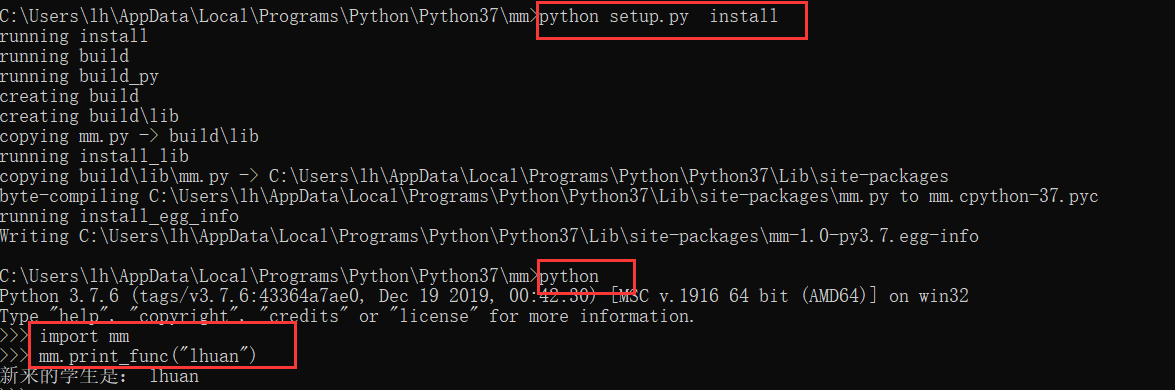
七、运行期服务模块组
运行期服务模块组包含Python解释及环境变量相关的模块
| 模块名称 | 说明 |
|---|---|
| sys | 存取系统相关的参数与函数 |
| types | Python内置类型的名称 |
| operator | 与Python标准运算符相同功能的函数 |
| traceback | 输出或是取出堆栈的追踪信息 |
| linecache | 提供随机存取文本文件的独立行 |
| pickle | 将Python对象转换为i字节流(bytes stream)或读取 |
| shelve | 提供Python对象的永存性 |
| copy | 复制功能的函数 |
| marshall | 与pickle相同,适合简单的Python对象 |
| warnings | 发出警告信息 |
| imp | 存取import语句的操作方式 |
| code | Python解释器的基类 |
| codeop | 编译Python程序代码 |
| pprint | 输出资料 |
| site | 在同一部主机上进行各个类库的初始化操作 |
| builtin | 内置函数 |
| main | 程序代码入口处 |
7.1 sys模块
sys模块用于存取与Python解释器有关联的系统函数,包括变量和函数。
(1). sys.argv
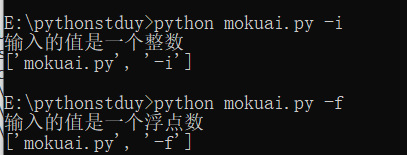
这个对象包含应用程序的参数列表,argv[0] 是应用程序的名称,argv[1] 是对应程序的第一个参数,argv[2]是应用程序的第二个参数
import sysif sys.argv[1] == "-i":print("输入的值是一个整数")elif sys.argv[1] == "-f":print("输入的值是一个浮点数")else:print("无法识别")print(sys.argv)
(2). sys.built_module_names
这是一个元素对象,包含所有与Python解释器编译在一起的模块名称字符串。
import sysprint(sys.builtin_module_names)##结果('_abc', '_ast', '_bisect', '_blake2', '_codecs', '_codecs_cn', '_codecs_hk', '_codecs_iso2022', '_codecs_jp', '_codecs_kr', '_codecs_tw', '_collections', '_contextvars', '_csv', '_datetime', '_functools', '_heapq', '_imp', '_io', '_json', '_locale', '_lsprof', '_md5', '_multibytecodec', '_opcode', '_operator', '_pickle', '_random', '_sha1', '_sha256', '_sha3', '_sha512', '_signal', '_sre', '_stat', '_string', '_struct', '_symtable', '_thread', '_tracemalloc', '_warnings', '_weakref', '_winapi', 'array', 'atexit', 'audioop', 'binascii', 'builtins', 'cmath', 'errno', 'faulthandler', 'gc', 'itertools', 'marshal', 'math', 'mmap', 'msvcrt', 'nt', 'parser', 'sys', 'time', 'winreg', 'xxsubtype', 'zipimport', 'zlib')
(3). sys.copyright
与Python相关著作权信息的字符串
import sysprint(sys.copyright)##结果All Rights Reserved.Copyright (c) 2000 BeOpen.com.All Rights Reserved.Copyright (c) 1995-2001 Corporation for National Research Initiatives.All Rights Reserved.Copyright (c) 1991-19
(4). sys.exec_prefix
安装prefix的目录
import sysprint(sys.exec_prefix)##结构C:\Users\lh\AppData\Local\Programs\Python\Python37
(5). sys.excutable
Python解释器运行文件的完整路径与文件名
import sysprint(sys.executable)##结果C:\Users\lh\AppData\Local\Programs\Python\Python37\python.exe
(6). sys.exit([arg)
用来离开Python解释器。
sys.exit() 函数会输出SystemExit 异常,可以使用try……expect语句来处理。参数arg可以是整数或其他对象类型。如果是整数的话,arg等于0代表正常结束,其他整数值1~127表示有错误产生
(7). sys.getrecursionlimit
读取系统内函数递归深度的最大值,默认值为1000
import sysprint(sys.getrecursionlimit())
(8). sys.path
这个是一个列表对象,包含所有模块的搜索路径。
##sys.pathimport sysprint(sys.path)##结果['e:\\pythonstduy', 'C:\\Users\\lh\\AppData\\Local\\Programs\\Python\\Python37\\python37.zip', 'C:\\Users\\lh\\AppData\\Local\\Programs\\Python\\Python37\\DLLs', 'C:\\Users\\lh\\AppData\\Local\\Programs\\Python\\Python37\\lib', 'C:\\Users\\lh\\AppData\\Local\\Programs\\Python\\Python37', 'C:\\Users\\lh\\AppData\\Roaming\\Python\\Python37\\site-packages', 'C:\\Users\\lh\\AppData\\Roaming\\Python\\Python37\\site-packages\\win32', 'C:\\Users\\lh\\AppData\\Roaming\\Python\\Python37\\site-packages\\win32\\lib', 'C:\\Users\\lh\\AppData\\Roaming\\Python\\Python37\\site-packages\\Pythonwin', 'C:\\Users\\lh\\AppData\\Local\\Programs\\Python\\Python37\\lib\\site-packages', 'C:\\Users\\lh\\AppData\\Local\\Programs\\Python\\Python37\\lib\\site-packages\\django_celery-3.1.16-py3.7.egg', 'C:\\Users\\lh\\AppData\\Local\\Programs\\Python\\Python37\\lib\\site-packages\\anyjson-0.3.3-py3.7.egg']
用户可以在sys.path列表中加入自己的路径。
sys.path.append(“C:\windows”)
(9). sys.platform
一个当前操作系统的名称字符串
import sysprint(sys.platform)##结果win32
(10). sys.modules
(11). sys.setrecursionlimit(n)
设置系统内函数递归深度的最大值为n
import sysprint(sys.setrecursionlimit(2000))print(sys.getrecursionlimit())
(12). sys.stderr
一个文件对象,用来代表标准错误输出装置
import sysprint(sys.stderr)##结果<_io.TextIOWrapper name='<stderr>' mode='w' encoding='utf-8'>
(13). sys.stdin
一个文件对象,用来代表标准输入装置,通常指键盘
import sysprint(sys.stdin)##结果<_io.TextIOWrapper name='<stdin>' mode='r' encoding='utf-8'>import sysdata = sys.stdin.readline() #从标准输入装置输入一个数字print("input numbers:",data)##结果56input numbers: 56
(14). sys.stdout
一个文件对象,用来代表标准输出装置,通常指屏幕
import sysprint(sys.stdout.write("独绕回廊行复歌"))##结果独绕回廊行复歌7
(15). sys.version_info
一个元组对象,包含Python的版本信息。
major、minor、micro是版本编号
releaselevel可能是:alpha、beta、final
import sysprint(sys.version_info)##结果sys.version_info(major=3, minor=7, micro=6, releaselevel='final', serial=0)
7.2 types模块
types模块包含Python内置类型的名称。用户可以使用Python解释器的type(obj)内置函数,得到obj对象的内置类型。
import typesdef printTypeName(x):print(type(x))printTypeName(10)printTypeName("lhuan")printTypeName(1+2j)printTypeName((1,2,3))printTypeName([1,2,3,4])##结果<class 'int'><class 'str'><class 'complex'><class 'tuple'><class 'list'>#检查对象x是否是字符串类型import typesx = "好风胧月清明夜"if type(x) == str:print("x 变量是一个字符串")else:print("x 变量不是一个字符串")##结果x 变量是一个字符串
7.3 operator模块
operator模块包含所有Python标准运算符相对应的函数,是用C写成的。
a + b 等于 operator.add(a,b) 或者 operator.add(a,b)
a - b 等于 operator.sub(a,b) 或者 operator.sub(a,b)
a * b 等于 operator.mul(a,b) 或者 operator.mul(a,b)
a / b 等于 operator.truediv(a,b) 或者 operator.-truediv_(a,b)
import operatorprint(operator.add(10,50))##结果60
7.4 traceback模块
traceback模块支持输出与捕获追踪堆栈(traceback stack),在被输出的时候,可以检测调用函数的堆栈类调试
7.5 linecache模块
linecache模块让用户可以随机存取文本文件中的任何一行,linecache模块使用高速缓存来操作文件。
##setup.py 的内容import sysdata = sys.stdin.readlineprint("输入:",data)
(1). linecache.getline(filename,lieno)
filename是文件的名称(包含路径),lieno是filename文件中的行号,第一行的行号为 1
import linecacheprint(linecache.getline("E:/pythonstduy/mm/setup.py",1))print(linecache.getline("E:pythonstduy/mm/setup.py",2))##结果import sysdata = sys.stdin.readline
(2). linecache.clearcache()
清除linecache.getline() 函数所使用的高速缓存
7.6 pickle模块
pickle模块可以处理Python对象的序列化。
对象的序列化就是将对象转换为位串流(byte stream),这样就将对象存储在文件或数据库中,也可以通过网络来传输。
对象序列化的操作:pickling、serializing、marshalling或flattering。
对象的反序列化的操作:unpickling
7.7 shelve模块
shelve模块使用字典对象来提供Python对象的永久存储。
这个字典对象的键值(key)必须是字符串,而数值(value)是pickle模块可以处理的对象
7.8 copy模块
copy模块提供深拷贝(deep copy)和浅拷贝(shallow copy)的功能,可以处理列表、元组、字典及类实例变量等对象的复制。
(1) 浅拷贝
浅拷贝就是直接复制对象
浅拷贝增加了一个指针指向已经存在的内存地址
当旧对象内的可变异元素的数据改变的时候,新对象的数据会随之改变。
import copya = [{"name":"lhuan"},2,3]b = copy.copy(a)print(id(a),id(b)) ##id()函数用于查看变量的内存地址a[0]["name"] = 'lars'print(a,b)##结果2916002624712 2916002624776[{'name': 'lars'}, 2, 3] [{'name': 'lars'}, 2, 3]
(2) 深拷贝
深拷贝除了创建对象之外,还会以递归的方式将旧对象内所包含的其他对象都复制一份。
当旧对象内的可变异元素的数据改变的时候,新对象的数据不会随之改变。
深拷贝增加了一个指针并申请了一个新的内存,使这个增加的指针指向新的内存。使用深拷贝的情况下,释放内存的时候不会因为出现浅拷贝时释放同一个内存的错误
import copya = [{"name":"lhuan"},2,3]b = copy.deepcopy(a)print(id(a),id(b))a[0]["name"] = 'lars'print(a,b)##结果[{'name': 'lars'}, 2, 3] [{'name': 'lhuan'}, 2, 3]
7.9 marshal模块
marshal模块是可以处理Python对象序列化的模块。
可以使用marshal模块来读写二进制格式的数据,然后将这些数据读写成字符串的格式。
可以使用marshal模块来序列化.pyc文件(编译过的.py文件)。
marshal模块只能用在简单的对象上,如果是永久性的对象,需要使用pickle模块
7.10 imp模块
imp模块提供存取import语句操作的内部机制。ihooks模块也提供相同的供,以及简单易用的接口函数。
(1). imp.find_module(name,[,path])
用于搜索模块的实际位置。
name 是该模块的名称字符串
path 是该名称的路径。如果忽略path参数,path就是一个None对象,搜索sys.path所列的路径
搜索成果,返回一个元组对象。内容为:file,pathname,description:模块的文件名,文件的路径,列表对象,列表中的每一个元素都是一个元组。
import impprint(imp.find_module("sys"))print(imp.find_module("types"))##结果import imp(None, None, ('', '', 6))(<_io.TextIOWrapper name='C:\\Users\\lh\\AppData\\Local\\Programs\\Python\\Python37\\lib\\types.py' mode='r' encoding='utf-8'>, 'C:\\Users\\lh\\AppData\\Local\\Programs\\Python\\Python37\\lib\\types.py', ('.py', 'r', 1))
(2). imp.get_suffixes()
这个函数返回一个列表对象,表示模块文件的搜索顺序。
列表中的每一个元素都是一个元组,每一个元组描述模块文件的特定类型,格式为:suffix,mode,type
suffix 是加在模块名称之后的字符串,形成该模块的文件名称
mode 是传给open() 函数用的打开文件模式
type是一个整数,表示文件的类型
import impprint(imp.get_suffixes())##结果import imp[('.cp37-win_amd64.pyd', 'rb', 3), ('.pyd', 'rb', 3), ('.py', 'r', 1), ('.pyw', 'r', 1), ('.pyc', 'rb', 2)]顺序:.pyd ----> .dll---->.py------>.pyc
(3). imp.load_module(“name”,file,path,desc)
加载一个模块,并返回一个模块对象,如果操作失败的话,就会输出ImportError。
name 是模块的名称,file 是打开的文件,path是file的文件名及路径,这三个参数可以是“空字符串”或None。
desc是一个元组。
如果打开文件,之后要将file关闭。
import impfile,path,desc = imp.find_module("types")m = imp.load_module("types",file,path,desc)print(m.ModuleType)##结果import imp<class 'module'>
7.11 keyword模块
keyword模块测试一个字符串是否属于Python的关键字
(1). keyword.iskeyword
这个函数用于测试一个字符串是否属于Python的关键字
import keywordprint(keyword.iskeyword("del"))print(keyword.iskeyword("lhuan"))##结果TrueFalse
(2). keyword.kwlist
一个列表对象,包含所有Python的关键字
import keywordprint(keyword.kwlist)##结果['False', 'None', 'True', 'and', 'as', 'assert', 'async', 'await', 'break', 'class', 'continue', 'def', 'del', 'elif', 'else', 'except', 'finally', 'for', 'from', 'global', 'if', 'import', 'in', 'is', 'lambda', 'nonlocal', 'not', 'or', 'pass', 'raise', 'return', 'try', 'while', 'with', 'yield']
7.12 pyclbe模块
pyclbr(Python Class Browser) 模块提供类和模块的方法,来浏览类的功能
7.13 code模块
code 模块提供了一些用于模拟标准交互解释器行为的函数
import codeinterpreter = code.InteractiveConsole()interpreter.interact()
运行之后可以进入命令行
PS C:\Users\lh> & C:/Users/lh/AppData/Local/Programs/Python/Python37/python.exe e:/pythonstduy/mokuai.pyPython 3.7.6 (tags/v3.7.6:43364a7ae0, Dec 19 2019, 00:42:30) [MSC v.1916 64 bit (AMD64)] on win32Type "help", "copyright", "credits" or "license" for more information.(InteractiveConsole)>>> a=(... 1,... 2,)>>> print (a)(1, 2)
7.14 codeop模块
codeop模块提供函数编译Python程序代码。用于不可以直接使用codeop模块,需要通过code模块来存取。
7.15 py_compile 模块
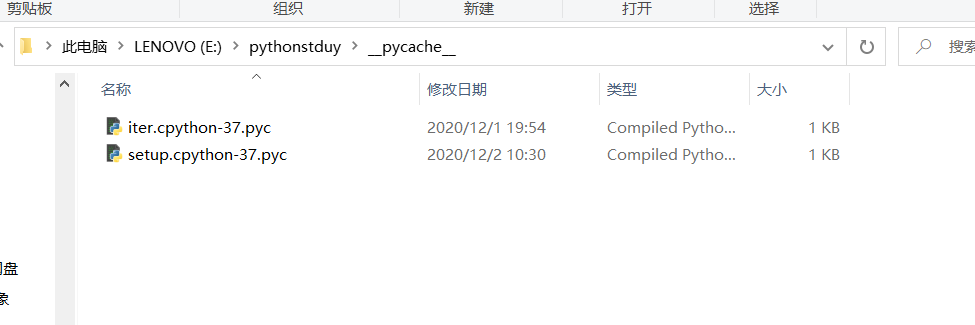
py_compile.compile(file[, cfile[,dfile]]) 编译Python源程序文件产生二进制文件。
file:源程序文件的名称
cfile:编译过的文件名称 默认file +c ,如果设置dfile,则用在错误信息中替代file的名称
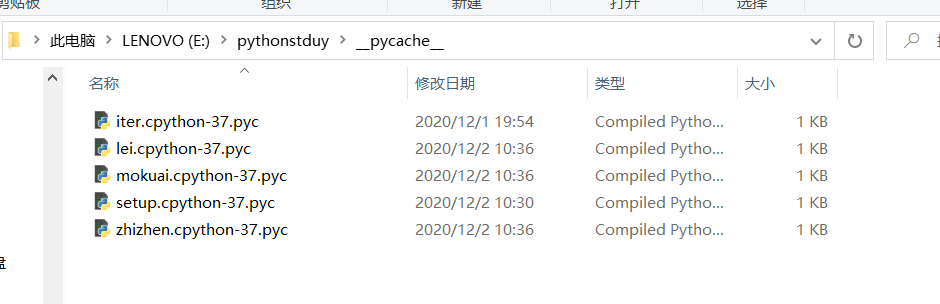
import py_compileprint(py_compile.compile("E:\pythonstduy\setup.py"))##结果E:\pythonstduy\__pycache__\setup.cpython-37.pyc
7.16 compileall 模块
compileall 模块用来编译指定目录中所有Python源程序文件。compieleall模块会使用py_compile模块。
import compileallprint(compileall.compile_dir("E:\pythonstduy"))##结果Listing 'E:\\pythonstduy'...Compiling 'E:\\pythonstduy\\lei.py'...Listing 'E:\\pythonstduy\\mm'...Compiling 'E:\\pythonstduy\\mm\\mm.py'...Compiling 'E:\\pythonstduy\\mm\\setup.py'...Compiling 'E:\\pythonstduy\\mokuai.py'...Compiling 'E:\\pythonstduy\\zhizhen.py'...True
7.17 dis模块
dis 模块是Python二进制的反编译器。可以用来分析Python二进制码。
7.18 site模块
site 模块会在Python解释器激活的时候自动加载,以便在同一部主机上进行各个类库的初始化操作
7.19 builtin 模块
_ builtin 包含内置函数,eg:abs()、apply()、cerce() 等
7.20 main 模块
main模块是Python解释器的最上层对象,所有在Python解释器的命令行中创建的对象都属于 main模块的名称空间
7.21 数据压缩模块
数据压缩模块可以直接将通用的数据打包和压缩为指定的格式。
常见的压缩模块有zlib、gzip、bz2、zipfile和tarfile。
import zliba = b'python python python'print(len(a))b = zlib.compress(a)print(b)print(len(b))print(zlib.decompress(b))print(zlib.crc32(a))##结果20b"x\x9c+\xa8,\xc9\xc8\xcfS(@\xa6\x00U\xf1\x08'"17b'python python python'4158723612
八、字符串处理模块
8.1 string
(1) string.capwords(s)
这个函数先使用split() 函数将字符串s分割,然后使用capitalize() 函数将每一个分割字符串的第一个字符转换为大写,最后使用join() 函数将分割后的字符串连接起来。
import stringprint(string.capwords("lhuanl hhdad"))##结果Lhuanl Hhdad
(2) string.digits
字符串 ‘0123456789’
import stringprint(string.digits)##结果0123456789
(3) string.hexdigits
字符串 ‘0123456789abcdefABCDEF’
import stringprint(string.hexdigits)##结果0123456789abcdefABCDEF
(4) string.octdigits
字符串 ‘ 01234567 ‘
import stringprint(string.octdigits)##结果01234567
(5) string.whitespace
空格
import stringprint(string.whitespace)##结果
8.2 re
re模块用来使用Perl类型的正则表达(regular expression)运算,Python通过re模块提供对正则表达式的支持。
使用re模块的步骤:先将正则表达式的字符串形式编译称Pattern实例,然后使用Pattern实例处理文本并获得匹配结果(一个Match 实例),最后使用Match 实例获得信息。
import repattern = re.compile(r'hello') ##将正则表达式编译成Pattern对象##使用Pattern匹配文本,获得匹配结果,无法匹配的时候会返回Nonematch = pattern.match('hello world')##使用Match获得分组信息if match:print(match.group())##结果hello
8.3 struct
struct 模块用来将Python的数据与二进制数据结构进行转换,转换后的二进制数据可以应用在C语言及网络传输协议中。
(1) struct.pack(“fmt”, v1, v2, ……)
这个函数将数值v1、v2……安装fmt的格式转换为字符串
import structprint(struct.pack("hHL", 1, 2, 3))h代表第一个数值转换为整型(c中的short)H代表第二个数值转换为整数(c中的unsigned short)L代表第三个字符转换为长整型(c中的unsigned long)网络传输中使用little-endian的数据格式,所有输出结果如下##结果b'\x01\x00\x02\x00\x03\x00\x00\x00'
(2) struct.unpack(fmt, string )
import structprint(struct.unpack("hHL",b'\x01\x00\x02\x00\x03\x00\x00\x00'))##结果(1, 2, 3)
(3) struct.calcsize(fmt)
返回fmt结构的大小,即转换后的字符串大小
import structprint(struct.calcsize("hHL"))##结果8import structa = struct.pack("hHL", 1, 2, 3)print(len(a))##结果8

若有收获,就点个赞吧
0 人点赞


